Selenium Exceptions
Core WebDriver Exceptions
This section applies exclusively to automated testing, which requires knowledge of one of the modern high-level programming languages. Within our course, it is offered for introductory purposes only. You may find this list useful when working on the level's practical assignment. Below is a list of the most common WebDriver exceptions:

- ElementNotVisibleException — this exception means that although the element is present in the DOM, it is not visible, so it cannot be interacted with.
- IllegalLocatorException — thrown when By cannot process the arguments passed to it. The most common cause is using a compound class name in By.className().
- StaleElementReferenceException — thrown when the reference to the element being accessed is no longer valid.
- MoveTargetOutOfBoundsException — thrown if the moveToElement(WebElement toElement) method is passed an element that is outside the screen, and also, in some cases, when the driver cannot hit a moving element (for example, when the page is in the middle of scrolling (jquery) — it is worth waiting for it to finish and only then accessing the elements)
- SessionNotCreatedException — this exception means that a session could not be created. It is thrown when using ‘requiredCapabilities’ for a remote launch if no browser with the “required” properties is found.
- TimeoutException — thrown when a command does not complete within a sufficient period of time. The period is either specified by a function parameter or is the default one.
- UnhandledAlertException — thrown when unexpected modal dialog windows appear.
- UnsupportedCommandException — this exception means that the command used by the remote webdriver is not supported.
- InvalidCookieDomainException — thrown when trying to add a cookie for a domain different from the current one.
- UnableToSetCookieException — thrown when the driver cannot set a cookie for whatever reason.
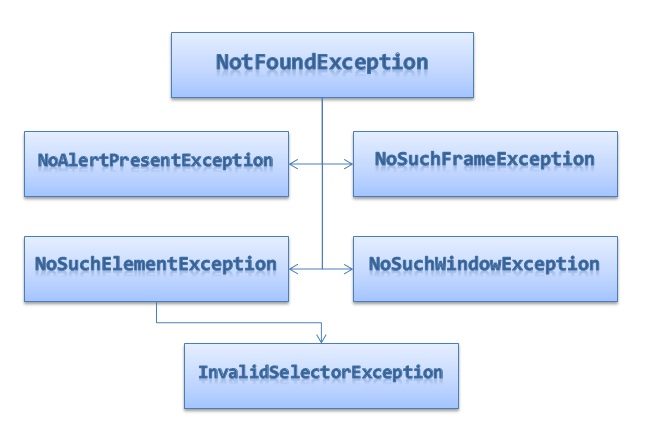
“Not Found” Group Exceptions
- NoAlertPresentException — thrown when trying to switch control to a dialog window that does not currently exist.
- NoSuchElementException — thrown by the findElement(By by) method if no element with the given selector is found on the page.
- InvalidSelectorException — this exception is thrown by the findElement(By by) method when the given search selector does not return a WebElement. Currently it occurs only when using xpath — when the xpath expression has syntax errors or does not point to a WebElement (for example, “count(.//span)”).
- NoSuchFrameException — thrown by the WebDriver.switchTo().frame(int frameIndex) and WebDriver.switchTo().frame(String frameName) methods if no frame with the given parameter is found. You can read more about working with frames in this article.
- NoSuchWindowException — thrown when there is no window with the given name (WebDriver.switchTo().window(String windowName)). Articles about working with windows: