Level 20
The SQL Language and Basic SQL Queries

MULTI-TABLE DATABASES
Level 20
Too Many Pointless Options
Greg hands Reggie a long list of options. A few weeks later, Reggie calls Greg to say the list is no use at all: none of the candidates has anything in common with him.
You can't ignore interests completely. There has to be another, better way...
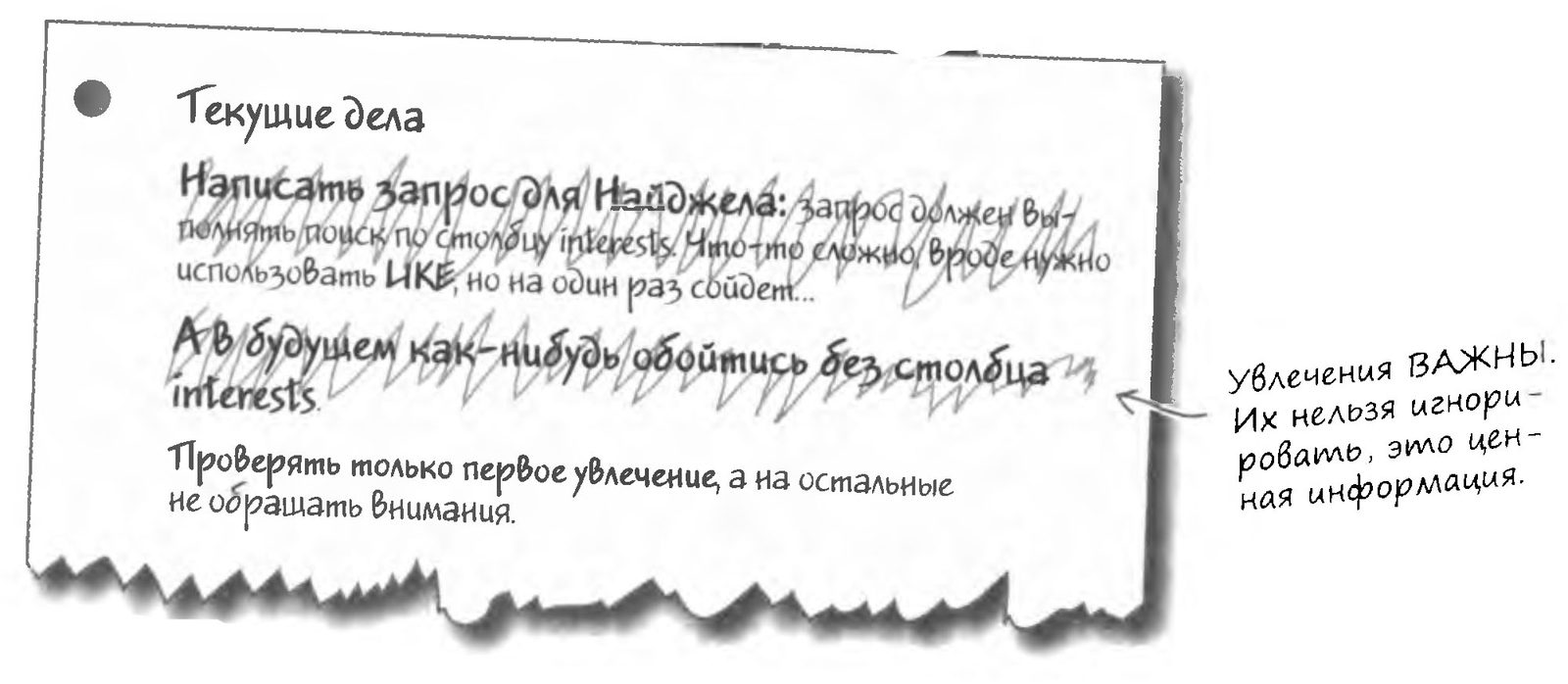
Use only the first interest
Greg hands Reggie a long list of options. A few weeks later, Reggie calls Greg to say the list is no use at all: none of the candidates has anything in common with him.
Let's step away for a minute, young Padawan, and try to solve this task to please the Master and gain new knowledge. Write your own answer to the question, and then check it against the correct one.
Use the SUBSTRING_INDEX function to extract the first hobby from the interests column.

So Greg writes a query that will help Reggie find his match. The query uses the SUBSTRING_INDEX function, and the first interest has to be "animals"

SELECT * FROM my_contacts
WHERE gender = 'Ж'
AND status = 'Не замужем'
AND state = 'МА'
AND seeking LIKE '%Мужчина%'
AND birthday > '1950-28-08'
AND birthday < '1960-28-08'
AND SUBSTRING_INDEX(interests,' ,' , 1) = 'животные';
A Match for Reggie

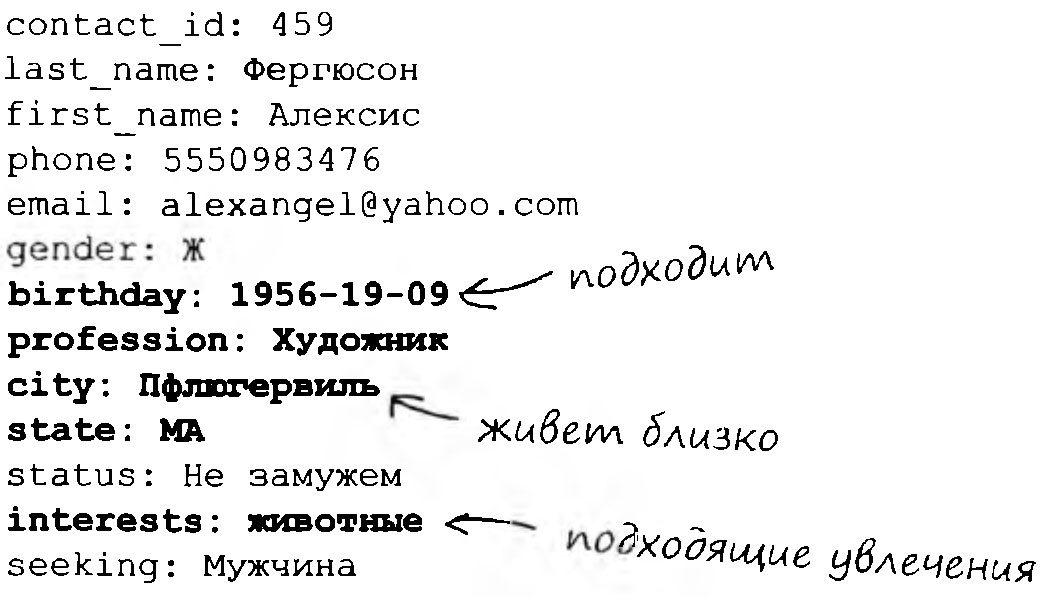
At last! Greg has found a match for Reggie:
A Tragic Mismatch
Reggie set up a date with Alexis, and Greg was eagerly waiting to hear how it went. He was already picturing a new my_contacts table that would become the start of a new social network.

The next day Reggie is standing at Greg's door, and he is very angry.
Reggie shouts: "Sure, she's into animals. But you didn't tell me she stuffs them! There are dead animals everywhere!"

Brainstorm
What will Greg's next query look like once he has created several interest columns?
Creating New Interest Columns

Greg realizes that writing a correct query against a single interests column is too hard. He has to use LIKE, which sometimes produces wrong matches.
But Greg knows how to use the ALTER command to change tables and how to split text strings, so he decides to create several interest columns and put each interest in its own column. He figures four columns will be enough.
Let's dazzle with more than just our metal-and-ceramic shine: let's show off our intellect by writing down our own solution to this problem on paper. Then we'll check it against the Master's version.
Using the ALTER command and the SUBSTRING_INDEX function, modify the table so that it consists of the listed columns. The number of queries is not limited.
contact_id
last_name
first_name
phone
email
gender
birthday
profession
city
state
status
interest 1
interest 2
interest 3
interest 4
seeking
contact_id
last_name
first_name
phone
email
gender
birthday
profession
city
state
status
interest 1
interest 2
interest 3
interest 4
seeking
Starting Over
Greg feels guilty about Reggie's failure and decides to give it another try. First, he pulls Reggie's record out of the table:
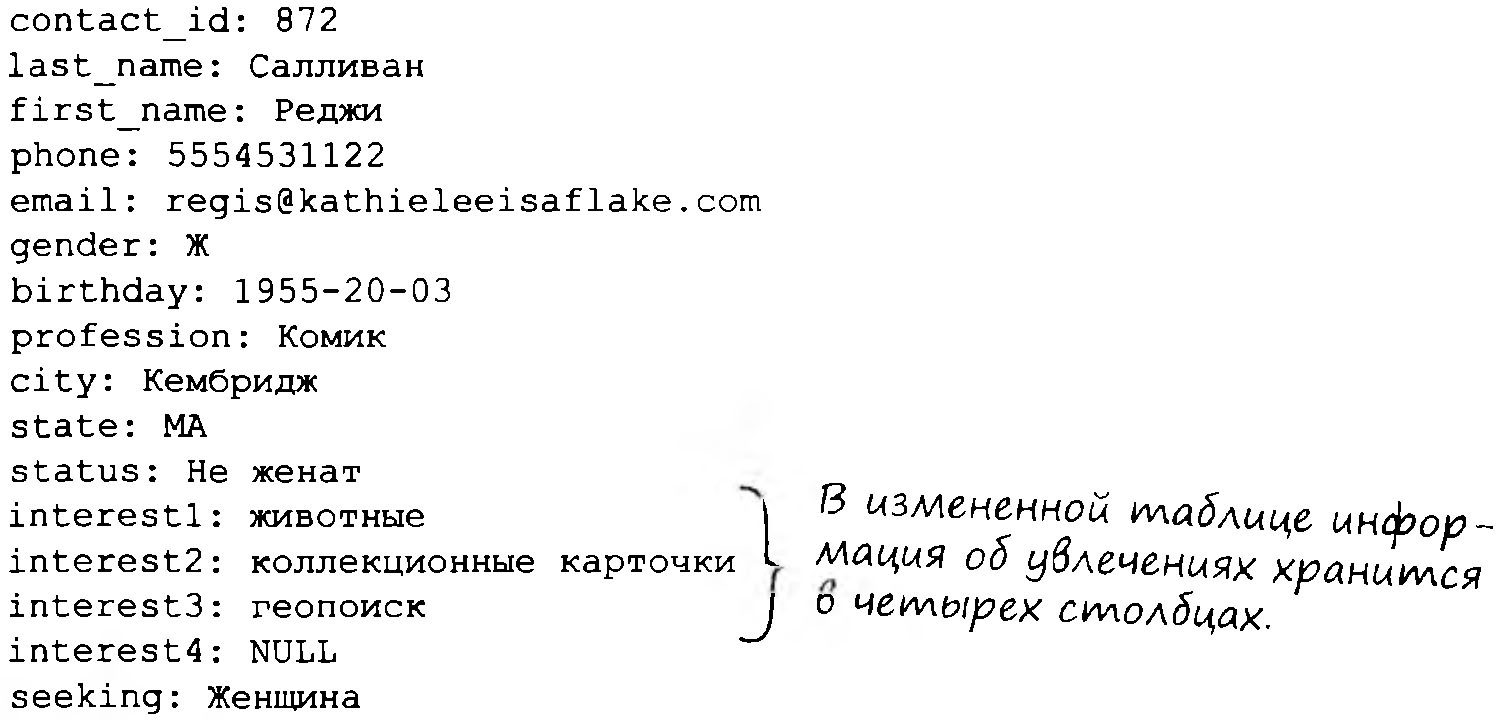
Let's think it over and write down the answer for this query, and then check it against the Master's correct version.
Greg is writing a query that should return a suitable match for Reggie. He starts with the simple columns (gender, status, state, seeking, and birthday) AND ONLY THEN moves on to the interest columns. Write his query.
It's All in Vain...

Adding new columns did nothing to solve the underlying problem: the table's structure makes it hard to write queries against it. Note that every version of the table violates the rule of data atomicity.
... Wait a Second!

What if we create a separate table that stores only information about interests?
Brainstorm
What good will creating a new table do? And how do we link the data in the new table to the existing table?

One Table Is Not Enough
So, if we limit ourselves to working with the current table, there is no good solution. We tried to work around the flaws in the data structure in various ways, even changing the structure of the entire table. None of them worked.
The confines of a single table turned out to be too narrow. What we really need are additional tables that work in combination with the current one, letting us link one person to several interests. At the same time, the existing data will be fully preserved.
The non-atomic columns from the existing table should be moved into new tables.
A Multi-Table Database with Clown Information
Remember our clown information table from the previous level? The clown problem keeps growing, so we converted the single table into a handier set of several tables.
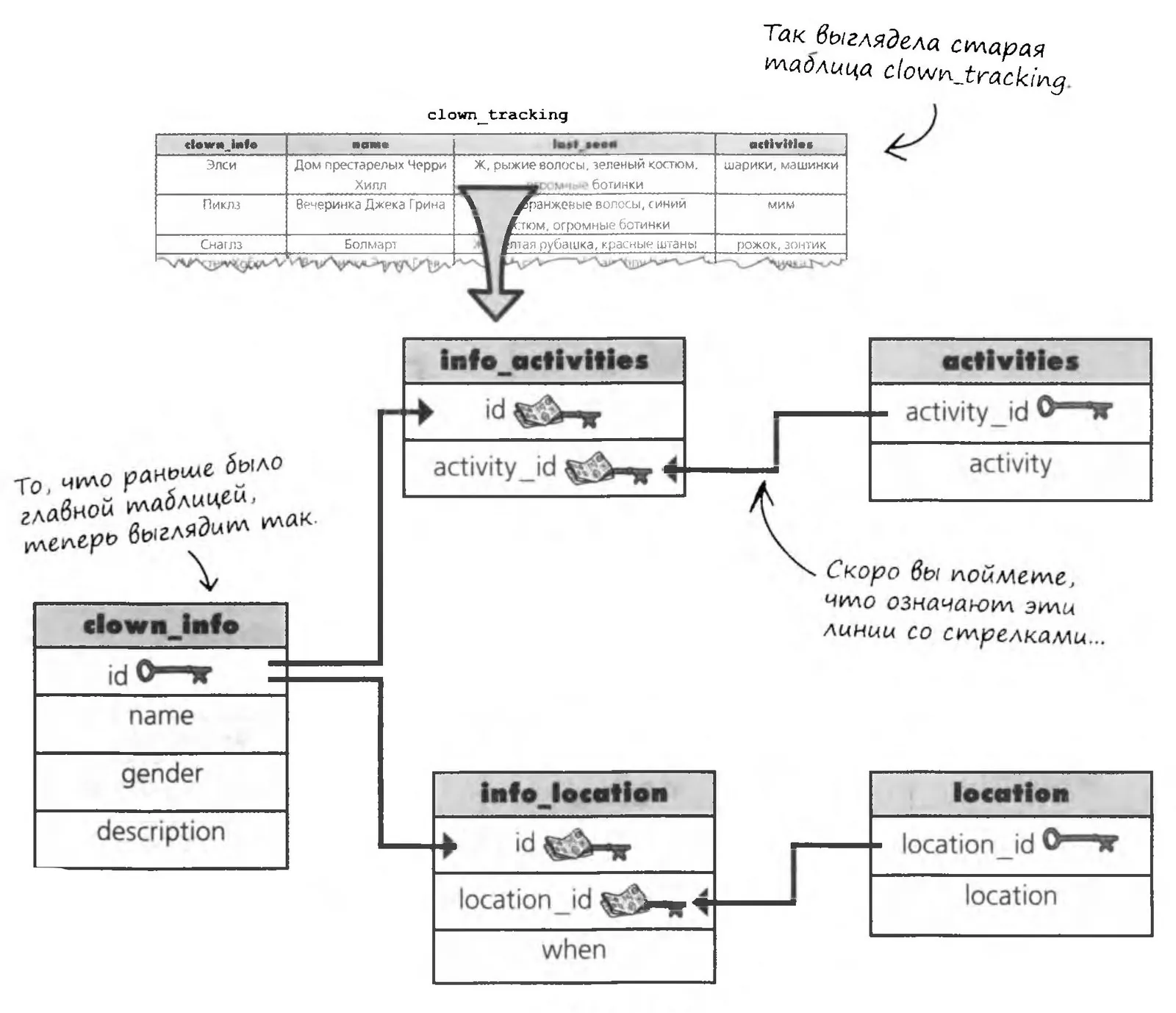

Over the next few pages we'll show why the table was split this way and not another, and what all these arrows and keys mean. After that, you'll be able to split Greg's table using the same principles.
Brainstorm
What do you think the lines with arrows mean? And the key icons?
The clown_tracking Database Schema
A representation of all the structures in a database (tables, columns, etc.) and the logical relationships between them is called a schema.
A visual representation of a database helps you picture how its components are related, but a schema can also be written out as text.
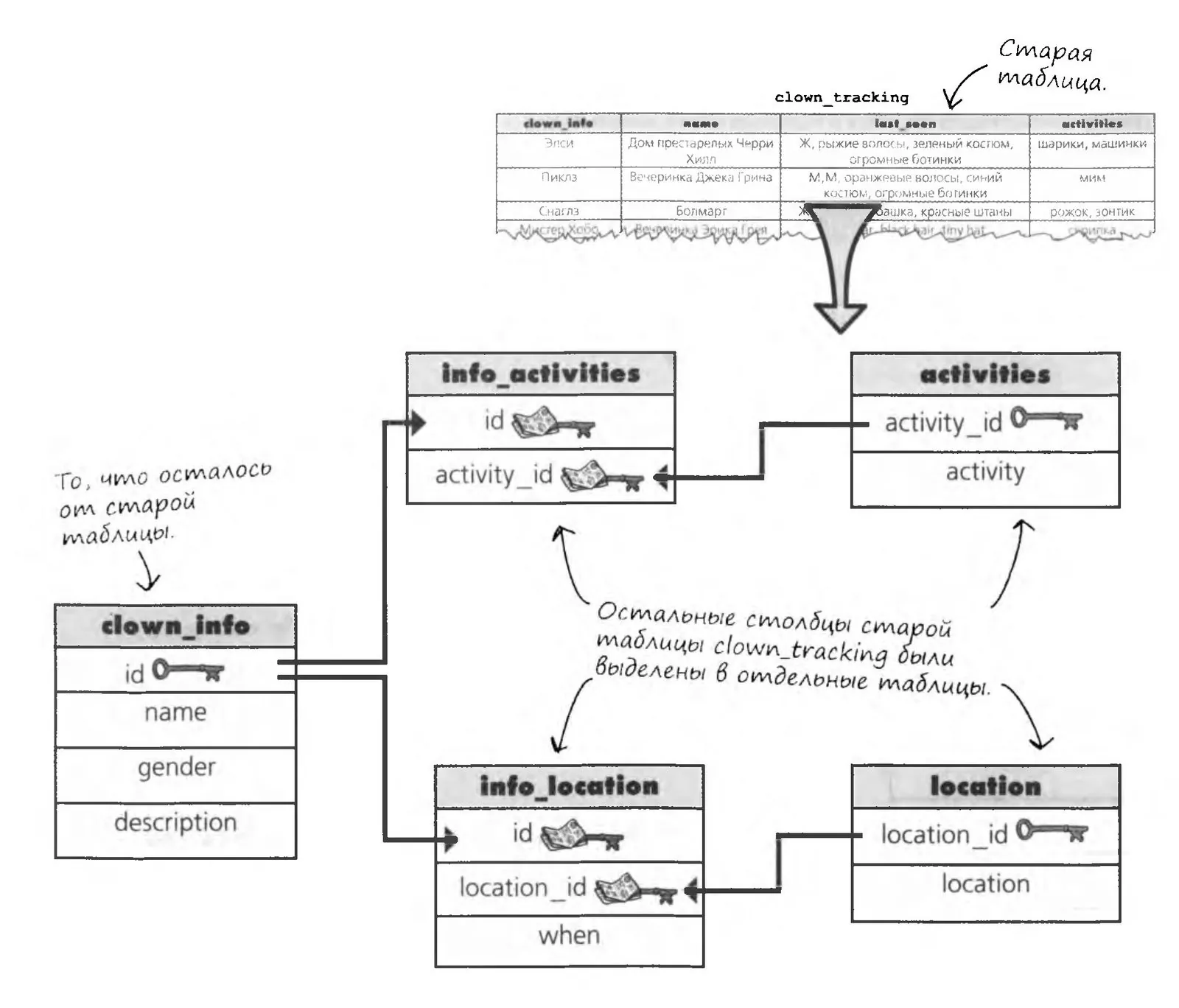
The description of the data (columns and tables) in your database, including all related objects and the connections between them, is called a SCHEMA.
Simplified Table Representation
You've seen how the clown information table was transformed. Now let's try to do the same with the my_contacts table.
Both approaches work well for individual tables, but when you need to draw a diagram of several tables, you have to look for something else.
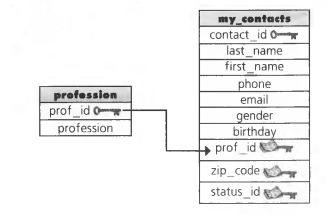
Below is a simplified representation of the my_contacts table.
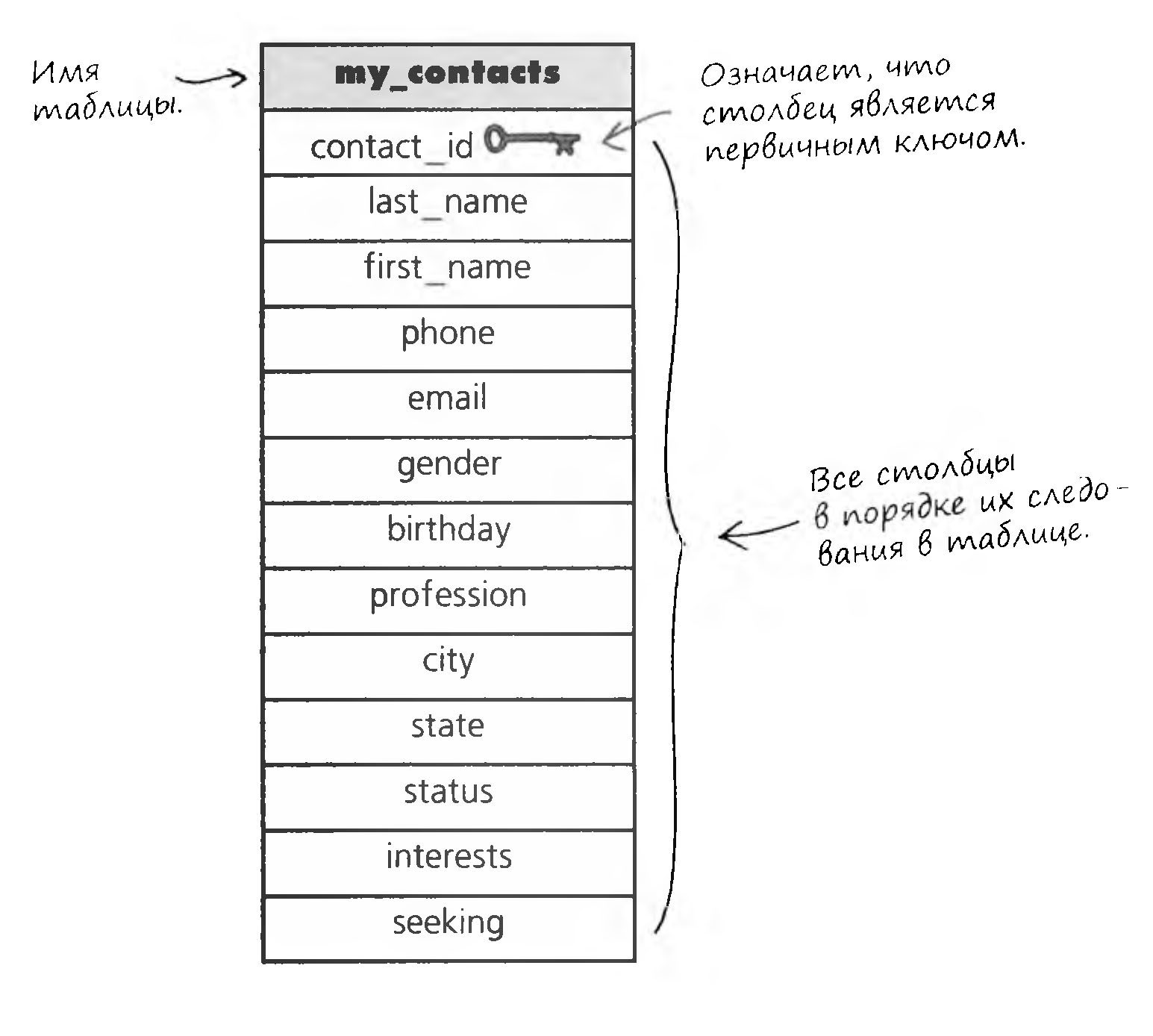

A diagram helps separate a table's structure from the data stored in it.
How to Turn One Table into Two
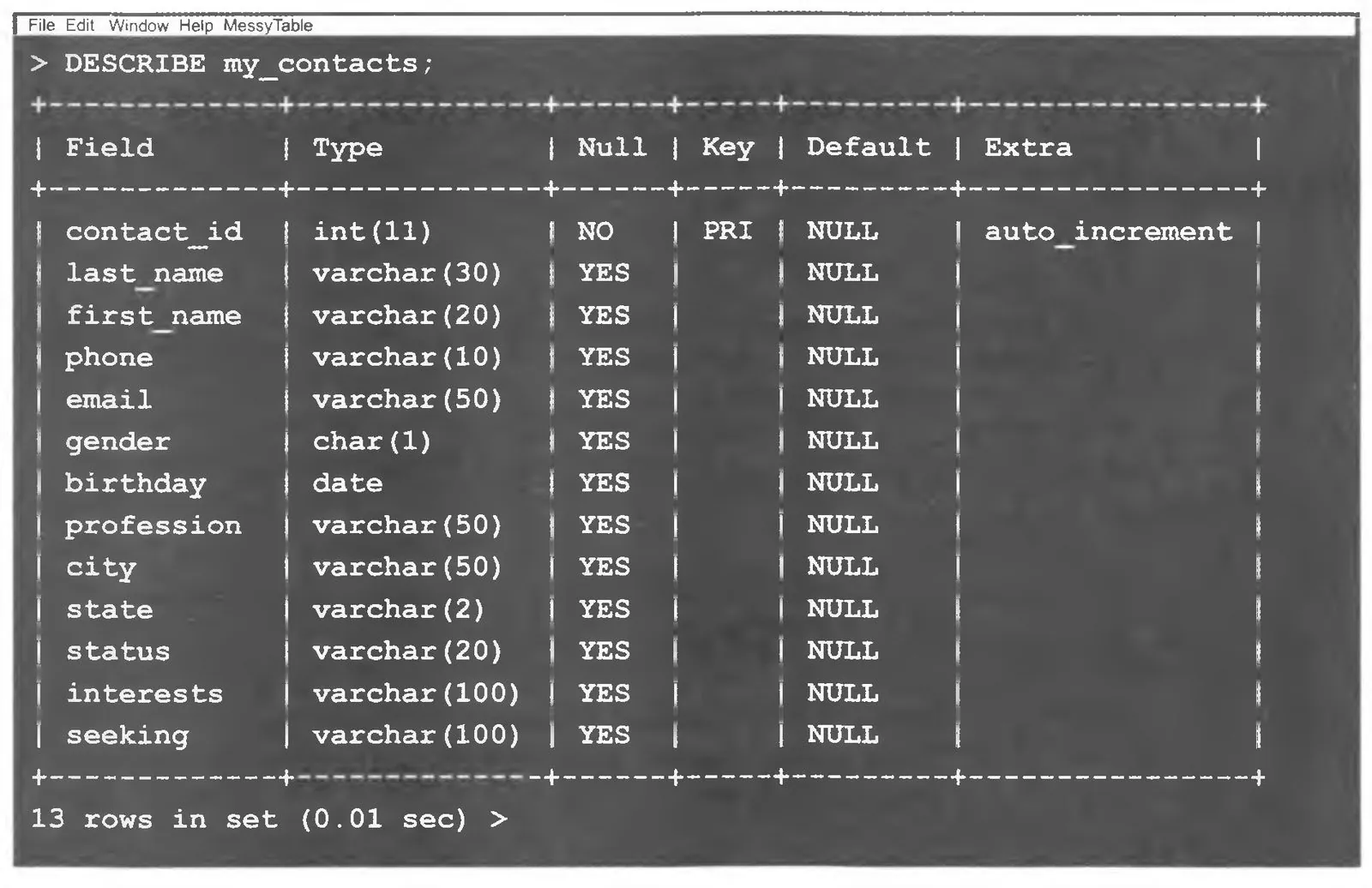
We know that writing a query to search the interests column as it stands is quite hard, because a single column can hold several values at once. Still, creating several separate columns did make our job a little easier.
On the right is the my_contacts table as it currently stands. The interests column is not atomic, and there is really only one good way to make it atomic: we need a new table to store all the interests.
First, let's draw a few diagrams showing what the new tables will look like. Only once the new schema is ready can we move on to creating the new tables or modifying the data.
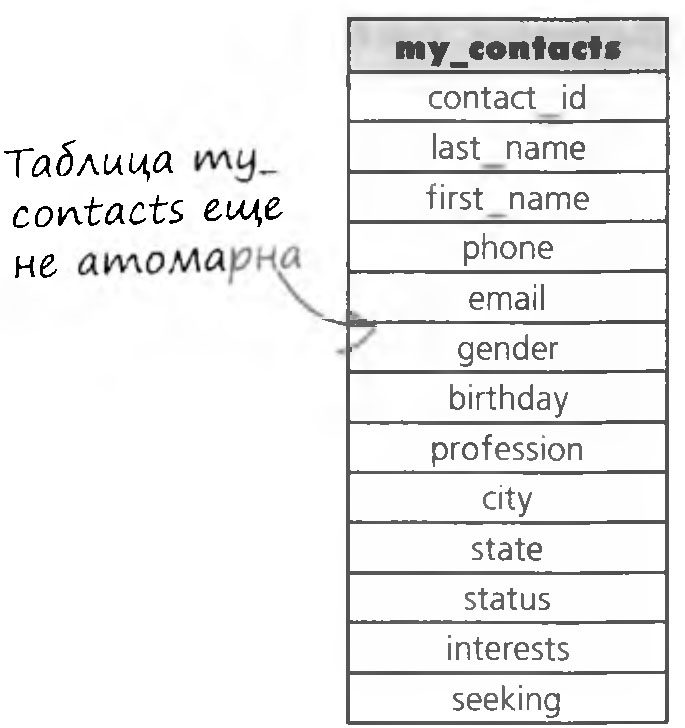
We remove the interests column and put it in a separate table.
The interests column moves to a new table.
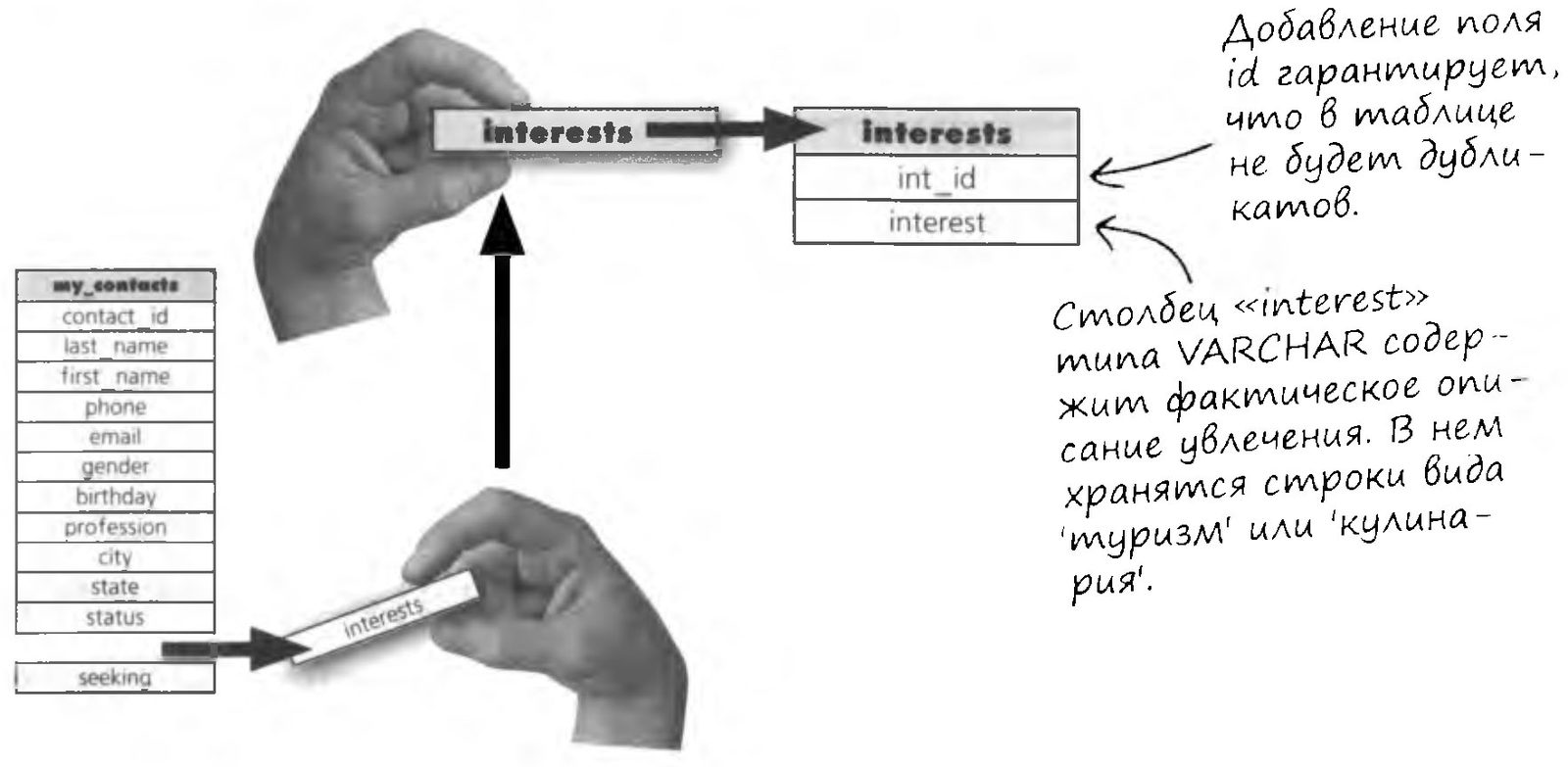
The new interests table will store all the interests from the my_contacts table (a separate record for each interest).
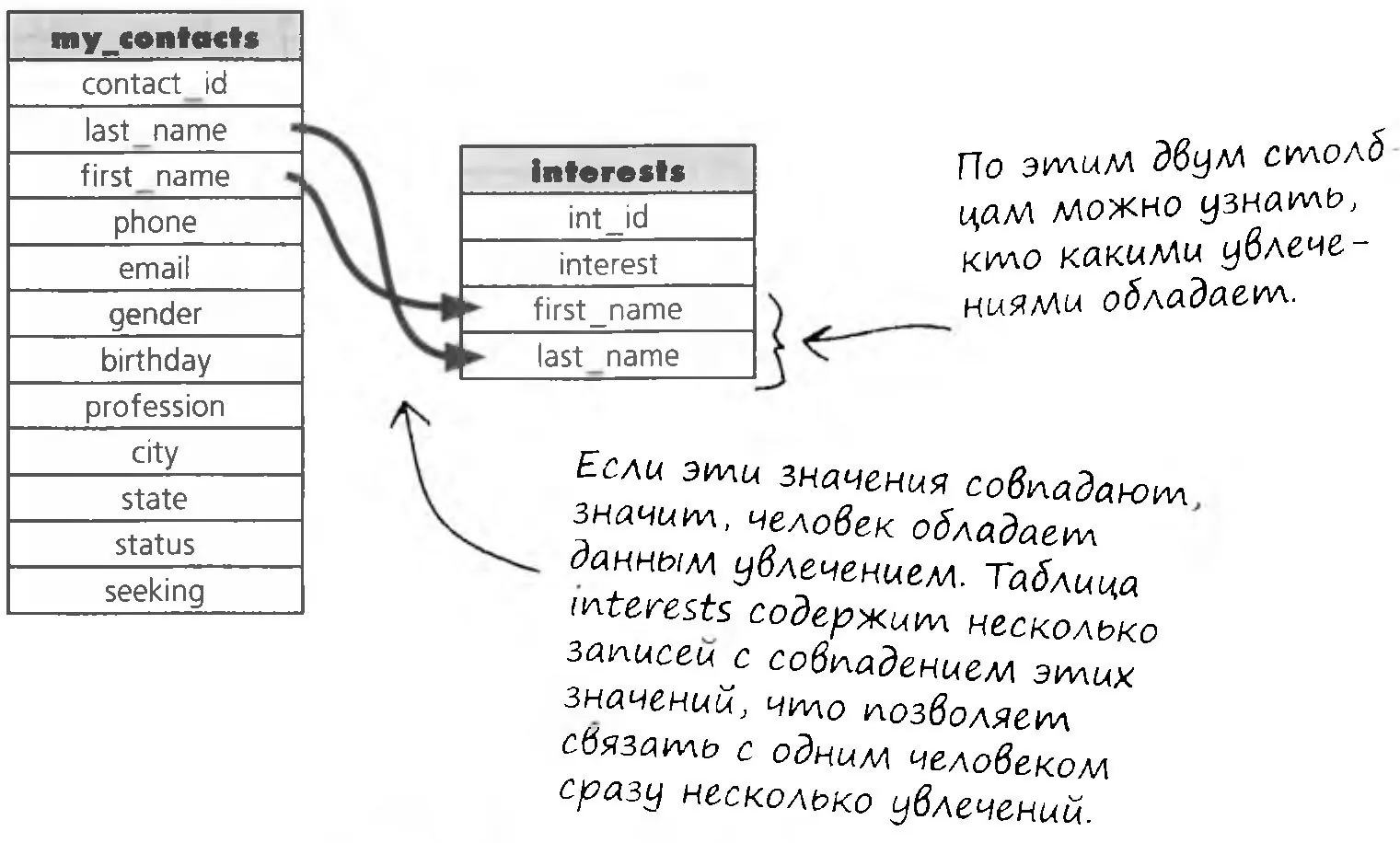
We add columns that will show which interests belong to which person in the my_contacts table.
We've moved the interests out of the my_contacts table, but how do we tell who has which interests? We need to take information from the my_contacts table and put it in the interests table so that the two tables are linked to each other.
For example, we could include the first_name and last_name columns in the interests table.

Brainstorm
We're heading in the right direction, but first_name and last_name are not the best way to link tables.
Why not?
Linking Tables

The first version of the linked tables had one serious flaw: we tried to use the first_name and last_name fields to link them. What if the my_contacts table gets records with identical first_name and last_name values?
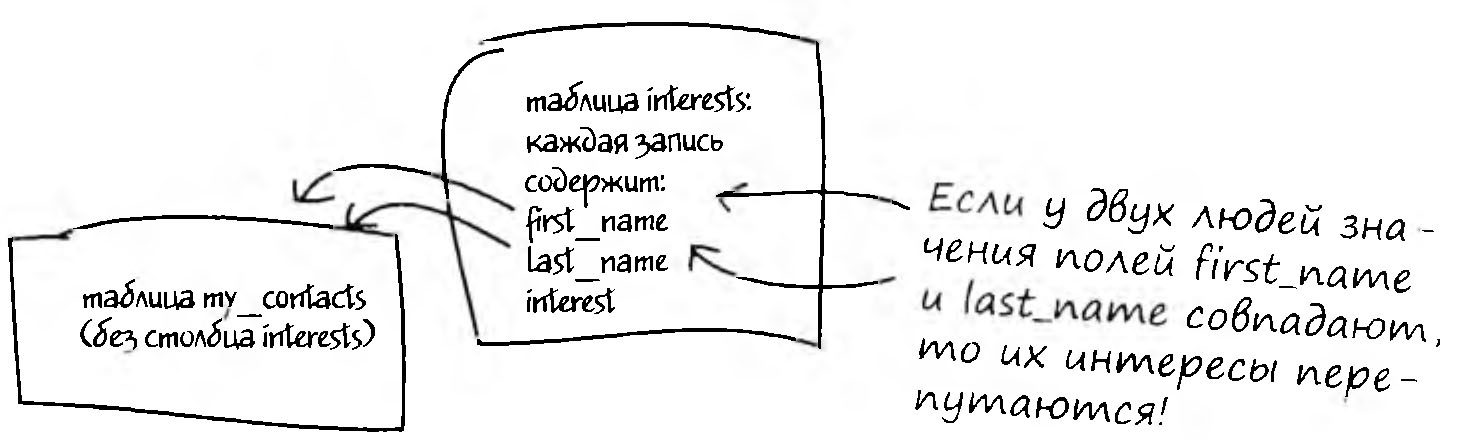
Two tables must be linked through a unique column. Fortunately, since we've already started normalizing, my_contacts already has such a column: the primary key.
We can store the value of the primary key from the my_contacts table in the interests table. Even better, this column will let us tell which interests belong to which person in the my_contacts table. This way of linking is called a foreign key.
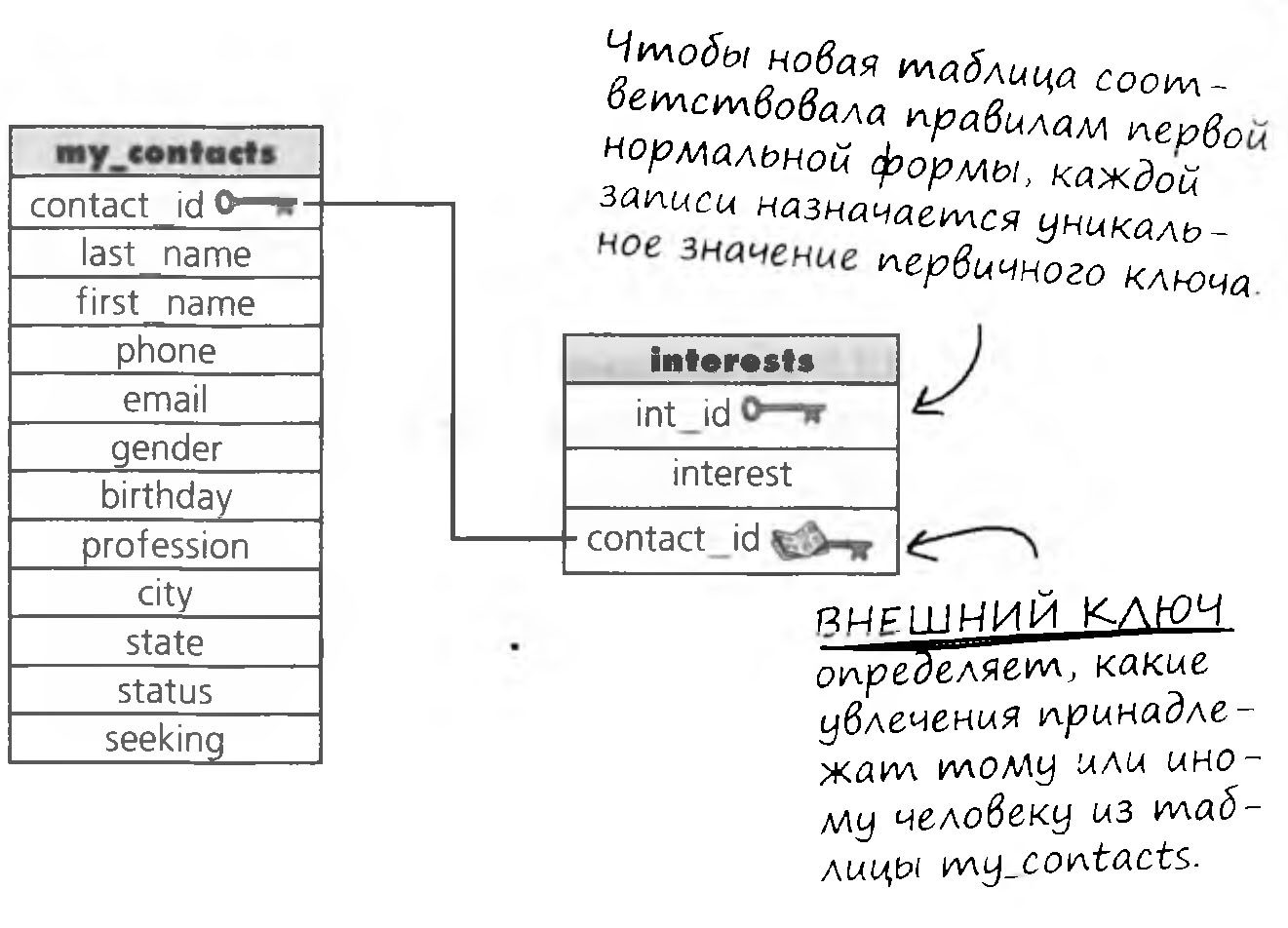
A FOREIGN KEY is a table column that stores the values of another table's PRIMARY KEY.
What You Need to Know About Foreign Keys


I get it, a foreign key lets me link two tables. But what good are NULL values in a foreign key? Can we make sure a foreign key is always linked to a parent key?
A NULL value in a foreign key means the parent table has no matching primary key value.
However, we can make a foreign key accept only meaningful values that exist in the parent table. To do that, use a constraint.
Foreign Key Constraint
Although you can create a table with a column that will act as a foreign key, that column becomes a real foreign key only if you designate it as one in a CREATE or ALTER command. The key is created in a structure called a constraint.

Creating a FOREIGN KEY as a table constraint has certain advantages.
If you try to break the rule, you'll get an error message; this prevents accidental breaking of the links between tables.
On insert, the foreign key will accept only values that exist in the parent table's primary key. This requirement is called data integrity.
Recall that a PRIMARY KEY is one example of a unique index and is used to uniquely identify the records in a table. No two records in a table can have the same primary key value. The primary key is usually abbreviated as PK (primary key).
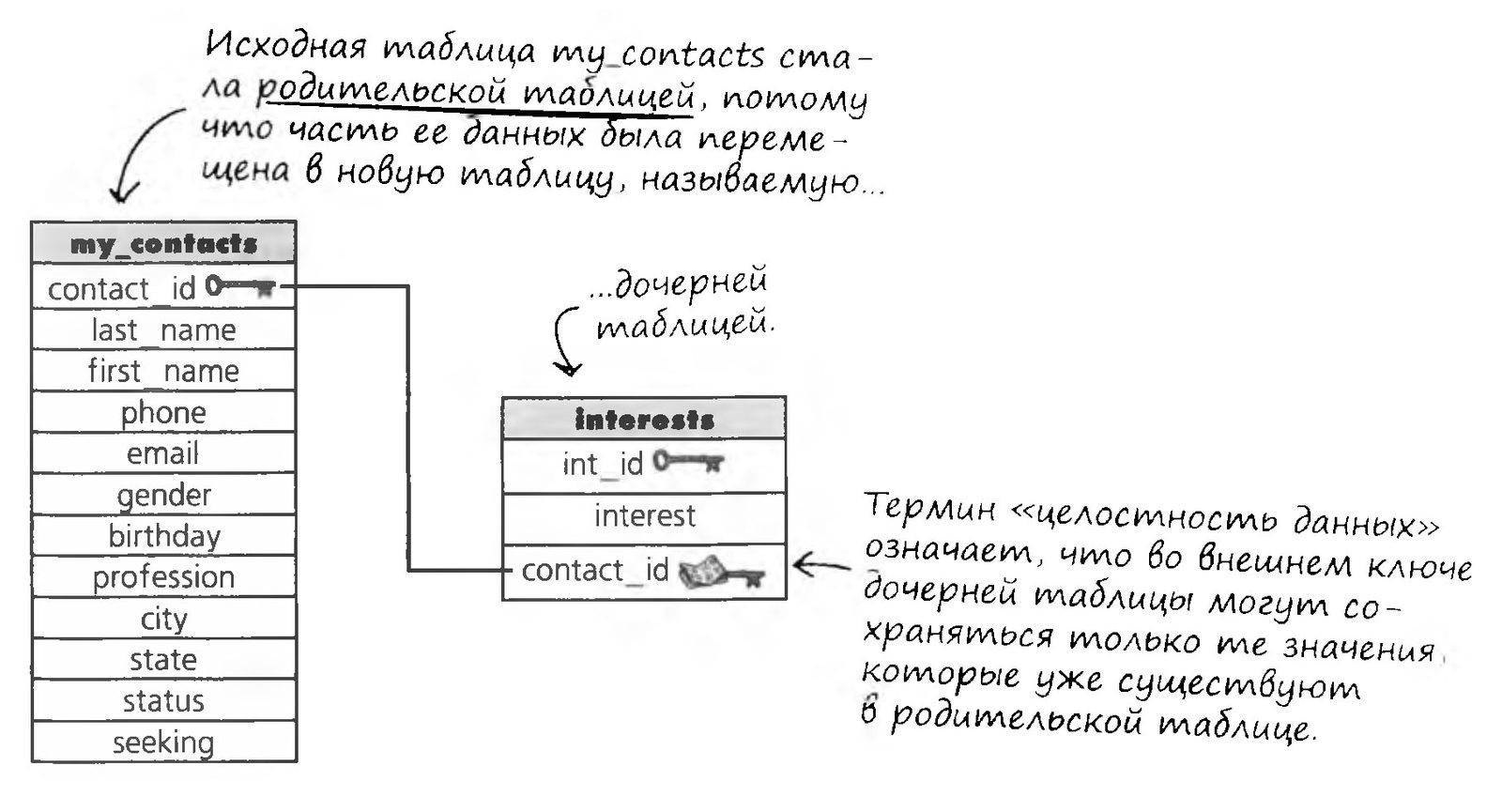

A foreign key must be linked to a unique value in the parent table.
That value doesn't have to be a primary key value, but it must be unique.
Splitting the Interests
Now for the hardest part: we'll use another function to remove the data copied into the interest1 column from the current interests value. After that, we can continue filling in the remaining columns using the same principle.


The SUBSTR function takes the text of the interests column and returns a specified part of it. We pick out the characters that were copied into interest1, plus two more characters (the comma and the space).
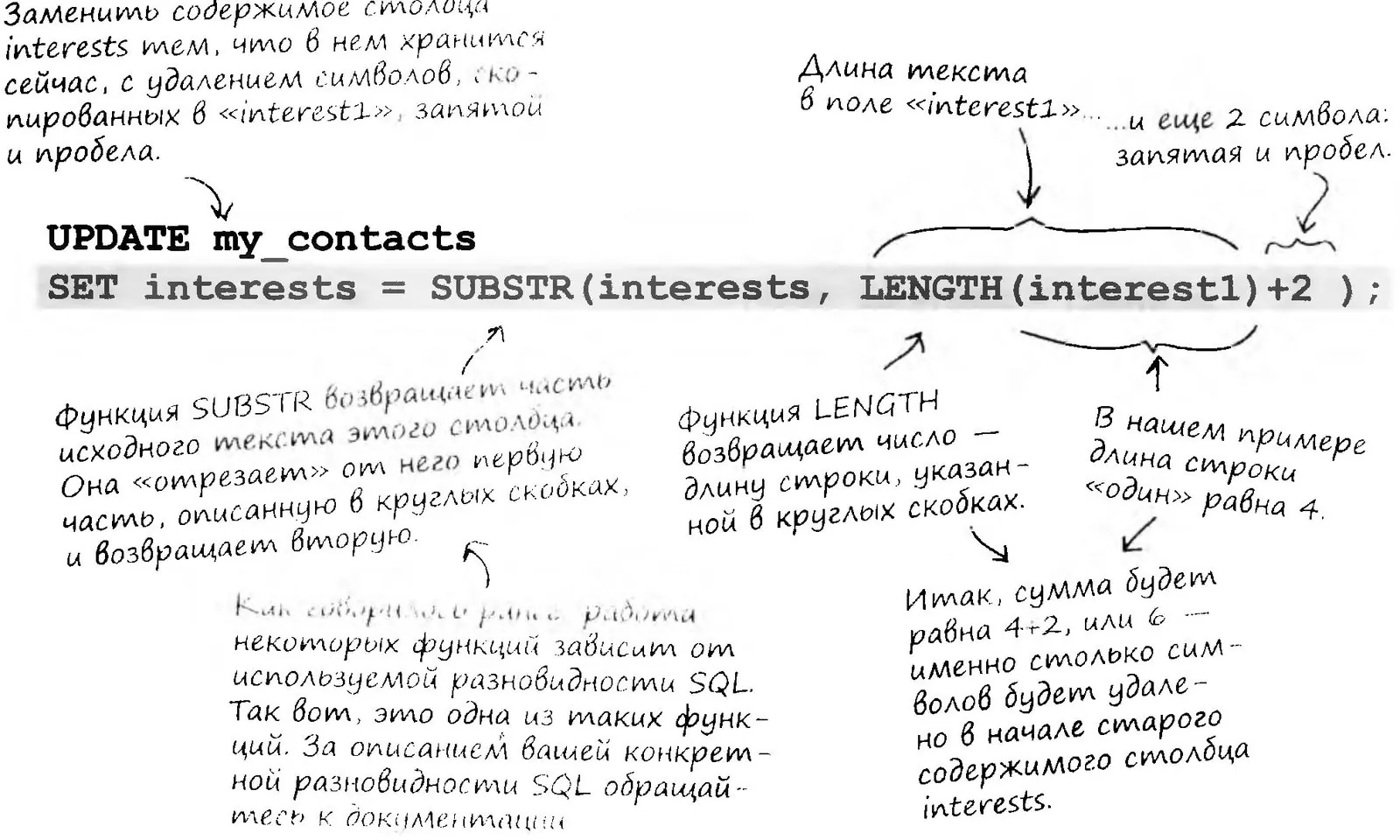
Updating the Columns
After the UPDATE command runs, the table will look like the one below.
But the work isn't finished yet. Now we need to do the same for the interest2, interest3 and interest4 columns.

Young Padawan, let's reinforce our new knowledge by writing a query on paper and checking it against the Master's correct version.
Fill in the blanks in the UPDATE command. (Hint: with each SUBSTR call, the text in the "interests" column gets shorter.)
Displaying the List
At last the interests are split into separate columns. To display them we can use a simple SELECT command, but not for all of them at once. And the command won't let us easily pull them into a single result set, because the interests are stored in four columns. The result will look something like this.
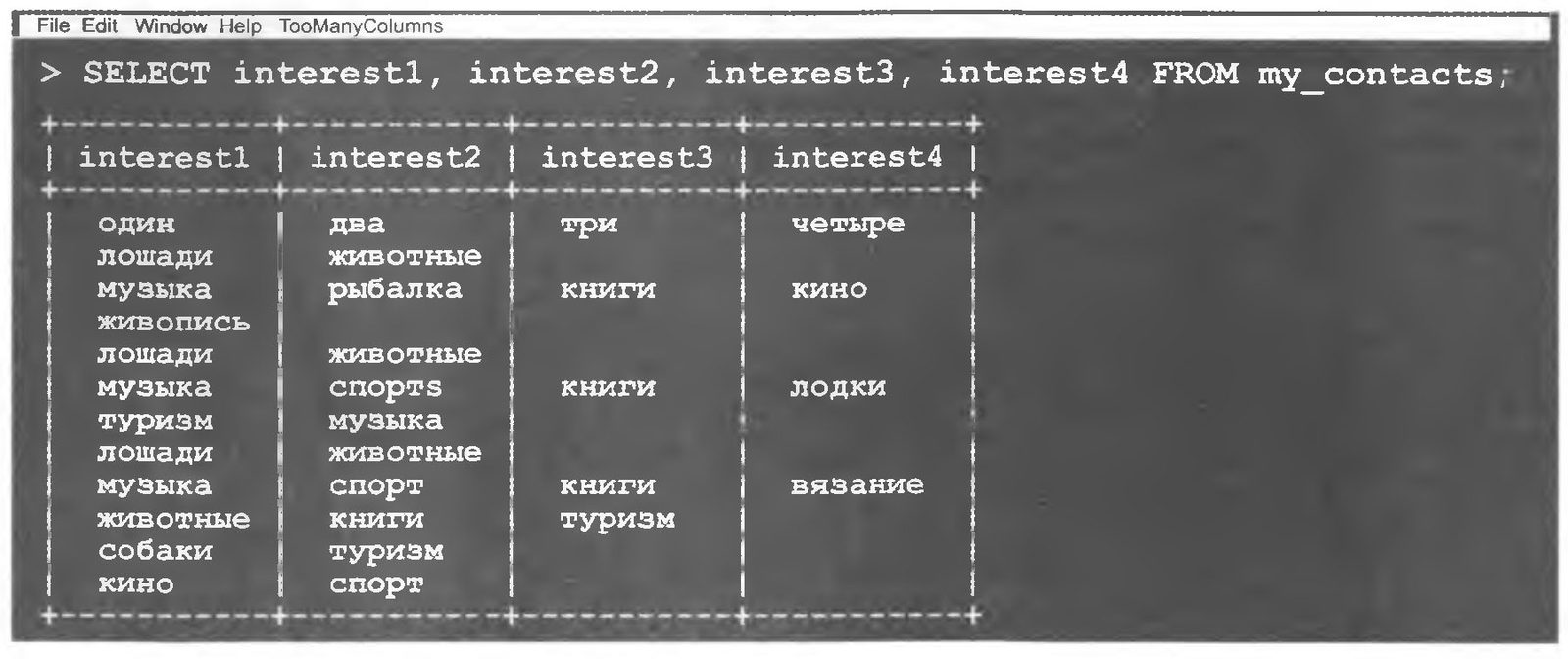
Of course, we can write four separate SELECT commands to display all the values:
SELECT interest1 FROM my_contacts; SELECT interest3 FROM my_contacts;
SELECT interest2 FROM my_contacts; SELECT interest4 FROM my_contacts;
All that's left is to figure out how to insert the results of these commands into the new table. Fortunately, it can be done, and in more than one way: at least three of them!
Let's test our knowledge and think about the question below. And please the Master with the right answer!
Recall the select command for the profession column that we wrote earlier:
SELECT profession FROM my_contacts GROUP BY profession
ORDER BY profession;
Below are THREE WAYS to use select commands to automatically fill the new interests table. Think about the select, insert and create commands. Then look at the descriptions of the three ways. Your task is not to guess the correct syntax but to think through the available possibilities.
Who Needs Table Aliases?
You do! We're about to get into joins and pulling data from multiple tables. Without aliases you'd have to type table names over and over, and you'd get tired of it fast.
Table aliases are created almost the same way as column aliases. The table alias is given after the first use of the table name in the query, with the keyword AS. In the following example it says that the my_contacts table can from now on also be referred to as mc.
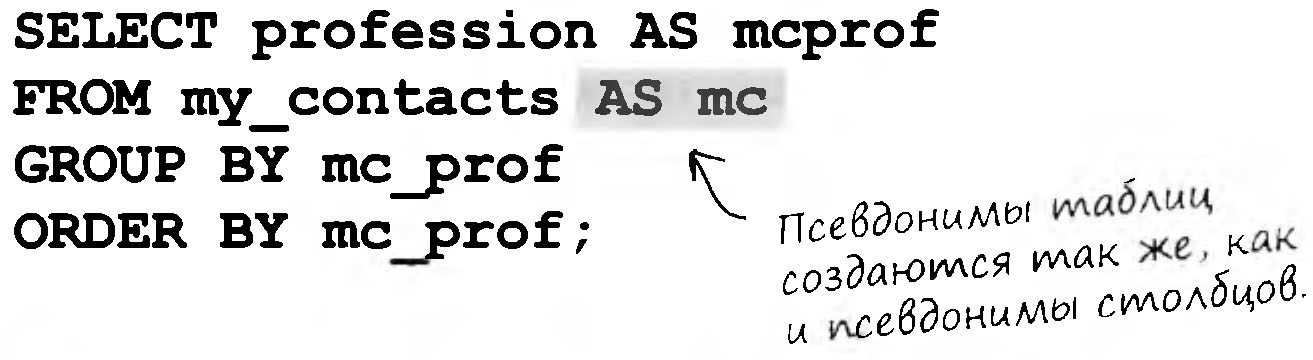
Table aliases are also called correlation names.

And do I have to use "AS" every time I need to create an alias?
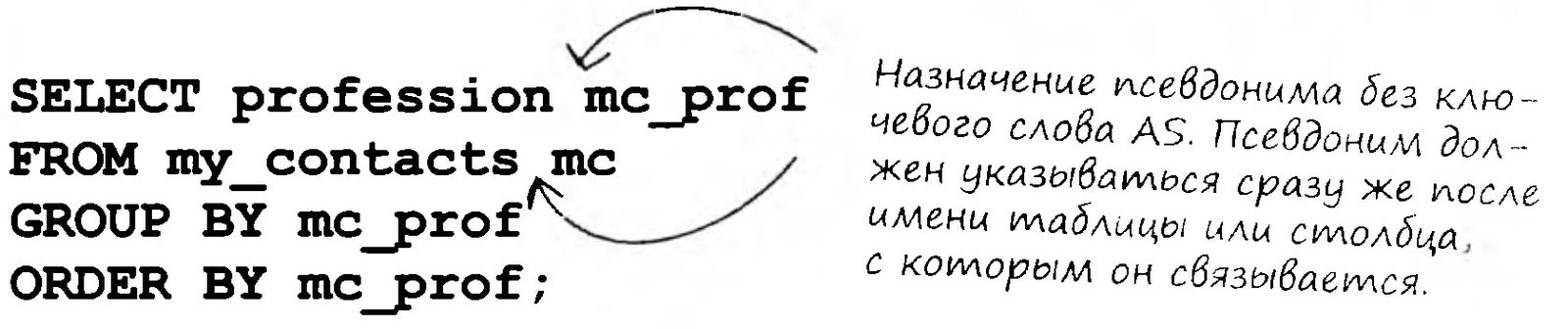
No, there is a shorthand syntax for assigning aliases.
Just leave out the keyword AS. The following query does the same thing as the query at the top of the page.
Everything You Wanted to Know About Inner Joins
Anyone who has ever heard of SQL has surely heard the word "join". The topic isn't as complicated as it may seem at first glance. We'll show you what joins are, how they work, when to use them, and which kind of join fits which situation.
But we'll start with the simplest kind of join (which isn't even a full-fledged join!).
It's known by many names. In this book we'll call it a cross join, although you'll also come across the terms "cross product" and "Cartesian join".
...this is where result tables really come from.

Suppose you have two tables: one with the names of kids and one with the names of the toys those kids have. Your task is to figure out which toys could be given to each kid as a gift.
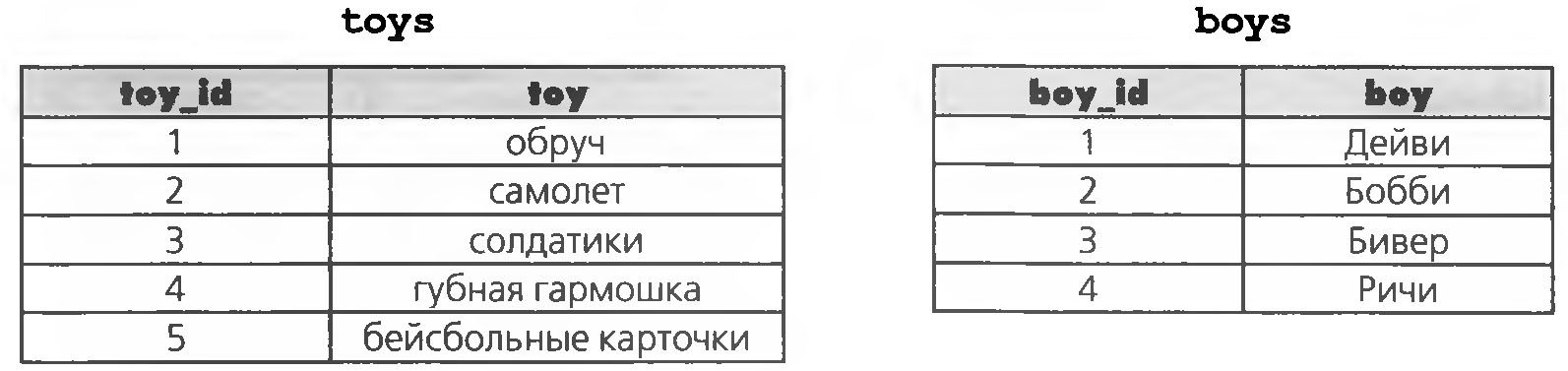
Cross Joins
The result of the following query is a cross join. We request data from both tables: the toy column from the toys table and the boy column from the boys table.
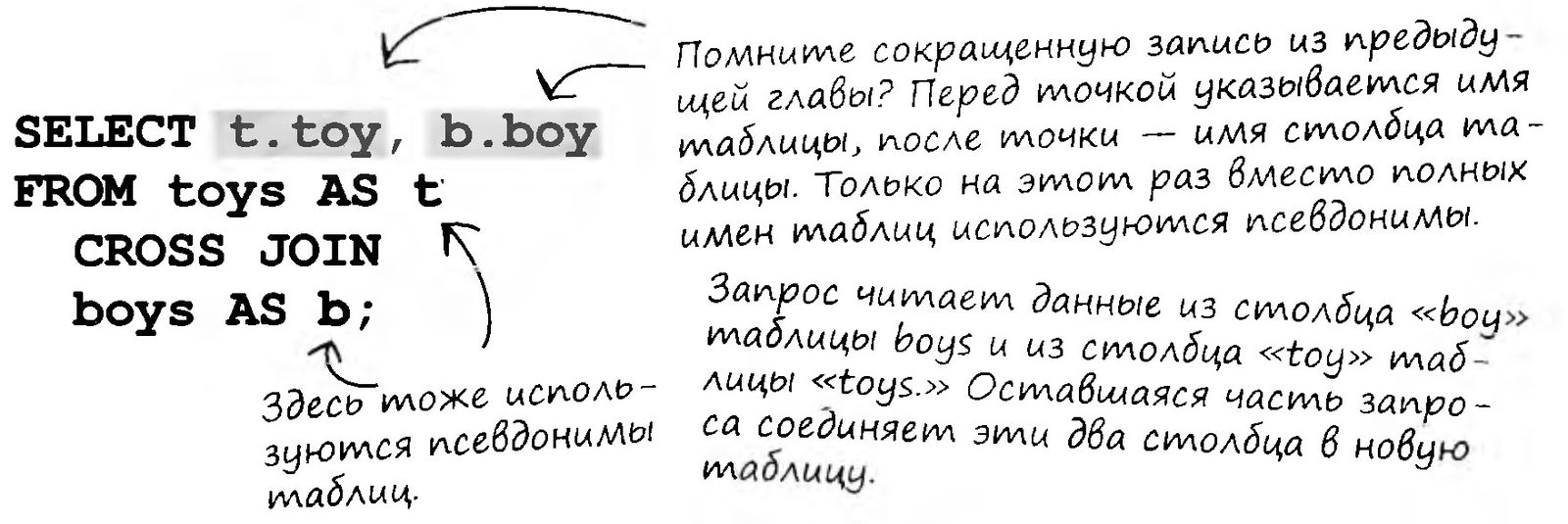
A cross join creates a pair from each value in the first table and each value in the second table.
A cross join (CROSS JOIN) returns combinations of every record in the first table with every record in the second table.
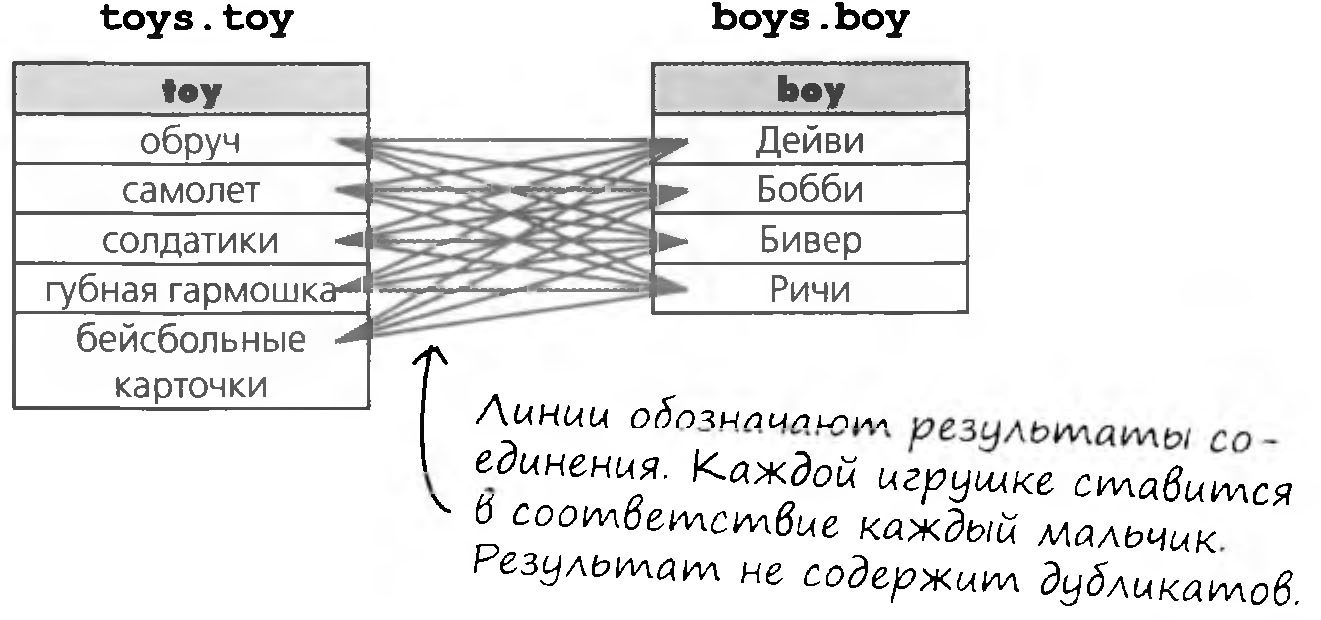
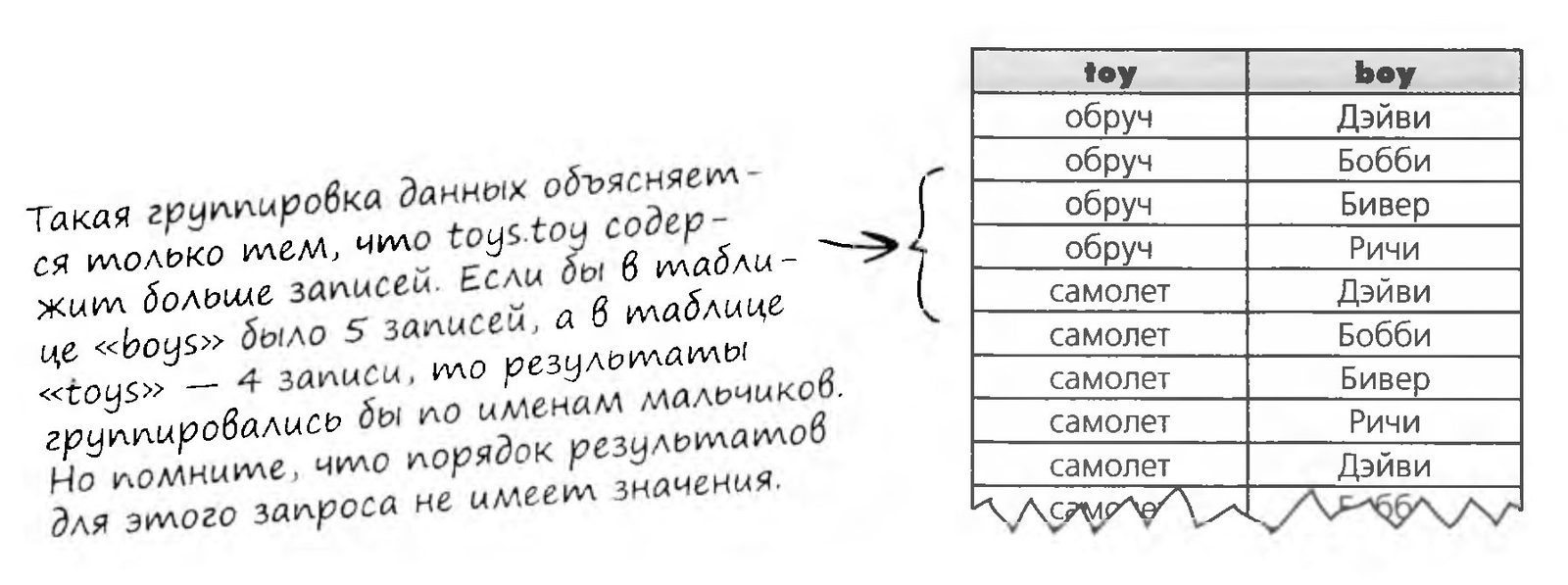
The join result consists of 20 records (5 toys * 4 boys), that is, all possible combinations.
Frequently Asked Questions
And why would I need this?
It's important to know about cross joins, because while experimenting with joins you can accidentally get a cross result. Knowing this will help you fix a badly written query. Check it out, it happens. Besides, cross joins are sometimes used to test the speed of an RDBMS and its configuration. They take a relatively long time to process, which makes analysis and comparison easier.
What if I use a query like this: SELECT * FROM toys CROSS JOIN boys; What happens when you use SELECT * ?
Try it yourself. You'll get the same 20 records, but they'll include all 4 columns.
An inner join (INNER JOIN) is a cross join from whose results some records are excluded by the query condition.
What happens if you cross join two very large tables?

You'll get a huge number of records. It's best not to experiment with cross joins: with such a gigantic volume of returned data, your computer may "freeze"!
Is there another syntax for such queries?
Yes, there is. Instead of the keywords CROSS JOIN you can put a comma:
SELECT toys.toy, boys.boy
FROM toys, boys;
I've heard the term "inner join" before. Is it the same thing as a cross join?
A cross join is a kind of inner join. In essence, an inner join is a cross join from whose results some records are excluded by the query criteria. Inner joins will be described in more detail soon, but for now, just remember this!
Brainstorm
What result do you think the following query will return:
SELECT b1.boy, b2.boy
FROM boys AS b1 CROSS JOIN boys AS b2;
Try it yourself.
Unleash Your Inner Join
Got it! So I can link the new tables to the new version of my_contacts. I don't have to write a dozen SELECTs, I just need to include the tables in an inner join.
It's only the beginning.
Think that's all? We're covering only one kind of one type of join. You still have a lot to learn about this and other kinds of joins before you can use them effectively and sensibly in practice.
An inner join combines the records of two tables according to a given condition. Columns are included in the output set only if the joined record satisfies the condition. Let's take a closer look at the syntax.
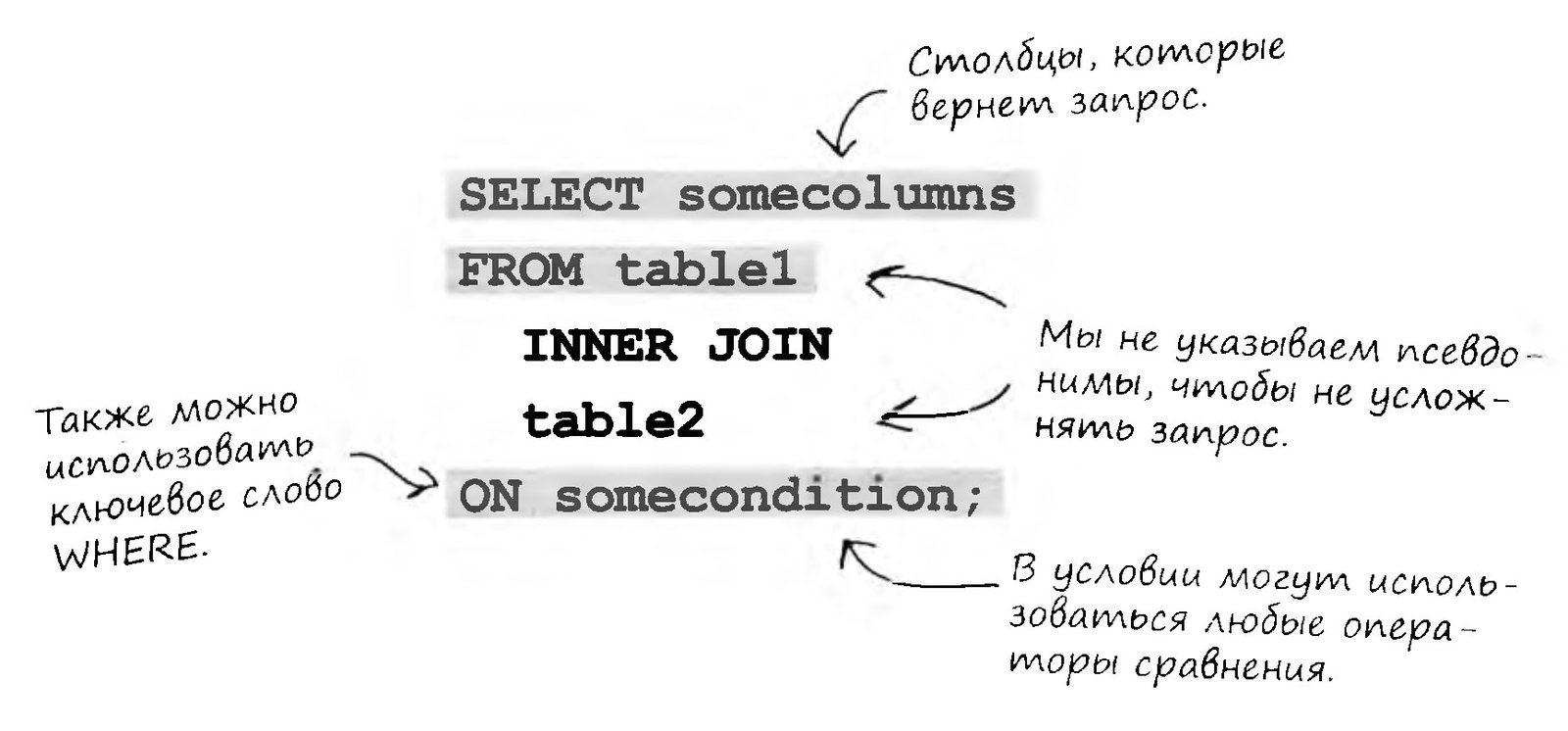
An inner join combines records from two tables according to a given condition.
The Inner Join in Action: the Equijoin
Consider the following tables. Each boy has only one toy. The relationship is one-to-one, and toy_id is a foreign key.
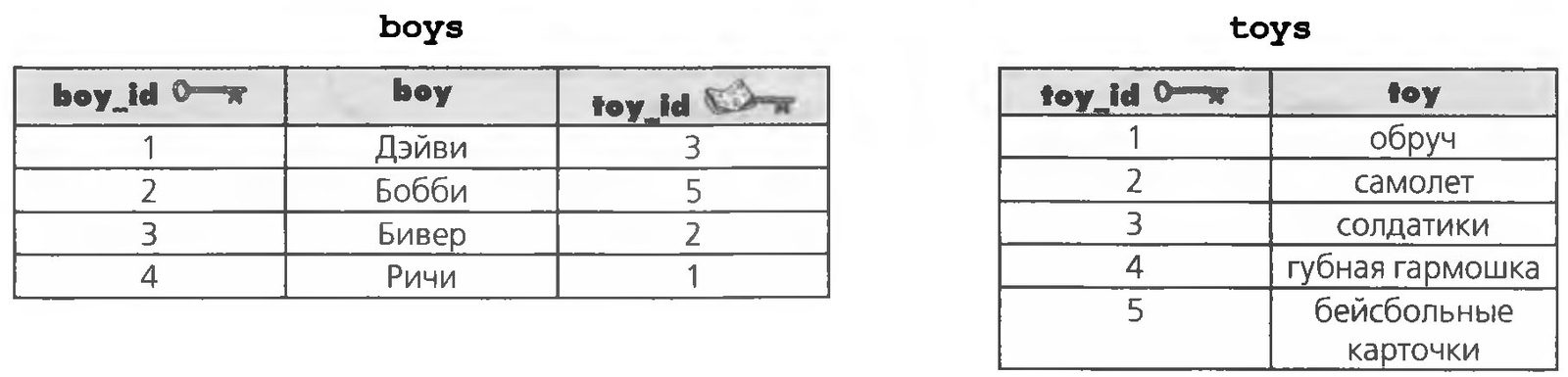
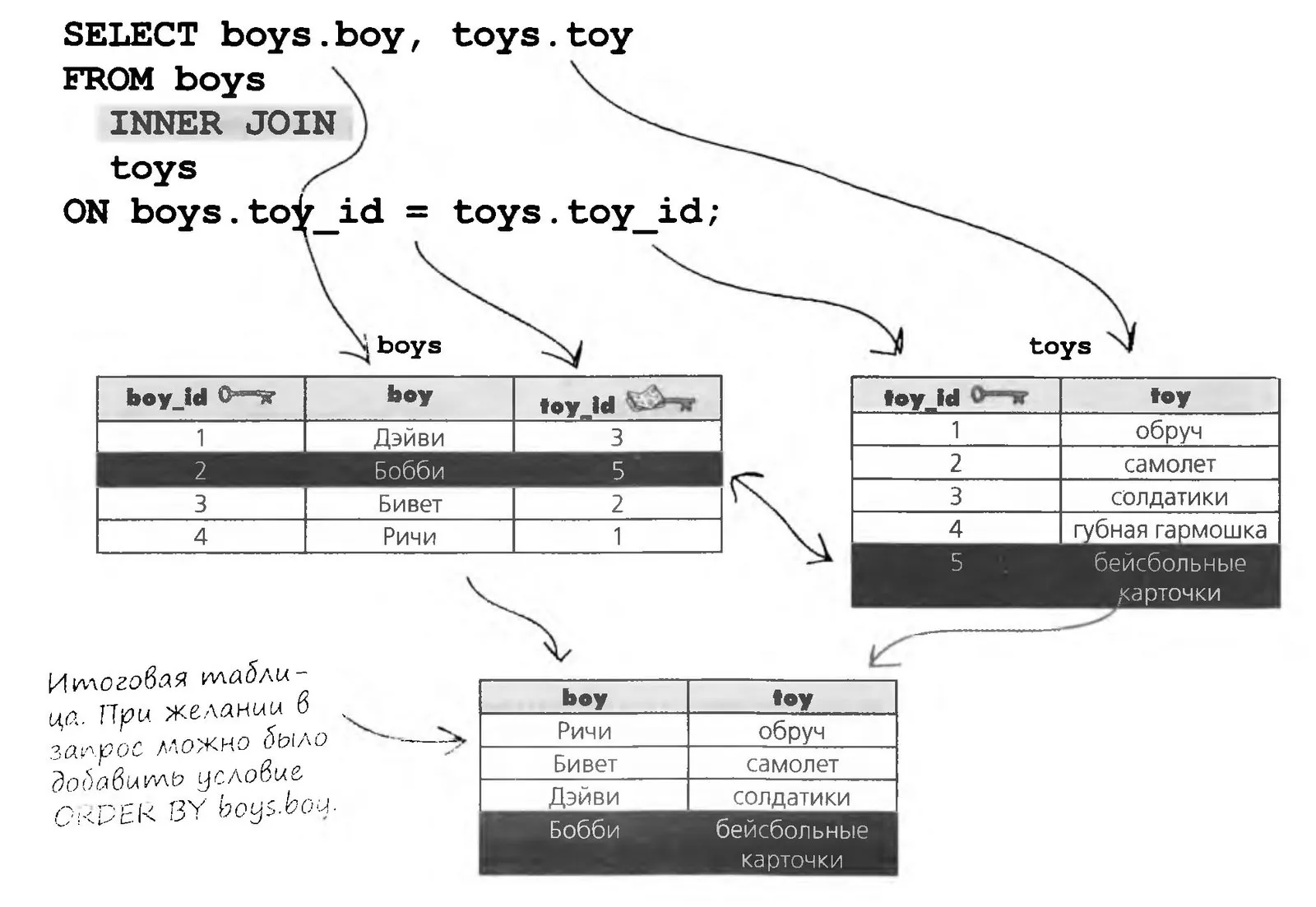
All we need is to find out which toy belongs to each of the boys. We can use an inner join with the = operator to find the matches between the boys foreign key and the toys primary key.
An equijoin is an inner join that tests for equality.
The Inner Join in Action: the Non-Equijoin
A non-equijoin returns records in which the specified column values are not equal. As an example, consider the same two tables, boys and toys. Using a non-equijoin, we can find out exactly which toys each boy does not have (this result is handier when you're looking for a birthday present).
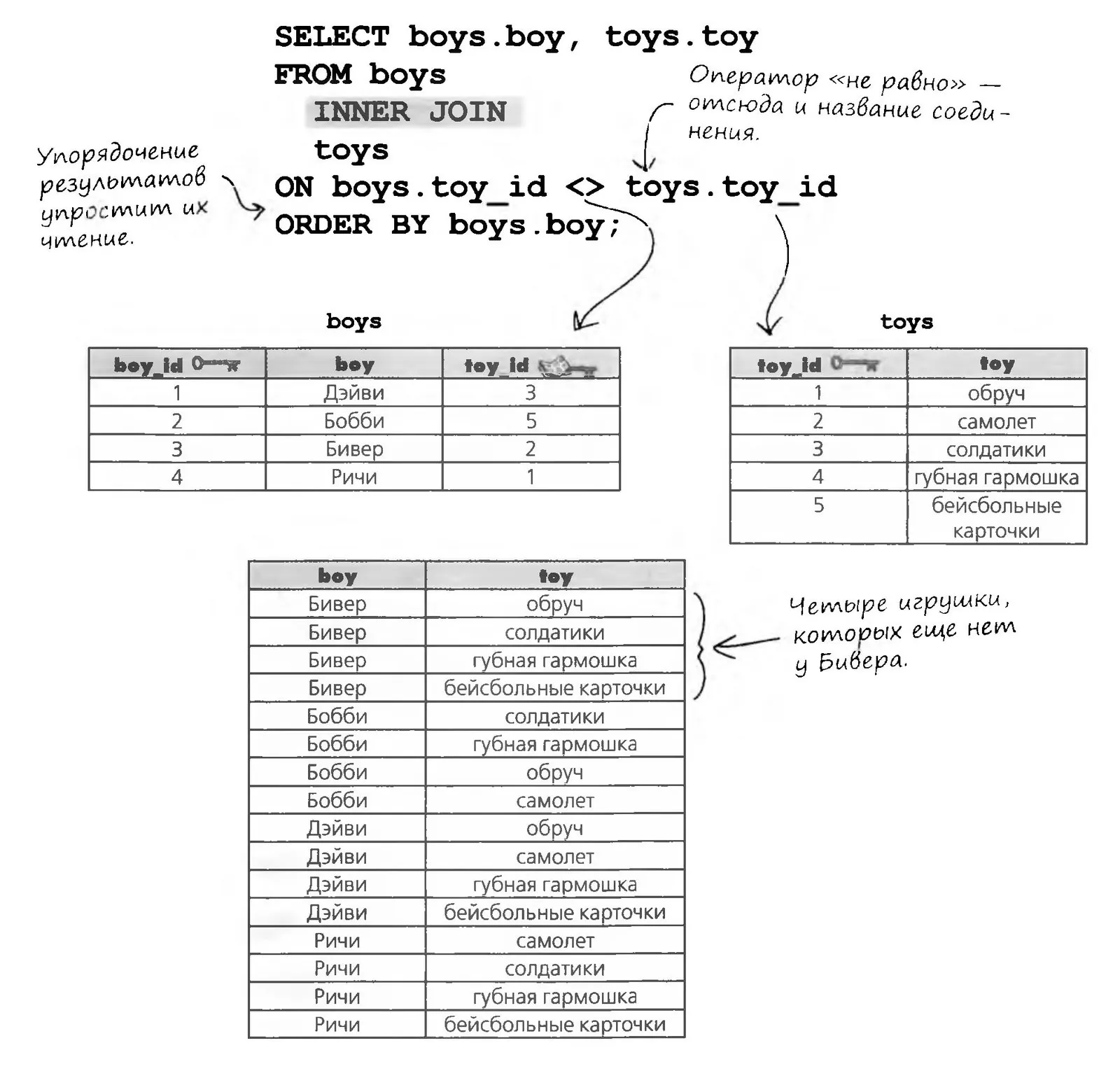
A non-equijoin tests for values that do not match.
The Last Inner Join: the Natural Join
Only one kind of inner join is left: the so-called natural joins. Natural joins are possible only if the column used for the join has the same name in both tables. Let's take another look at these two tables.
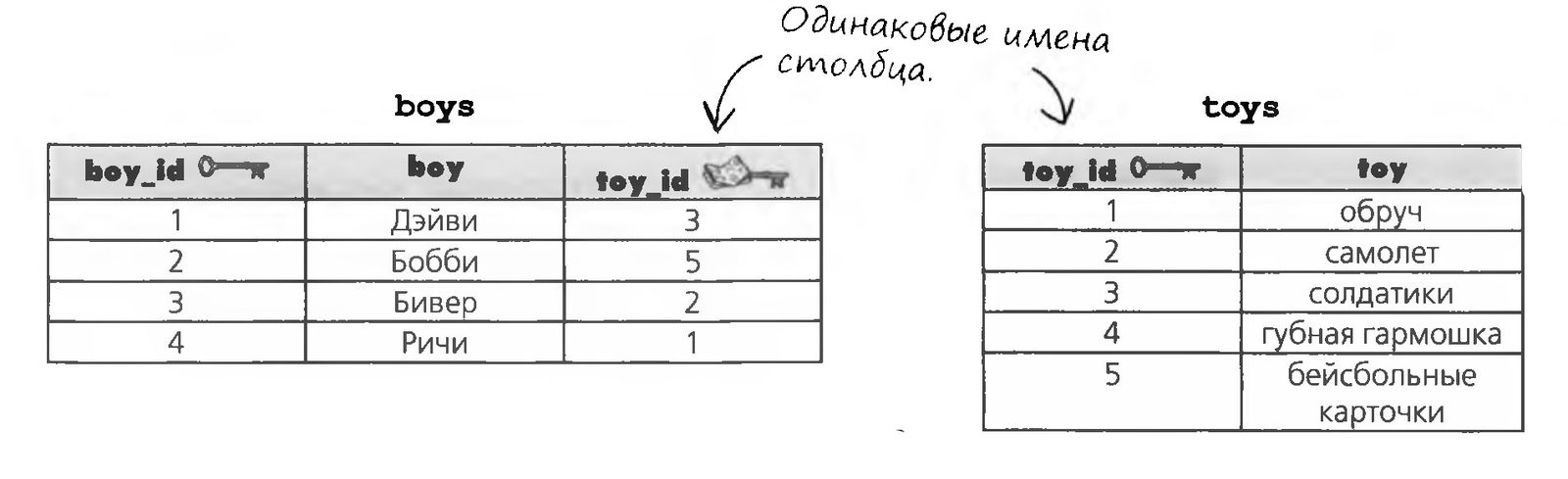

As before, we want to know which toy each boy has. The natural join recognizes matching column names in the two tables and returns the corresponding combinations.
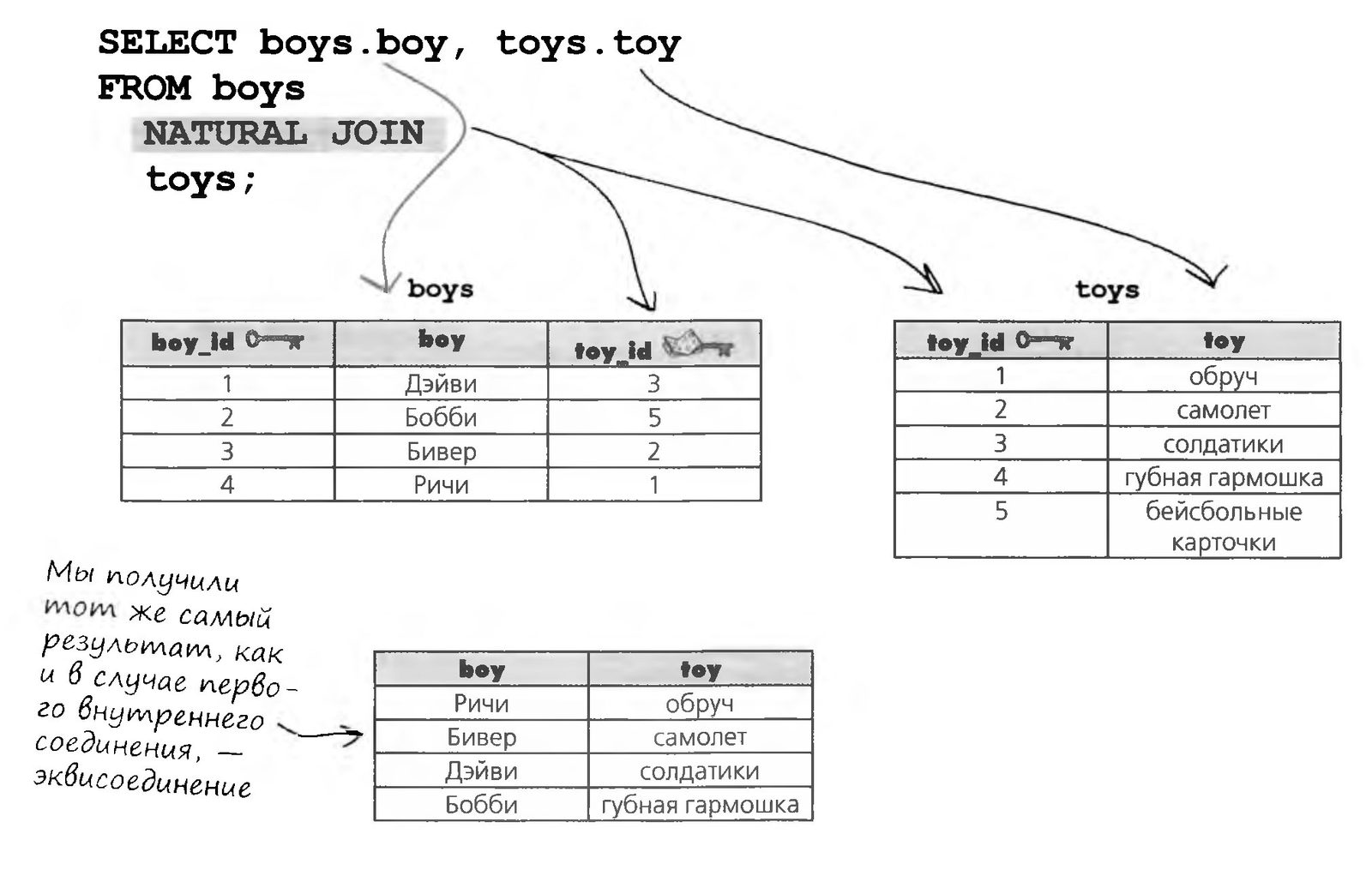
A natural join links records by the values of columns that have the same name.
Nested Queries?
Greg is gradually starting to grasp what joins can do. He sees that splitting a database into tables makes sense, and that working with well-designed tables isn't all that hard. Greg is even planning to expand the gregs_list database.
But I still often have to enter one query and then use its results as the input of another query, when it would be handier to put one query inside the other. But that's only a dream...
A query inside another query?
Is that even possible?
A Frank Talk About Table and Column Aliases
Interview of the Week:
SENSATION! INVESTIGATION! SQL Aliases: What Are They Hiding?
Galaxy QA Academy: Welcome, Table Alias and Column Alias. We're glad to have you with us today. We hope you'll help us clear up a few misunderstandings.
Table Alias: Of course, I'm delighted to be here too. And you can call us TA and CA for short during this interview (laughs).
Galaxy QA Academy: Ha-ha! Yes, that will do nicely. So, CA, let's start with you. Why all the secrecy? Are you trying to hide something?
Column Alias: Not at all! If anything, I'm trying to make things clear. I'm speaking for both of us right now, right, TA?
TA: Of course. With CA it's obvious what he's trying to do: he takes long or redundant column names and makes them easier to work with. Just for convenience. He also gives you result tables with clear column names. My case is a little different.
QA Academy: We have to admit we're not as well acquainted with you, TA. We've seen you at work, but we still don't fully understand what exactly you do. After all, when you're used in queries, you don't show up in the results.
TA: Yes, that's true. But I think you're missing my higher purpose.
QA Academy: A higher purpose? Interesting, go on.


TA: I exist to make writing queries easier.
CA: And you help me with joins, TA.
QA Academy: I'm lost. Could you give an example?
TA: Let's look at the syntax. I think it will be perfectly clear what I do:
SELECT mc.last_name, mc.first_name,
p.profession
FROM my_contacts AS mc
INNER JOIN
profession AS p
WHERE mc.contact_id = p.id;
QA Academy: Got it! Everywhere I would have had to type my_contacts, I can just type mc. And profession is replaced by p. That's much simpler and far more convenient when I have to include two column names in one query.
TA: Especially when the tables have similar names. Shortening them helps you not only write the query you need but also understand it when you come back to it some time later.
QA Academy: Thank you very much, TA and CA. It was really... uh... where did they go?
New Tools
After Chapter 8 you can build joins like a real SQL pro. Below are the key concepts of this chapter. The full list of tools is in Appendix 3.

Queries Inside Queries
And everyone will notice how... (What's the word? Refined? Sophisticated? Elegant?) I am.
A two-part query for me, please. Joins are all well and good, but sometimes you need to put several questions to the database at once. Or take the result of one query and use it as the input of another query. Subqueries, also called subordinate queries, will help you with that. They prevent data duplication, make queries more dynamic, and might even get you into a high-society party. (Or maybe not, but two out of three ain't bad!)

Greg Starts Looking for Work
Until now, the gregs_list database had been a purely selfless endeavor. It helped Greg match up his friends, but it brought in no income.
Suddenly Greg realized he could open his own recruiting agency and match the people on his list with various job options.
With these new capabilities, I can create my own recruiting agency.
Greg knows that for acquaintances who become interested in his offer, he'll have to add new tables to the database. Instead of putting the information in my_contacts, he decides to create separate tables with one-to-one relationships, for two reasons.
First, not everyone on the my_contacts list is interested in his services. A separate table lets him get rid of NULL values in my_contacts.
Second, if Greg ever hires people to help him run the business, information about income may turn out to be confidential. In that case Greg will grant access to such tables only to those who really need it.
New Tables Appear in Greg's List
Greg has added new tables to his database to store information about the desired position and salary range, as well as the current position and salary. Greg is also creating a simple table to store information about the available job openings.
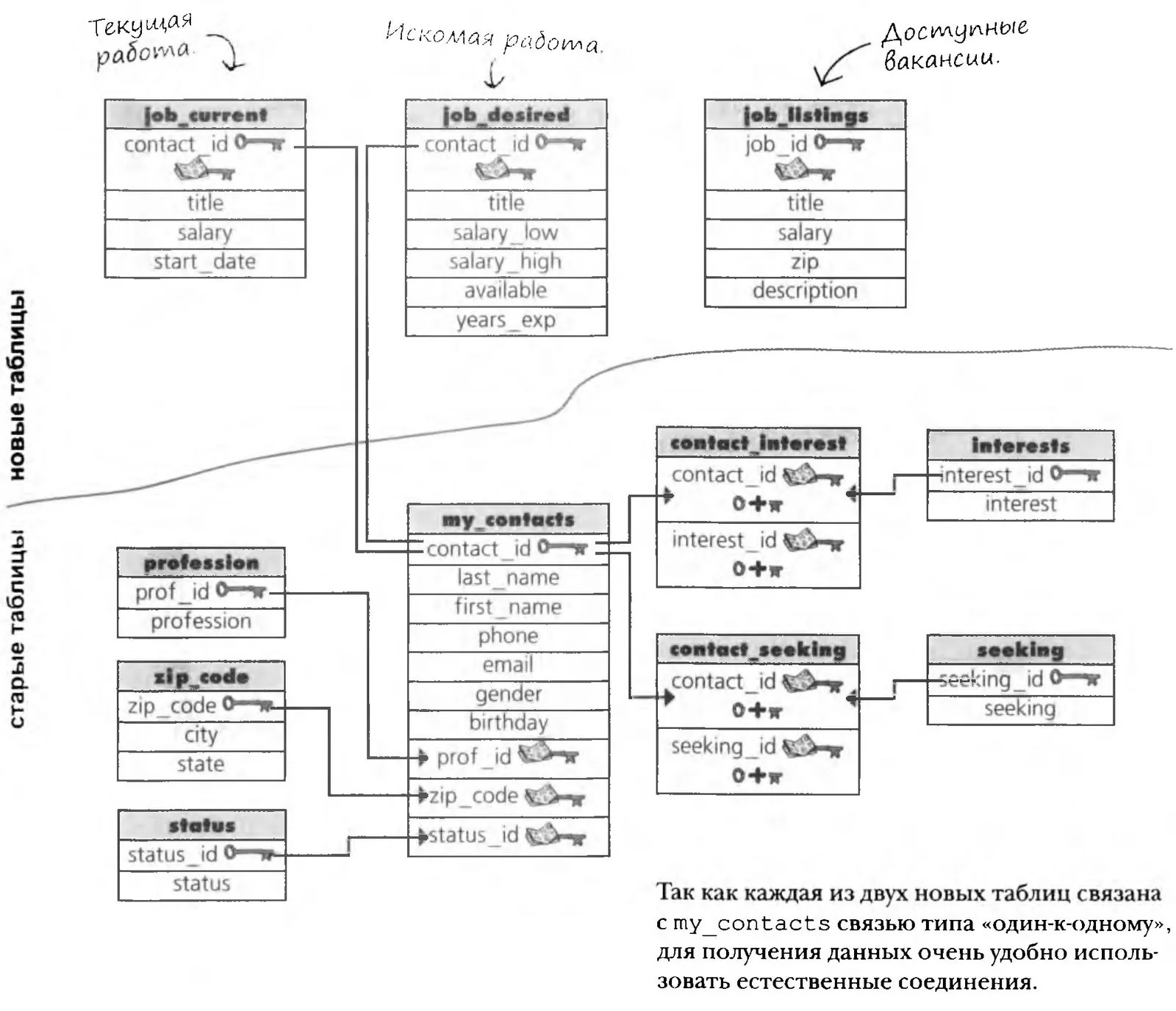

Greg Uses an Inner Join
Greg has received information about an excellent job opening and is now trying to find candidates for it in his database. He wants to find the best match, because if his candidate gets hired, he'll receive a bonus.
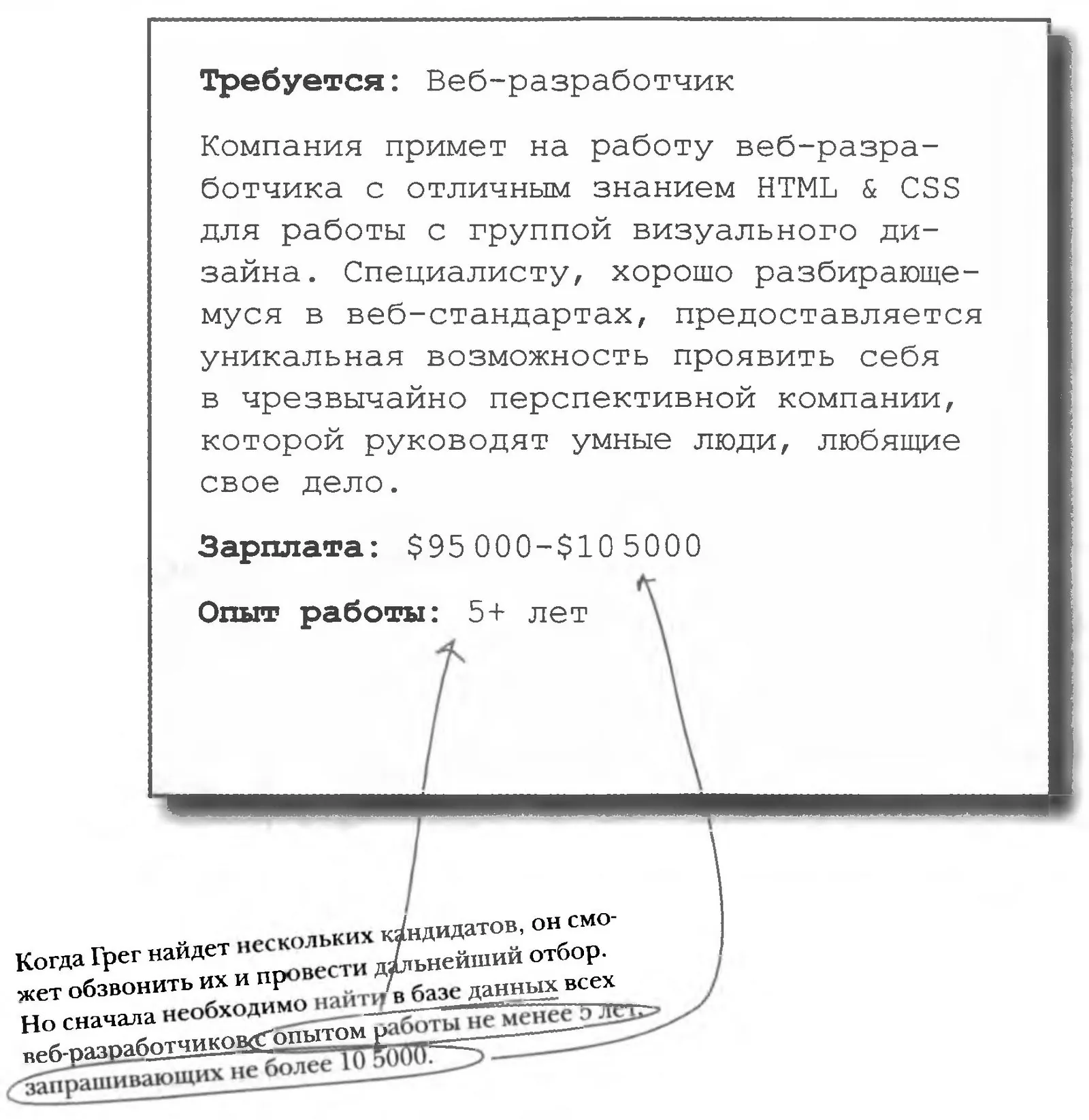
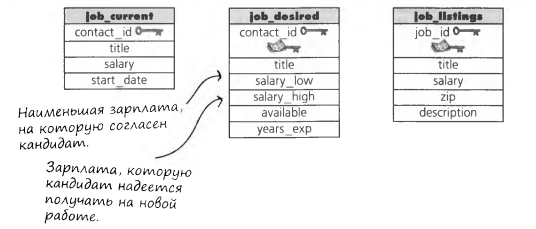
Padawan, let's check how well you understood the new topic and reinforce your knowledge. Try writing this query
Write a query that selects from the database the candidates who meet the given conditions.
Two Queries Turn into a Query with a Subquery
In effect, we're simply combining two queries into one. The first query is called the outer query, and the second is the inner query.
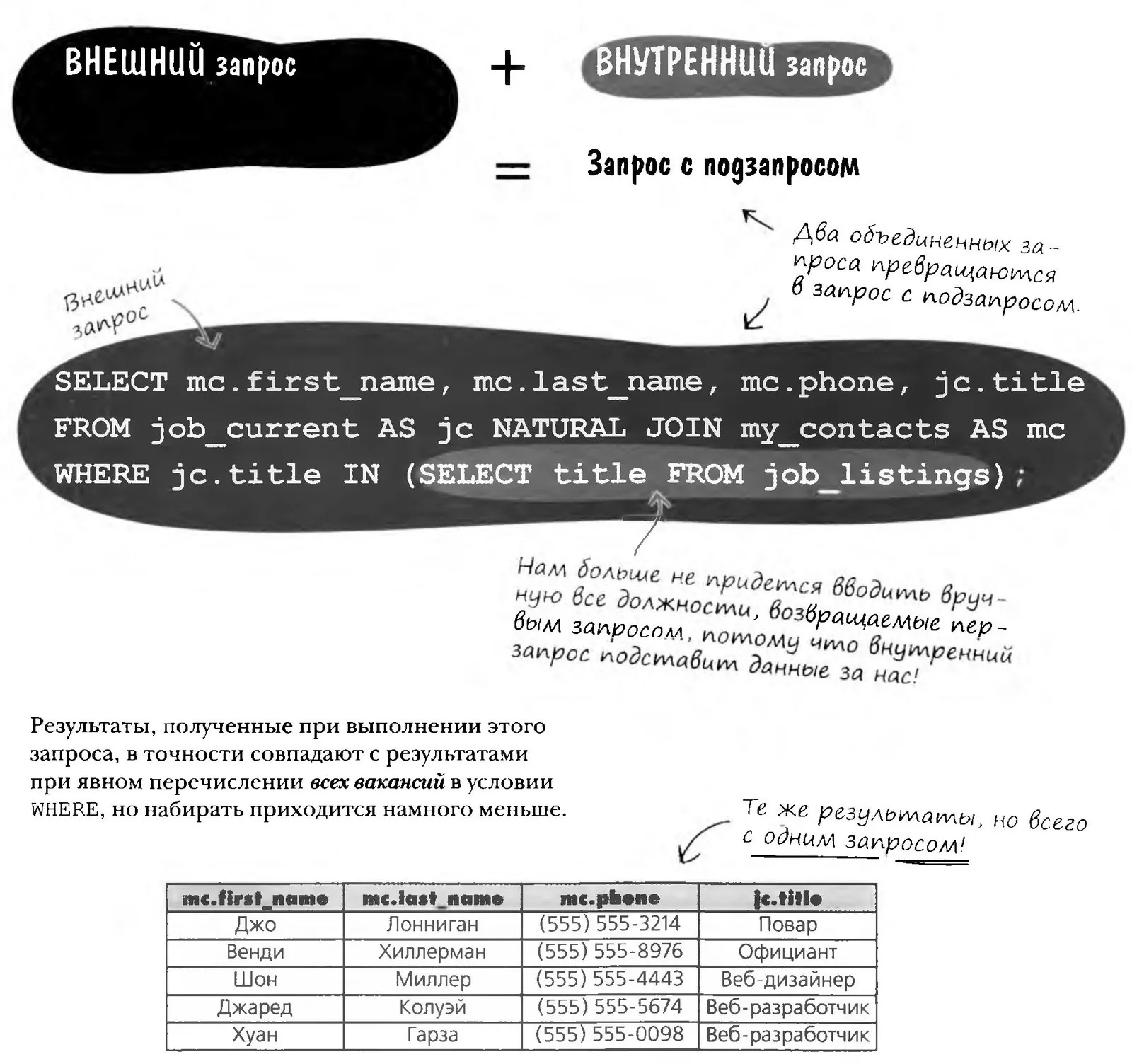
Subqueries: When One Query Isn't Enough

A subquery is nothing more than a query inside another query. The "enclosing" query is called the outer query, and the "nested" one is called the inner query, or subquery.
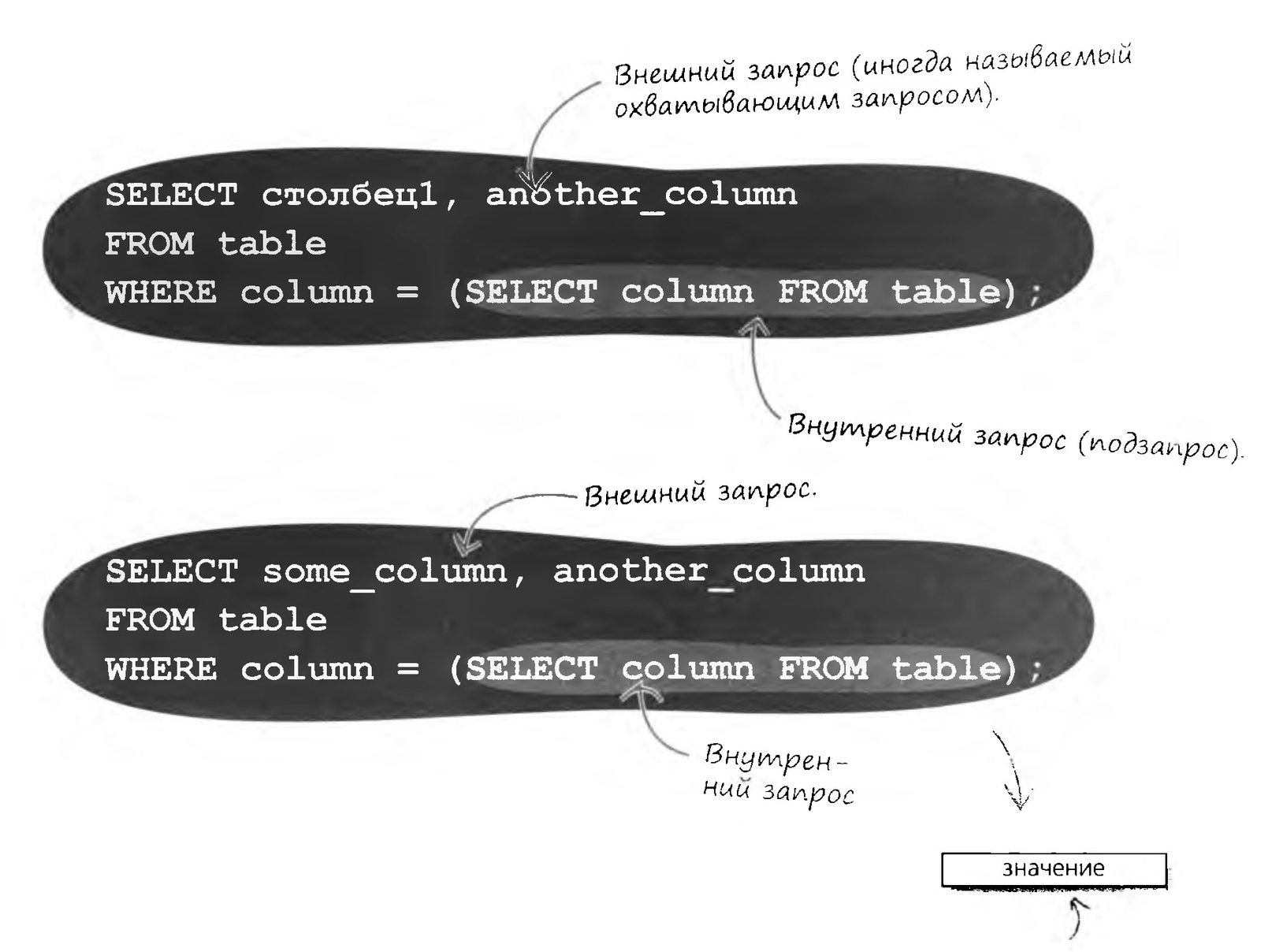
Since the subquery uses the = operator, it returns a single value: one record from one column (sometimes called a "cell", but SQL uses the term scalar value). This value is compared with the columns in the WHERE clause.
A Subquery in Action

Let's see how a similar query against the my_contacts table works. The RDBMS reads the scalar value from the zip_code table and compares it with the columns in the WHERE clause.
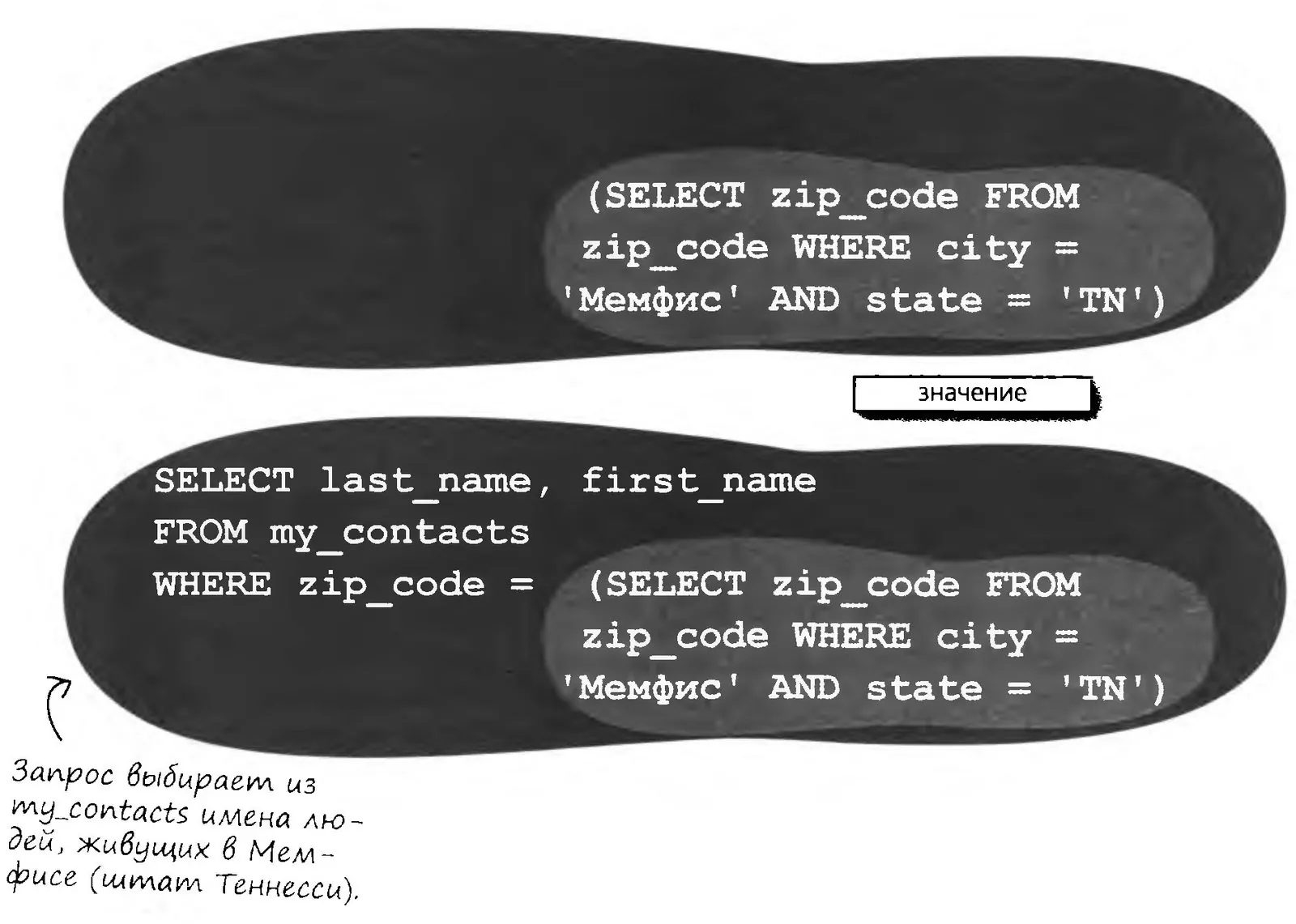
Frequently Asked Questions
Why can't the same thing be done with joins?
It can, but some people find subqueries easier to work with than joins. It's nice to have a choice of syntax.
The same query can be implemented like this:
SELECT last_name, first_name
From my_contacts mc
NATURAL JOIN zip_code zc
WHERE zc.city = 'Мемфис'
AND zc.state = 'TN'
Inner or Outer?
OUTER QUERY
You know, Inner Query, I don't actually need you. I'll do just fine without you.
Yeah, sure. You give me one tiny result, but users want data, and LOTS of it. I'm the one who gives them that data. I think if you weren't around, they'd be perfectly happy.
You won't have to if you add a WHERE clause.
Oh, you need me, all right. What good is one column of one record? It just doesn't contain enough information.
Sure, but I work on my own.
INNER QUERY
And I can do without you too. You think it's fun to hand you a specific, precise result just so you can turn it into a set of matching records? Quantity is no substitute for quality, you know.
No, I give your results a certain kind of focus. Without me you'd have to wade through all the data in the table.
I AM your WHERE clause, and a very specific one at that. Frankly, I don't need you all that much.
Fine. Maybe we really should work together. I set the direction for finding your results.
So do I.
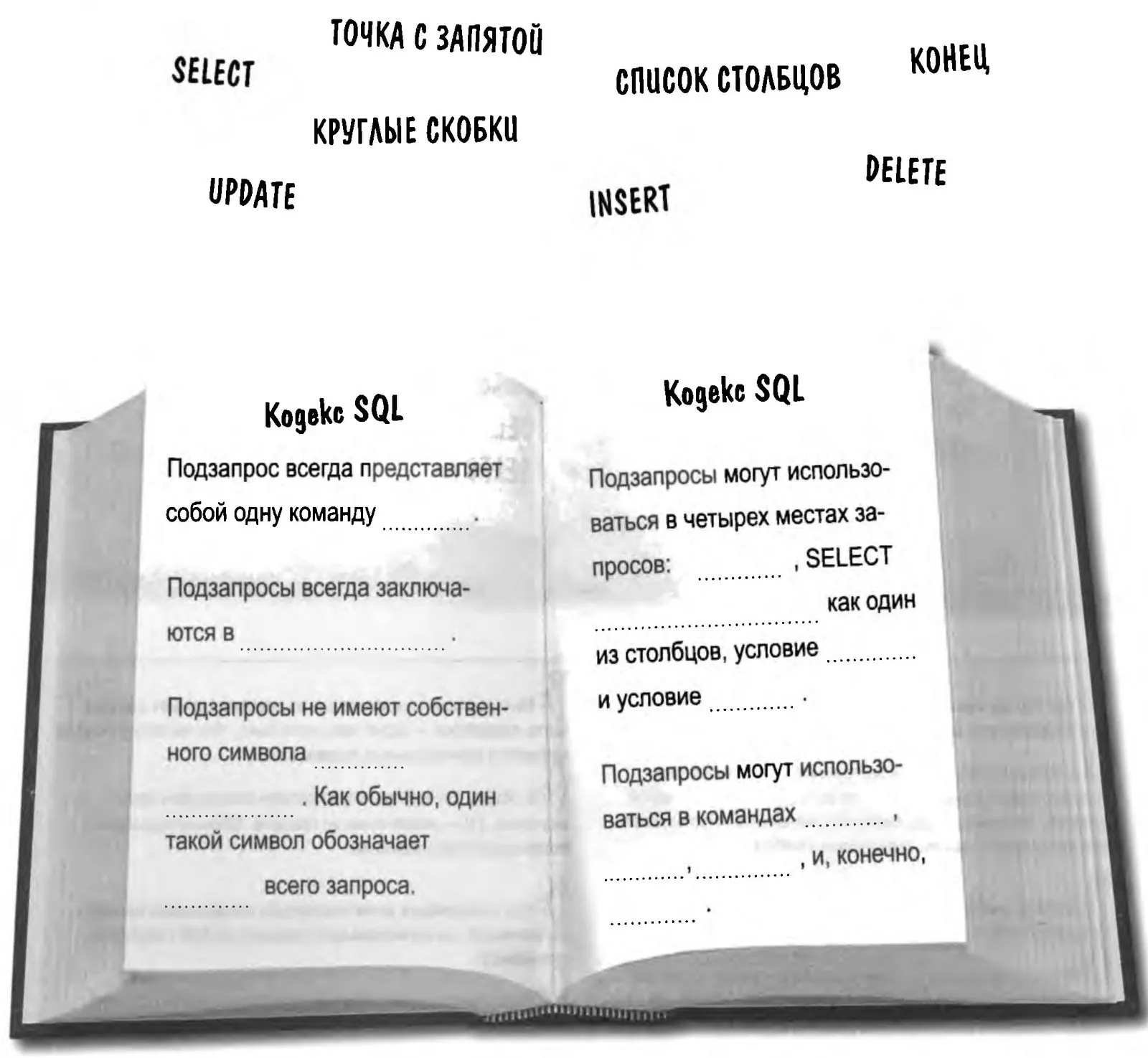
Rules for Subqueries
Below are some rules that subqueries must satisfy. Fill in the blanks with words from the following set (some words may be used more than once).
A Correlated Subquery with NOT EXISTS
A very common use case for a correlated subquery is finding all records in the outer query that have no matching records in a related table.
Suppose Greg wants to expand the client base of his job search service. To do that, he plans to send messages to everyone in my_contacts whose data is not yet in the job_current table. To find those records he uses the NOT EXISTS condition.
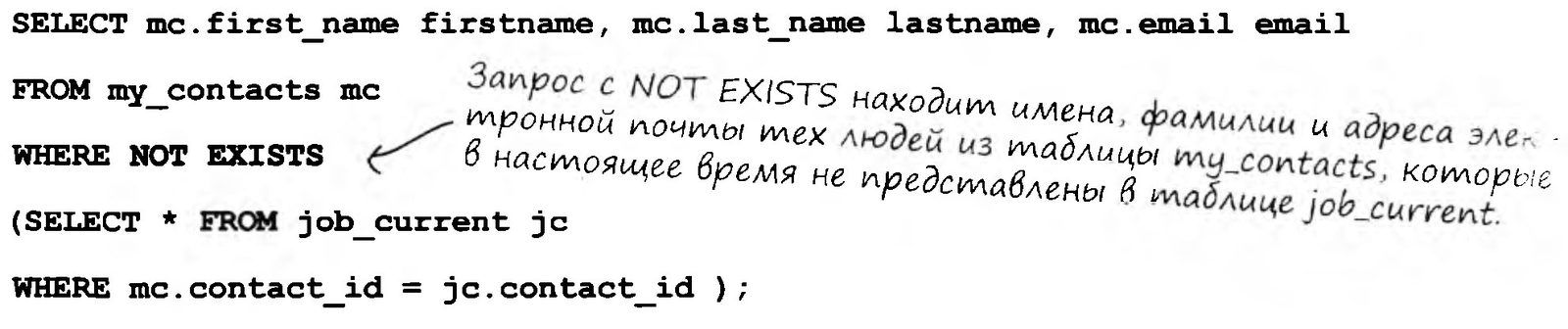
A Correlated Subquery with NOT EXISTS
By analogy with IN and NOT IN, subqueries can also use the keywords EXISTS and NOT EXISTS. The subquery below returns data from my_contacts whose contact_id value appears at least once in the contact_interest table.

Write queries that answer the following questions (use joins and non-correlated subqueries where appropriate). Use the gregs_list database schema.
Show all job titles whose salary equals the highest salary in the job_listings table.
Greg's Job Search Service Takes Orders
Greg is now quite at home selecting data with subqueries. He has even learned to use them in INSERT, UPDATE and DELETE commands.
He has rented a small office and is about to throw a party to celebrate the launch of his new business.
I wonder if I'll be able to find my first employee in the job_desired table...
Frequently Asked Questions
So, can a subquery be nested inside another subquery?
Absolutely. The number of nesting levels for subqueries is limited, but in most RDBMSs it is well above the practical "ceiling"
What's the best way to build a subquery inside a subquery?
Try writing small subqueries for the different parts of the question. Look them over and try combining them. If you're trying to find people with the same salary as the highest-paid web designer, the breakdown of the query might look like this:
Find the highest-paid web designer
Find the people who earn x
and then substitute the first query for x.
I don't like subqueries. Can I use joins instead?

In most cases, yes, you can, but first you need to learn a few things about joins.
Left, Right...

On the other hand, an outer join depends much more on the relationship between the two tables than any of the join types covered so far.
A left outer join (LEFT OUTER JOIN) goes through all the records of the left table and looks for a match for each of them among the records of the right table. This is especially handy when there is a one-to-many relationship between the left and right tables.
To understand the logic of an outer join, you need to know which table is on the "left" and which is on the "right".
In a left outer join, the table that comes after FROM but BEFORE JOIN is considered the "left" one, and the table that comes AFTER JOIN is considered the "right" one.
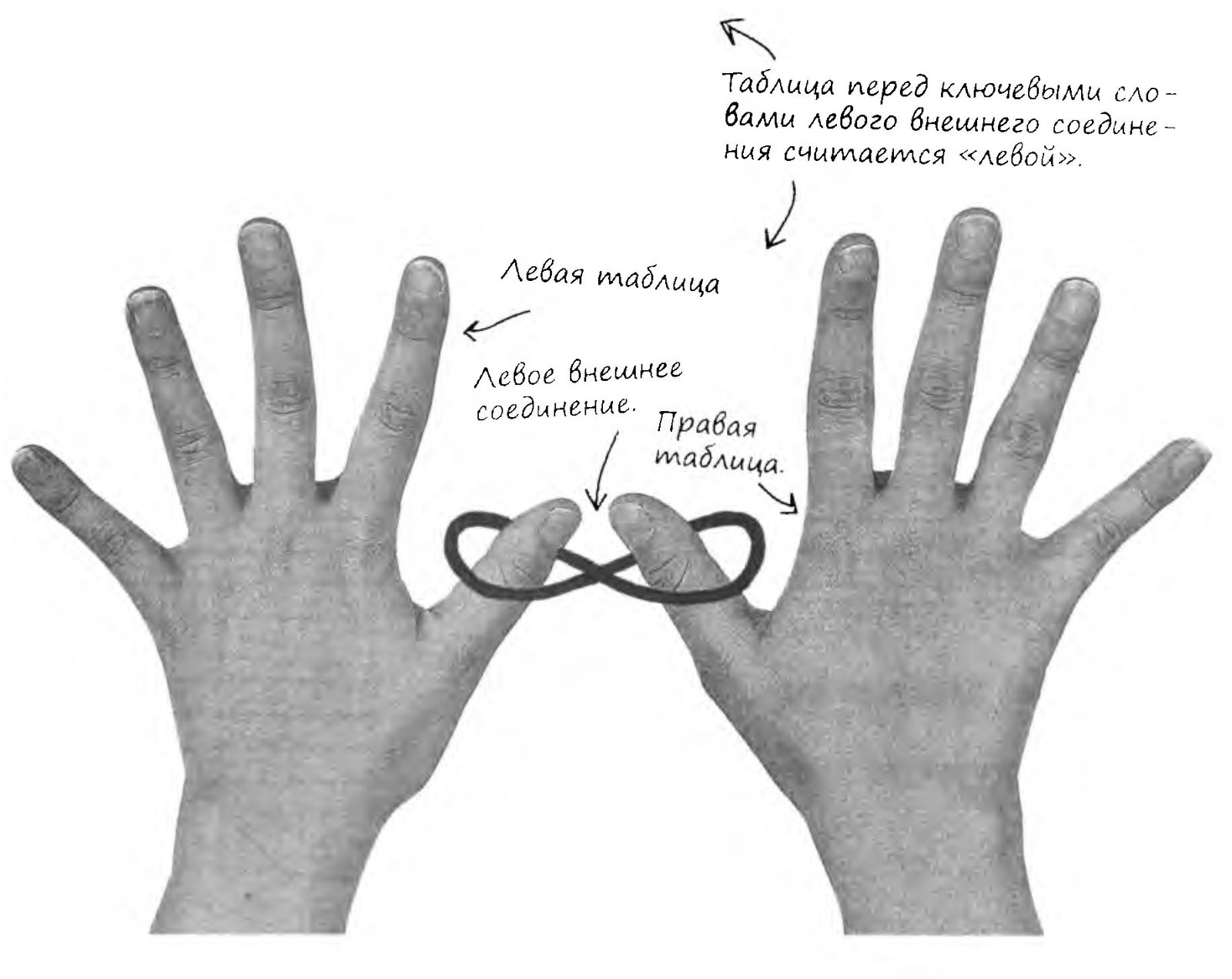
In a left outer join, a match among the records of the right table is looked up for EVERY RECORD of the LEFT table.
A Left Outer Join Example
With a left outer join we can find out which toy belongs to which girl.
Below is the syntax of a left outer join, using the tables we've already worked with. The girls table is listed first after FROM, so it is considered the left table; next come the keywords LEFT OUTER JOIN; and finally, the toys table is considered the right table.
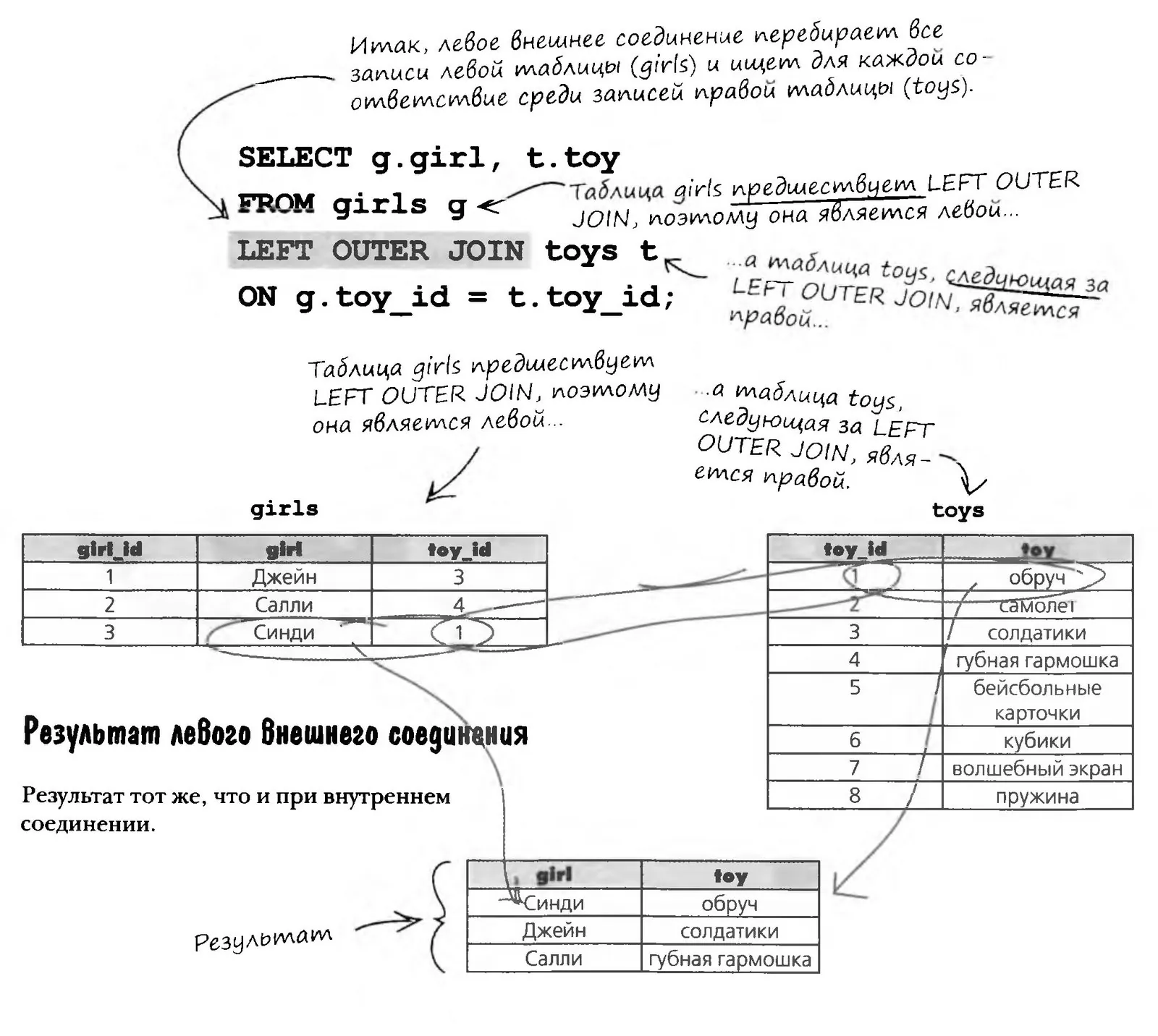
Is that it? What exactly have we achieved? It seems an outer join is no different from an inner join.
It is different: an outer join returns a record whether or not it has a match in the other table.
The absence of a match is indicated by a NULL value. In our example with girls and toys, a NULL in the results means that the toy doesn't belong to any of the girls. Very valuable information!
A NULL value in the results of a left outer join means that the right table contains no values matching the left table.
Write queries that answer the following questions (use joins and non-correlated subqueries where appropriate). Use the gregs_list database schema.
Show the first and last names of people whose salary is above average.
The Right Outer Join

A right outer join is almost exactly like a left outer join, except that it compares the right table against the left one. The following two queries return exactly the same results.
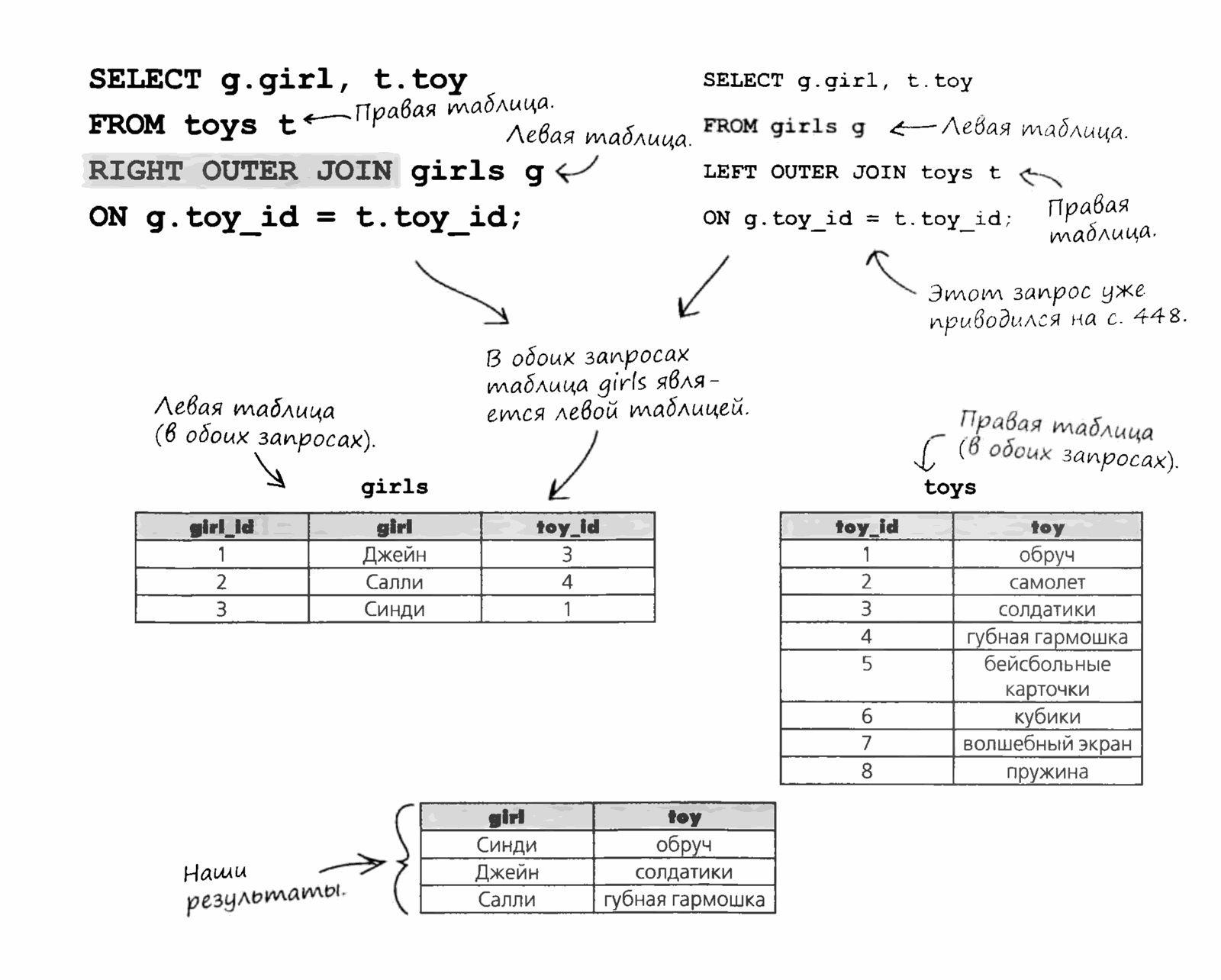
A right outer join looks in the left table for matches for the right table.
Is that it? What exactly have we achieved? It seems an outer join is no different from an inner join.
It is different: an outer join returns a record whether or not it has a match in the other table.
The absence of a match is indicated by a NULL value. In our example with girls and toys, a NULL in the results means that the toy doesn't belong to any of the girls. Very valuable information!
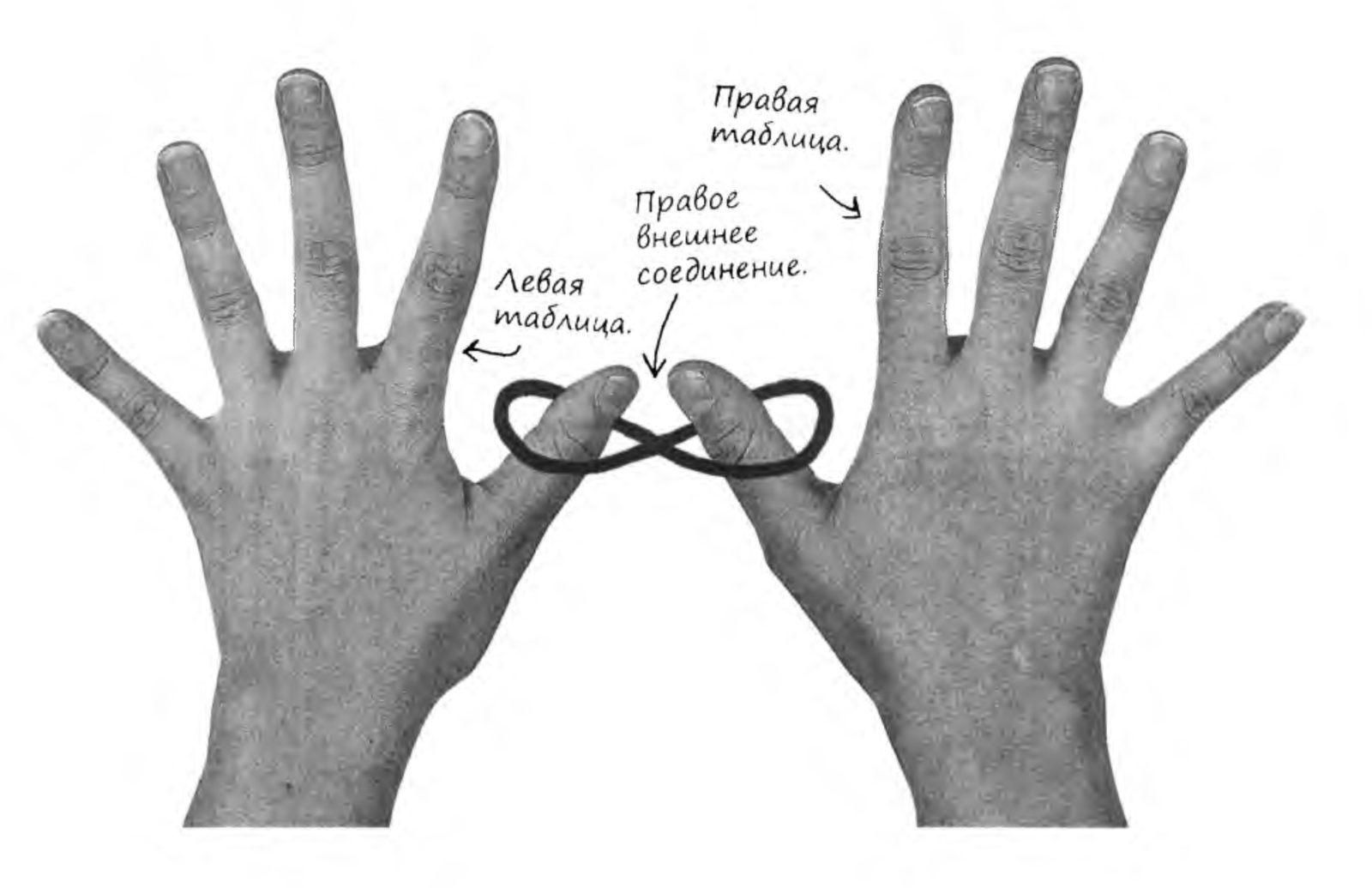
Creating a New Table
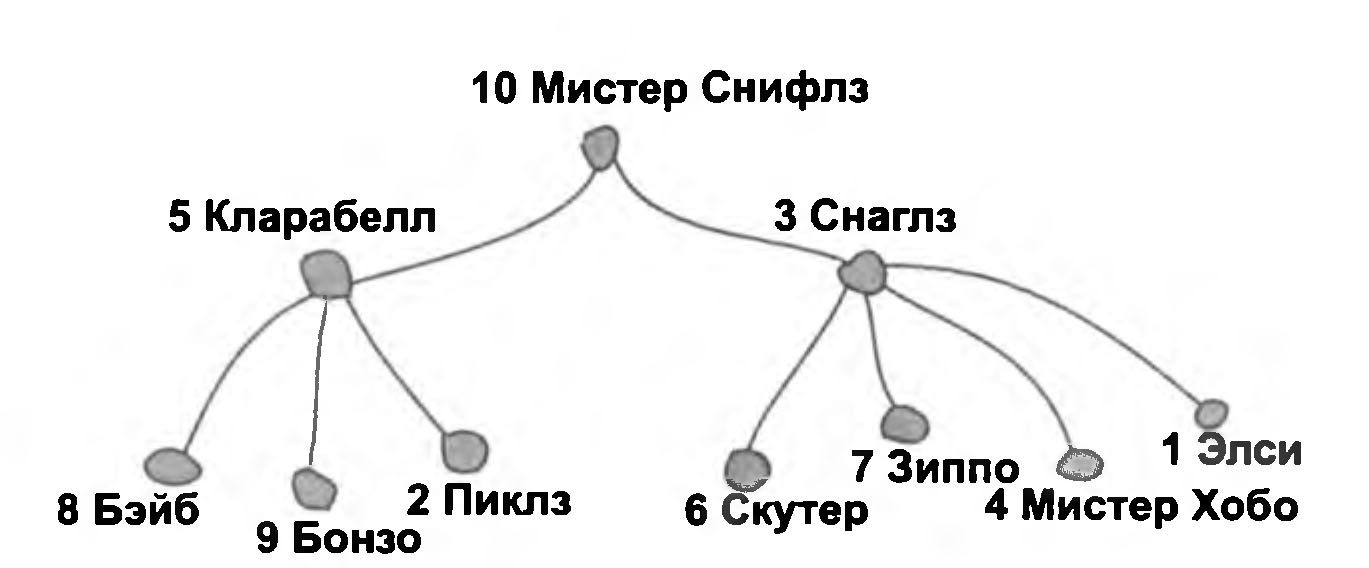
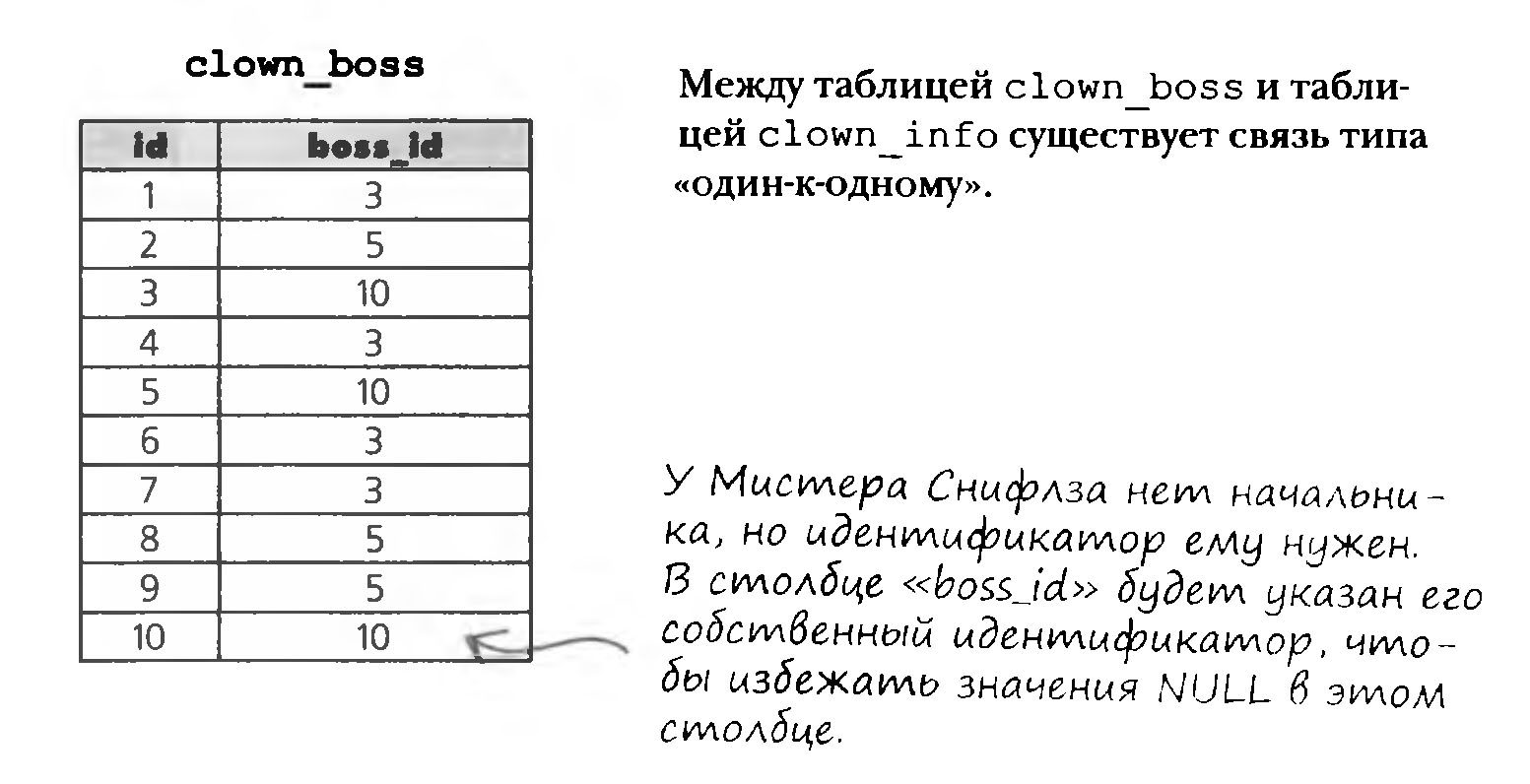
We can create a table listing all the clowns and the IDs of their bosses. Here is what the hierarchy looks like with the IDs.
The new table gives, for each clown, the ID of his boss from the clown_info table.
A Self-Referencing Foreign Key
We need to add a new column to the clown_info table with information about who is the boss of each clown. The new column will store the boss's ID. We'll call it boss_id, as in the clown_boss table.
In the clown_boss table, boss_id was a foreign key. When added to clown_info, this column is still a foreign key, even though it sits in a different table. A foreign key like this, which refers to another field of the same table, is called self-referencing.
We consider Mr. Sniffles to be his own boss, so his boss_id is the same as his id.
A self-referencing foreign key is a table's primary key used in that same table for another purpose.
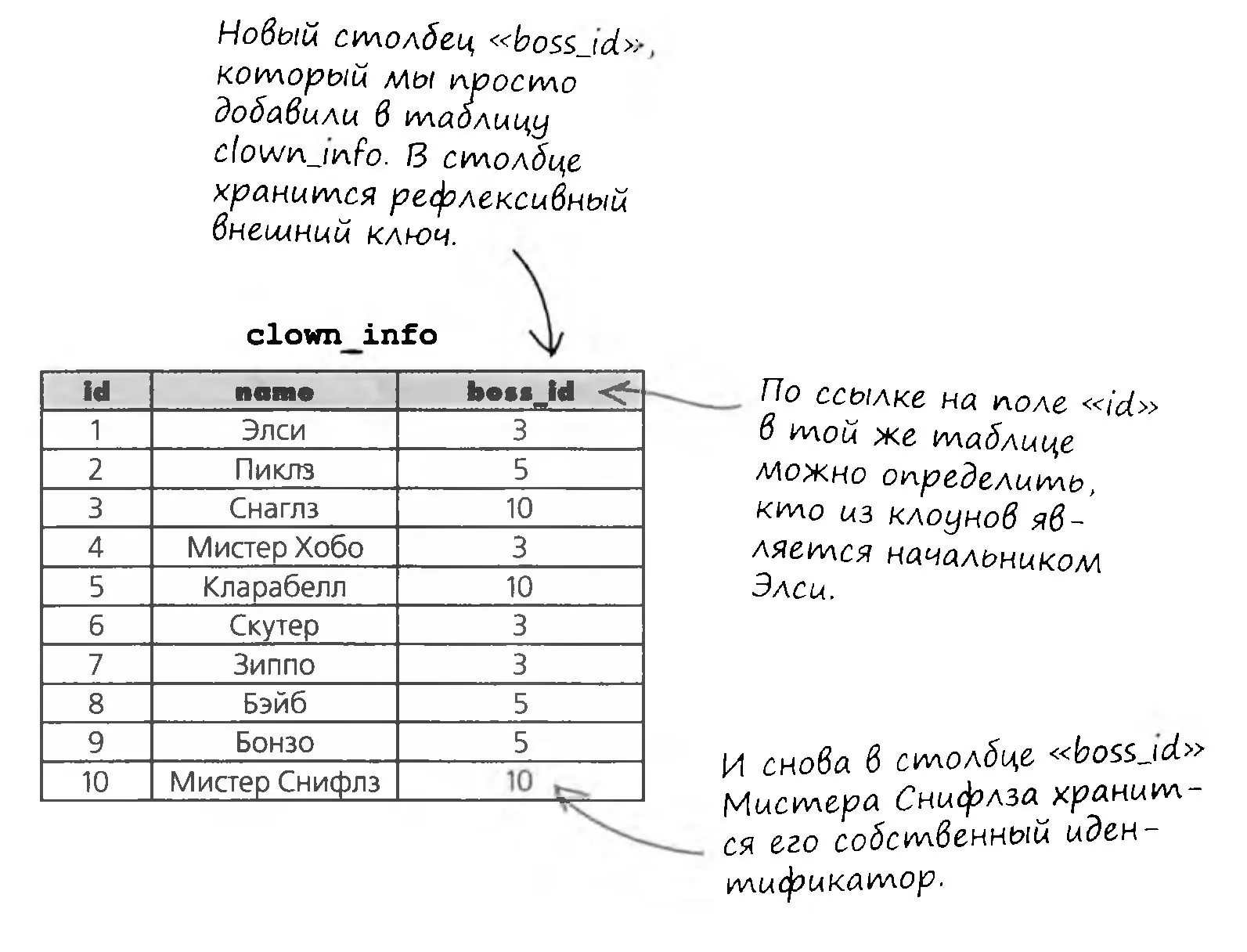
A SELF-REFERENCING foreign key is a table's primary key used in that same table for other purposes.
Joining a Table to Itself
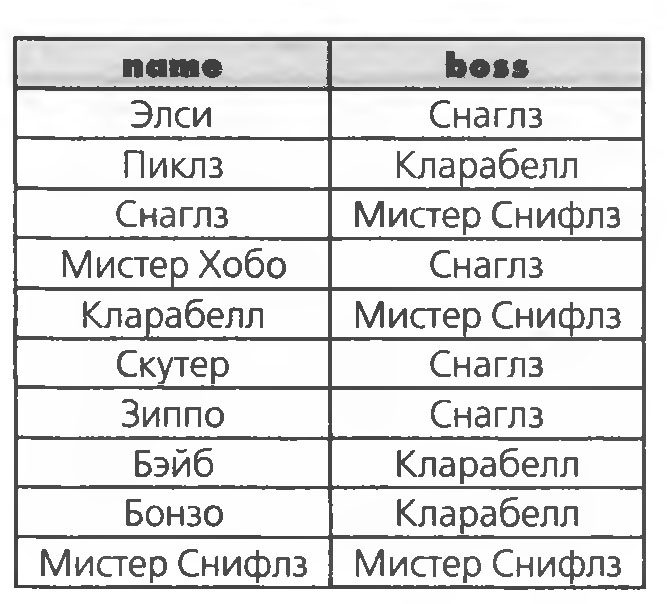
Suppose we want to list all the clowns and their bosses. A list of all the clowns with their boss IDs is easy to get with a SELECT query:
SELECT name, boss_id FROM clown_info;
But what we need are pairs: the clown's name and his boss's name.
Write queries that answer the following questions (use joins and non-correlated subqueries where appropriate). Use the gregs_list database schema.
Find all web designers whose zip code matches the zip code of any web designer vacancy in the job_listings table.
Unions
There is one more way to get combined results from tables: unions (the keyword UNION).
A union combines the results of two or more queries into one table, based on what is specified in the SELECT query. Unions can be thought of as the "overlapping" values of all the queries.
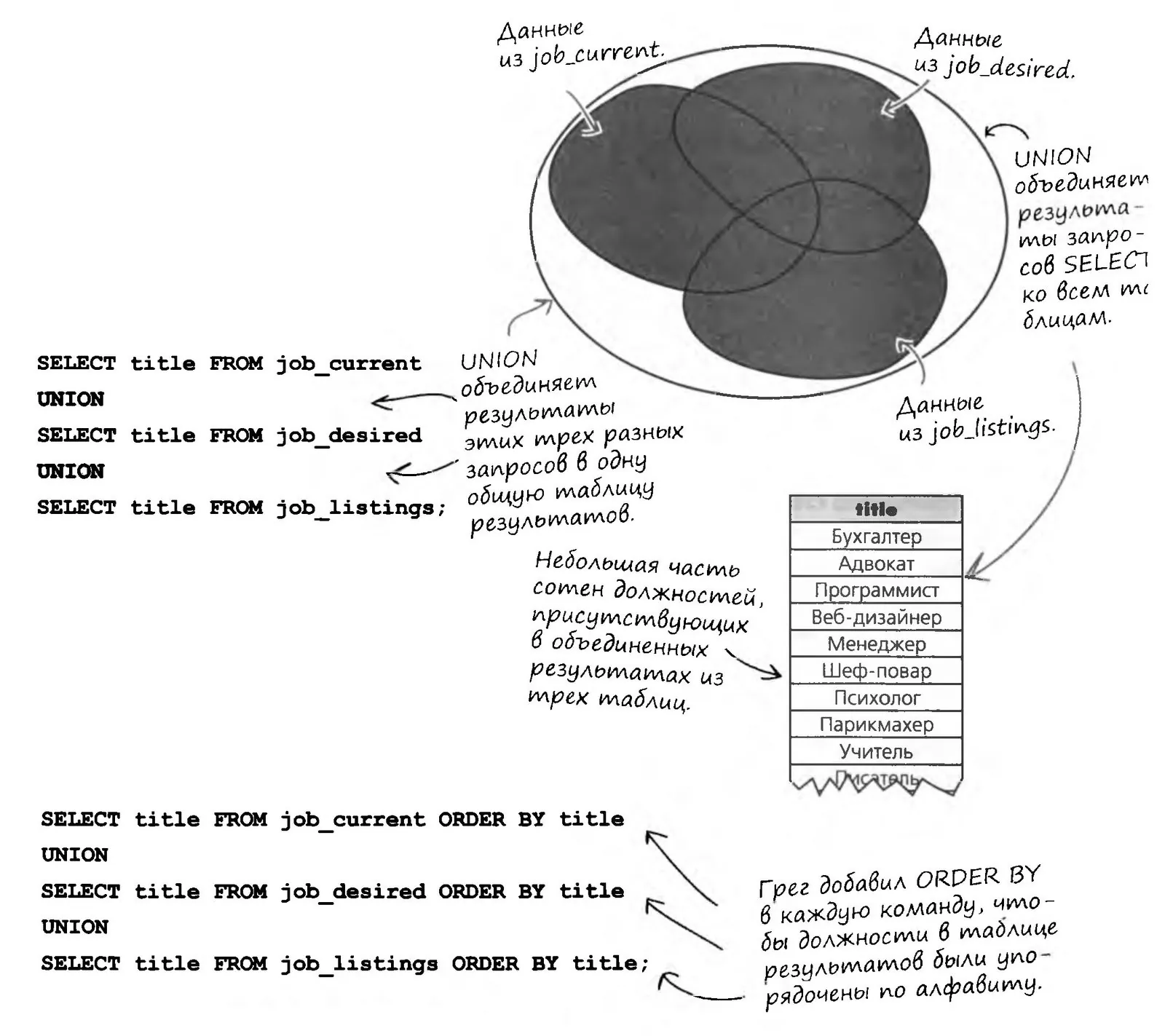
Greg notices that the result has no duplicates, but the job titles aren't listed in order, so he tries the query again with an ORDER BY clause added to each SELECT command.
Brainstorm
What do you think happened when the new query ran?
The Rules of Unions in Action
The number of columns in the SELECT commands must be the same. You can't select two columns with one command and one column with another.
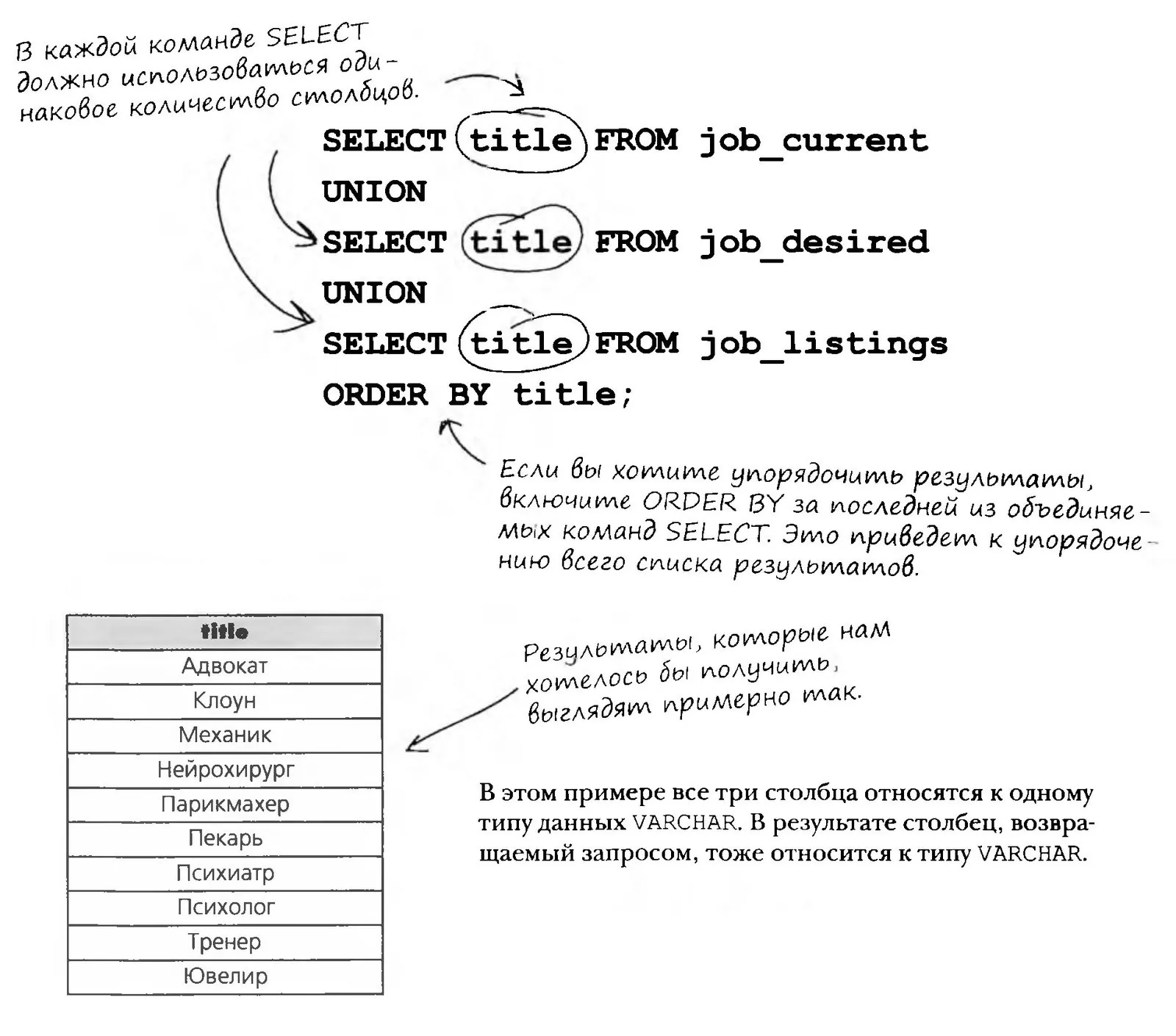
Brainstorm
What do you think will happen if the columns being combined have different data types?
UNION ALL
UNION ALL works exactly like UNION, except that it returns all the values from the columns instead of a single instance from each group of duplicates.
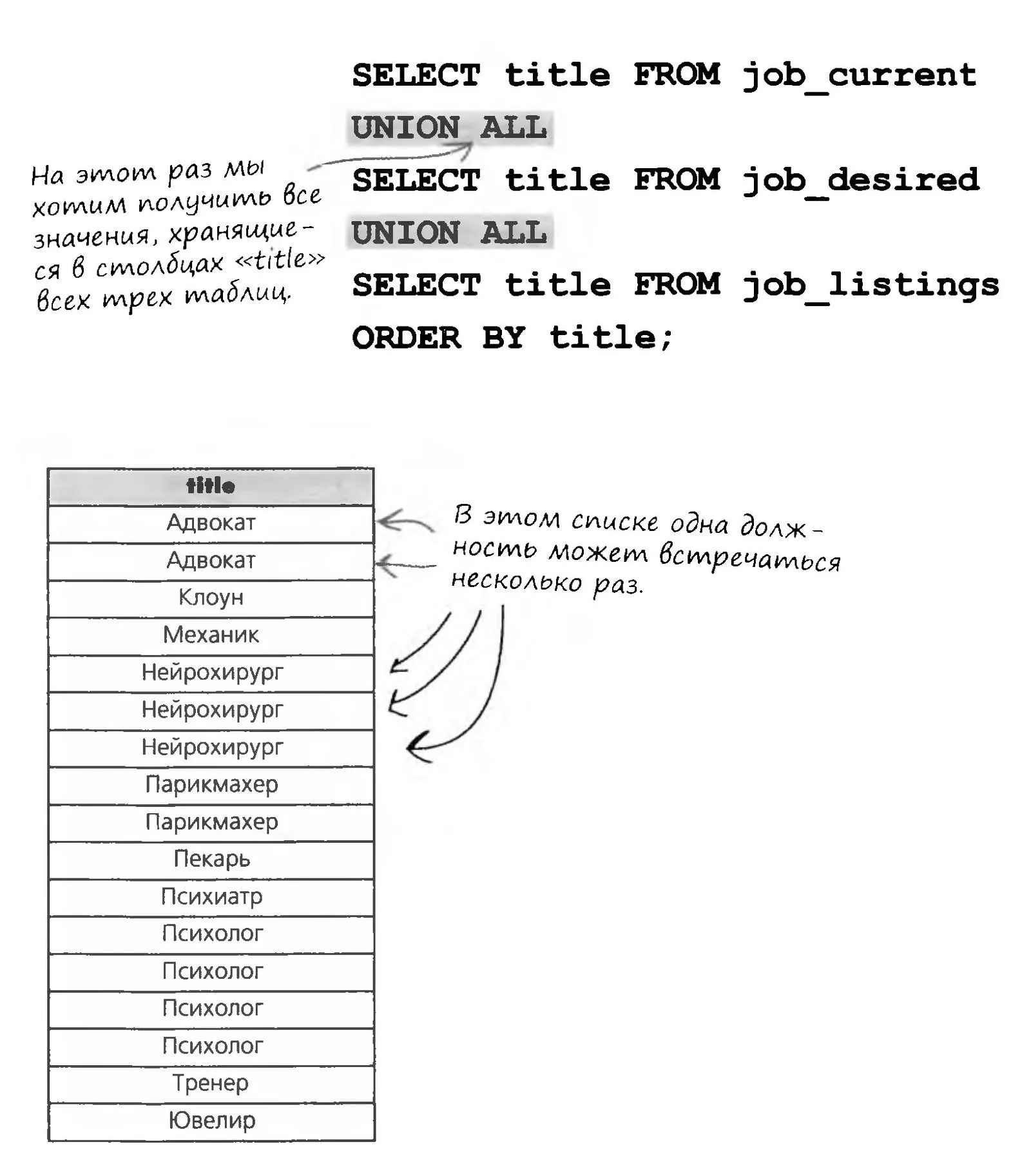
So far, the unions we've built have used columns with matching data types. In some situations, however, you may need to build a union from columns of different types.
When we say that data types must be compatible with each other, it means that they can be converted to a common type if necessary; if that can't be done, running the query will result in an error.
Say a union combines an INTEGER type with a VARCHAR type. Since VARCHAR data can't be converted to an integer, the INTEGER will be converted to VARCHAR in the results.
The End of the SQL Levels
Now You Are a True SQL Jedi

Level Practical Assignment
Wow, you did it! You've made it all the way to the end of the course, and this is your last practical assignment, so complete it with the honor of an SQL Jedi. But I think that after so many exercises together, you'll write all the practice queries correctly on the first try.
SQL-3 Level Theory Test
Form for Submitting Your SQL Queries
To move on to level 21, you need to score at least 12 points (60%) on the level 20 assignments.