Level 19
The Relational Database Model and Relational Operations
Principles of SQL Queries
Are you with me or with them? It's time to choose a side!
AND OR
Don't mix up AND and OR!
If ALL the conditions must be true, use AND.
If AT LEAST ONE of the conditions must be true, use OR.
Still can't tell which side you're on? Then scroll down the level, and we'll help you look inside and understand your true nature.

The OR operator is really useful, but I don't get why we didn't use AND in the previous example.
Can I use more than one AND or OR in a single WHERE clause?

Of course, you can chain as many conditions as you like. AND can also be used together with OR in a single condition.
How AND Differs from OR
The following examples show the possible combinations of two conditions joined with AND and OR.
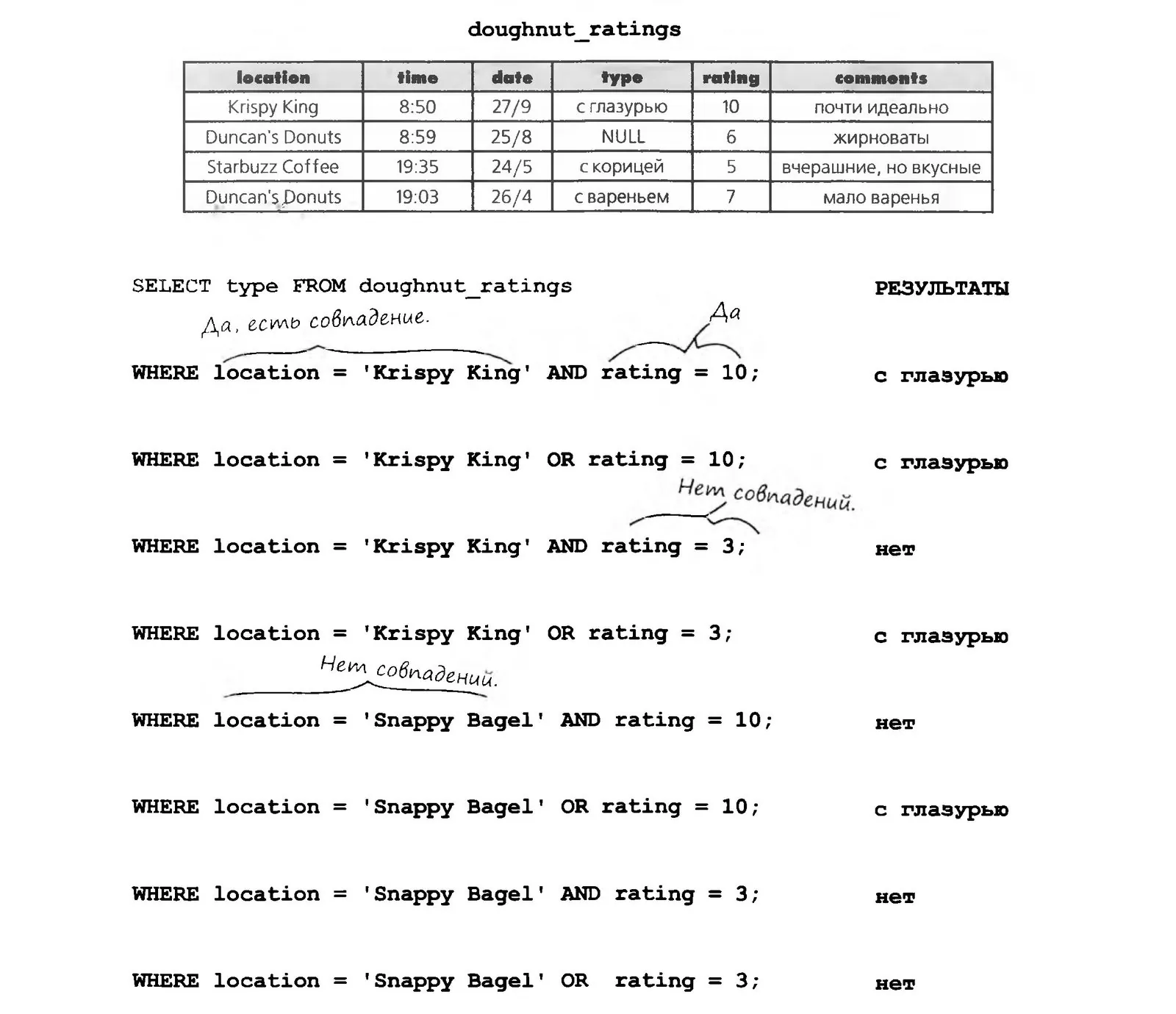
LIKE: A Word That Saves You Time
California has way too many cities. If Greg tried to list them all in a query, joining them with OR, it would take him forever. Luckily, there's a handy LIKE keyword that, combined with special characters, searches for part of a text string and returns the matches.
Greg can use LIKE like this:
SELECT * FROM my_contacts
WHERE location LIKE`%CA`;
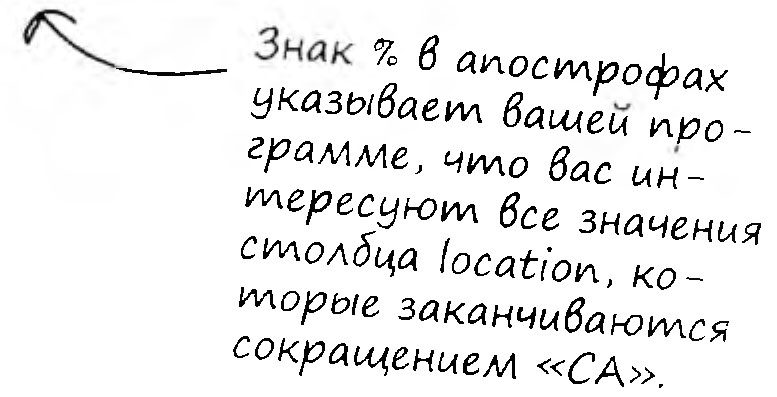
Special Characters
LIKE is usually used with two special characters, the “wildcards,” which stand in for the actual content of a string. Like a joker in card games, a wildcard matches any character (or sequence of characters) in a string.

BRAIN
STORM
What other special characters have you come across in this level?
I LIKE it
LIKE is used with special characters. The first one, the % sign, stands for any number of arbitrary characters.
SELECT first_name FROM
my_contacts WHERE first_name
LIKE `%им`;

The second special character, which so often keeps LIKE company, is the underscore ( _ ), and it stands for exactly one arbitrary character.
SELECT first_name FROM my_contacts WHERE first_name LIKE `_им`;

Checking Ranges with AND and Comparison Operators

The bar owner wants to pick out the drinks whose calorie count falls within a given range. How do you write a query for the range from 30 to 60, inclusive?
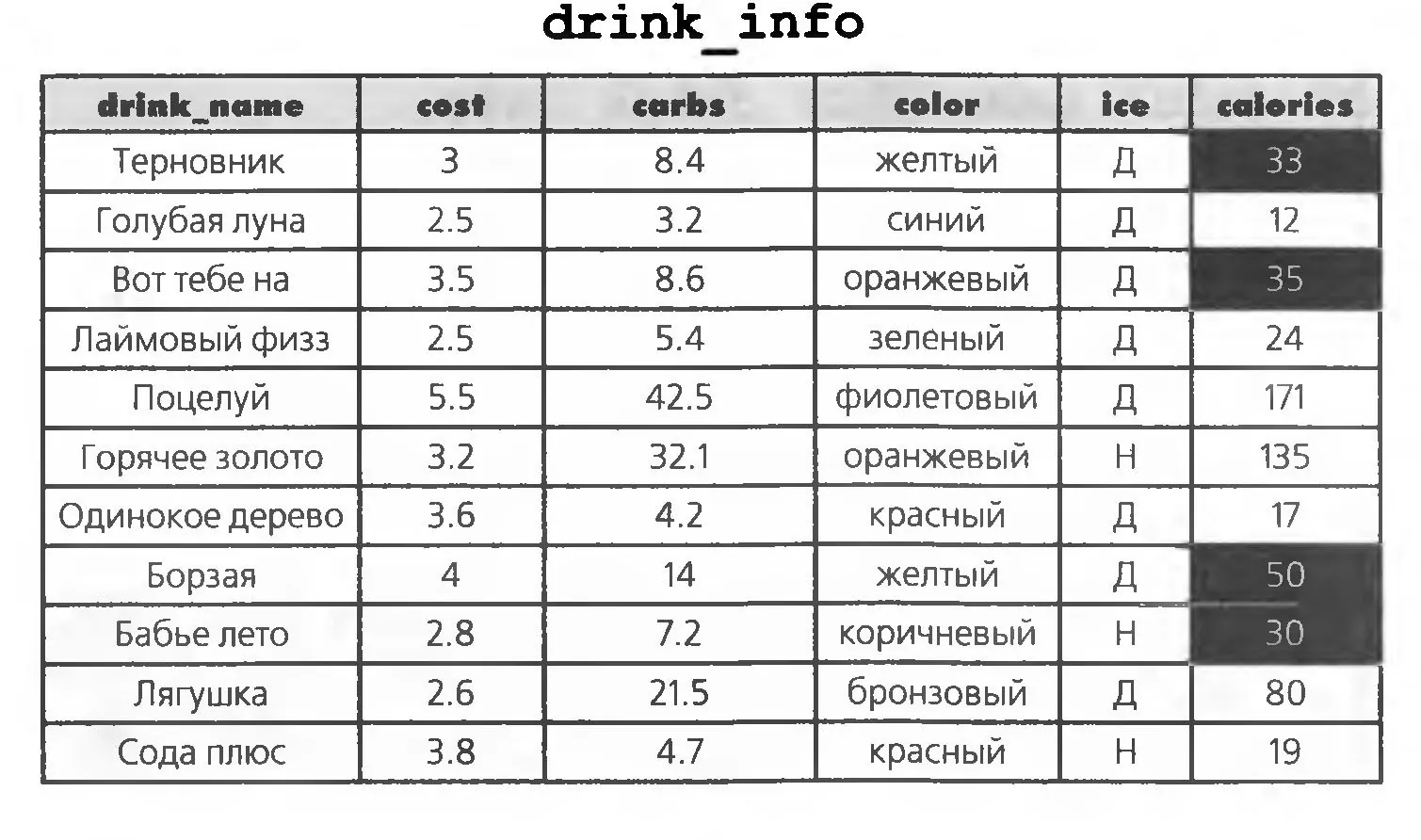
SELECT drink_name FROM drink_info
WHERE
calories >= 30
AND
calories <= 60;

Just BETWEEN Us... There's Another Way

You can also use the BETWEEN keyword to check whether a value falls within a range. This form is shorter than the previous query but returns the same results. Note that BETWEEN includes the range boundaries (30 and 60). The BETWEEN construct is equivalent to using the <= and >= operators, not < and >.
SELECT drink_name FROM drink_info
WHERE calories BETWEEN 30 AND 60
Let's try to answer some questions and check your knowledge. Take a pen and a sheet of paper and write your versions of the queries for the questions below. As always, we'll check the answers when you're ready.
Change the query so that it returns the names of all drinks that contain more than 60 or fewer than 30 calories.
Try using BETWEEN with text columns. Write a query that returns the names of all drinks that start with letters from “Д” to “О”.
What result do you think the following query will return?
SELECT drink_name FROM drink_info WHERE calories BETWEEN 60 AND 30
The IN Condition
Amanda, Greg's friend, uses Greg's contact list to look for guys. She has already been on a few dates and has started her own table with her impressions.
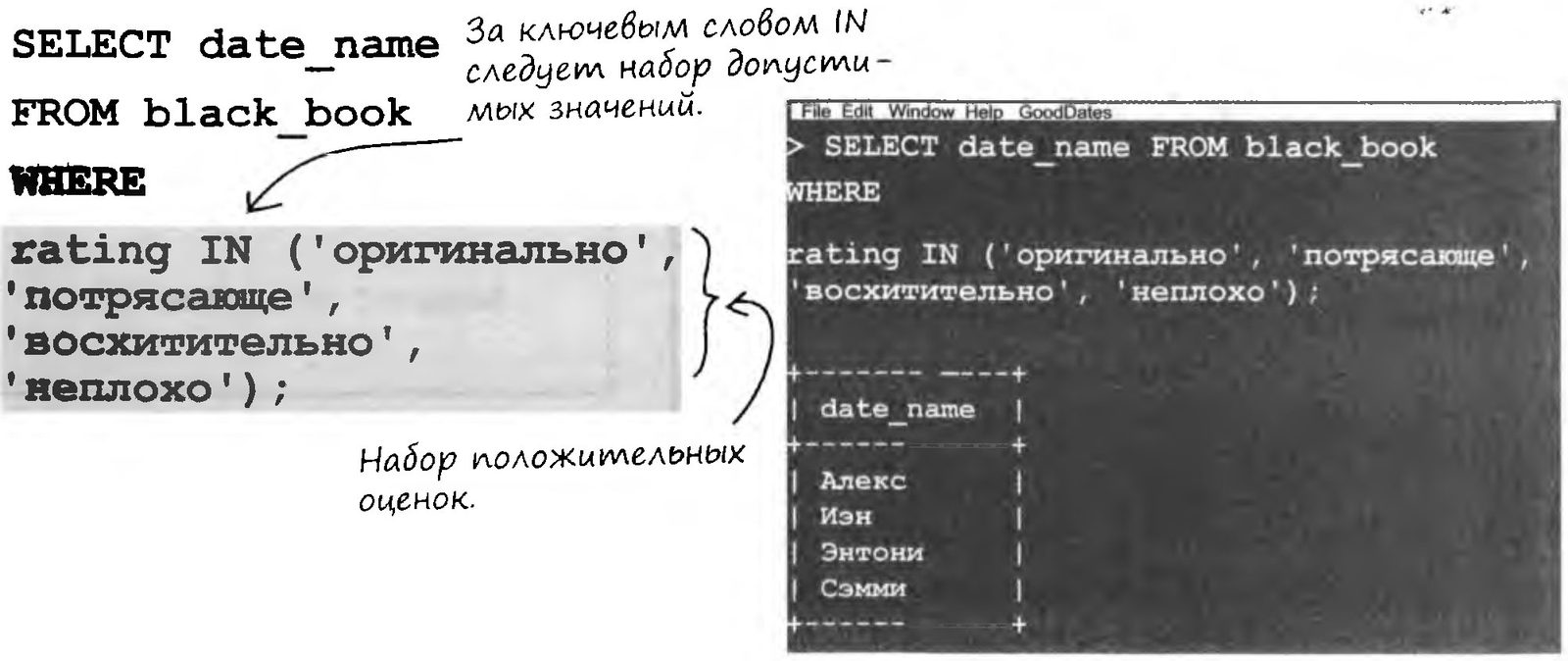
Amanda named her table black_book. She wants a list of the successful dates, so she picks the entries with good ratings.
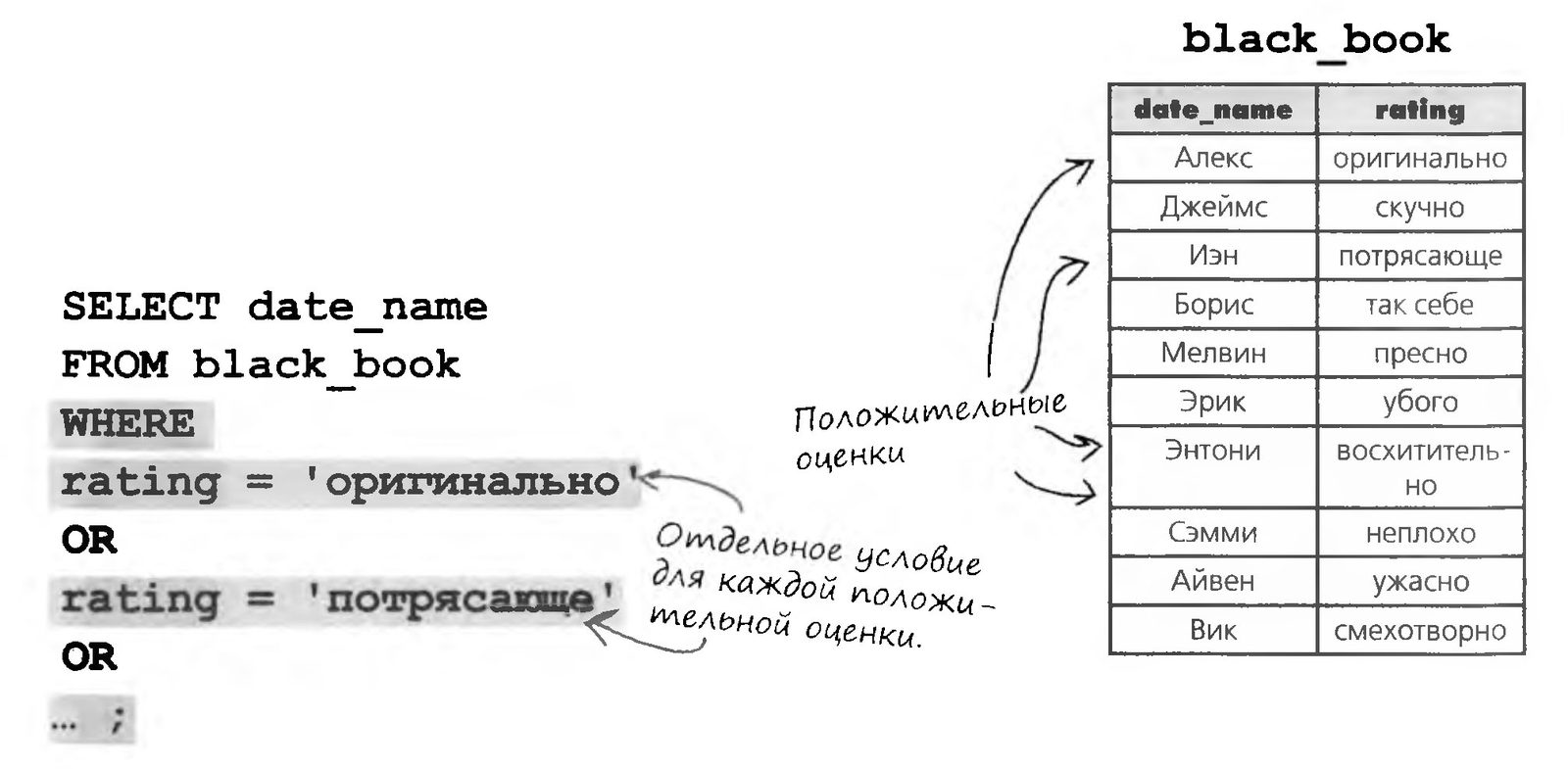
Instead of building long chains of OR, we can simplify the query with the IN keyword. IN is followed by a set of values in parentheses. If a column's value matches one of the values in the set, the record (or the specified subset of its columns) is included in the query result.
The NOT IN Keywords
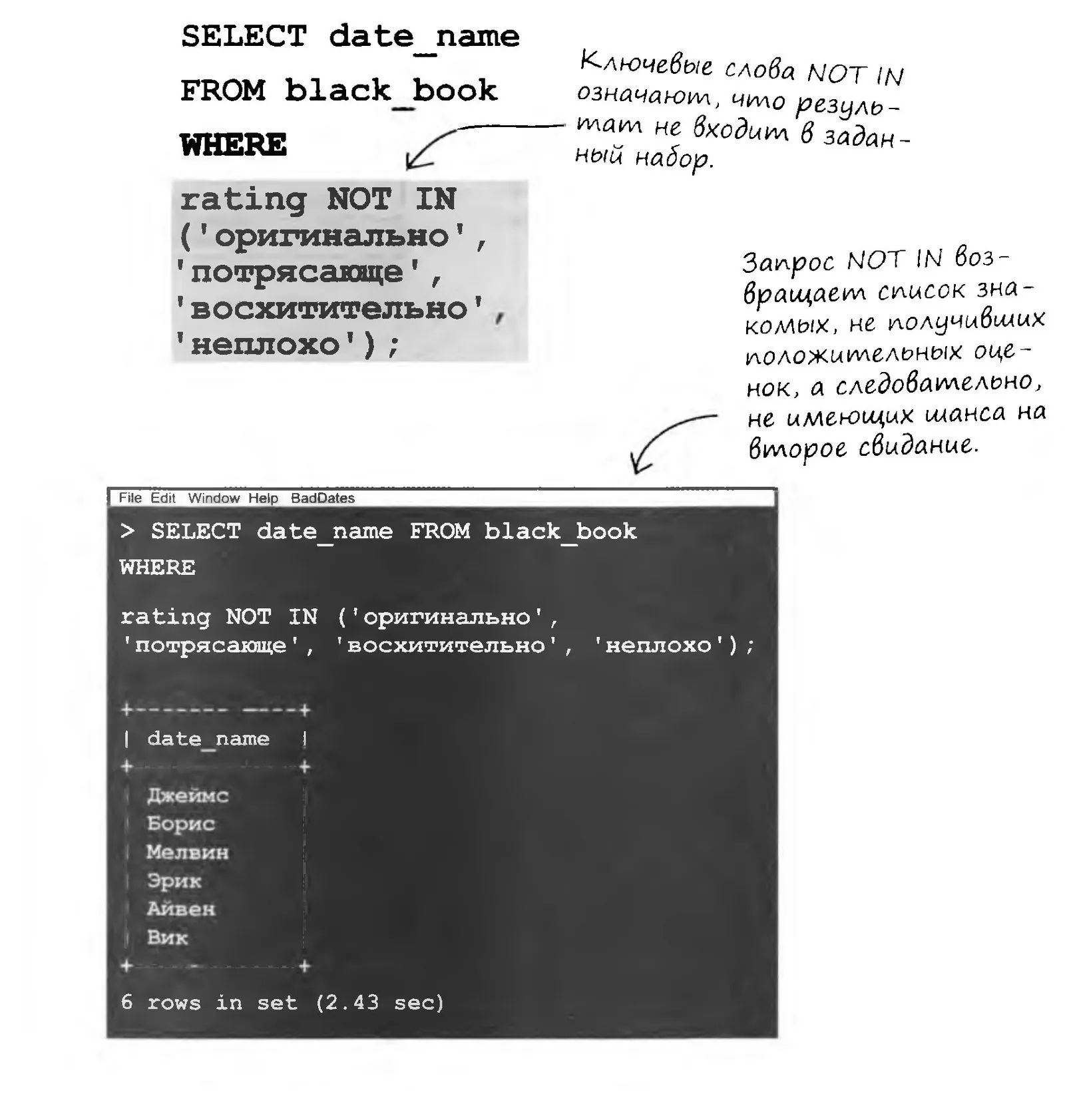
And of course, Amanda wants to know which of her acquaintances got bad ratings. If they call, she'll suddenly have some urgent business to take care of.
To get the names of the acquaintances with low ratings, put the NOT keyword before IN. With NOT IN, the result includes the records whose column value is not in the given set
BRAIN
STORM
When is NOT IN more convenient than IN?
Sorting Query Results

Dear friends, we have a tough job ahead of us. We need to put our movie library in order. Each of the 3,000-plus movies needs a sticker with its category, after which the movies go onto the shelves in alphabetical order.
We need a list of movies in which the titles within each category are in alphabetical order. You already know how to use the SELECT command, you can easily get a list of movies in a given category, and you can even filter by the first letter of the title and by category.

Whoa! But sorting a list this big would take a huge number of SELECT commands. My old circuit boards can't take that! You're shiny and new, you can do a million calculations a second, but I'd just overheat. Here's only a small sample of the mess we'd have to run:


BRAIN
STORM
Where do you think the movies whose titles start with a digit or a non-alphabetic character (for example, an exclamation mark) will end up in this list? No idea? Google it! High time to start making full use of a search engine!
ORDER BY

Want to sort the results of your query? It's easy: just add the ORDER BY keywords and a table column name to your SELECT command.
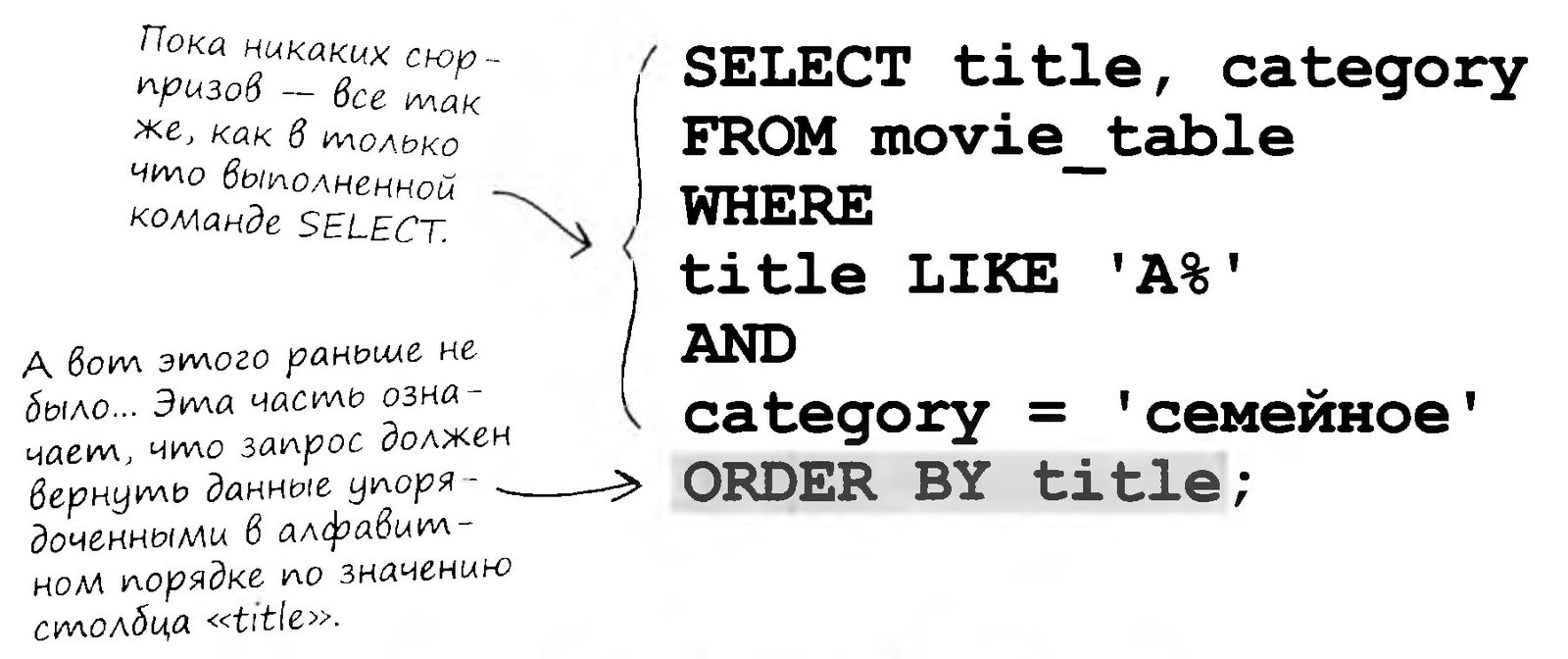
Want to sort the results of your query? It's easy: just add the ORDER BY keywords and a table column name to your SELECT command.
Time to Give Your Brain a Workout...
Sorting by One Column
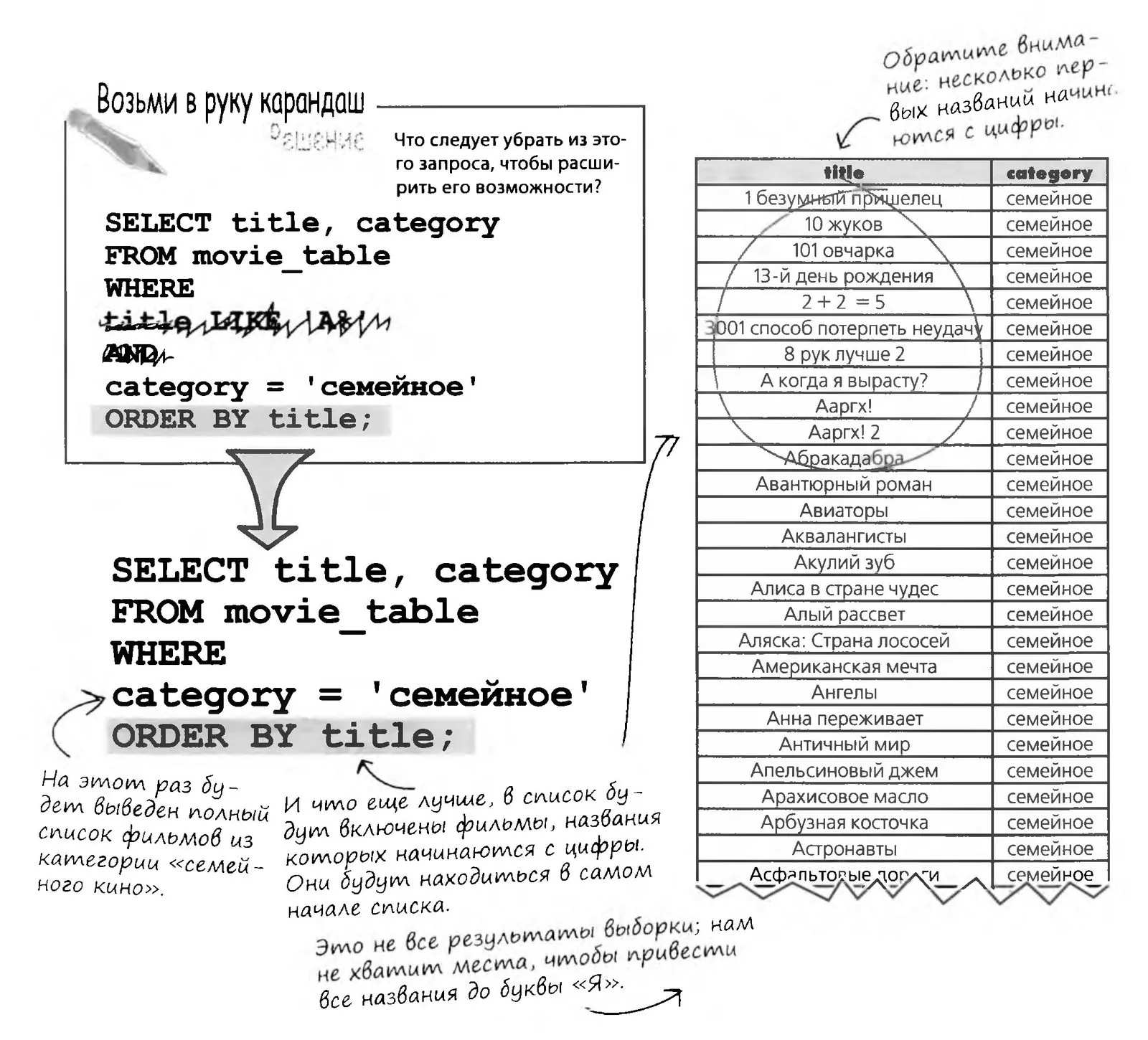
If you add an ORDER BY title clause to the query, you no longer have to select titles that start with a particular letter: the query itself returns the data lined up in alphabetical order by the value of the title column.
All you need to do is remove the title LIKE condition from the query, and ORDER BY title will do the rest.
ORDER BY lets you sort the data of any column.
Time to Give Your Brain a Workout...
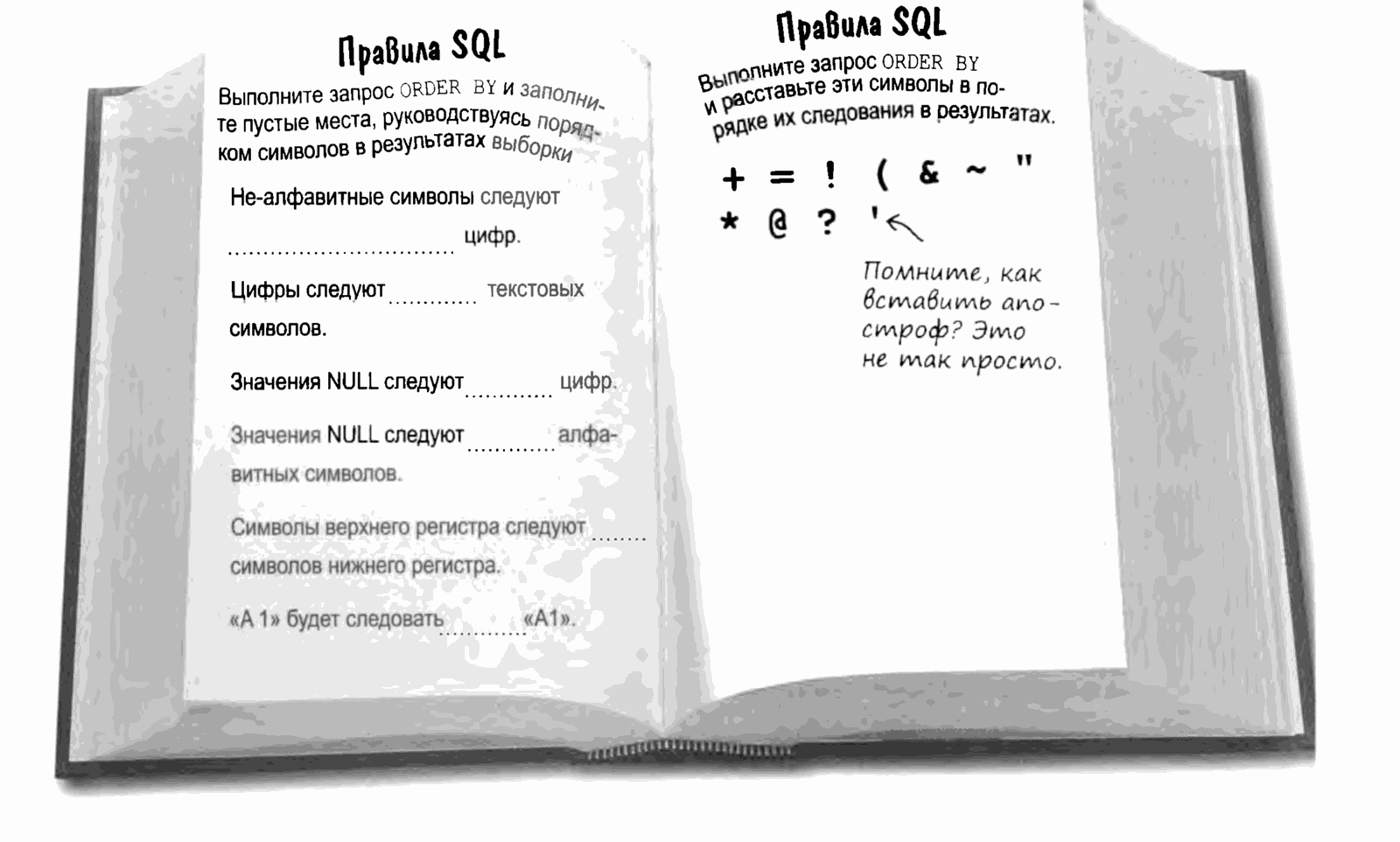
Let's create a simple table with a single CHAR(1) column named “test_chars”.
Insert into it the digits, letters (uppercase and lowercase), and non-alphabetic characters listed below (each character goes into a separate row). Insert a space, and leave one row with a NULL value.
Run a SELECT query with the new ORDER BY clause against the column. Fill in the blanks in the book.
!"#$%&' ()*+,-./0123: ;<=> ?@ABCD[\]^ 'abcd{|}~
Apply the SQL sort order to the given string and state the output that an ORDER BY command would return
ORDER with Two Columns
Looks like everything is going great: we can arrange the movies alphabetically and build an alphabetical list for each category.
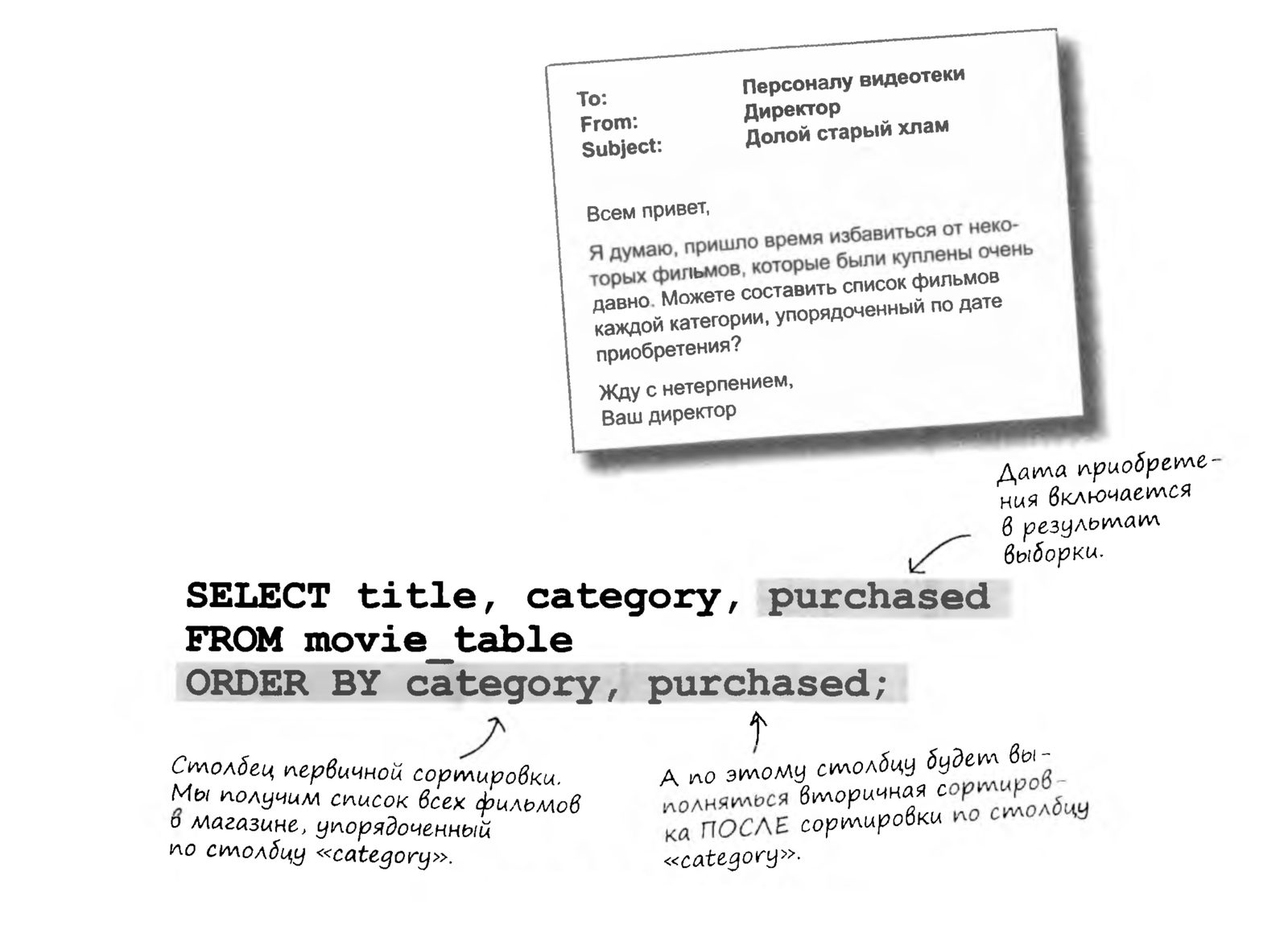
Unfortunately, the director has come up with something else for you...
Fortunately, a single command can sort data by several columns at once.
ORDER with Multiple Columns

Sorting isn't limited to just two columns. You can sort by any number of columns to get the information you need.
You can do more! Sort ALL the data! Sorting isn't limited to just two columns. You can sort by any number of columns to get the information you need.
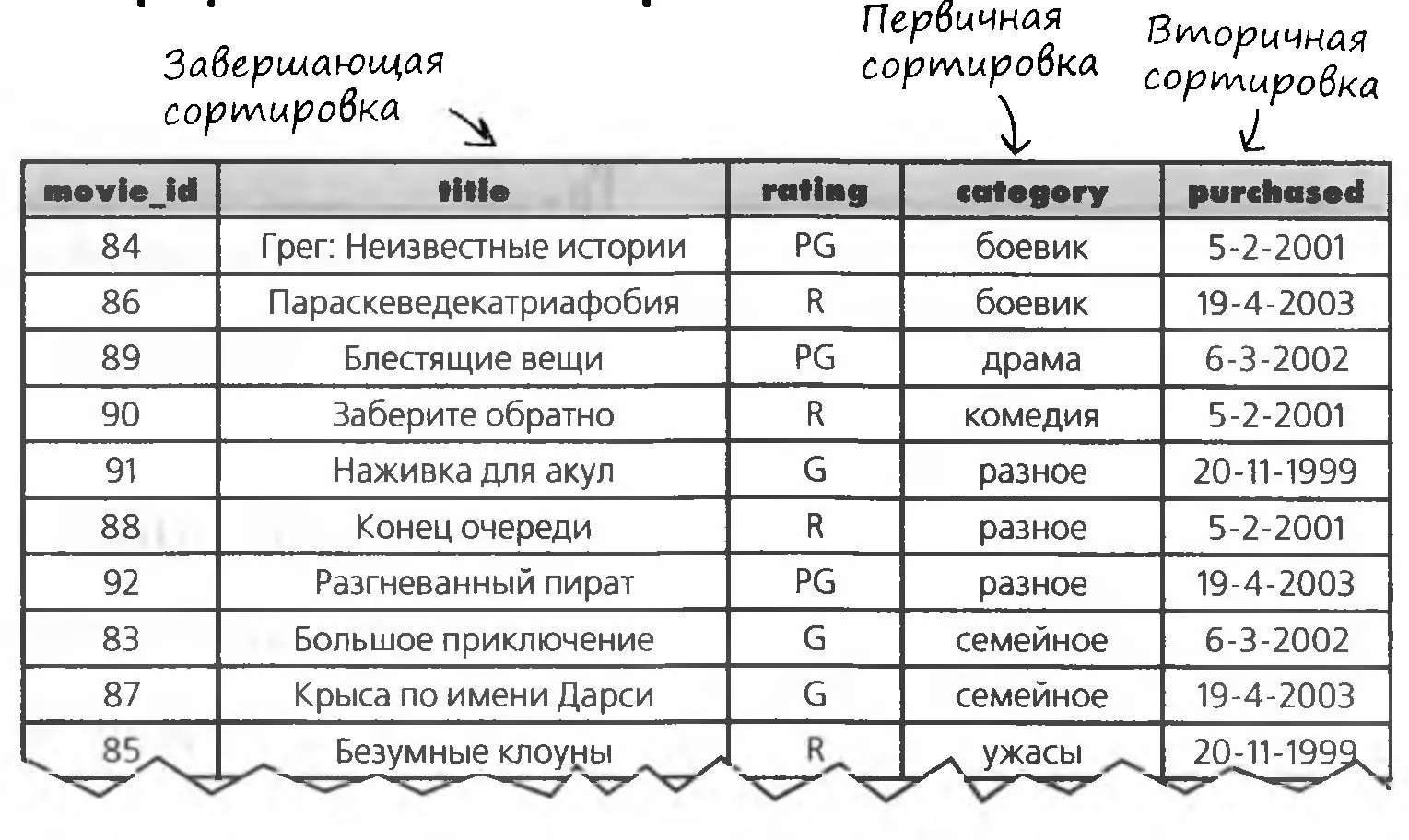
Take a look at the following ORDER BY clause with three columns. Below you can see how the sorting works.
SELECT * FROM movie_table
ORDER BY category, purchased, title;
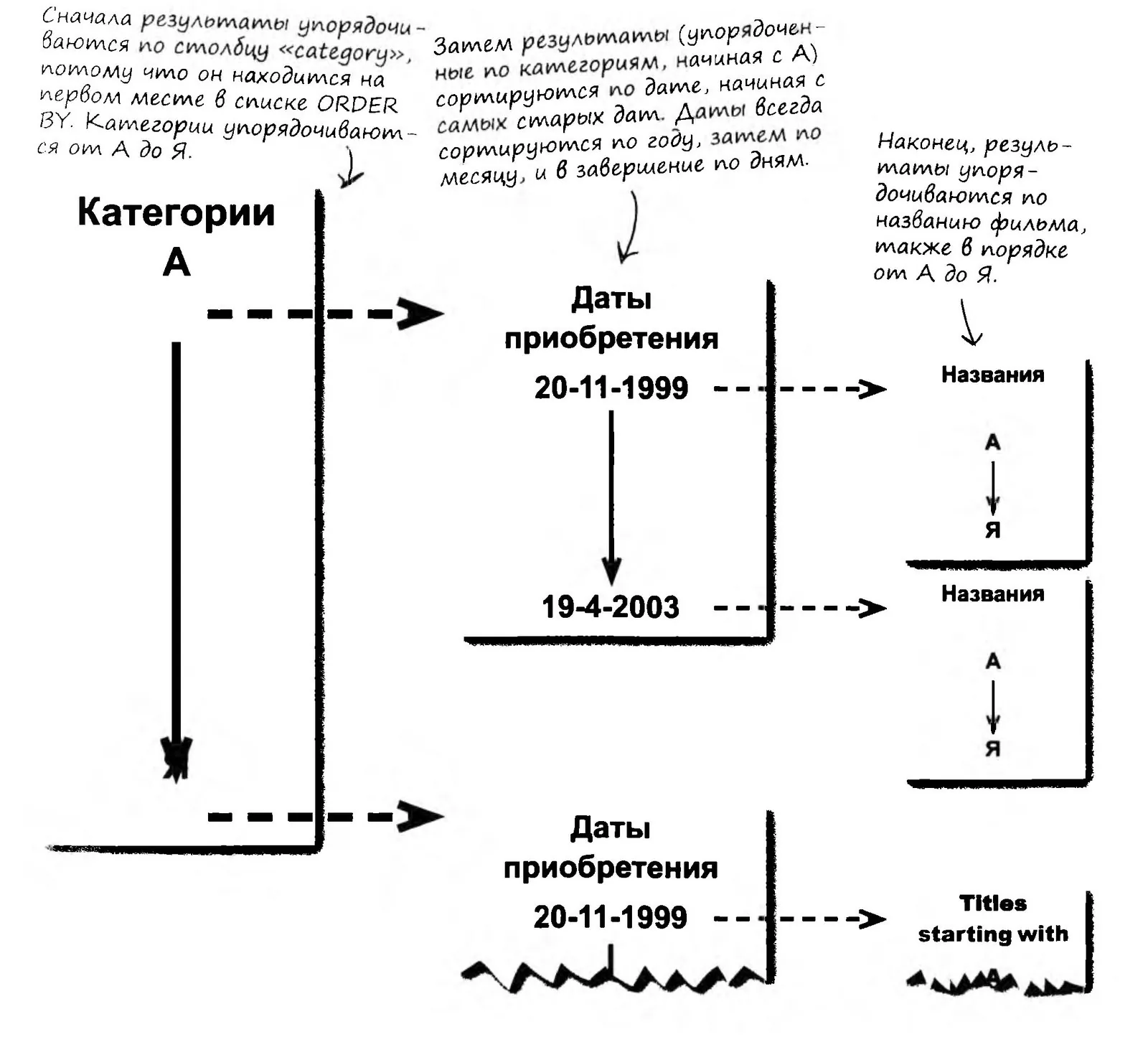
The Sorted Table
Let's see what data the SELECT command returns for the original movie table.
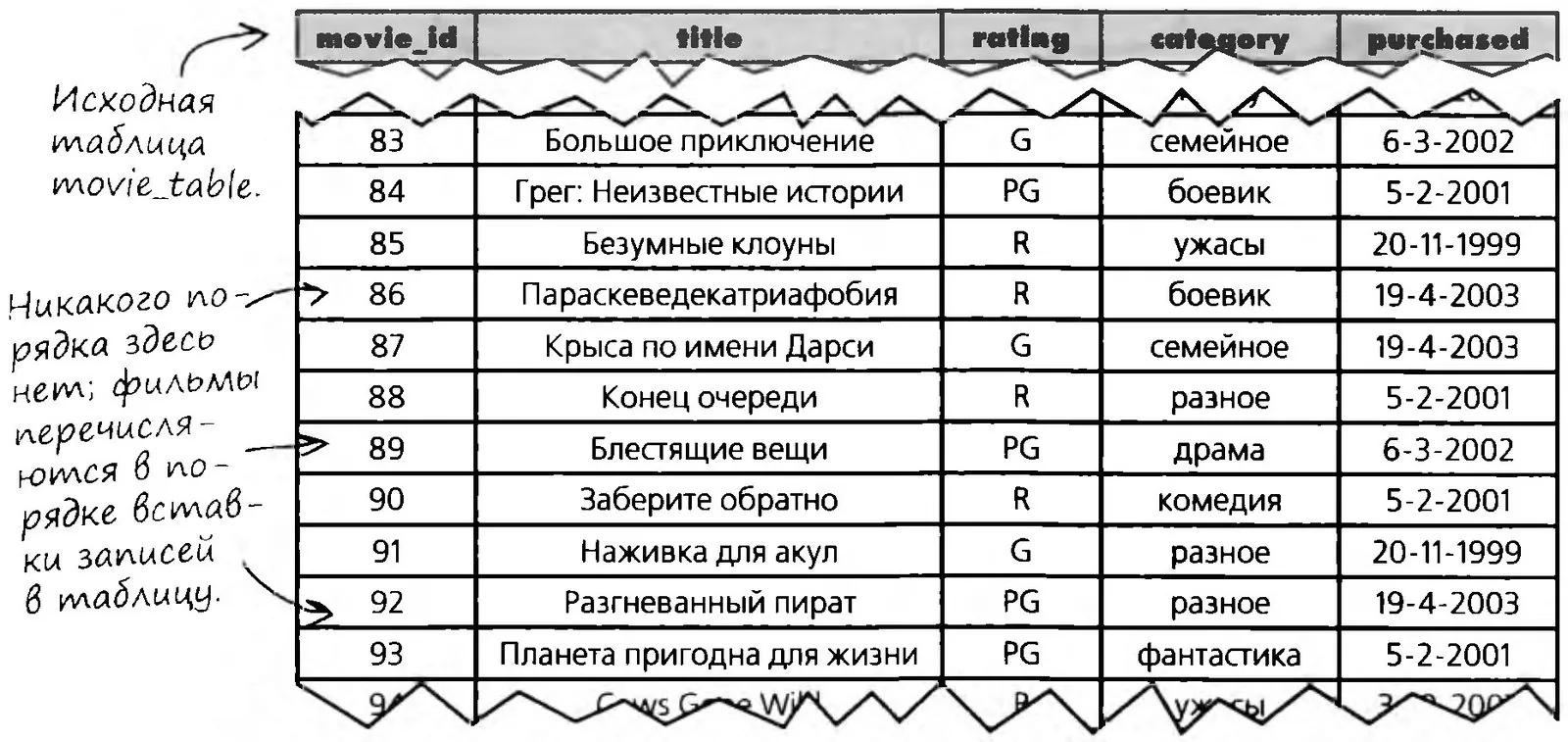
... and the sorted results of our query:


I don't like old movies... What if I want to see the new ones first? Do I really have to read the list from the end to the beginning?
You're becoming an SQL Jedi now, and it's high time to tell you our code word. SQL has a keyword for reversing the sort direction.
By default, SQL sorts ORDER BY columns in ascending order: from A to Z, from 1 to 99999, and so on. If you'd rather get the data in reverse order, put the DESC keyword after the column name.
Frequently Asked Questions

How can that be? We used the DESC keyword to get a DESCRIPTION of a table. Are you sure it can also be used to change the order?
Yes, it all depends on the context. If you put DESC before a table name (for example, DESC movie_table;), you get a description of the table. In that case it's interpreted as short for DESCRIBE.
In an ORDER clause, it's interpreted as short for DESCENDING and determines the order of the results.
Can I use the full words DESCRIBE and DESCENDING in my queries to avoid confusion?
You can use DESCRIBE, but DESCENDING won't work.
The DESC keyword after a column name in the ORDER BY clause sorts the results in descending order.
DESC and Reversing the Data Order
Imagine your data standing on the steps of a staircase. When you climb up the stairs (data sorted in ascending order), you'll run into the letter A before the letter B. When you walk down (data sorted in descending order), the first letter you meet will be Z, and the last will be A.
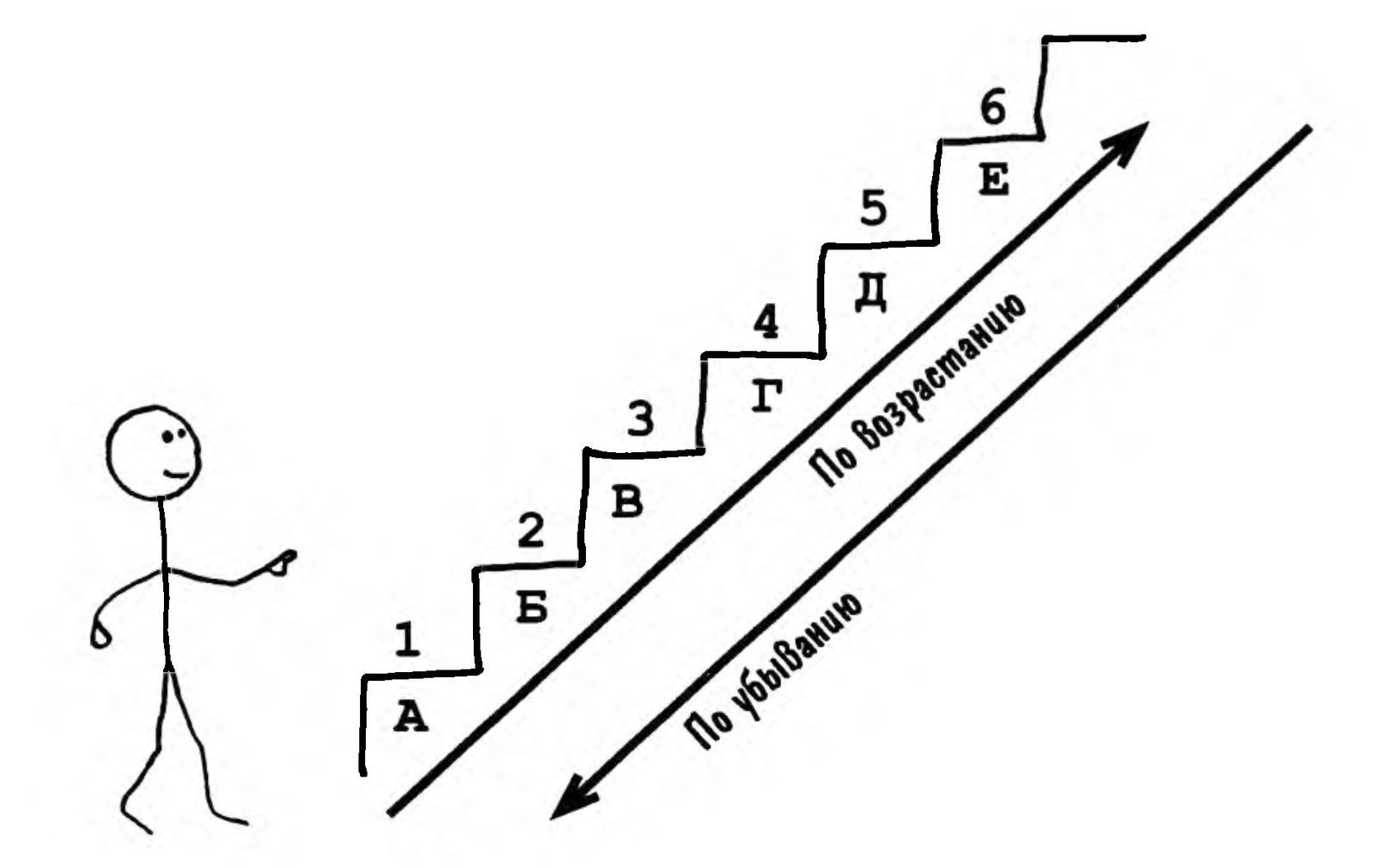
The following query returns a list of movies sorted by purchase date, newest first. For each date, the movies purchased on that day are listed in alphabetical order.
SELECT title, purchased
FROM movie_table
ORDER BY title ASC, purchased DESC;

You've Got Mail!
TO: Galaxy QA Academy Video Library Staff
FROM: Director
Subject: Dig in!
Hello, everyone!
Everything is just great! The movies are right where they belong, and thanks to those clever ORDER BY clauses, every customer can easily find exactly what they need.
To reward you all for your exemplary work, there's a pizza party at my house tomorrow. We're getting together at 6:00 PM.
And don't forget to bring your report!
Your Director.
P.S. And don't dress up too much, I need to move some furniture around...
Cookie Trouble
The leader of our group of girl Padawans is trying to figure out which of her charges has sold the most Star Cookies (they hawk them just like scouts do). So far she has a table with each girl's sales for each day.
I need to determine the winner as soon as possible.


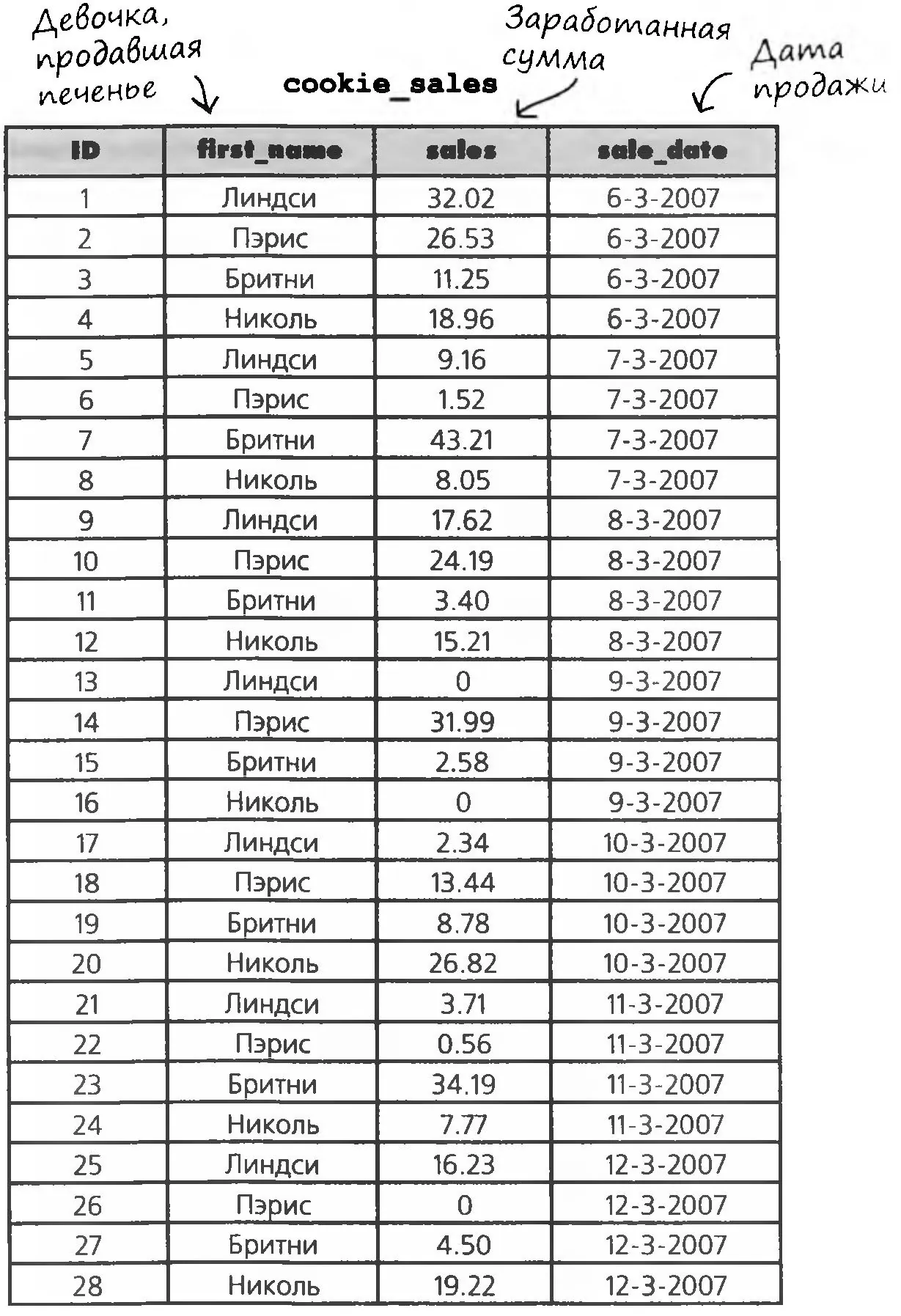
Princess Leia, Master of the Girl Padawans
The girl who sells the most cookies wins free Tauntaun riding lessons. Every girl wants to win, so it's very important for Leia to name the winner quickly, before things turn into a fight.
Use your ORDER BY skills and write a query that will help Edwina find out the winner's name.
Write your own version of the query on a piece of paper, then click the Master's answer and compare the two.
So, let's find the winner among the girls and see who gets the free horseback riding lessons!
Group Hypnosis Sessions with GROUP BY
What if you need to apply a droid-reflashing query not to all droids, but only to a group of a certain type? To group data, SQL has a wonder command: GROUP BY. This construct is designed to pick out separate groups of rows from a table, with the functions specified in SELECT (for example, COUNT(), MIN() and so on) applied to each group.
Another very common use of GROUP BY in SQL is selecting unique records from tables. In the following example, you'll notice that the result set has no repeated girls' names, whereas in the original table they appeared more than once.

Okay, I get that you can group a query result by rows like this and remove duplicate rows, but there's a simple DISTINCT command that just removes them. Why bother with grouping?
Yes, you're right, the two commands do the same thing here, but GROUP BY actually allows more precise grouping. Let's look at an example.
Suppose we have a table of users:
- id - a unique identifier.
- email - the user's e-mail.
- hash - the user's unique hash.
And now we have the task of selecting unique users, and specifically unique people, not unique accounts. After all, one person can have 100 accounts with different e-mails and, of course, ids. And the hash is a string that identifies them as one unique person.
So we need to select all the records with a unique hash. For this, we once again use GROUP BY:
SELECT * FROM `table` GROUP BY `hash`
As a result, only unique hashes will be returned, meaning you won't see 2 identical hashes in the result set, and DISTINCT couldn't have done that!
The AVG Function with GROUP BY
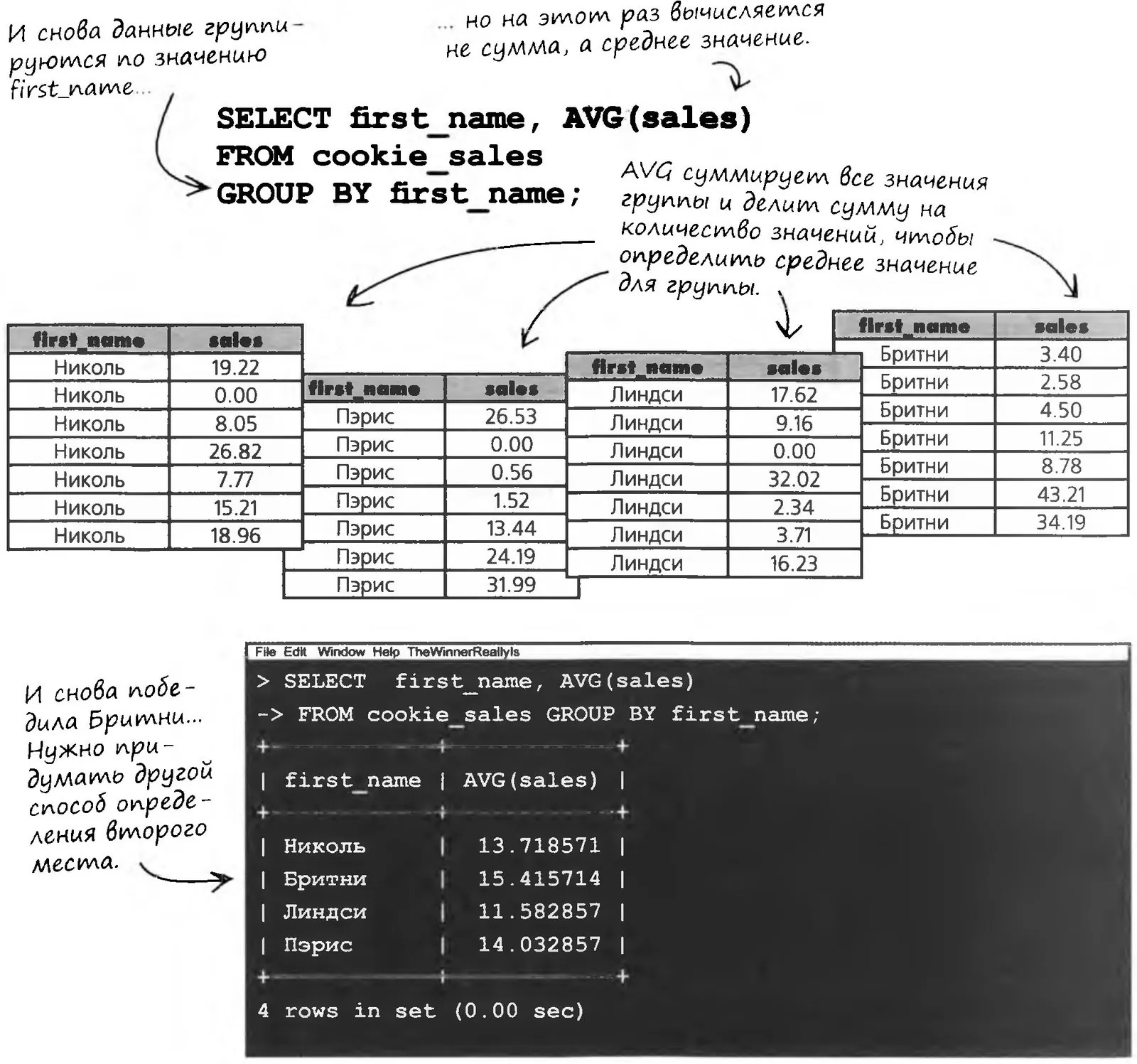
The other girls were upset, so Edwina decided to hand out a second prize for the highest average daily sales. To calculate it, she uses the AVG function.
Each girl sold cookies for seven days. For each girl, the AVG function adds up her sales and then divides the total by 7.
MIN and MAX
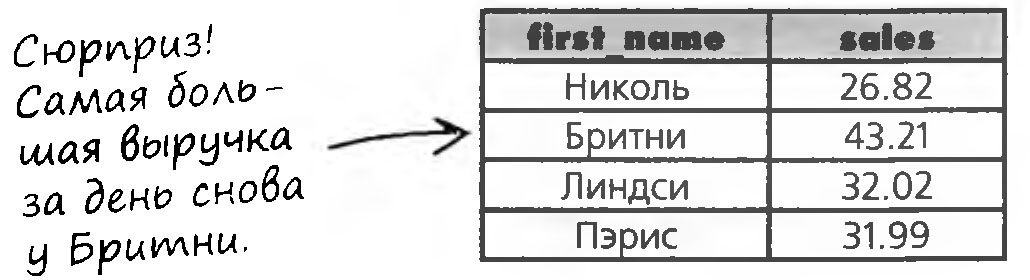
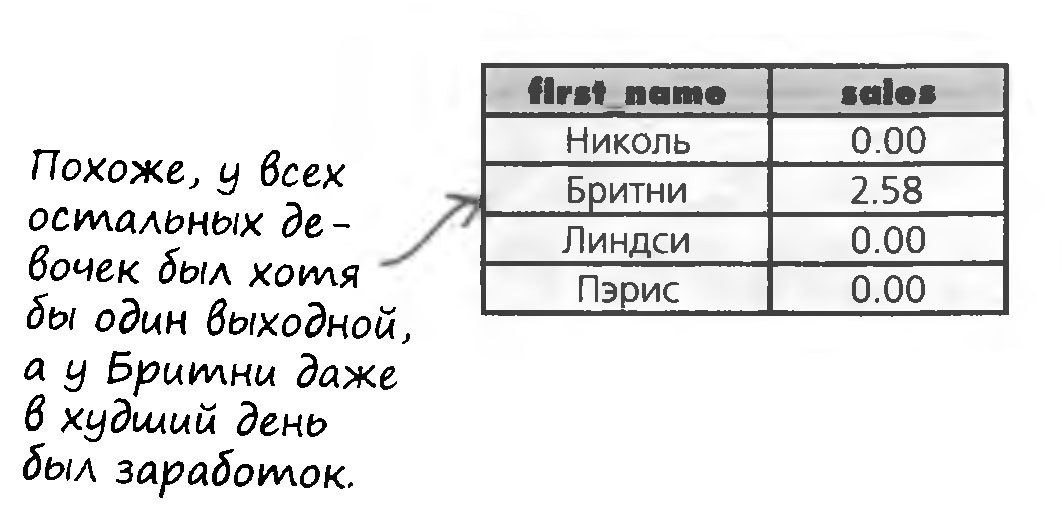
Not ready to give up, Edwina applies the MIN and MAX functions to her table. She wants to find out whether any of the other girls had higher daily sales, and maybe on her worst day Britney earned less than the others?
To find the largest value in a column, use the MAX function, and to find the smallest value, use the MIN function.

SELECT first_name, MAX (sales)
FROM cookie_sales
GROUP BY first_name;

SELECT first_name, MIX (sales)
FROM cookie_sales
GROUP BY first_name;

COUNT, or Counting Rows
To find out which girl sold cookies on more days than the others, Edwina tries using the COUNT function for counting. The COUNT function returns the number of records in a column

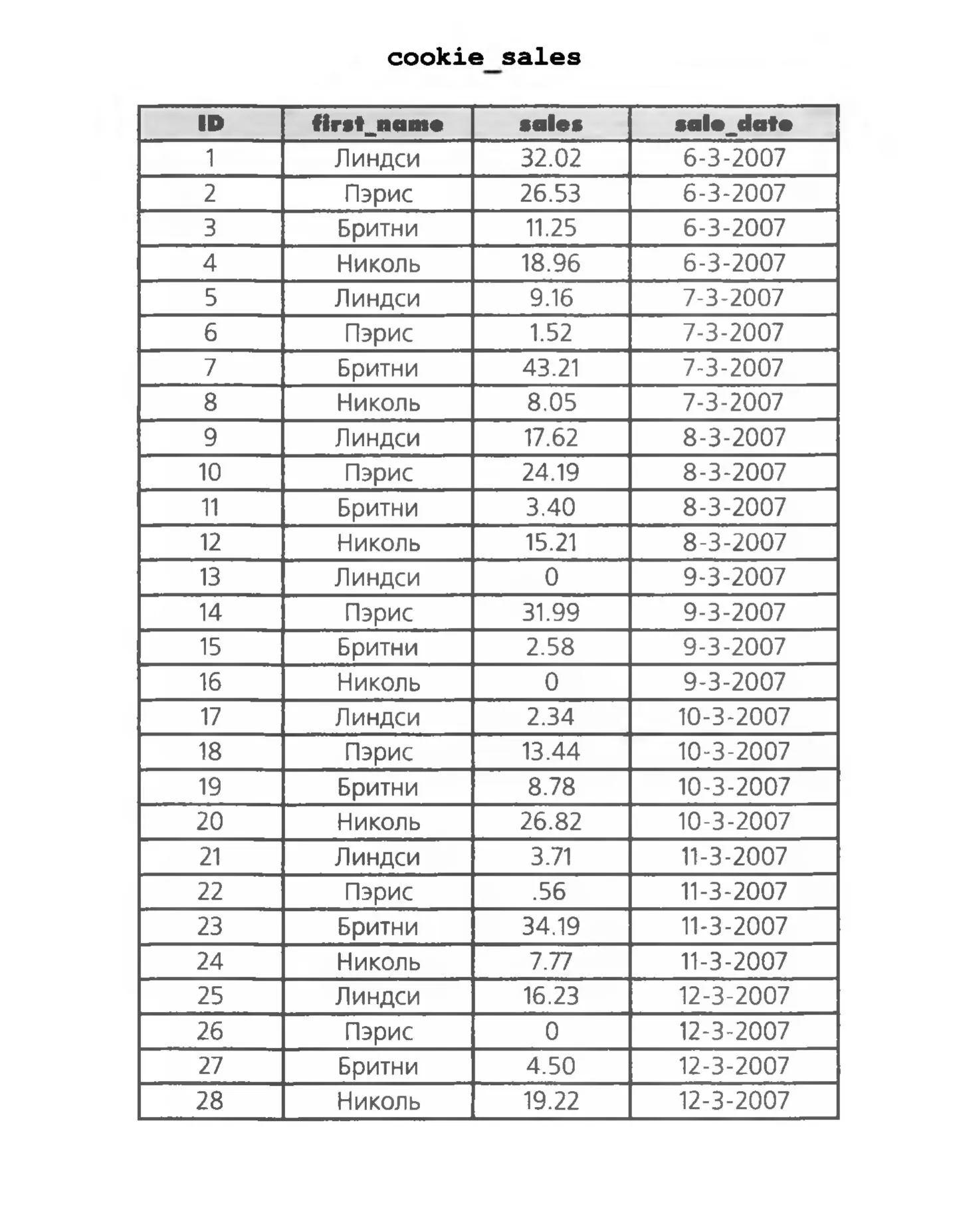


To find out how many days cookies were sold, we could sort the result by sale_date,
and subtract the first date from the last one.
Right?
Actually, no. We can't be sure there were no skipped days between the first and the last date.
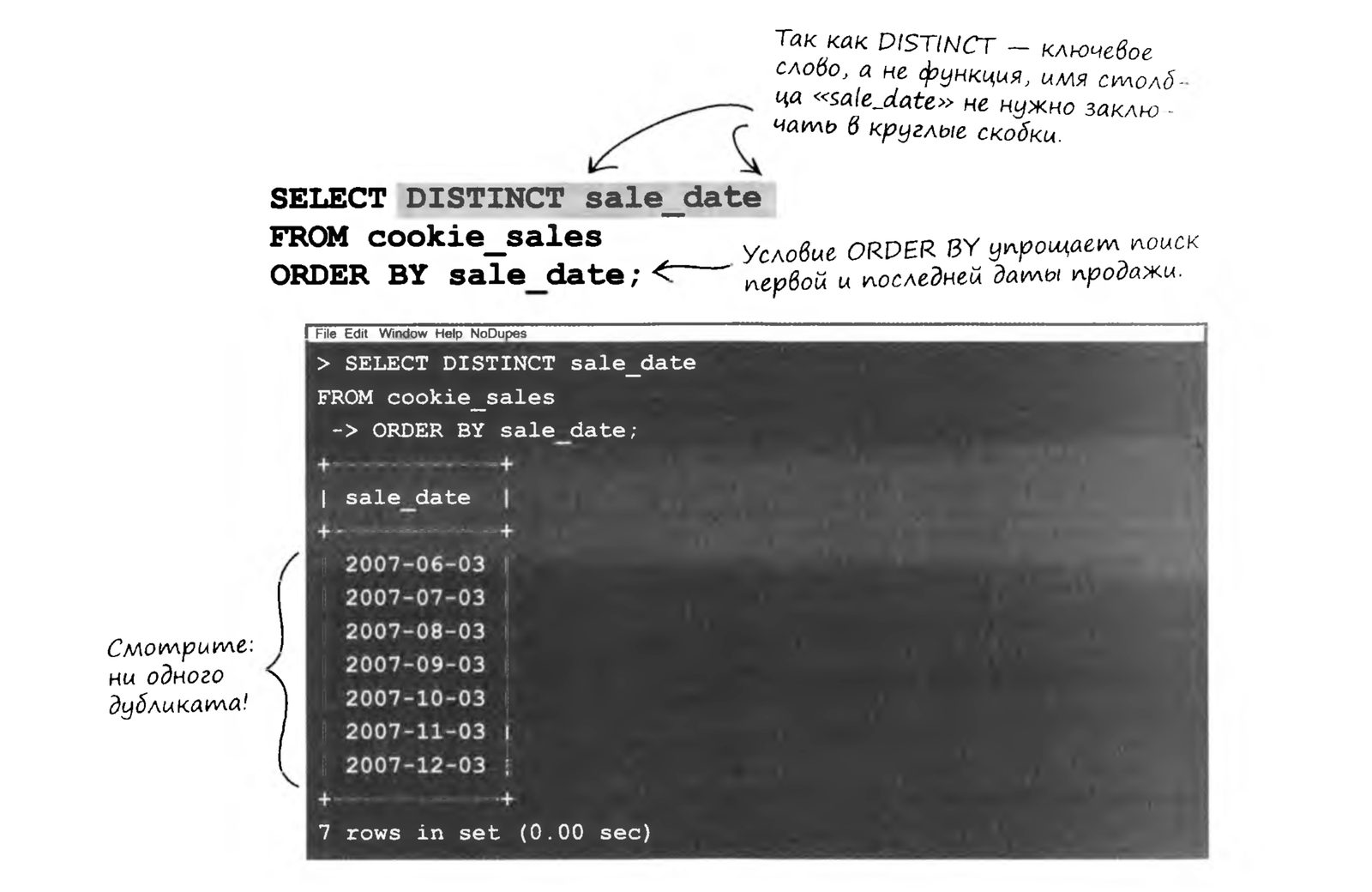
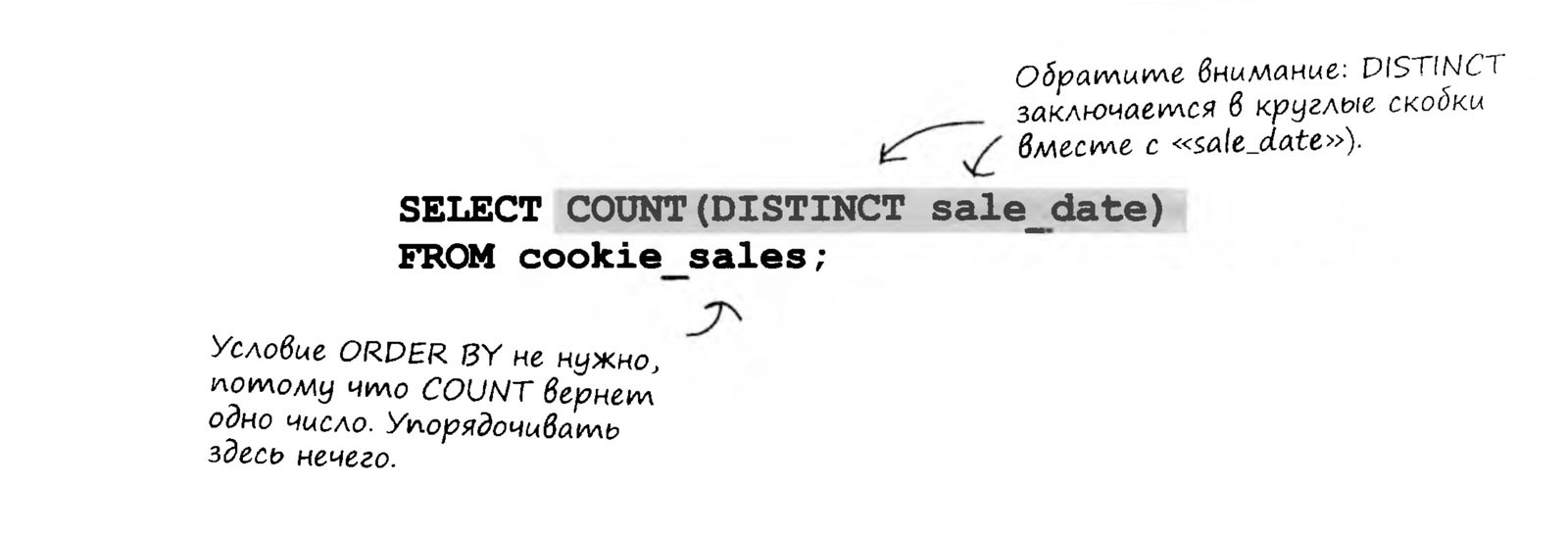
There's a much simpler way to find out over how many days cookies were sold. The task is solved with the DISTINCT keyword. It helps us not only compute the COUNT value we need, but also get a list of dates without duplicates.
The SELECT DISTINCT Command
First, let's see how the DISTINCT keyword works without the COUNT function
Now let's try running the command with the COUNT: function
Level Practical Assignment
I know you're itching to put your knowledge into practice and try everything we've just learned in real queries. So don't delay: into battle! Combat assignments await you.
SQL-2 Level Theory Test
Form for Submitting Your SQL Queries