Level 6. Bug Tracking Systems. JIRA

Welcome to the icy planet Hoth! By passing its harsh trials, you will learn to work in a team with other IT specialists. And a bug tracking system will help you with that.
Every tester at a company of more than 2 people works with a bug tracking system. Let's figure out what this system is, using JIRA as an example.
As far as I know, a bug tracking system is usually understood to be an application designed to:
- help software developers (programmers, testers, and others) log and control the errors and faults found in programs,
- provide user support,
- and monitor how these errors are being eliminated and whether any IT processes are being carried out or not.
Project structure
- Lets you assign, prioritize, track, report on, process, and monitor “bugs”
- An extensible platform that can be configured for specific business processes
- Boosts productivity by cutting the time lost on tracking the progress of problem solving and on coordination
- Improves the quality of execution because the progress of every task is recorded in detail right up to its completion
How Jira is used
Jira is used to formalize relationships within an IT team. A tester should see a bug tracking system first and foremost as their own protection. Every bug and every testing task should have its own document in the system, with a status and a result marked on it. Let's look at a few practical examples:
1. Your boss calls you in for a report:
BOSS: What have you been doing all last week?
Clueless QA: Uhhh... Hmmm... Tolik asked me to check the new design of the disc store
BOSS:
- Which tasks exactly were tested?
- What was the scope of work?
- How many bugs were opened?
- How many of them are fixed?
Clueless QA: (starting to look foolish) Let me check my scraps of paper, there were something like 12 errors.
Smart QA: According to my QA task, 8 critical errors, 3 major, and 2 minor were found. 8 bugs are already fixed. The list of completed tests is in the Jira testing task.
By keeping electronic documentation and opening tasks and bugs in a bug tracking system, you can always get a report on your own work. And most importantly, you can control your progress and see the status of testing.
2. Users are complaining about a bug that the product manager had classified as a "feature":
BOSS: Why wasn't the bug caught?
Clueless QA: I found this bug, honestly, but the programmer said it was a feature and there was no need to file anything.
Developer: I did everything according to the spec, and it said nothing about this
Product manager: It's clearly a bug, but I knew nothing about it, the testing team never reported it to me.
BOSS: We'll have to fire such an irresponsible tester!
Smart QA: I filed the bug. Here's the task - SAS-3412. The product manager closed it as "not a bug". I did my job; all questions go to him.
Even if you think your bug most likely won't get fixed, by opening a document for it you protect yourself in case it turns out to be a bug after all once the program is in production.

Why JIRA?
- So why do we use Jira as our example? Is it because it's better?
- Impossible to say for sure.
- Maybe because the author was using it when he created this level?
- Who knows... He used Redmine a lot in his day, too.
Let's put it this way: Jira is a more widespread bug tracking system than the others, but it doesn't hold an absolute lead. Jira is actively developed and constantly adds new modules, because it's a paid product, unlike the slow-moving open source projects. What's important to understand is this: all bug tracking systems are alike, and if you can work in one of them, a few hours will be enough for you to figure out any other.
What does JIRA have?
By and large, any tracking system is a tool for electronic document management. Since all IT folks are for saving the trees and against paper that always gets lost, every document you need is created as a task. There are tasks for almost everything: write a program, test it, set up a server for it, and even replace a dead hard drive in a work laptop. The types of tasks you will run into at work:
- Bug reports / Let you track the progress of a bug fix.
- HelpDesk (customer support / service desk). This is where the bugs we missed will come from. We won't let that happen!
- Project management / These are the manager-facing features: they track completed tasks, time spent, code quality, and more.
- Task progress management / Creating a custom workflow.
- Requirements management / Creating software development tasks for programmers.
- Workflows / Visualizing workflows through charts, tables, and filters of current tasks.
Example of a project structure
In general, the project structure in bug tracking systems can be represented by this table:
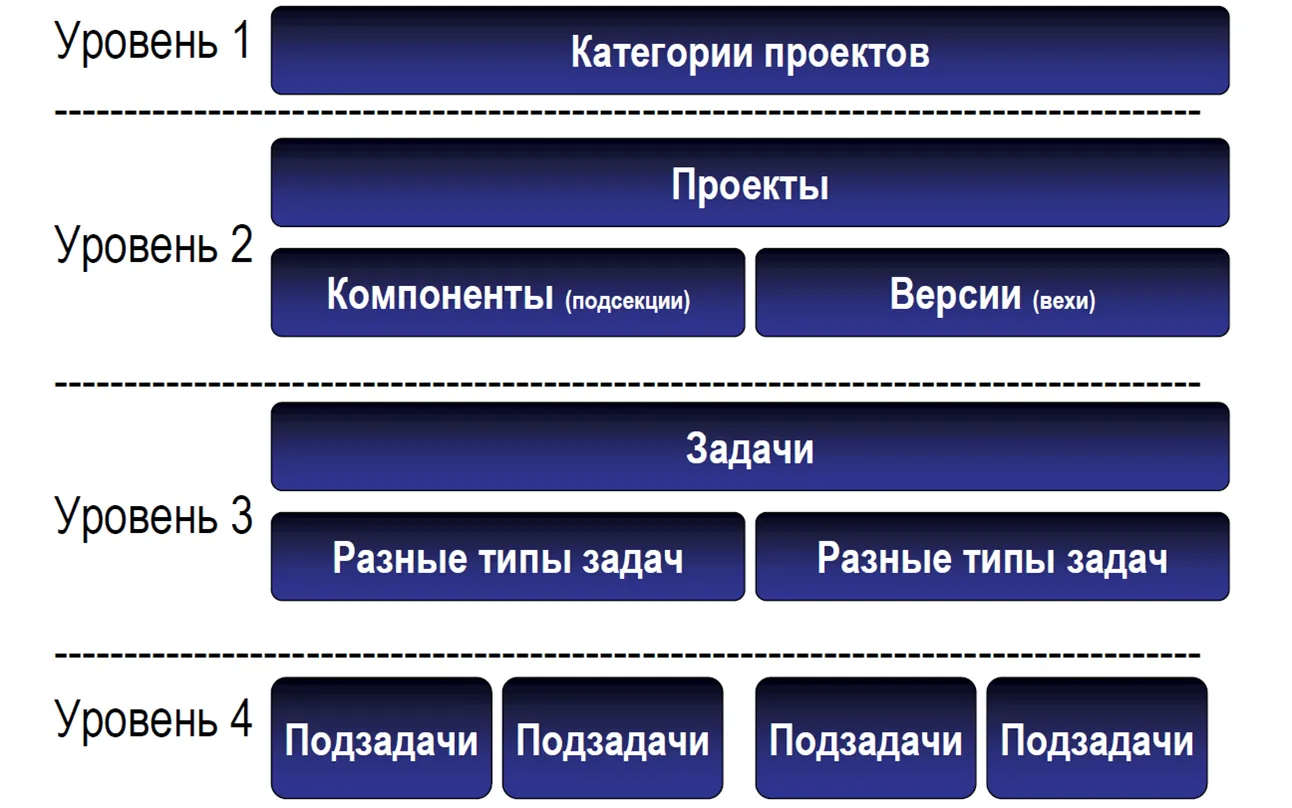
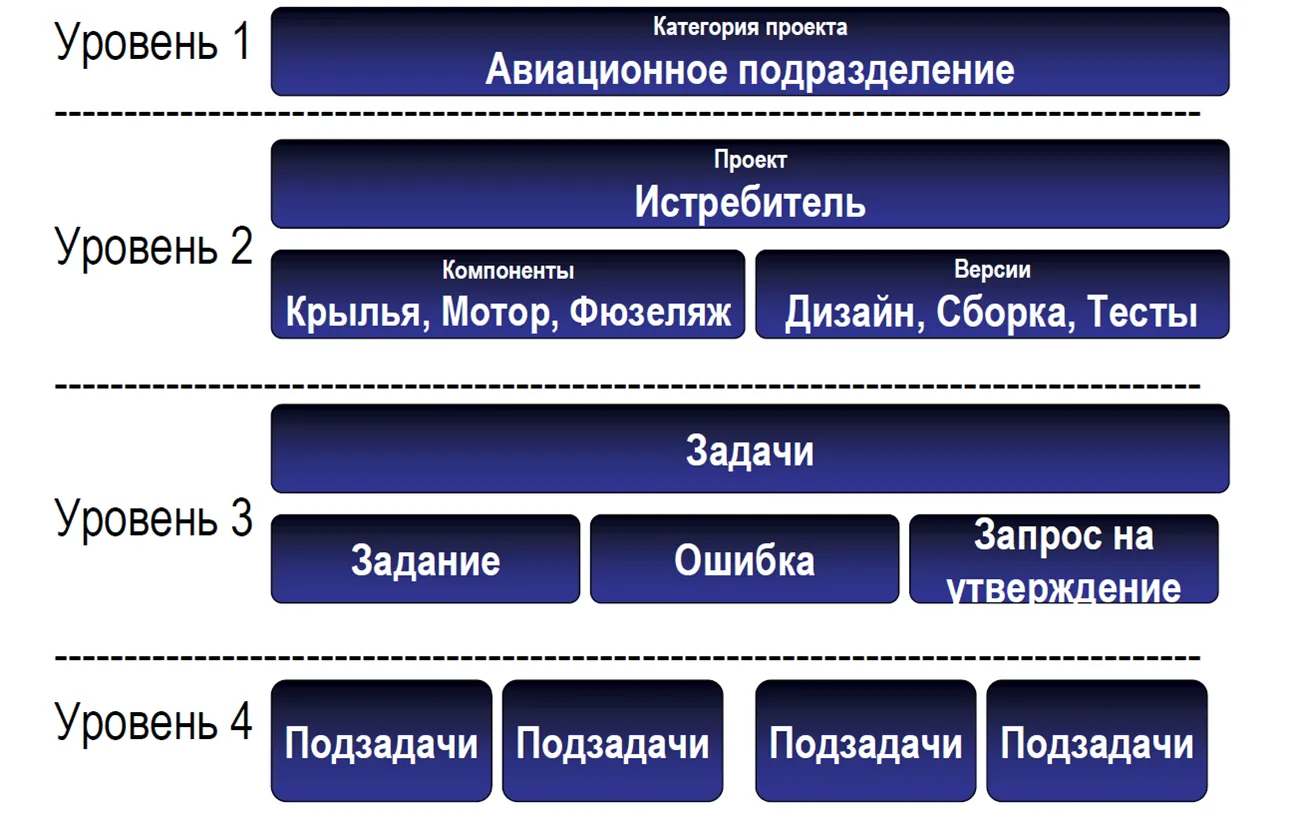
Let's look at how this structure works using the example of a factory that builds rebel starfighters to destroy the Death Star:
Working with defects
( Defect tracking in JIRA )
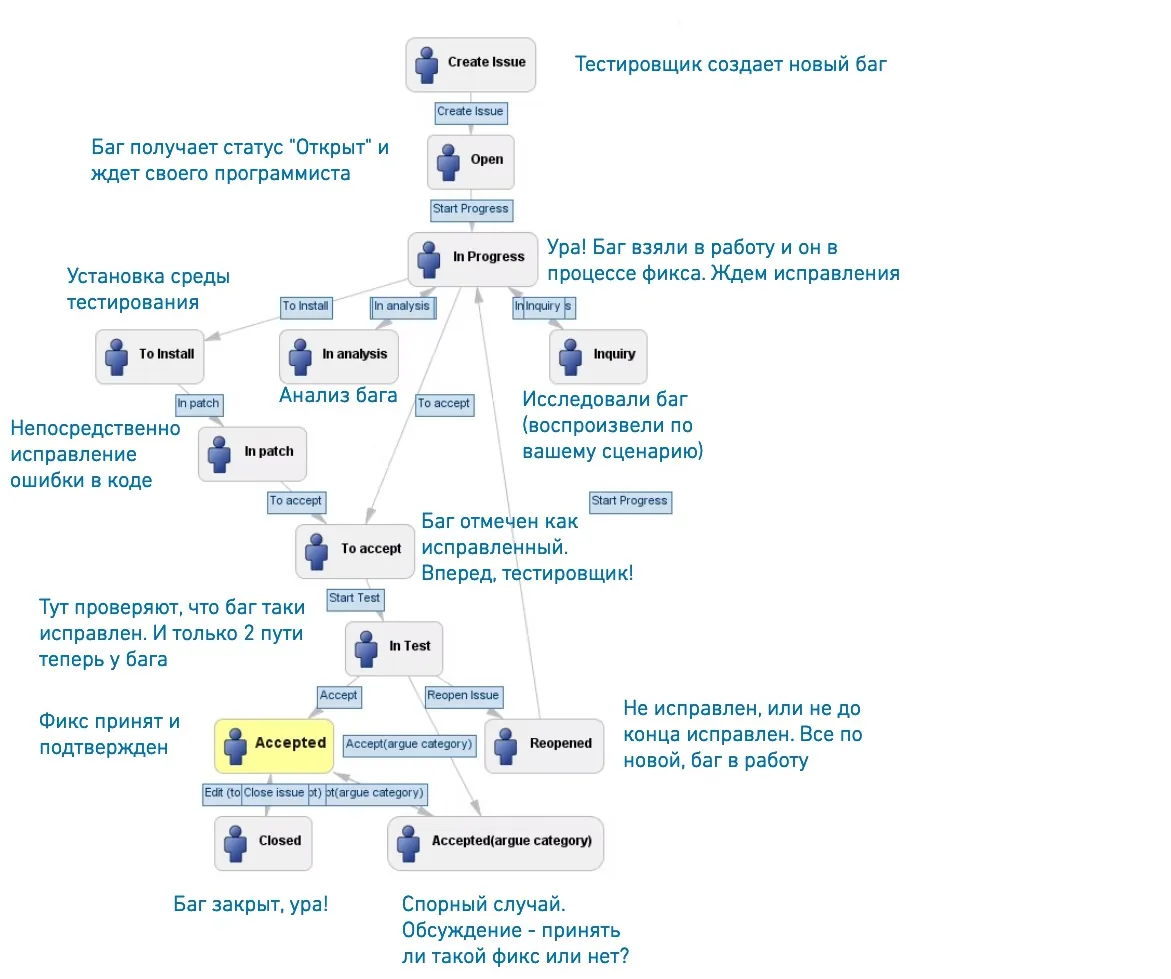
Below is a diagram of the basic life cycle of a bug filed in a bug tracking system. As soon as you create a new bug report, it automatically gets the status "New". The bug report needs to be assigned to a programmer or a test manager (if there is an intermediate link). From there, the bug has three paths: 1. "Rejected" with the spell "it's not a bug, it's a feature", 2. "Open" if it has been accepted for work, or 3. "Deferred" until better times. These three states are on the same level, and a bug can move between them. Next, if the bug gets fixed, it receives the status "Fixed". If the fix fails testing, the bug is reopened and goes back to the same programmer who was working on it. This will keep happening until it passes verification and is "Closed".
P.S. A closed bug can also be reopened if it shows up again. For example, in another version or in a related project.
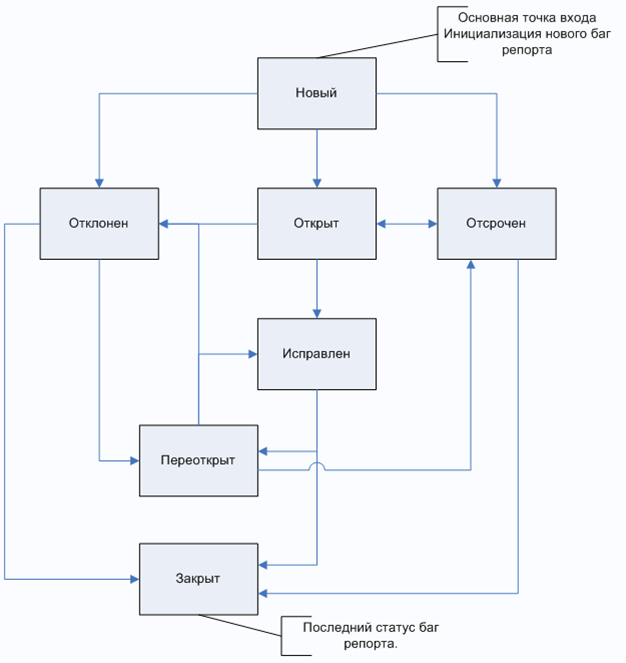
It wasn't for nothing that the description above noted that this is a basic scheme. A bug tracking system is flexible, and the workflow should be configured by your company as it sees fit. For example, you could add a status like "On the Boss's Carpet" and let the boss review every bug before it is fixed. A special feature of my company was the bug status "In QA progress". It means the issue is being worked on by a tester, and it is used so that two people don't work on the same issue. Next, we'll look at a concrete example of a defect life cycle in Jira.
By the way, you've surely wondered what an Issue is. An Issue (English for a point of dispute, or a little problem) is what we call a single electronic document in a bug tracking system.
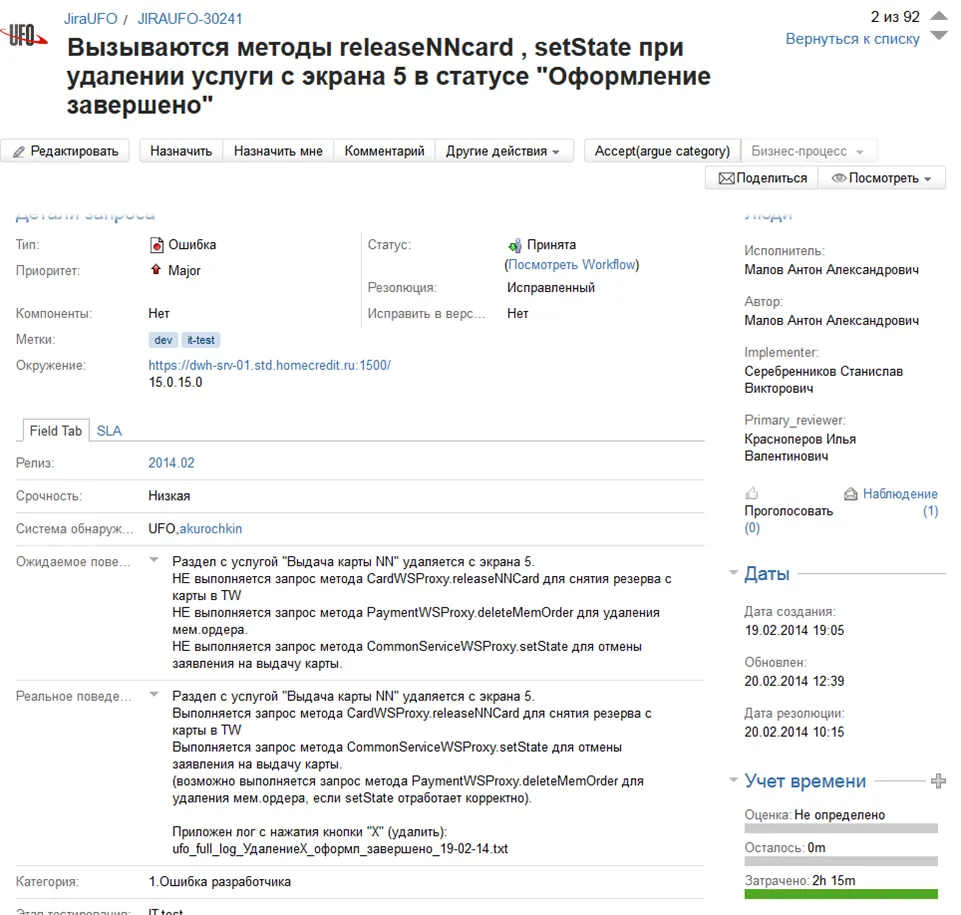
Example of a bug report in Jira
How cold it is on this level...
Brrrrr.....
Quick, take a look at an example of an issue bug report and let's move on. Unfortunately, this is the only example in Russian.
I'll translate for you, but you need to learn the English names of the testing elements. I'll help you with that. In each level, only the new English words will be translated; it's assumed that you have already learned the previous ones.
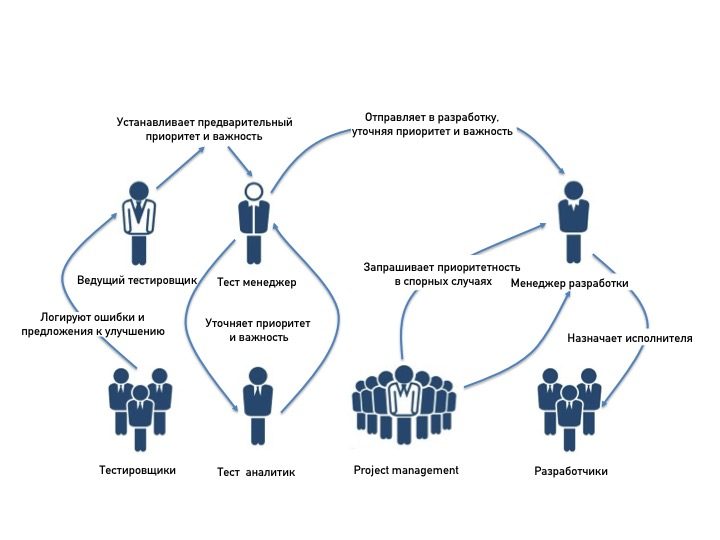
Working with defects - tracking by role
The diagram below shows how an issue circulates among the roles in testing during the first part of its life cycle (before the bug is assigned to a developer). This part is extremely important, because besides describing the bug, you need to give it a priority and a severity, set the sprint, add labels, and so on, and also settle any disputes with the product manager over each of these points. You'll learn more about the roles in testing at level eight. Let's also clarify that the scheme looks like this only in the ideal case and only in large companies that have all of these employees. In other cases all of these activities still happen, except that one and the same person plays these roles. In other words, you should be able to set the priority and severity yourself, assign the right programmer to fix the bug, and also argue with the product manager about ambiguous points and be able to justify your position.
Home page example
Where does Jira begin? Jira, like any web system, begins with a home page. This page is customizable, meaning you can add the modules you are interested in. The standard set includes: project news, tasks, and favorite task filters.

Agile board

With the Agile board and coffee, my morning I begin. This table holds the whole list of tasks currently circulating in the company. Each column has its own task status: what is only being developed, what failed testing, what is waiting for testing, what has been tested, and what has passed testing successfully (Pass QA).
What is an Agile board, you may wonder? In our case, it is a visual display of the bugs and tasks for this sprint, split by status (and with various additional indicators).
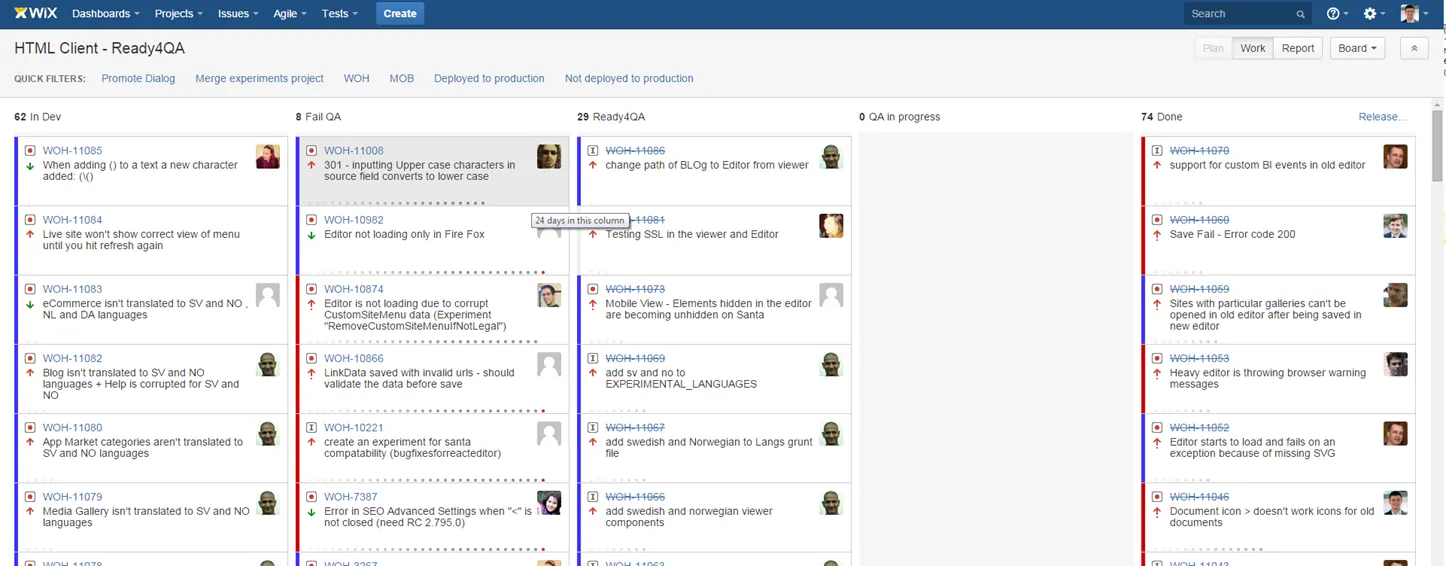
To make the picture easier to follow:
- In Dev - tasks that are in development
- Fail QA - what didn't pass testing
- Ready for QA - what is waiting for testing, the tester's backlog of work
- QA in progress - what is being tested right now
- Done - what is completed/tested, bugs fixed
DEV task
DEV task - this is a development task, the primary document a tester starts working with when testing new functionality. A development task is created for everyone in the company, but first and foremost for the programmer. This document contains all the key information about the task, plus links to more detailed documents, such as a specification if the feature is large; if it isn't, everything is described in the issue itself.
This document reaches the tester from the Ready for QA column, when development is finished and it's time for testing. Let's go through the main parts of a DEV task:
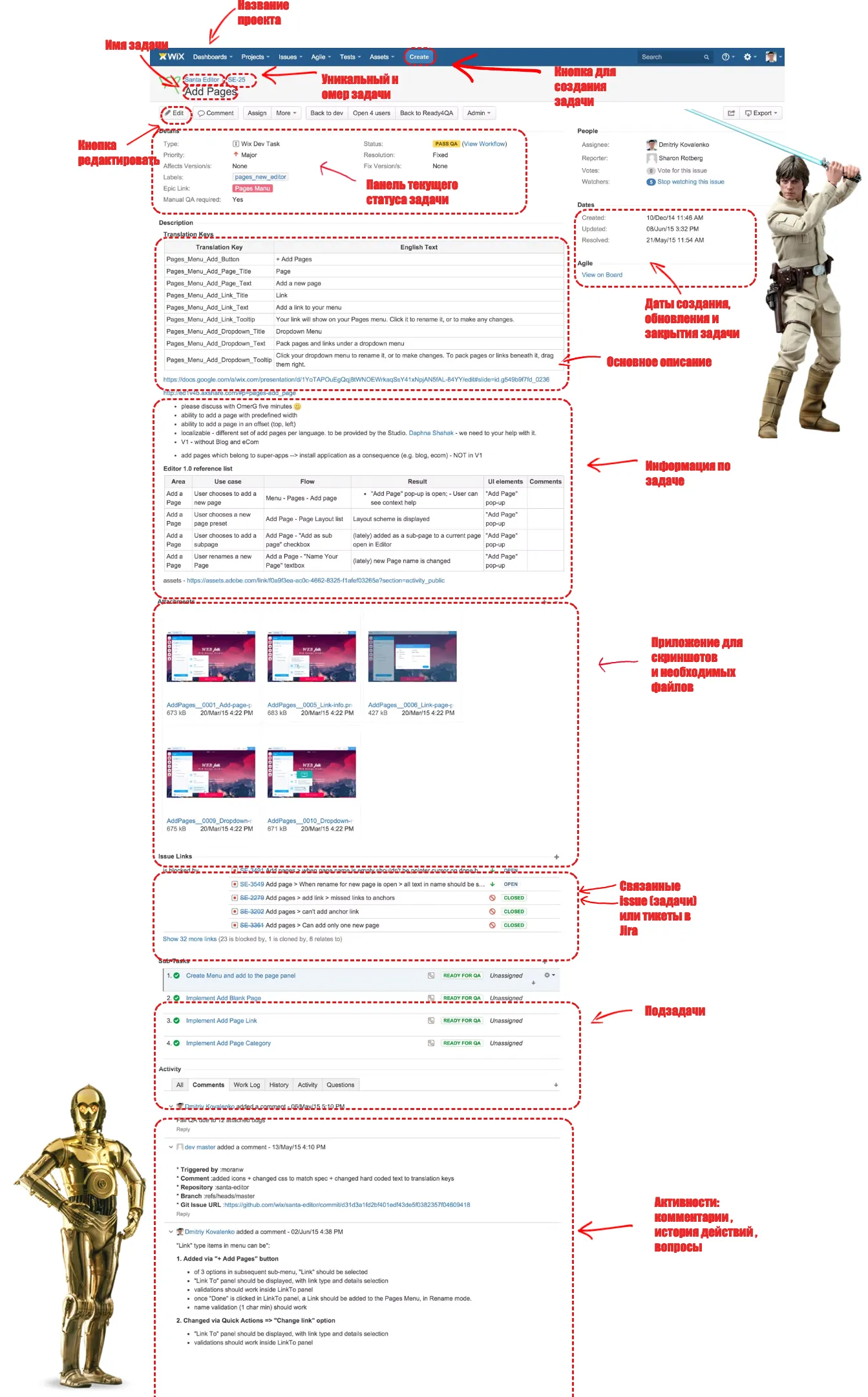

Let's take a closer look at the current task status panel
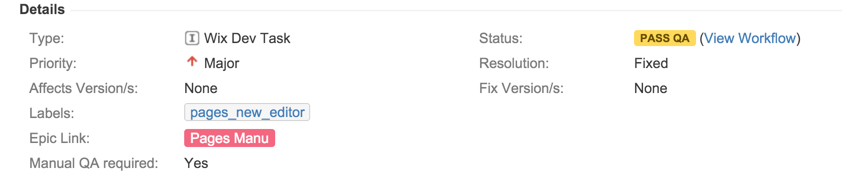

- Type - The type of task.
- Priority - Priority.
- Affects versions - the version in which the bug was found
- Labels - A tag indicating that the task belongs to some feature, structure,
release, and the like
- Epic link - Similar to a label, but it forms a rigid structure and automatically builds a link between tasks and a filter.
- Status - the current status of the bug. Pass QA/Fail QA/Resolved/Closed/In progress/Open/Reopen ....
- Resolution - the verdict passed on the bug. It overlaps with the status but carries additional information. For example, if a bug is closed (Closed), Resolution says why it was closed: fixed/not a bug/duplicate/can't reproduce...
- Fix version - the version containing the fix for the bug. The bug is verified in this version or a later one
And how are we supposed to tell the difference between epic link and label, and between Status and Resolution now??
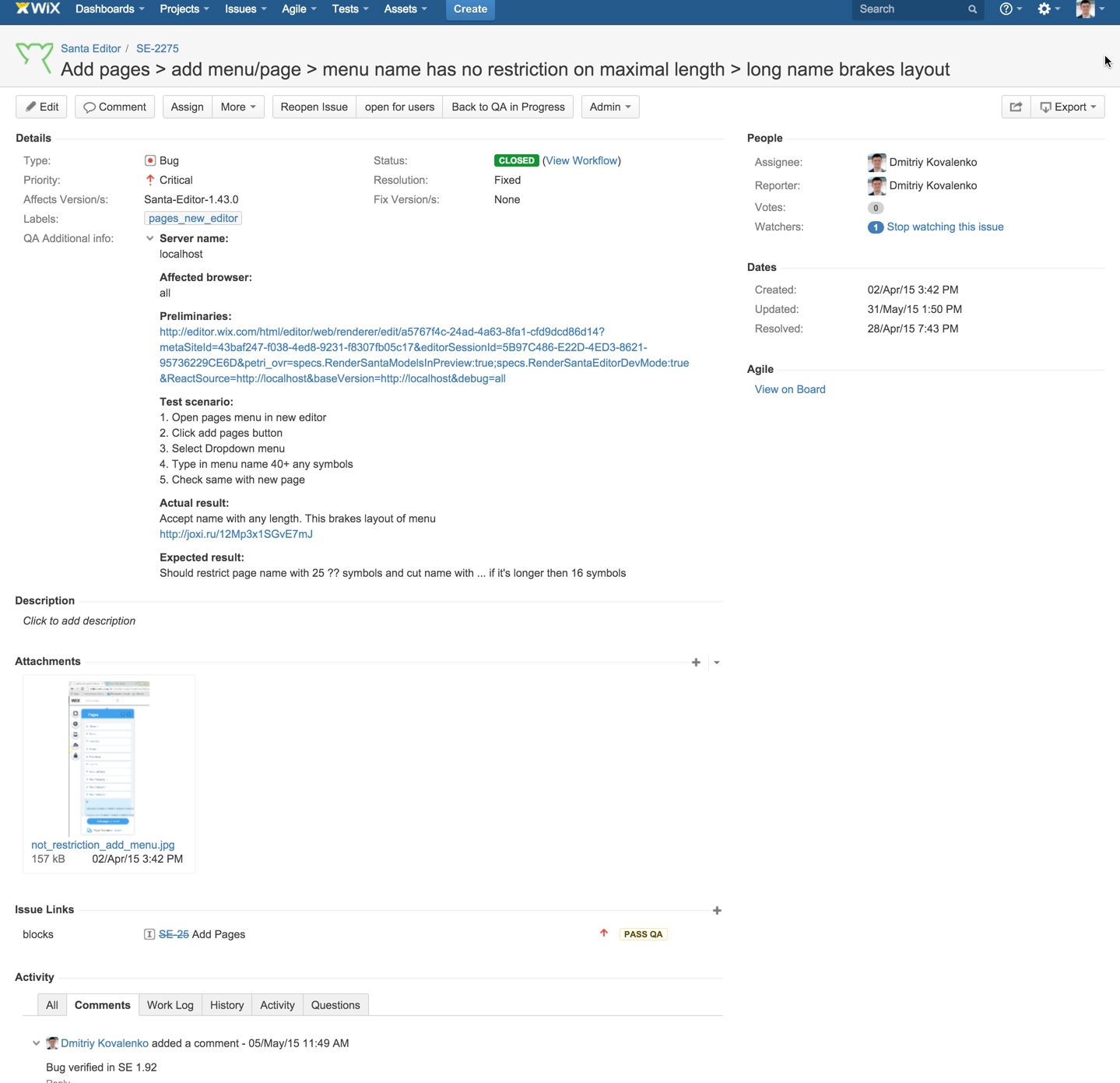
Bug
At last, we've reached the description of a bug. I'm happy to say it is very close to the bug report standard we already learned in the previous level. But creating a bug report in Jira is a real pleasure. The whole structure is ready; you just pick the value you need. On top of that, a single template for describing a bug is usually developed and added automatically when a bug is created.
A standard bug description should contain: the test environment (server name), the device/program affected by the bug (browser name), preliminaries (preconditions), the test scenario, and the Actual and Expected results.

The current task status panel is the same for all types of tasks. The only difference is type - bug
Bug description
Description - an alternative description (not required if everything has already been entered in QA info)
Screenshot of the bug
Activity, comments, history, questions
Alternative systems
The author fully admits that there are as many bug tracking systems, and other automated document management systems, as there are fish in the sea and users on the internet. They are all alike and will be an easy tool in the hands of anyone who knows how to test and how to file a bug properly. Let's look at some similar systems to broaden our horizons and be ready for anything.
The second most popular system after Jira is Redmine. Its main difference is its open source foundation. That's why administering it takes certain skills with the Linux system. But this doesn't concern testers at all. We work only with the interface. You'll find a more detailed comparison of the systems in this article

Articles to read on the topic
Questions and summary

Tutorial video
The tutorial video will be the cherry on our Jira cake. Once you've watched it, get to practice!
For additional in-depth study, here's a link to Jira University. There you'll find a full training course on the Jira bug tracking system from its maker.
Practice

Create a practice bug - any one from your homework. Assign it to the project administrator.
Head over to the Jira portal.
To log in, you need to be given access to the Jira project. Let us know if you haven't received the email with access.
Homework

A fascinating practical assignment awaits you and, as always, a theory test. You'll find the description of the practice in the Jira task. Don't forget to submit your work through the form.

Dear future tester, before you move on, I recommend that you read these articles on the topic of the level: