Level 5. Working with Defects

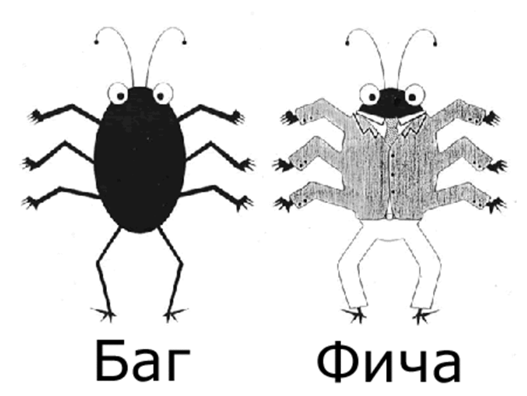
The eternal questions of a tester: "To file a bug or not to file? Bug or feature?"
Bug
First, let's figure out what this notorious bug is, and what kind of impudent thing a feature is!
Bug (from English bug: a beetle, a small insect) is a common term among programmers for errors in programs.
A bug should be told apart from a glitch, which is nothing more than a symptom of a bug that sends the user into a nervous, hysterical reaction.
Fun fact: in Russian and Ukrainian, "bug" has a feminine slang form too, "baga" — same meaning, just a quirk of those languages having grammatical gender. English doesn't have that distinction, but every tester agrees on one thing: fixing a bug always feels better than finding one.
The term "bug" is usually applied to errors that show up while a program is running, as opposed to, say, design errors or syntax errors.
Feature (a property, capability, function, functionality, etc.). It is usually used in reference to some program: "An important feature of the program is the ability to export a report to an Excel spreadsheet."
There is also the well-known phrase "it's not a bug, it's a feature" (sometimes "bugfeature"). This way, any documented bug that doesn't affect the program's functioning (and often even one that does) moves into the category of its features (peculiarities). One such "bugfeature" was the amazing ability in Windows 98 to restart Windows without rebooting the computer. You had to hold Shift while clicking "Restart" in the Shut Down window. It saved a lot of reboot time, yet it was kind of a bug.
Writing a Bug Report

A bug report is a technical document, so the problem must be described in technical language. Use the correct terminology for the names of user interface elements (editbox, listbox, combobox, link, text area, button, menu, popup menu, title bar, system tray, etc.), for user actions (click link, press the button, select menu item, etc.) and for the results obtained (window is opened, error message is displayed, system crashed, etc.).
Requirements for the Mandatory Fields of a Bug Report
The mandatory fields of a bug report are: a short description (Bug Summary), priority (Priority), steps to reproduce (Steps to Reproduce), actual result (Actual Result) and expected result (Expected Result).
Below are the requirements and examples for filling in these fields.
How to Write a Bug Report Title
The "Where? What? When?" principle
As an example, here is how to write a bug report title. The title, or summary, should capture the whole point of the bug and be written so that it's clear what it's about without reading the full bug description.
To create a title, compose a sentence that states the facts of the defect in the following order:
- Where? Where in the user interface or the architecture of the software product the problem is located. Start the sentence with a noun, not a preposition.
- What? What happens or doesn't happen according to the specification or your idea of how the software product should normally work. Point to the presence or absence of the object of the problem, not to its content (the content goes in the description). If the content of the problem varies, list all the known variants in the description.
- When? At what point in the software product's operation, on what event, or under what conditions the problem shows up.
For example:
What: incorrect data calculation
Where: on page NNN
When: after entering a negative value in field Y.
Try not to write phrases like "I click the link," "I press the button," and the like. Both the title and the step descriptions are instructions for whoever will fix the problem, so it's better to phrase them as "click the link" or "press the button"
For example:
Mobile site > Post filter by time > The page freezes when two values are selected in the time dropdown at the same time
Bug vs. Bug Report

You probably have a question: "what's the difference between a bug and a bug report?" Let me clarify: a bug is the error itself, but once a tester describes it by all the rules, it turns into a bug report, which people usually talk about like this: "I opened a bug" or "I filed a bug." Besides, a bug report can contain either one specific bug or all the bugs found while testing a program/website/app.
Why is that? When you work with a bug tracking system, a separate electronic document (a bug report) is usually created for each bug, and so on for every one of them. But when you work without a bug tracking system, bugs are written up either in a text document or in a spreadsheet, and all the other bugs found go in the same place. You're not going to create a separate file for each bug.
Many people think that all of testing boils down to finding bugs, but we found out in the first level that this isn't so. Still, let's not downplay the importance of this work. After all, 80-90% of a tester's job is finding errors. But remember one thing: a tester is valued not for the bugs they found, but for the bugs they didn't miss. In other words, failure is when users discover defects in the delivered product, especially ones that get in the way of a business process. Missing bugs that are hard to catch or that affect a very small number of users is not considered a failure for a tester.
A Little More About Bug Reports

- The error description (bug or defect report) is, along with the testing report, the main artifact a tester is responsible for
- The recommended format for describing errors in systems designed for interactive dialogue with the user: What I did What I expected What I got
- The types of defects correspond to the types of testing that were run to uncover them (level 2). There are also defects caused by violations of coding conventions, user interface standards and more.
- The defect tracking algorithm (recording the steps taken to process an error report) can differ from project to project.
The recommended error tracking scheme:
- The tester logs the error report and addresses it to the lead tester, having first specified the error's priority.
- The lead tester checks that the error description is complete (links to requirements, screenshots, system or application logs) and that the situation that caused the failure is reproducible, and also refines the priority and passes the error on to the development team.
- Reverse tracking goes in the opposite order through all the links of the tracking chain.
Me think you tired are, but the forces of evil never sleep, and well prepared you must be. Try to pump yourself up and focus

The Main Fields of a Bug Report:
Summary
A short description of the problem that clearly points to the cause and the type of the erroneous situation.
Project
The name of the project under test
Application Component
The name of a part or function of the product under test
Version Number
The version in which the error was found
Priority
The most common is a five-level scale for grading defect severity:
- P1 Blocker
- P2 Critical
- P3 Major
- P4 Minor
- P5 Trivial
(see the Defect Prioritization section below for details)
Severity
Defect severity:
- S1 High
- S2 Medium
- S3 Low
(see the Severity Grading section below for details)
Status
The status of the bug. It depends on the procedure in use and on the bug workflow and life cycle.
Author or Reporter
The name of the person who created the bug report
Assigned To
The name of the team member assigned to fix the problem
Environment
OS / Service Pack, etc. / Browser + version / ...
Information about the environment where the bug was found: the operating system, the service pack and, for web testing, the browser name and version, etc.
Description
Steps to Reproduce
The steps that make it easy to reproduce the situation that led to the error.
Actual Result
The result you get after following the steps to reproduce
Expected Result
The correct result that was expected
Additional Information
Attachment
A log file, a screenshot or any other document that can help clarify the cause of the error or point to a way of fixing the problem
Defect Prioritization
Defect priority grading. When describing a bug, use only the English name of the priority.
- Blocker bug (Blocker)
A blocking error that puts the application out of action, making further work with the system under test or its key functions impossible. The problem must be solved for the system to keep functioning. - Critical bug (Critical)
A critical error: key business logic that works incorrectly, a hole in system security, or a problem that brought the server down temporarily or puts some part of the system out of action, with no way to work around it through other entry points. The problem must be solved to keep working with the key functions of the system under test. - Major bug (Major)
A major error, or the most standard bug, assigned when part of the core business logic works incorrectly. The error is not critical, or there is a way to work with the feature under test through other entry points. - Minor bug (Minor)
A minor error that doesn't break the business logic of the part of the application under test, or an obvious user interface problem. - Trivial bug (Trivial)
A trivial error that doesn't touch the application's business logic: a hard-to-reproduce problem, a barely noticeable user interface glitch, a problem in third-party libraries or services, or a problem that has no impact at all on the overall quality of the product.
Defect Prioritization



Defect Severity Grading (Severity)
- S1 High
The error must be fixed as soon as possible, because its presence is critical for the project. - S2 Medium
The error must be fixed; its presence is not critical, but it definitely needs to be resolved. - S3 Low
The error must be fixed; its presence is not critical and doesn't need an urgent solution.
The order in which errors are fixed, by their priority:
High -> Medium -> Low
Common Mistakes When Writing Bug Reports
- Insufficient data provided
The same problem doesn't always show up for every input value and for every user logged in to the system, so it is strongly recommended to include all the necessary data in the bug report. - Determining priority and severity
Very often a defect's severity gets overrated or underrated, which can lead to the wrong order of work when solving the problem. - Language of the description
When describing a problem, people often use the wrong terminology or convoluted turns of phrase that can mislead the person responsible for fixing it. - Missing expected result
If you don't state what the required behavior of the system should be, you waste the developer's time searching for that information and thereby slow down the fix. You must cite the relevant item in the requirements, a test case you wrote, or, if the situation wasn't documented, your own opinion.
Who Is Responsible for Filling in the Bug Report Fields
Defect Management
(tracking by status)
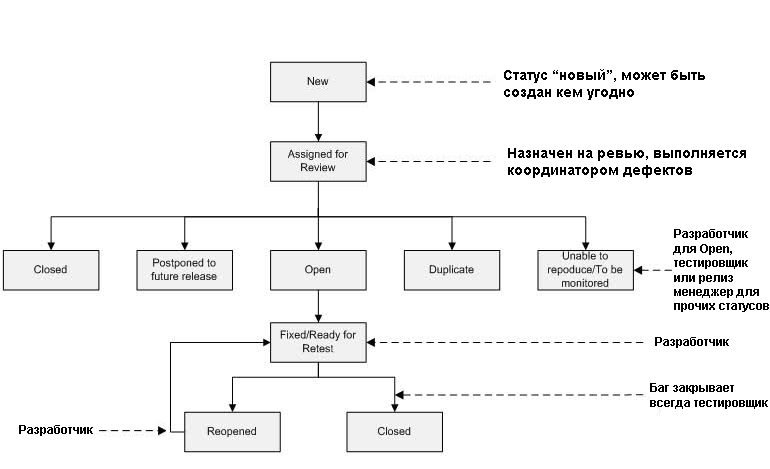
The diagram shows the classic bug-handling workflow. Anyone can file bugs, but it's usually a tester or support (the latter is a bad option). After it's created, a bug gets the status "new" and goes for review, getting the status "in review". Note that not every company does bug review, and in that case the tester moves the bug straight to the "open" state. With a review, the bug can be closed (if it's no longer relevant) or handed over to the development department for fixing, which is also "open". Once it's fixed, the bug is given the status "resolved" and the tester starts verifying the quality of the fix. From here there are two paths: send it back for rework with the status "reopen", or close the bug. In some cases you can even reopen a closed bug if it suddenly comes back from the dead in a new version.
Resolution: the reason a status was assigned
There is a limited number of statuses in a defect's life cycle, and to describe the reason for a particular status, a resolution is used. It explains why the status was set. After all, every bug will eventually be closed, but the reasons for closing differ. Some things got fixed, some got put off, and some turned out not to be bugs at all. Which resolutions a project uses depends on the software development methodology. Let's go through the standard set of resolutions:
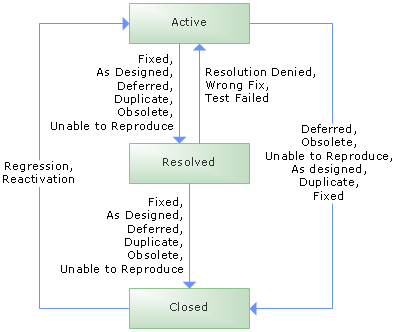
Fixed/Resolved - the best status: the bug is fixed : )
As designed/By design - the reported bug is a feature
Cannot Reproduce - the bug no longer reproduces; you need to recheck it and either clarify the description or close it if you couldn't reproduce it
Deferred/Postponed - put off until better times
Obsolete/Not relevant - the bug is outdated and it's "time to retire", or it has simply become irrelevant
Not a bug - your bug wasn't recognized as one
Duplicate - such a bug already exists, and one of them should be closed
Won’t fix - they don't want to fix it, for various reasons, for example because the impact on users is too small compared to how hard it is to fix
Incomplete - an unfinished bug; shame and censure on the tester who gets a bug returned with this status, for they failed to describe everything correctly
Merged - the fix was merged with other functionality, or the task was folded into the main code and is no longer standalone code
SF Closed - it happens: the bug self-destructed
Statuses may differ in a particular company; the ones listed above are all the standard statuses.
Serious Jokes
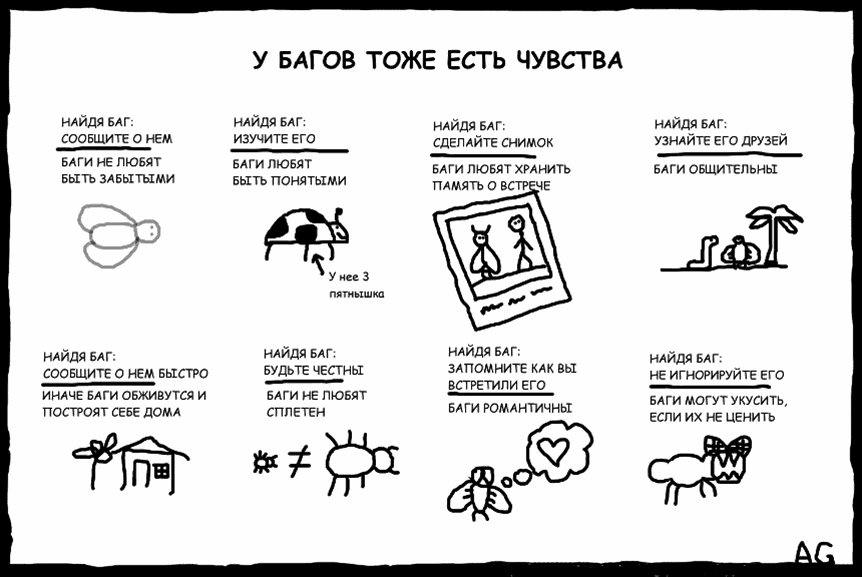
Bugs are classified by how harmful they are:
- showstoppers
- serious ones
- minor ones
- total nonsense
- testers' nitpicks
By frequency of occurrence:
- always
- sometimes (the nastiest type of bug, the "floating" one)
- only on the customer's machine
Bugs are also classified by who noticed the symptoms and where. For example, if the Mega-Boss of All Customers spots a bug on a system that is already live, the entire IT department, cleaning lady included, will be fixing it all weekend.
Showstoppers found on a Friday evening are an especially nice treat. They can bring untold joy to any programmer who loves leaving work on Saturday morning.
Bugs are mass-produced by outsourcing sweatshops and assorted sloppy hackers. Products containing an overdose of these bugs are called a bugfest.
There is a special spell, "It's not a bug, it's a feature," which lets you get rid of a bug with minimal losses, that is, by doing nothing. However, only the most experienced programmers have mastered this sorcery.
Battle Instructions
Before you start writing up bugs yourself, take a look at an example of how bugs are prioritized. Bug by bug, by priority, so to speak. Note also that in our classification priority comes first and severity is secondary. That means you first determine a bug's priority, and each priority level is then split into 3 severity levels so the bug can stand out among its friends. This example uses bugs from the cookie shop website (level 4).

Blocker
When buying cookies, clicking the "Add to cart" button takes you to an unexpected page. There is no way to get to the shopping cart page. No workaround

Critical
It's impossible to buy a lollipop (a specific kind). Clicking the "Buy" button does nothing. A console error "Unexpected error", is thrown and the item count in the cart does not increase

Major
One of the images in the cupcake gallery on the home page doesn't work. An endless preloader keeps spinning. Steps to reproduce: scroll the gallery through 5 pictures ...

Minor
Spelling mistake in the "buy cookies rite now" link on the home page

Trivial
The "buy cookies rite now" link on the home page doesn't change color after being clicked. ER: visited links are purple
Video lesson: everything about bug reports in practice
Practice

Copy my bug report table for yourself. Pick the latest accepted and graded bug from your last homework and write it up according to all the rules.
Practical Assignment

Greetings, my student! I want to thank you for the excellent testing. I really liked the bugs you sent me, so I want more bugs!
But now that you know everything about bugs, they must be perfectly written up.
So, the assignment:
Test the website and find all the bugs. The bugs must be written up according to the bug report example.
This is the simplest website you've had to test, so there will be 2 equally weighted grades:
for the defects found and for the quality of the bug report write-up: a correct description, the right priority, etc.