Level 8. Test Plan. Working with Requirements
In this level you will learn
how to work with requirements, while we wipe out the Imperial forces in the Dagobah system.
Hurry up, we need your help!

Roles in Creating a Test Plan
Below are the main roles you will have to try on when creating a test plan. That doesn't mean you will play all of them at your workplace (although most likely you will). It goes without saying that you need to be ready for anything. After all, you can't tell your employer, “I'm not really into database administration, ask Bob to do it.” We'll list all the roles you may need, but don't dwell on them too long, since this information was already covered in Level 4. Let's recall which roles we looked at.
Main roles:
- Test Manager, Test Project Manager
- Test Analyst
- Test Designer
- Tester, Test Engineer
Supporting roles:
- Administrator of the test system and the applications that support the testing life cycle
- Database Administrator, Database Manager
- Test Developer

Now that you know all the roles in testing, let's go through each one in more detail. Meanwhile, the Imperial army has retreated and is busy with its own affairs.

Test Manager, Test Project Manager

Exercises managerial control (management oversight)
Responsibilities:
- Provides technical direction
Example: Assigns test execution and test design duties among the other testers. In our case, gives the instruction to create a test plan.
- Obtains the necessary resources
Example: Figures out how many resources you will need (servers, smartphones, computers, etc.) and requests them from the tech support department before the work begins.
- Provides management reporting
Example: Prepares the necessary documentation for the previous two points.
These are usually the duties of the testing team lead. If you are the only tester in the department, lucky you: you will have to handle all of this yourself.
Test Analyst

Identifies and prioritizes test scenarios and ensures they get developed
Responsibilities:
- Develops the test plan
This role bears the main responsibility for coordinating the work on creating the test plan
- Develops the testing model
Example: chooses the types of testing and the number and duration of test cycles
- Evaluates testing effectiveness
Done by calculating the project's test coverage, building a project map, and calculating the software quality level as a percentage

Test Designer
Establishes and defines the operations, attributes, and relationships of test classes
Responsibilities:
- Establishes and defines test classes
- Establishes and defines test suites (packages)
Example: creates tasks for writing test cases and test scripts. Combines all the tests into test suites

Tester, Test Engineer
Executes test scenarios
Responsibilities:
- Executes tests
- Records the results
- Recovers tests and the system after failures
- Documents change requests (defects found, suggestions for improvement)

How complicated! Let me try to explain it all in simple words, in Klingon.
How dreadful! You don't understand Klingon?!
Fine, I'll explain it like this:
1. The test plan starts with the test manager or team lead. They set the task of testing and creating test documentation and must hand over the technical documentation for the feature, or make it perfectly clear where to find it. By documentation we mean: testing requirements, mockups, design, and so on. We'll talk about requirements right after this section.
2. The test analyst works primarily on the test plan. They write out the strategy, choose the types of testing, decide which types of testing are needed, create the testing schedule, split everything into test sections (by the areas covered by test cases) — in short, they fill in every item of the test plan.
3. Then it's the test designer's turn. For each test section, they create test cases, checklists, or automated tests. After the test coverage is created, they will also be responsible for reporting on it. They are also in charge of maintaining all the tests.
4. Time to test! In the end, the testers run through all the test cases and file bug reports for them, and testing wraps up with a noisy victory over the bugs and a release.

Working with Requirements
Example of an untestable software performance requirement
- The system response time must be within acceptable limits
- The response time (response to which operation?) of the system (what is “the system” in this requirement: UI, DB, client + server + network?) must be (under what conditions? what load?) within acceptable limits (what are these acceptable limits in numbers?)

What did we miss in the requirement?
What response time? At what bandwidth utilization? “Must not exceed 1 second” — under what conditions? And finally, the execution time of what?!
What about resources? What should they be like?
Example of a testable requirement:
- The end-to-end system response time from the end user's point of view under production load (50 user sessions in “manager” mode / 15 user sessions in “analyst” mode), with bandwidth utilization between the client system and the application server within 50% on a 100 Mb/sec network, must not exceed one second for record creation operations and three seconds for record search operations.
- The execution time of analytical reports is defined separately for each report.
- The amount of RAM used must remain stable.
Practical tips:

- Changes in the requirements must be unambiguously reflected in changes to the system's functionality and to the test suite that covers it
- Requirements coverage analysis is recommended at the test design stage, provided that the process guarantees fixed requirements within an iteration
- If the requirements are “floating,” coverage analysis is performed once a version of the system is delivered that includes the set of current requirements. This approach increases the overall time allotted for testing because of technological downtime
- Every requirement must be tested (have a test)
- Every test must relate to some requirement
- Requirements can be generated by tests (when using agile methodologies)
- Requirements must be under version control.

Before the Master tests your knowledge, take a look at what the forces of evil are up to,
Check yourself before moving on
1. What is a software requirement?
2. Give an example of a testable requirement.
3. Give an example of an untestable requirement.

Overview of Testing Artifacts by Role
You need to understand that test documentation is created for all the roles in testing. What's more, it is necessary for the testing process as a whole, as well as for programmers, product managers, and other specialists you will work with. Below are the roles that this type of test document most often applies to.
Software Tester:
Analyst:
Test Designer
Test Manager
- Test script
- Test log
- Test Case
- Test-Ideas List
- Workload Analysis Model
- Test Data
- Test results
- Test Strategy
- Test Automation Architecture
- Test Environment Configuration
- Test Suite
- Test Plan
- Test Evaluation Summary

All of this is a chart of the structure of testing
artifacts proposed by the IEEE 829 standard
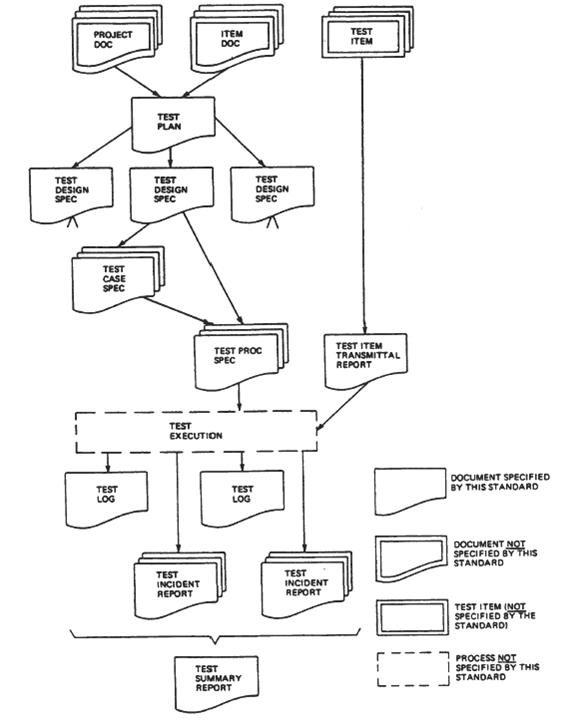
Testing artifacts are documents stored in a version control system, or completed forms in a test management system and the output reports they generate.
The following overview of testing artifacts is organized by the roles in the testing team defined earlier
Software Tester
Test script – a step-by-step description of the actions needed to execute a single test scenario. A test script should describe actions for manual execution that are suitable for handing over to the test automation team.
Test log – a record of a script's execution in the system: the result of running a test script entered into the test report, or a mark of the normal completion of a test suite on the control sheet.
Analyst
Workload Analysis Model – a working load model that defines the conditions and configuration of the system during testing.
Test Data – a formal description of the test data that will be used for testing, or of the algorithms for obtaining test sets if they cannot be described and presented because of their size or complexity.
Test results – a summary report compiled from the test logs and the information about defects recorded for the current state of the system.
Test Case – a formal specification of the system state before a test suite is executed, a description of the input conditions, the actions of the test scenario (possibly a set of references to test scripts), and the expected result (most often in the form of a description of the system state after the test scenario is executed).
Test-Ideas List – a numbered list of ideas that can be implemented as test scenarios. It is used to agree in advance on the direction and approaches to testing.

You must be tired, and the dark side is resting, too. Here's a little joke for you:
"How green I was back then..." Yoda thought after watching the first episode.
Test Designer
Test Strategy – a document that defines the strategy for testing a system (the set of activities, the types of tests to be run, the resources required, etc.). RUP proposes the test strategy as the main part of the Test Plan of a testing project.
Test Automation Architecture – a document that records the approaches to test automation, as well as the specifications of the tests that are to be automated and a description of the tooling solutions for software test automation.
Test Environment Configuration – a description of the software and hardware configuration of the test bench, as well as the specifics of setting up and administering the application software.
Test Suite – a document describing a set of test scenarios that cover business transactions and showing how the state of the system under test can be analyzed through test logs and reports of recorded errors.
Test Manager
Test Plan – a document describing the goals and objectives of testing an application or system under test, including a description of the overall approach to testing, the testing strategy, the list of deliverable artifacts, and the resource usage plan.
Test Evaluation Summary – a document presenting a summary analysis of the test results in terms of the resources spent and the results achieved, the system's readiness for release, and forecasts for improving the cost-to-result ratio in the later stages of the project.

Hooray! Now you know what a test plan is and you can easily write one! Think I'm joking?
No, I'm not joking! Chances are you've already started on your test plan and gone through all the documentation handed over in the previous level. It's the perfect time to open your test plan template and start filling it in. But where to begin? Let's go through it point by point...
The Master will explain everything to you in detail.
It has always been a mystery to me how stormtroopers go to the bathroom in those suits of armor.
Oh yes, sorry, I got distracted. Let's start with the definitions...



Definitions
Project – The “bla bla” project is intended for creating .......
Functional testing – testing the application's functions for compliance with the requirements
Stress testing – an assessment of a system's reliability and stability under conditions that exceed the limits of normal operation. Test environment – a set of software for reproducing user actions as close to real ones as possible.
TS (Technical Specification) – a document describing a set of technical and functional requirements for a software product. User story – a step-by-step instruction that reproduces a user's actions.
Purpose
Purpose of the document:
The purpose of this test plan is to describe the testing process for the site bla-bla.ru (full address http://bla-bla.ru). This document gives an idea of the planned work, timelines, and testing strategies. This document is not intended to describe test cases, link to the defects found, or analyze them.
Testing Goal
The goal of testing the project is to verify all of its functionality on various browser versions and at various monitor resolutions, as well as to run a series of stress tests to identify the project's bottlenecks and vulnerabilities. The final documents of the testing process will be: a test results report, which includes a description of the test environments and the defects and shortcomings found; and the testers' conclusion on the overall state of the project, presented as a chart of the ratio of critical defects to their total number. Testing is planned to be done manually, without automated systems.
Strategy
The testing process strategy is planned in three stages. Let's look at the stages of the testing process:
The first stage consists of analyzing the technical specification, drawing up a critical checklist, writing the test plan, and a partial run of the functional tests.
The second stage will be devoted to detailing the functional checklist and a detailed run of the functional tests, with defects identified and described.
At the third stage, stress testing and load testing will be carried out, with a description of the defects found or a demonstration of compliance with the system requirements.
In this way, the maximum level of detail in the depth of testing is achieved, which in turn makes it possible to estimate the resources required more accurately and also allows the project developers to start fixing defects at the earliest stages.
Since defects will not be tracked in a bug tracker, all defects found will be passed to the project managers in writing, as bug lists.
At the first stage, smoke testing will be applied, during which the requirements will be clarified and the test environments will be defined and configured.
By the start of the second stage, a critical checklist will have been prepared, as well as a functional testing checklist and a user story.
At the second stage, detailed testing of the project's functionality is performed, and defects are collected and described. Each checklist is run for every browser.
The third stage completes the testing work. It runs an established set of tests to identify vulnerabilities. This type of testing is quite time-consuming, so the necessary set of test cases is developed jointly with the project developers.

Smoke Testing
Goal: To sketch out the skeleton of the checklists for functional testing and stress testing. This method is applied with a minimal set of tests and a minimal technical specification. The goal of this testing is not to find errors, although if obvious defects turn up at this stage, the tester will record them.
Functional Testing
Goal: To identify functional errors and deviations from the technical specification and user expectations by executing standard as well as non-trivial test scenarios.
Testing in a Specific Environment
Goal: To verify that the project works correctly and looks right in various browsers and at various monitor resolutions.
Description of configurations:
Browser/Resolution
1680*1050/Internet Explorer 11

Me not understand nothing at all! Test plan big and scary. Everything in Inglish. Aaaargh!! Brrr! Master, help me!
Me not understand nothing at all! Test plan big and scary. Everything in English. Aaaargh!! Brrr! Master, help me!
What voice in my head? Looks like Master Yoda has started a telepathic transmission to explain the meaning of the test plan to us. May the Force be with us!

My young Padawan. We will never leave you in the dark. Remember, you can always turn to the Masters for help on social media or through the form. I hope my explanation helped you. But that's not all the help you'll get - here is an example of a test plan written by my best Padawan for a different feature. Use it wisely, don't copy everything blindly, and may the Force be with you!
Summary of the theoretical part of the course,
everything we've learned up to this level
This summary is here so that you can go through each item and recall everything you know about it — a little retrospective. Until now, we've been dealing with testing theory and test documentation. Theory... theory... it's so boring, but it's still necessary before we start actually testing and studying the practical aspects of specific types of testing. This is the essential foundation, and without it you can't venture into the testing galaxy. You'll be able to cement the foundation by writing a test plan. Let's recall what we've learned:
- The definition of software testing and the quality of information systems
- The place of testing in the software development process
- Requirements for the testing process
- Goals and objectives of testing
- Levels of testing
- Stages of testing
- Types of tests
- Roles in testing
- Working with defects
- Overview of testing artifacts and test documentation
1. How do you understand an untestable requirement?
2. How can you make testable a requirement that is not?

Time will show what you've understood in this course.
And now take the level test and impress the Master.
I hope you already sent in your test plan back in the previous level. If not, hurry up and
submit it. The form is the same. If you submitted it earlier, there's no need to submit it again.

It's time to check all your knowledge from the theoretical part of the course. This is the final theory test, and it gathers the questions from the first 8 levels. Use the power of testing to pass it, and review the material you've covered before taking the test.