Level 9. Testing Web Applications


No time to explain. Just find out what a web application is, quick, and let's start testing!
Definition of a web application
- A web application is an application that users access through a web browser over the Internet or an intranet
- A web application is a system that usually includes a set of scripts located on a web server and interacting with databases and other sources of dynamic content
- We will call web applications any applications that provide a web interface
Characteristics of a web application
- A web browser is used to interact with the user. The user does not talk to the server directly
- The server and the browser communicate by sending each other requests over a standard protocol (HTTP/HTTPS)
- Only the web browser can initiate a connection
- Interaction with the user is usually carried out through form elements and submitted requests, most often GET or POST
- These stages are separated by clearly identifiable requests from the browser to the application
- A standard representation (HTML / XHTML) is used to describe the interface
How a web application differs from a regular application
- The web interface is displayed not by the application itself but by the browser's standardized “engine”
- The web browser takes over all interaction with the user and turns to the web application only when necessary
- A web application dynamically generates a series of web documents in a standard format (for example, HTML) that browsers support

The web browser. How it talks to a web server
A web browser is software for viewing websites, that is, for requesting web pages, processing and displaying them, and moving from one page to another
- Only the browser can initiate a connection to a web server
- The web browser sends a request (in a language such as JavaScript or VBScript) over one of the access protocols (HTTP, HTTPS). For example, “show such-and-such file”. In response to the request, the server sends a file, which the user receives
- Dynamic elements are added to the user interface on the web browser side
- Usually every web page is delivered to the user as a static document, but a sequence of pages can provide a dialogue with the user by processing the data that the user can enter into web forms embedded in the page
Examples of web forms
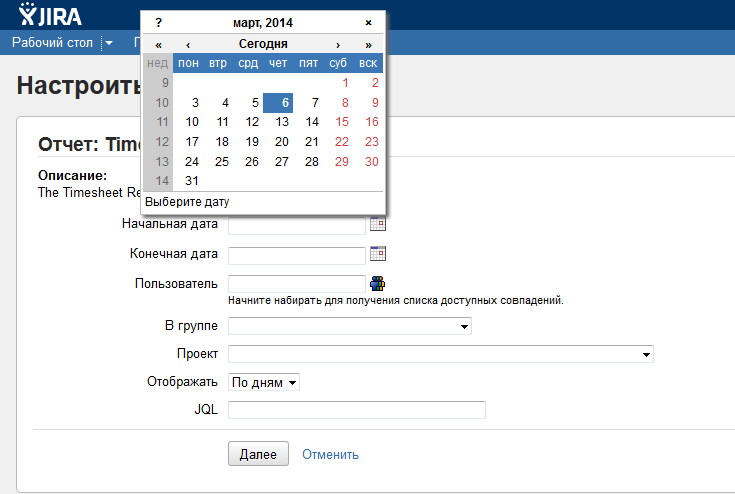
An example of a browser talking to a web server
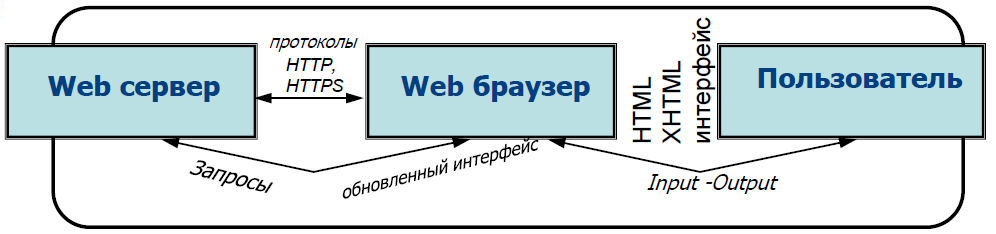
1. The user clicks a link, the browser sends a request to the server and waits for the response: Browser -> Server
2. The server runs a script, sends the result to the browser and finishes its work: Server -> Browser
3. The browser displays the page, “scanning” it for links that must be requested from the server (the <img src>, <script src> tags and so on) and sends the corresponding requests: Browser -> Server, Browser -> Server...
4. The user fills in a form and clicks a button: Browser -> Server
5. The server processes the form, writes the data to the database and sends the browser a Location header: Server -> Browser
6. The browser, having received this header, requests the specified page: Browser -> Server
7. The server handles the request... and so on
Facts about the web interface
- By the time the user sees the page in front of them and starts doing something with it, the Server has already finished its work!
- And the user is interacting not with the Server but with their own HTML page, which they received in the browser
- In most cases the result of a script running on the Server is plain text: the text of an HTML page, which is handed to the browser and displayed by it as ordinary HTML
- The client asked — the server delivered.
- This makes the answer clear to the question of whether you can find out exactly how many users are on a site right now. You can't. Because there is nobody “on the site”. They connect, request a page and disconnect.
A web application as a client-server application

C-3PO, I have a question for you. Can you answer it? What is needed to interact with a web application?
Of course I don't like to brag, but I do know the answer to that.
For interaction you need:
hosts (client and server);
interacting software; implemented interaction protocols.
Well, how was that?

Excellent work, C-3PO. Maybe you can also tell me what a web server is?

That's easy. A web server is a service that receives and processes HTTP requests.
By the way, very often a web server's functionality is extended until it becomes an application server.
Here, look at an example of applications bundled into a single service:

Me know about client-server interaction too!
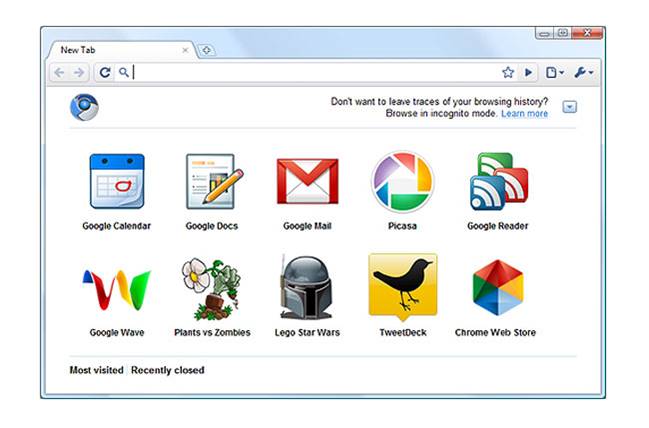
In most cases the client (the user agent) is a web browser, which makes requests to the server and thereby initiates the connection.
The main function of a browser:
- Rendering (visualization) of HTML code
- Auxiliary functions: Simpler navigation (back, forward, history, bookmarks); Data caching; A built-in email client; A built-in HTML editor and web inspector, etc.
And what do you know about rendering a web page?
Me know nothing at all about this...

And you were the one bragging!.. All right, I'll tell you how it all works. Let's go through the sequence of the browser's work when displaying a document:
- A DOM (Document Object Model) is built from the HTML document received from the server.
- The styles are loaded and parsed, and the CSSOM (CSS Object Model) is built.
- Based on the DOM and the CSSOM, the render tree is built: a set of render objects (Webkit uses the term “renderer” or “render object”, and Gecko uses “frame”). The render tree mirrors the structure of the DOM, but invisible elements (for example <head> or elements styled with display:none;) do not make it in. Also, each line of text is represented in the render tree as a separate renderer. Each render object contains its corresponding DOM object (or block of text) and the style calculated for that object. Put simply, the render tree describes the visual representation of the DOM.
- For each element of the render tree, its position on the page is calculated — this is layout. Browsers use the flow method, where in most cases a single pass is enough to place all the elements (tables need more passes).
- Finally, all of this goodness is drawn in the browser — painting.
As the user interacts with the page and scripts run, the page changes, which requires repeating some of the operations listed above.
Client-server application architecture
Client-server is a network architecture in which devices are either clients or servers
- The client is the machine that makes a request, and the server is the machine that responds to it
- Both terms (client and server) can be applied to physical devices as well as to software
- When testing, it is helpful to picture the configuration of the system the web application under test runs in, so that you can look into problems more effectively
- Understanding the system configuration makes your bug descriptions more valuable
Three-tier architecture of a client-server application
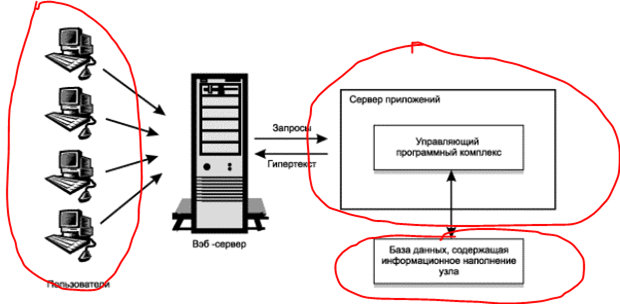
Three-tier architecture is a variant of client-server architecture in which the UI, business logic, data access and data storage are developed and run as independent modules, often on different platforms
The standard three-tier architecture of a content management system consists of a data store, an application server and a client side
Two-tier architecture of a client-server application
- Two-tier architecture means dropping the application server. In this case the data users request most often is stored not in a database but as ready-made static information pages
- This approach lets you do away with the chain “receive the user's request - query the database - build the requested page - deliver the built page to the user”
- This avoids overloading the server's hardware resources
and significantly reduces the load on the database - Obviously, this solution is not suitable for large corporate portals, which are meant to provide not only efficient information management but also a workplace for the company's employees.

The web browser as a thin client
- In computing, a thin client is a client computer in a network with client-server architecture that
offloads most information-processing tasks to the server - This is what sets a thin client apart from a thick client, which, on the contrary,
processes information independently of the server, using the latter mostly just to store data - A thin client usually has minimal hardware, sometimes without even a hard disk
- An example of a thin client is a computer with a browser
used to work with a web application - During a user session, the web browser interprets and
displays pages and acts as a universal thin client for any web application
Tired?
No time to rest, let's keep going
Structure of a web application, using a web portal as an example
- Content is controlled by content management systems (CMS)
- A CMS lets you manage the text and graphic content of a web application, giving the user convenient tools for storing, navigating and publishing information
- There are now plenty of ready-made website content management systems, including free ones
A set of services and applications (interactive training courses, knowledge assessment tools, information exchange tools, registration, etc.) as well as tools for personalization and
access control
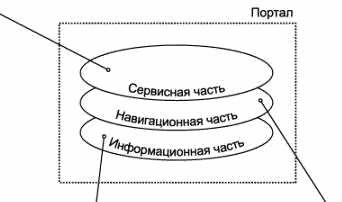
The portal's informational content.
A search engine,
a directory of links to resources
Client-side and server-side functionality
- Functionality is implemented on both the server side and
the client side - Functionality implemented on the client side
usually boils down to:
validating input data
and implementing extra interface features,
which is done using the scripting
capabilities built into HTML
- Besides scripting capabilities, there are other means of
extending functionality, such as ActiveX technology,
Macromedia Flash and others, which interact with the web
application using their own mechanisms
Technologies based on code execution in the client application
AJAX (Asynchronous JavaScripting and XML):
- Eliminates the need to reload a web page and lets you load and transform the information you need “on the fly”
- Not a standalone technology but an idea. AJAX is one of the
components of the DHTML concept
Example: the Facebook news feed
DHTML or Dynamic HTML:
This is a way of creating an interactive website using a combination of:
- the static markup language HTML
- the embedded scripting language JavaScript
- CSS (Cascading Style Sheets)
- DOM (Document Object Model)
It can be used, for example:
- to make navigation easier or to make forms interactive
- to move elements around the screen dynamically
- it can serve as a tool for creating browser-based video games
DHTML applications are entirely self-contained in the browser, with no server support
Example - http://despiration.wix.com/pechenka

Java applets:
- A non-standalone software component embedded in and executed inside the browser window: special Java applications, a reference to which is embedded in the web page
- Applets can run on all platforms for which Java
virtual machines exist
Because of endless security vulnerabilities in applets, the technology has all but died. Chrome no longer supports it.
Example - http://www.echoecho.com/freejamenus02.htm. Works only in Firefox
Macromedia Flash for animation
Adobe Flex
Flex is a large set of classes that extend the capabilities of Flash. The Flex framework includes localization support, application styling, modular application development, and built-in validators and text-field formatters, all the tools that developers of applications running online need.
Facts about Flex:
- A technology for building Rich Internet Applications
- A technology related to Flash and based on describing the interface in an XML dialect called MXML (a declarative interface description language used by the Adobe Flex platform)
- Besides the interface, it also lets you describe certain actions of the application
- Compiling Flex produces an swf file, which is run by Flash Player embedded in the browser
A good example - http://albert-elrom3.wix.com/qa-exam

All right, you have a few minutes to collect your thoughts, look out the window or feed the cat. Have a cookie. Congratulations, you've earned a legitimate break.

They say knitting gives the brain a really good rest
How Flex differs from Flash, and the advantages of Flex:
- Flex extends the basic capabilities of Flash by letting you describe the application interface in XML, which speeds up and simplifies the development of rich web applications
- Flex components for building charts are designed to be easy to use. Example: Google Analytics charts
- Flex 2, besides development speed, provides the full multimedia capabilities of the Flash Platform, including streaming video and audio, and supports pushing data to clients
- AJAX can work with Flex
JavaScript:
- A programming language interpreted by web browsers: scripting-language code such as typeScript and JavaScript embedded in an HTML page, capable of running Java applets and controls
- Originally used mostly to script the behavior of the
browser, it has since evolved and now powers full-fledged programs, on both the client side and the server side
An example of drawing a 3D space with JS http://maxogden.github.io/voxel-perlin-terrain/
ActiveX:
- This is code interpreted by the browser and executed in its own address space
- A web page can contain references to ActiveX controls, which are dynamically loaded libraries that run in the browser's address space
- Moreover, unlike Java applets, the execution of ActiveX controls is in general not subject to any restrictions on access to files and other resources of the operating system and the network
Outdated and rarely used
Technologies based on code execution on the web server
CGI (Common Gateway Interface) - a common gateway interface used to connect an external program to an application's web server. These are usually console applications that generate HTML code, which is passed to the browser. How it works:
- They are called by specifying their name (and parameters) in the URL
- It is important that web clients do not have to be browsers; they can be
any programs that use the HTTP protocol - The input is the content of the HTTP header or the request body,
depending on the protocol used - They can be code in scripting languages or an executable file
that can be created with almost any development tool
Time to figure out what HTTP is, don't you think?
HTTP (HyperText Transfer Protocol) is an application-layer data transfer protocol (originally for hypertext documents in HTML format, now used to transfer arbitrary data). HTTP is built on client-server technology, that is, it assumes there are consumers (clients) that initiate a connection and send a request, and providers (servers) that wait for connections to receive a request, perform the necessary actions and send back a message with the result.
Technologies based on code execution on the web server
Servlet
- A servlet is a CGI program written in Java, with better performance and the ability to keep state (sessions)
- A servlet is a program that extends the functionality of a web server by dynamically generating content and interacting with web clients using the request-response model
- Servlets are supported automatically by most web servers
- Servlets have become widespread in implementing web services
Web applications based on libraries :
for example, ISAPI or DSO
The problem of limited web application performance can be solved by building the application as libraries loaded into the web server's address space
Placing code executed by the web server inside a web page:
- ASP.NET technology: the ability to handle on the server the events that occur in the client application. ASP.NET is part of the .NET Framework and therefore gives access to all the capabilities of that platform
- JSP (Java Server Pages) technology: Java code (a servlet) is compiled once, on the first request to it, its methods are executed, and the results of those methods are placed into a data set sent to the browser
- PHP (Personal Home Pages) technology: the use of CGI applications that interpret scripting-language code embedded in an HTML page. It is easy to develop with and available for various platforms (more on this later)
Web services
Advantages of web services:
- They let software systems interact regardless of platform
- They are built on open standards and protocols
- Thanks to the use of XML, web services are easy to develop and debug
Disadvantages of web services:
- Lower performance and larger network traffic because of the use of text-based XML messages
Recently there has been a mass emergence of applications that use web services, including ones intended for end users
Such applications include, for example, the Microsoft Office
System family of applications, which use web services to access:
- data from dictionaries and encyclopedias,
- online translation systems,
- online product ordering services
Principles of construction and operation:
- The commands available for calling are described in the WSDL language
- The commands are actually invoked by sending SOAP messages to the address where the service is located (the standard HTTP protocol is used)
- To find a web service, there are global or local (internal) directories that support the standard UDDI discovery services (a UDDI directory)
Universal interface
for the discovery, description and
integration (Universal Description, Discovery, and Integration) of a web service
WSDL (Web Services Description
Language) - an XML-based language for describing the external interfaces of web services
(Simple Object Access Protocol) An XML-based messaging protocol
The dynamic web environment
When the value of an attribute of a particular environment does not stay constant during a procedure, the operating environment becomes dynamic
The web environment can rightfully be classed as a dynamic environment
Variable parameters of a dynamic web environment:
Resource-specific:
- Available RAM
- Disk space in use
Timing-specific:
- Network latency
- The order in which user transactions are performed
When a test case depends on exactly reproducing both a set of actions and the operating environment, and the environment cannot be reproduced (given its dynamic nature), the bug becomes irreproducible or hard to reproduce
Markup languages in the web environment
The HTML markup language (HyperText Markup Language) is a publishing language used in the web environment, the WWW (World Wide Web)
HTML is not a programming language in the broad sense: you cannot build a full-fledged application with it
HTML gives authors the means to:
- Publish electronic documents with headings, text, tables,
lists, photos, etc. - Retrieve electronic information with a mouse click on a
hypertext link - Design forms for carrying out transactions with remote services,
for use in searching for information, making reservations, ordering
products, etc. - Embed spreadsheets, video clips, sound clips and
other applications directly into documents
If the HTML topic interests you, or you need deeper knowledge for the place where you plan to work: the HTML reference and the HTML tutorial are here to help
Variants of markup languages

The SGML language is the most general and most complex of the meta-languages. It was widely used in printing and publishing, but its complexity kept it from wide adoption for everyday use. It became the progenitor of the meta-languages in use today
XML (eXtensible Markup Language) - a language that is a simplified version of SGML. XML does not limit us in creating our own markup elements
HTML is a well-defined
(by the W3C standard, the World Wide Web
Consortium) subset (sublanguage) of
SGML. It is a rigidly structured
markup language for web pages, yet syntactically a “soft” language: it permits many “liberties”, for example: missing closing tags, unquoted attribute values, case insensitivity, and so on
XHTML (eXtensible HyperText Markup
Language — the extensible hypertext markup language) is a syntactically “strict” subset of XML. XHTML is the same HTML, but it does not allow those syntactic “liberties”; for example, in XHTML all elements must be closed and boolean attributes are written out in full
The modern technology is HTML 5
HTML5 became a necessary, forced evolution of the language that web pages are written in. It was designed for writing web applications (the name for dynamic, interactive web pages where you can actually do something). Its predecessor, HTML4 (classic HTML), can only create static components such as images, tables, lists, text and so on, while modern media development calls for interactive components that can respond to user actions in real time.
- It can compete with plugins like Microsoft Silverlight and Adobe Flash, which were themselves created to plug the holes in the fossilized HTML4 standard.
- HTML5 implements many new syntax features. For example, the <video>, <audio> and <canvas> elements, as well as support for vector graphics and mathematical formulas. These innovations are designed to make it easier to create and manage graphics and multimedia objects on the web without needing third-party APIs and plugins.
Other languages in the web environment
DHTML (Dynamic HyperText Markup Language) is an extension of HTML that lets you create web pages with interactive elements such as:
- a moving background beneath the static content of the document
- moving objects, drop-down menus, buttons that light up
when the mouse cursor hovers over them, animation, scrolling marquees, etc.
JavaScript is a language for writing programs executed by the browser. It is the standard for Dynamic HTML. For security reasons, it cannot affect anything except the browser. It has no means of accessing the computer's disk, except for writing cookies
- JavaScript significantly extends the capabilities of a document created in this format
- A module written in JavaScript is integrated into an HTML file as a subroutine
- It is called for execution from the corresponding line of HTML code with a standard command. It can also exist as a separate file
PHP is a programming language designed specifically for building server-side applications
It has become very widespread thanks to its rich capabilities and ease of use
Since PHP is one of the most widespread languages for building and managing websites, this article examines in detail how this server-side web language works. Consider it extracurricular reading :')
The DTD schema (Document Type Declaration)
For full-fledged information exchange, we need to agree on, and record somewhere, exactly which markup elements will be used, with which properties and in what order. This is called a document schema, or a document type
declaration
- The DTD schema tells the validator which version of (X)HTML is used, and defines the document structure, the element types, their properties and the data types
- A DTD can be stored either in the document itself or in a separate file
- An HTML/XML document is linked to an external DTD schema by the special <!DOCTYPE > directive in the document header:

<!DOCTYPE HTML PUBLIC ―-//W3C//DTD HTML 4.0//EN‖―http://www.w3.org/TR/REC-html40/strict.dtd‖>
Right here, right now, open the page source and make sure the HTML document type is <!DOCTYPE html>
The concept of a URI
URI is a Uniform Resource Identifier
A uniform resource identifier is a very broad concept
There are no requirements on its format, only the requirement that it be unique
Examples: the IP address of a computer on a network - http://http://54.174.211.229/, the full address of this page - http://www.qaacademy.net/#!level9/g7m0g
The concepts of URL and URN

Every resource on the web has an address, which can be encoded as a Uniform Resource Locator, or URL
URL is a URI that, besides identifying a resource, also provides information about that resource's location
URL is a subset of URI with a strict format:
<protocol>://<host>/<path>/<document>#<fragment>
URLs usually consist of these parts:
- the scheme: the name of the mechanism used to access the resource (the protocol)
- the name of the machine on which the resource is located (the host)
- the name of the resource itself, given as a path
- the fragment identifier
So, we can consider that:
URI = URL or URI = URN or URI = URL + URN. A URI can indicate a resource's location (URL), its name (URN), or both. That is, URL and URN are special cases of URI.
Nothing beats a concrete example:
URI = http://www.qaacademy.net/#!blank-4/mcjbf
URL = http://www.qaacademy.net
URN = #!blank-4/mcjbf
HTTP/HTTPS protocols. The concept of a port

HTTP (HyperText Transfer Protocol ) is the protocol for transferring hypertext
Messages are exchanged according to the usual pattern:
- Request
- Response
HTTPS is an extension of HTTP that supports encryption. Unlike HTTP (standard port: 80), HTTPS uses TCP port 443 by default
A port is the number of a program on the server (used to tell apart the programs running on the same host). Port numbers below 1024 are reserved (the standard maps the most common services to certain numbers), while numbers from 1025 to ~65000 are free to use
This gets asked in job interviews
Ways a browser talks to a server
In fact, the HTTP protocol offers only a few ways to communicate.
A browser can send information to a server in the following ways:
- GET - data is passed in the address bar, for example when the user clicks a link
- POST - when the user clicks a button in a form
- Cookie - if the server has set a cookie and it has not expired, the browser sends it with every request to the server
- HTTP authentication - if the server has requested HTTP authorization, the browser sends the entered login and password with every request
HTTP request syntax
The standard scheme of an HTTP request:
<method> <URI> <version>
<set of headers>
<blank line>
<data sent to the server>
For example:
GET /index.html HTTP/1.0
User-Agent: Mozilla/4.05 (WinNT; 1)
Accept: image/gif, image/x-xbitmap,
image/jpeg, image/pjpeg, */*
The main HTTP request methods:
GET, POST, HEAD

The GET and HEAD request methods
GET
Requests information located on the server at the specified URL
The body of a GET request is always empty
Example:
GET /cgi-bin/birthday.pl?month=august&date=24 HTTP/1.0
HEAD
Similar to the GET method, except that the server's response has no body. A HEAD request is usually used to retrieve metadata, to check whether a resource exists (URL validation), and to find out whether it has changed since the last time it was accessed.
Uses of the request:
- the document's modification time
- the document's size
- the document's type
POST request methods
POST
The POST method lets you send data to the server in the client's request
The data sent to the server is in the body of the client's request
URL encoding is used as the encoding scheme with the POST method
Example:
POST /cgi-bin/birthday.pl HTTP/1.0
User-Agent; Mozilla/4.05 (WinNT; 1)
Accept: image/gif, iinage/x-xbj.tmap, image/jpeg, J.mage/pjpeg, */*
Host: www.ora.com
Content-type: application/x-www-form-ur.lencoded
Content-Length: 20
month=august&date=24
Other HTTP request methods
LINK
Associates header information with a document on the server
UNLINK
Removes the association between header information and a document on the server
PUT
Places the body of the request at the specified URI
DELETE
Deletes the data located on the server at the given URI
OPTIONS
Requests information about the server's communication options.
To request data about the server as a whole, instead of the URI
of the request, use the * character
TRACE
Requires the body of the request to be returned
unchanged. Used for debugging
Server responses
The server responds to a client's request as follows:
The first part of the server's response is the status line, which contains three fields: the HTTP version, the status code and a description:
HTTP/1.0 200 OK
After the status line, the server sends the client information headers:
Date: Fri, 10 Jan 1998 08:17:58 GMT
Server: Apache/1.2.6
Last-modified: Mon, 12 Jun 1997 21:53:08 GMT
Content-type: text/html
Content-length: 2482
<blank line>
If the client's request is successful, the requested data is sent
HTTP server response codes
Code range
Meaning of the response
100-199
Informational
200-299
The client's request succeeded
300-399
The client's request was redirected, further action is needed
400-499
The client's request is incomplete
500-599
Server errors
Cookies in HTTP
Cookie
A small piece of information that the server passes to the client
The client (browser) stores this information and sends it back to the server with every request as part of the HTTP header
Setting a cookie:
HTTP header
Set-Cookie: NAME=value; EXPIRES=date; DOMAIN=domain_name; PATH=path;
SECURE
HTML
<META HTTP-EQUIV="Set-Cookie"
CONTENT="NAME=value;
EXPIRES=date;
DOMAIN=domain_name;
PATH=path;
SECURE―>
Cookie setting parameters:
- expires=DATE
The cookie's storage time: a date in the format Wdy, DD-Mon-YYYY HH:MM:SS
GMT, after which the cookie expires. If this attribute is not specified, the cookie is kept for the duration of one session, until the browser is closed
- domain=DOMAIN_NAME
The domain for which the cookie value is valid. By default,
the domain name of the server that set the
cookie value is used
- path=PATH
This attribute sets the subset of documents for which
the cookie value is valid
- secure
If this flag is set, the cookie information is sent only over HTTPS (HTTP using SSL). If the flag is not specified, the information is sent the usual way
Rules for working with cookies
If a cookie takes a new value while the browser already holds a cookie with the same NAME, domain and path, the old value is replaced by the new one. In all other cases new cookies are added.
Using expires does not guarantee that a cookie will be kept for the specified period of time, since the client (browser) may delete the entry because of a lack of allocated space or some other limits.
The client (browser) has the following limits:
- up to 300 cookie values can be stored in total
- each cookie cannot exceed 4 KB
- up to 20 cookie values can be stored per server or domain
Video guide to working with cookies

Authentication in HTTP
Types of authentication:
- None (no authentication)
- HTTP basic authentication (the basic authentication mechanism built into HTTP)
- Form-based authentication (authentication implemented by a form)
- Client-certificate authentication (authentication based on client certificates)
- Digest authentication (authentication with hashed credentials)
Authentication headers:
- WWW-Authenticate:Basic realm=―Protected Area‖ (when the browser receives this header, it shows an authentication window)
- HTTP/1.0 401 Unauthorized (a page with a message about failed authorization is displayed)
- HTTP/1.0 403 Forbidden (a page with a message that it is impossible to get access to the page is displayed)
Specifics of gathering requirements for web applications
Classification of requirements for web applications:
- Functional: define the functionality of the system that lets
users accomplish their tasks within their business processes
- Non-functional: describe the characteristics of the application that matter to the user when working with the system:
- Application reliability requirements
- Application performance requirements
- Security requirements
- Scalability requirements
- As non-functional requirements for web applications, one can
consider the web standard of the W3C, the World Wide Web Consortium:

Non-functional requirements for a web application:
Application reliability requirements:
Determined by the operating conditions of the application (server parameters, the maximum number of application users) and by the acceptable quality indicators of the system under those conditions (the time to process a user's request to the system, the number of system failures)
Application performance requirements:
Performance is defined as the average time it takes to process a user's request to the system. The maximum acceptable response time for web applications is considered to be 5 seconds
Web application security requirements:
- Separation of access rights to the functions and data of each component of the web application
- Control of the access level of components and/or users
- Authorization and verification of users
Scalability requirements :
This is the ability of a system to increase its performance under higher load and as resources are added. For the user of a scalable web application, the moment when the load increases (for example, several more users access the application at the same time), and the moment when the application's configuration changes (for example, an additional data-processing component is added), should go unnoticed (that is, the system's response time to user requests should not change noticeably)
Risk management in the web environment
Project management under risk is a process that helps determine how the occurrence of particular risks related to the web environment will affect the project
Working with risks means identifying, analyzing, planning for and tracking them. This process should be addressed even before work on the project begins
The infrastructure and the methods of transmitting information always carry a certain risk, which is important to take into account when creating, testing and managing a web application
You need clear action plans to ensure the security of every item that carries a potential danger
Keep in mind possible updates, revisions, new versions, releases, and anything that may become outdated or cause increased danger
Causes of risks in the web environment
Risks in the web environment can be caused by:
- The operating system
- Hardware
- Software
- The browser
- The Internet service provider
- The server
- The client
- Login scenarios
- Error logging
- The Hypertext Transfer Protocol (HTTP)
- The Transmission Control Protocol/Internet Protocol (TCP/IP)
- Addresses (pointers) of information resources (URLs)
When you risk grabbing a carton of not-so-fresh kefir

An example of risk accounting and analysis
Subject of analysis
Risks
Links (HTML):
Broken links can keep your site from functioning properly. If links are not updated (are out of date), moving around the site can become problematic
Spelling (HTML)
If a site contains important information but it is poorly presented or unclear, visitors will not use your site
Meta tags (HTML)
If your site is not registered with search engines, people will not be able to find out that it exists
Titles (HTML)
If the title is ordinary and uninteresting, and the name of your resource tells visitors nothing, you will have difficulty promoting the site in search engines
Forms (Active elements)
If visitors get no response after filling in a form, they will consider your site untrustworthy and will not use it
Scripts (Active elements)
If the site has not been tested for errors specific to scripting languages (JavaScript and VBScript), visitors will get plenty of error messages and will stop using the site
XML (Active elements)
If documents are generated incorrectly, you may run into errors, which means the site will not make the best impression
Domain name (Site)
If the information contained in the domain name does not match reality, your site will not be able to attract much traffic
Ease of use (Site)
If the site is not easy to use, visitors will find other
alternative sites on the Web
Performance (Site)
If you do not handle the elements of the network infrastructure properly, you will run into problems when deploying the site and setting up hosting
Source control (Site)
Quality can be guaranteed only if you understand how forms, scripts, databases and any sources from which the site requests information are used
Server log files (WWW)
Use it to get rid of malfunctions, preserve the integrity of the site and prevent interruptions in its operation
Web standards
An application/site built to web standards means following the standards (HTML, XHTML, XML, CSS, XSLT, DOM, MathML, SVG, etc.) and proven best practices:
- valid code
- accessible code
- semantically correct code
- friendly URLs
For example, http://www.qaacademy.net/#!level9/g7m0g, is not a friendly URL at all; a friendly one would be http://www.qaacademy.net/level9
In other words, an application/site built to standards should ideally be:
- Well structured. The whole HTML document should have a clear hierarchy, and every logical block should be wrapped in div tags
- Clean (with valid code). While working with a site you must keep checking the console: errors thrown to the console are failures in the program, and therefore bugs
- CSS-based. All parameters of color, font, spacing and so on should be described in the component's style
- Search-engine friendly (SEO). SEO is a separate big topic that has nothing to do with testing. But we are interested only in its functional aspects. As testers, we check whether the version of the site for robots (the SEO version) opens when the parameter ?_escaped_fragment_= is added to the URL. The SEO version has no styles, is not meant for users and contains only the site's key search phrases and images Is there a sitemap for the search engine to index the site? Is there a robots.txt file that tells search bots how to index the site?
Below are recommendations for testing web applications using the web standards checklist method
Recommendations for using the web standards checklist
Usage:
It can be applied, supplemented and extended to fit the specifics of a particular web application
For example: do the pages declare the correct Doctype (DTD)?
- The declaration must be present at the beginning of every web page
- Markup and CSS will not pass validation if the document has no Doctype
<!DOCTYPE html PUBLIC "-//W3C//DTD XHTML 1.0 Strict//EN"
"http://www.w3.org/TR/xhtml1/DTD/xhtml1-strict.dtd"> <html
xmlns="http://www.w3.org/1999/xhtml">
Do the pages specify a character encoding (charset)?
If the browser cannot determine the encoding of a web page on its own, visitors will see unreadable text on the screen
Content-Type: text/html; charset=utf-8
or
<meta http-equiv="Content-Type" content="text/html;charset=utf-8" >
How to work with the web inspector
The web inspector is the main tool of a web tester. With it you uncover many bugs and analyze all of them. After all, an obvious functional bug is often accompanied by a console error that helps you understand its cause. More about this in the video lesson.

Practice
To feel the knowledge of testing, you must use it in practice. Do all the tasks on the list for the website and send them to me. To complete this assignment you may need to watch the tutorial video above.
- Find out the document title of the site
- Find out the doc type
- Find out the site's encoding and google what kind of encoding it is
- Find out what the favicon (the browser tab icon) is, and give a link to the image
- Open the SEO version of the site
- Open the mobile version of the site
- Buy cookies right now! and find out the name of the font
- Find out the exact size of the cupcake icon
- Give the URL of an image from the cupcake gallery on the home page
- Find "cookieName" in the site's registration request (you need to register)
- Find out the product id when buying a cookie. Example: "id":"338211591"
- Find out the HTML color code of the button on the home page. Example color: #CA7D08.
- Find out the HTML color code of the site's background
- Measure the average load time of the site over 10 attempts using the Page Speed Monitor app