Level 11. A/B Testing and Experiments: Fundamentals and Applications
Level 11
A/B Testing

Let's try to find out what A/B testing is.
So, A/B testing (also known as split testing) is originally a marketing research method. The idea is that a control group of elements is compared with a set of test groups in which one or more parameters have been changed, in order to find out which of the changes improve the target metric. One example is studying how the color scheme, placement, and size of interface elements affect a website's conversion rate.

Oh, come on, don't be scared. I'll explain everything to you in detail right now.
How A/B Testing Works
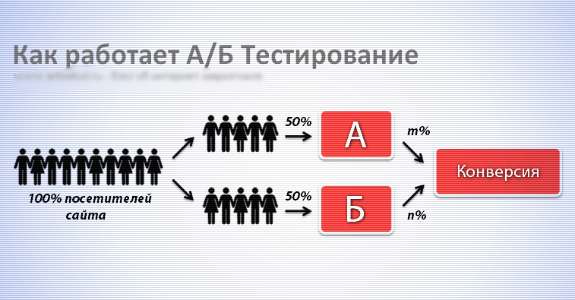
A/B testing (pronounced “ay-bee”) was originally invented by product managers to increase a project's conversion rate by letting the users themselves choose the optimal UI and functionality. For example, all users coming to a website are split into two focus groups (the percentage split can be anything, say 10% and 90%). In this case people vote with their wallets, because the functionality that survives is the one that brings in more profit, clicks, or usage. You'd think that if this interests managers, what does it have to do with testers?
In my company, 80% of the functionality ships under an a/b test or an experiment, and a tester needs to know how to deal with them.

Experiments
Experiments differ from standard comparative (A/B) testing and multivariate testing.
An experiment has only one new version, which is meant to replace the previous one.
Experiments have become widespread thanks to the safety they give developers. When critical vulnerabilities turn up in production (where was the tester?), it is much easier to shut down an experiment than to roll back a version. Experiments on functionality are the only salvation for big releases: it's the only way to slice the functionality into pieces, each of which can be switched off if necessary without touching the other new functionality. We'll look at them in more detail below.
An A/B Test Example
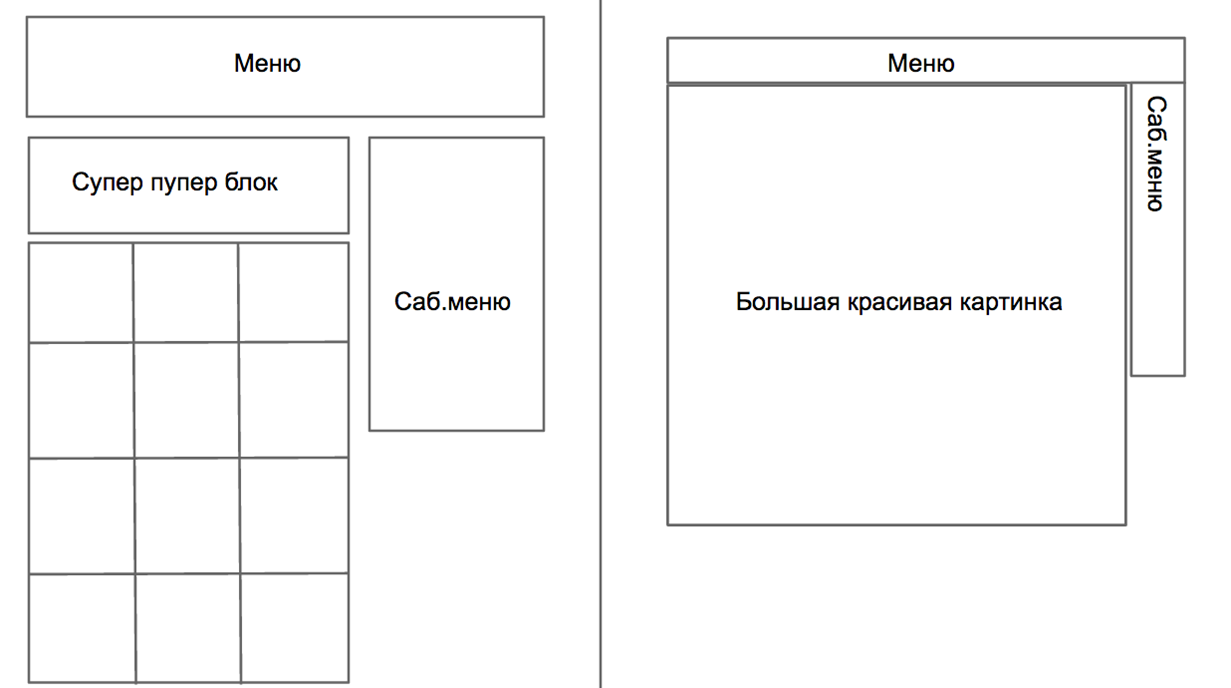

This is what version B looks like
This is what version A looks like
I told you it isn't hard at all if you move toward the goal step by step. Good work, tester!
A/B Testing

This knowledge you will need. Without it, the power of testing you will not feel, young tester...
A/B testing is a very effective marketing tool that lets you study a website's target audience closely: what motivates them to buy and, conversely, what puts them off.
That's why many product managers gladly use it, which in turn adds its own specifics to the work of developers and QA on these projects.
Let's imagine we're working on an online store. We have an idea for a new billing page, slightly modified. But we're not sure users will like it more than the current one.
So what should we do? If we simply replace the page with the new one, it might scare off some of the old customers who are already used to the existing one, and there's no guarantee users will like the new one anyway. So to test it (that is, to check whether users really like the new page and whether it will bring the store more profit), we simply roll out both versions at the same time. Let 50% of randomly selected users see the old billing page, while the other 50% are redirected to the new one. The numbers and the way the split is triggered are just examples.
Testing the Pages
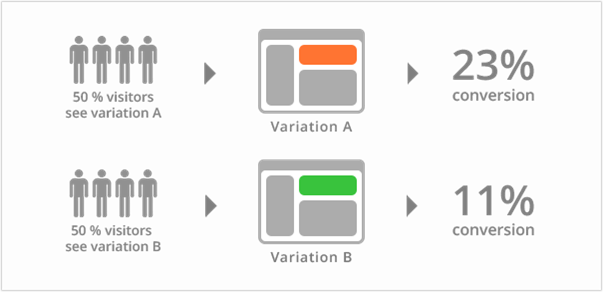
While the a/b test for the billing page was running, it turned out that the conversion rate of successful purchases was 23% for design variant “A”, compared with only 11% for variant “B”. Even a droid can see that design A will be opened up to all users.
Multivariate Testing
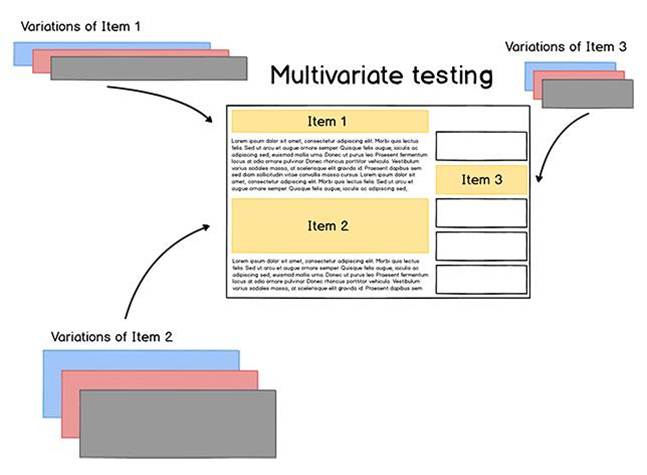
Quite often an A/B test is not limited to two different design or behavior models. In that case the states of the functionality can be described as a/b/n... In addition, different components on the same page can be tested. This kind of testing is called multivariate. It differs from a/b tests in having a larger number of variations and components.
A multivariate test can involve up to ten full versions of a single page. Each of them gets its own URL, or the experiment is switched on by some parameter (usually a URL parameter or a cookie entry)
The Life Cycle of an A/B Test
Hypothesis
“If we add an option to search for eco-hotels, conversion will grow”
We clarify and justify the expected improvement
“The number of people who want to book a room in an eco-hotel has grown by 10% over the last six months. If we make it easier to find such hotels on our site, this may increase the number of bookings by 2-7%”
We prepare two or three versions of the same form
“Version 1: the current state of the search form – without this option;
Version 2: the option as a checkbox;
Version 3: a link to the list of all eco-hotels”
We release
We analyze the results
“The analytics department says that the total number of hotel bookings rose by 5%, precisely thanks to a surge in eco-hotel room sales”
We keep the version that brought in more users/money
“Version B – the checkbox option – goes live at 100%”
How Do You Test Multivariate Functionality?
- Functional testing of ALL the new versions
- Regression testing – everything that may be affected by the a\b test (test enabled)
- When the test is turned off, everything works normally (the rollback case)
- Testing the a/b test report (optional)
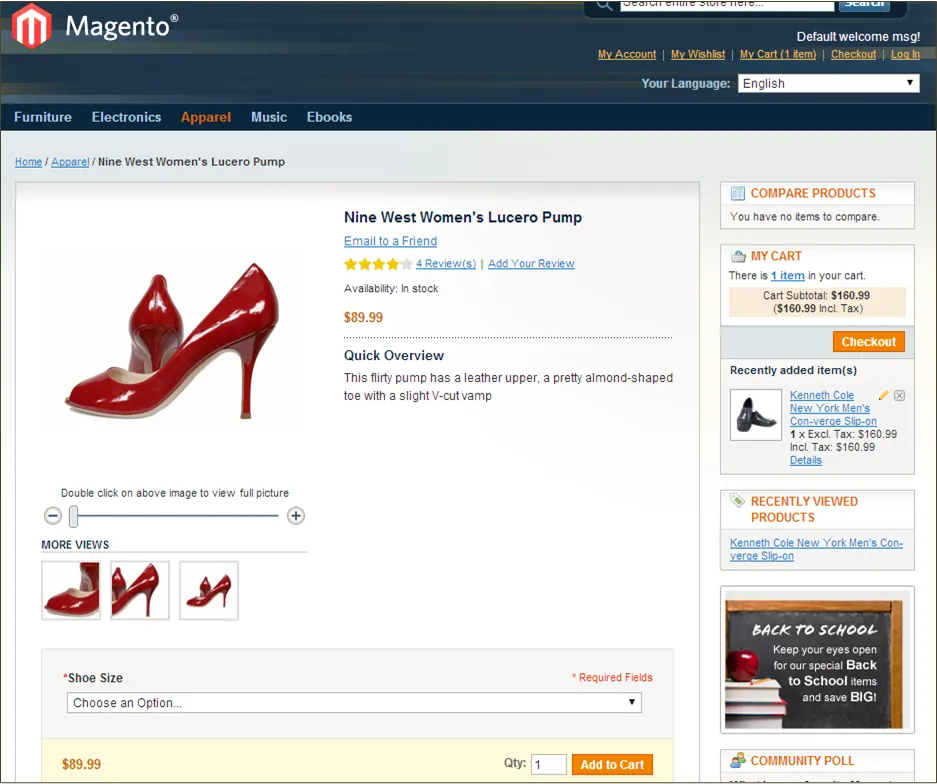
Examples of a/b testing in an online store
The blocks highlighted in red are the ones under a/b testing. Different users see different designs of these blocks
A/B Test Triggers
- First registration
- The user's country (IP address)
- Browser language
- A % of all registered, logged-in, or visiting users, etc.
- Other business parameters (for example, a paid app not being installed)
Testing:
- Delete/edit cookies
- Use VPN
- Change the language
- Trial and error, educated poking around, a script

There are still many questions ahead that we need to sort out. I'm sure every self-respecting tester should know the answers. And you do want to become one, don't you?
Where is the information about an a/b test stored?
- A cookie entry
- Backoffice parameters
- A URL parameter
- The server DB (anywhere on the server side)
What to test?
- Whether the developed versions meet the requirements
- Whether the traffic percentage split is set correctly
- Whether the versions are tracked
- Whether the user sees only one version of an element within a single session
No need to
- Test all combinations of versions of different elements on a page

Why Do You Need A/B Testing?

To get good results you need practice, practice, and more practice. And of course, you need to know what you're working with. Aren't you curious why you need a/b testing?
- A/B tests are used in almost all modern companies
- Code experiments create a flexible and safe development methodology.
- Unlike a release, an experiment can be switched off almost instantly if a deploy goes wrong
- With experiments you can vary the functionality for different target groups
What are the downsides?
- With so many experiments around, you'll have to sweat before you figure out exactly which one conflicts with your new feature
- If you forgot to switch an a/b test to 100%, or it went live in parallel with your feature, there may be some unpleasant surprises
Experiments
Experiments are almost the same thing as A/B tests, except that the current functionality plays the role of A and the new functionality plays the role of B.
What is it for?
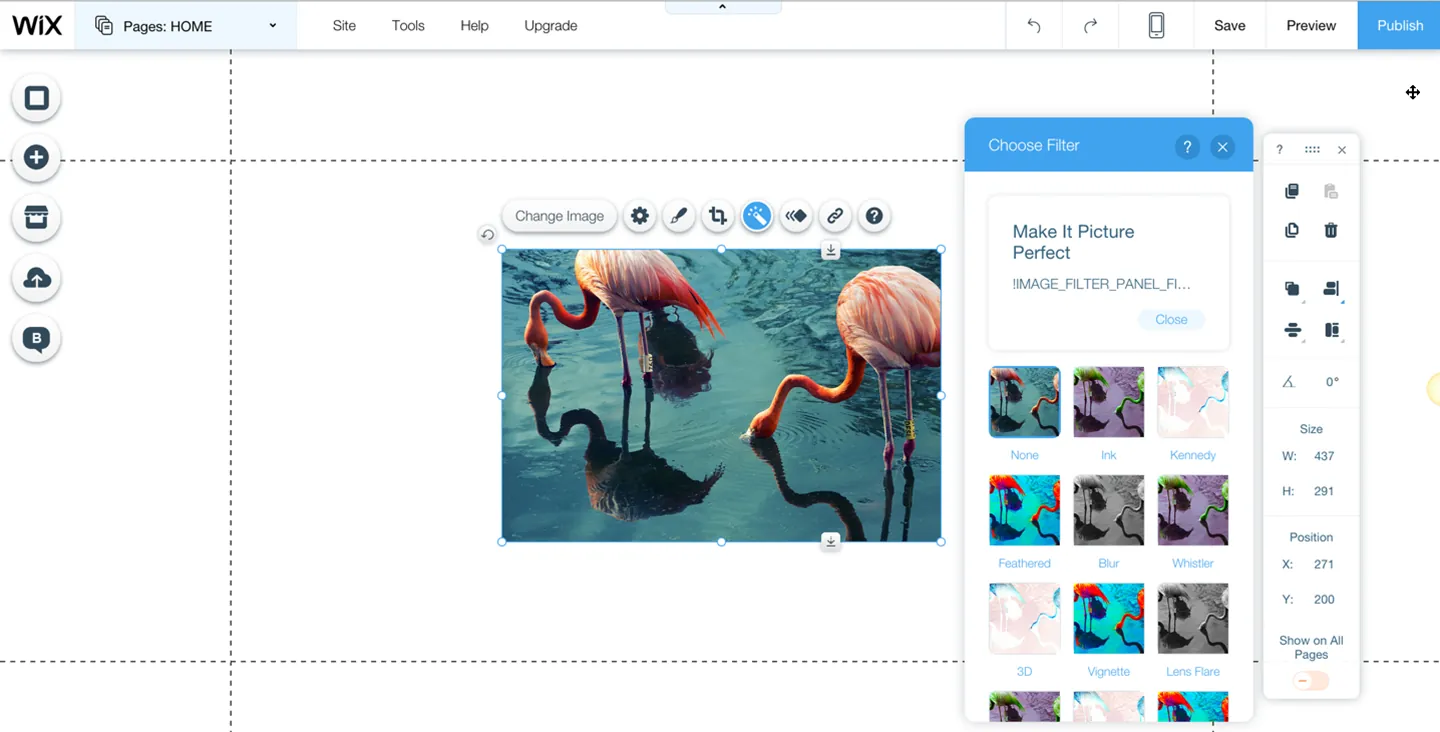
To try out and test new functionality with minimal impact on active users. An experiment is usually switched on by an extra parameter in the web page load request:
http://editor.wix.com/html/editor/web/renderer/edit/c781446a-0938-46b7-9b96-61eefcb14974?metaSiteId=a79b49ad-a941-49fe-9b89-6fb3d712dead&editorSessionId=53CA23B0-A49D-4AEC-A739-413D52C61758&experiments=imageFilters
When this parameter is added, the code-unlocking mechanism kicks in and you see the new functionality.
Experiments depend on the version. Of course, the new code is loaded together with the new version, but it is activated only once this experiment is switched on.
Example:
Experiment off
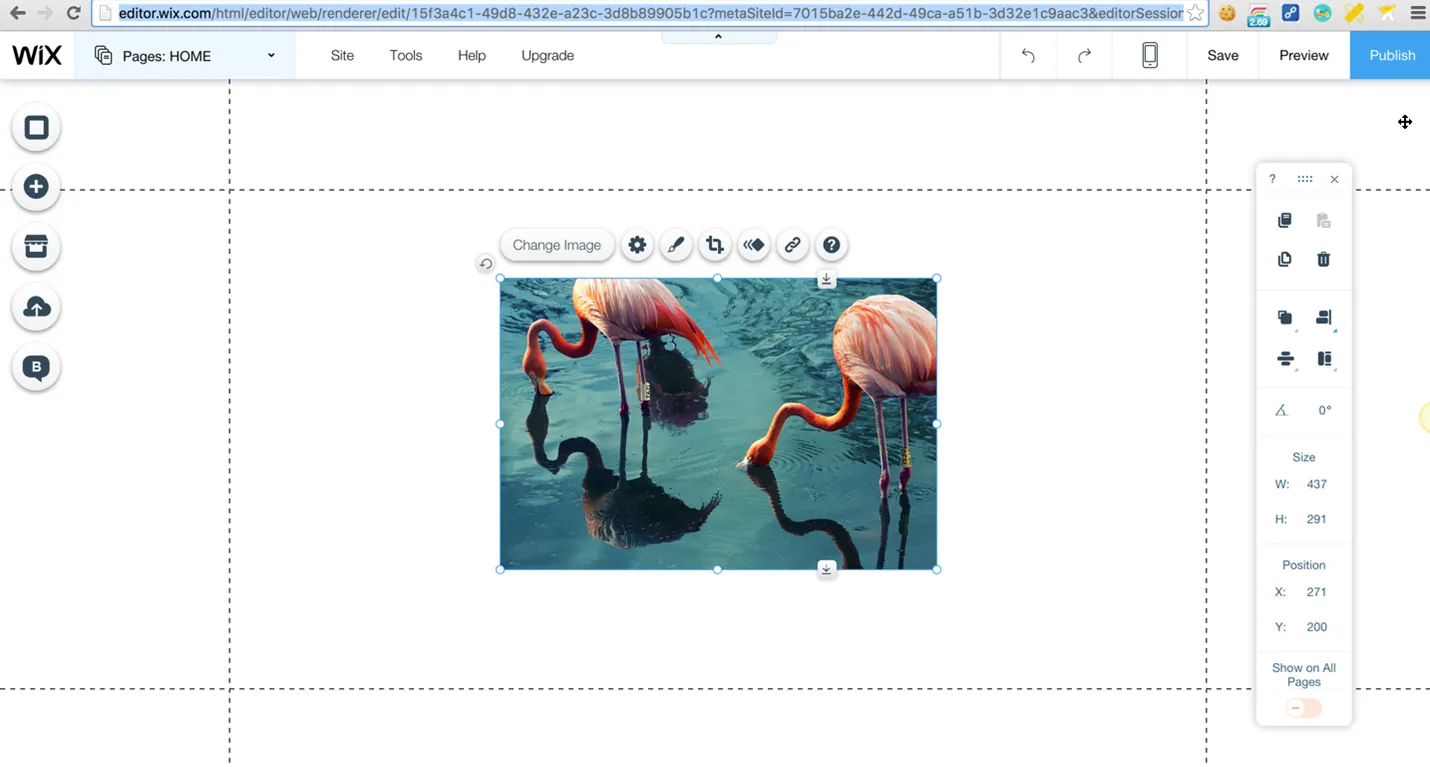
Experiment on
How to Test?
- Make sure your experiment is really switched on. The effect isn't always clearly visible; sometimes you have to dig through the code
- Test the new functionality (requirements compliance, integration testing, etc.)
- Regression testing of the old functionality with the experiment switched on
- Interaction of all the current experiments. Switch on all the active experiments and the ones about to launch, and run regression testing.
- The ability to switch the experiment off without critical consequences (users won't notice anything)
Surprises

It is important to keep tests and versioned functionality static during regression testing, and to make sure that they are. Check seven times which version you are dealing with before you start testing. It is really frustrating to realize you accidentally tested version “A” twice instead of “A” and then “B”. Or ran regression on the functionality without the experiment switched off. It is not enough to simply set the switching trigger; it is important to see with your own eyes that it works (you see the old or the new functionality, or you know for certain that the necessary files were loaded if the experiment isn't visible)
A possible solution – use a versioning “kill switch” for the functionality, that is, run testing with only one experiment switched on: a/b tests > all to B
What to Automate?
- Control versions
- The version that “won” and is switched on at 100%
- Or all the versions, if they are long-lived

Great news, Padawan, we're throwing a party soon! And to mark the occasion, Master Obi-Wan has decided to open his own online bar. To find out which menu the visitors like better, we launched an a/b test with different designs for placing online orders.
Enjoy some strong drinks:
Description: each of the bars has online ordering with delivery. The bars should be identical and differ only in the design of the order flow.
Your task:
1. Find the differences in functionality and describe them in free form
2. Find bugs on each of the sites. The test report must be filled out according to the level 5 standard, and be sure to specify the version.
3. Write a bug report, as well as a checklist of the tests you ran (just write down what to test to reveal the differences; there's no need to describe the whole site)
We're waiting for your wonderful bugs! Send them to us soon through the form.
Almost everything about A/B testing you have learned. Here is a test to prove it to yourself. High time it is to face the dark forces. Move on to level 12 after the test, you will.