Level 16. Test Automation
Level 16
Test Automation
What is automation? Probably when the robot works and the human relaxes


The robot runs the test
The robot analyzes the result
The robot documents the errors
The human relaxes!

That's how I laugh whenever someone thinks that about automated tests! In reality, automated tests mean hard work to write, maintain and support. All of the above is actually done by the tester. Besides having to create the automated tests (based on the test cases you've written), you have to run them, analyze the results, and then document them too.
Goals of Automation
The main goals of test automation are:
- A significant reduction in the time spent on repetitive testing operations (regression testing)
- High-quality performance testing of web applications. Automated tests are far more reliable than manual checks and completely eliminate the pesticide paradox.
- The only possible way to do load testing.
- Testing optimization: redistributing the testing department's resources (automation lets the same team significantly increase the volume of testing).
Criteria for Successful Automation on a Project
If these criteria are met, automated tests will be really useful on your project:
- A long-term project. You know the project will be developed for a year or more, which means there will be a lot of regression testing.
- A formalized project (a test plan and sets of test cases exist)
- A need for a large number of iterations (repeating the cases from release to release)
Test Script
A test script is a logically complete piece of code, saved in a separate file, that is the programmatic implementation of a specific test case. It is important to understand that a test script is the embodiment of a test scenario in some programming or automation environment.
Ways to create a test script:
1) Working through a "test driver" – with playback/record tools such as Selenium IDE, Katalon Studio, Testim IO and others
2) Building scenarios from scratch with a high-level programming language and a test framework

Robots are always ready to help you. Just teach us, program us, and we'll do everything you ask!
The main challenges of software test automation:
- The need to constantly update test scripts
In web testing, every time developers change selectors (element class names in the DOM), the tests have to be fixed, even if the changes are not visible in the interface. Manual scenarios don't have this problem.
- Interpreting and analyzing test results
As you've already figured out from the previous practical assignment, analyzing test results is a separate job in itself, and it usually takes a team up to a whole day when running a regression cycle.
- Automation works only in a well-formalized environment.
Your project needs quality documentation to support the automated tests.
Key properties an automated testing system should have
- A dedicated test repository that supports multi-user work and version control of the changes made, since tests change frequently (a version control system such as Git or SVN)
- A central repository of test resources.
- A system for managing test resources.
- A system for standalone functional testing
- Tools for building reports and quantitatively assessing the quality of the current product version.
- A system for distributing the testing process.
Test Automation Lab
An automation lab is a configured system for running tests and analyzing their results. Building it takes the joint effort of a system administrator, an automation systems architect, test designers, and automation engineers (developers of automated scenarios). And today you'll play the role of automated scenario designers. Let's look at how a continuous integration and test execution system works.
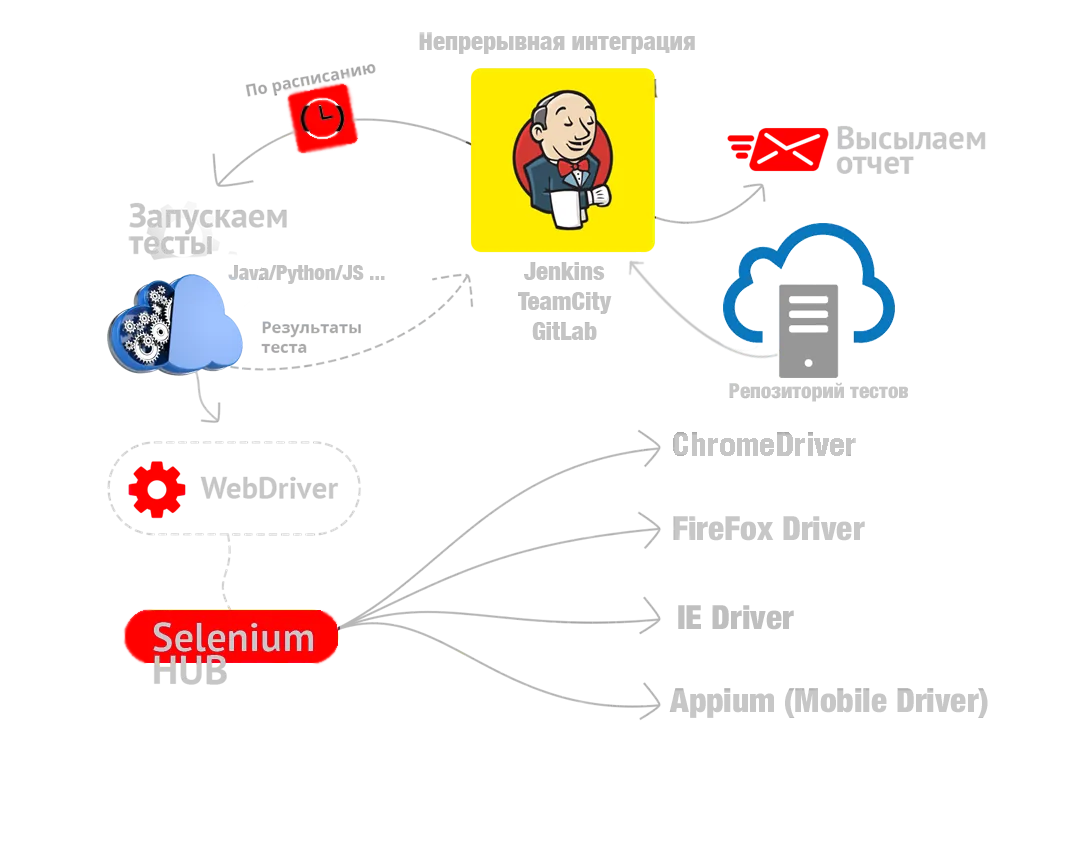

Let's walk through the process of launching automated tests and getting their results. This diagram shows the classic approach to the automation process. Let's make it clear right away that only test automation architects can set up and manage a system like this; we will just get familiar with the principles of how it works. The components are described in the same order in which the lab is built.
1. WebDriver is a framework for web automation. It provides methods for interacting with a web page in popular programming languages such as Java/Python/C#... which let you perform actions the way a user would: selecting an element, clicking it, reading its properties, and so on.
2. Test scripts. These are small programs that implement an automated test case in a high-level programming language. They use the methods of the WebDriver framework and implement the test steps as commands. The structure of the site under test is described separately in the Page Object format and plugged into the test.
Example of implementing a test case step:
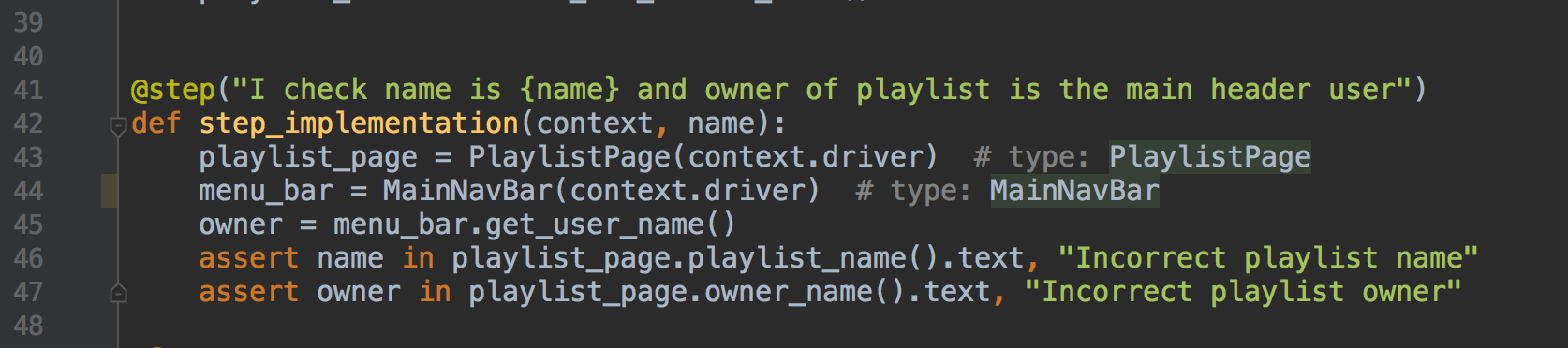
This example is written in Python. driver is an instance of a WebDriver implemented in a specific driver, for example ChromeDriver, PlaylistPage is a Page Object, and the assert command performs the check.

3. In this architecture the hub is represented by Selenium Grid, a cluster made up of several Selenium servers. It is designed to build a distributed network that lets you run many browsers in parallel on a large number of machines. At the moment Selenium Grid is starting to become outdated, and parallelization can be handled by the continuous integration system.
Selenium Grid has a star topology, meaning it includes a dedicated server called the "hub" or "switch", while the other servers are called "nodes". The network can be heterogeneous, meaning the hub and the nodes can run different operating systems and have different browsers installed. One of Selenium Grid's jobs is to pick a suitable node when the requirements for a browser are specified at startup: browser type, version, operating system, processor architecture and a number of other attributes.
Selenium Grid used to be a standalone product. Now there is physically just one product, Selenium Server, but it has several launch modes: it can run as a standalone server, as the hub of a cluster, or as a node of a cluster, depending on the startup parameters.
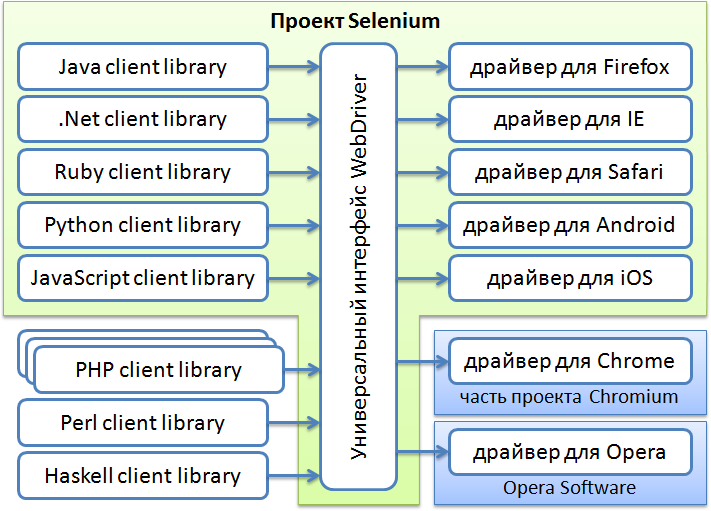
4. As for specific implementations of the WebDriver framework, they exist for all the major browsers. A driver is a piece of code that knows how to control its browser using the browser's native JavaScript commands. Some of them are developed by the Selenium team, and some by the browser makers themselves, such as Google and Opera (it's still alive! Even though its time has passed).
5. Repository and version control system. This is the universal code storage now used for all software development projects. Besides providing multi-user access, a version control system lets you keep several versions of the same document, roll back to earlier versions when needed, see who made a given change and when, and much more. The most popular VCS today is GIT
6. The last and key element of the automation lab is the continuous integration system, which ties all the previous components together and provides remote, continuous test execution. It automates the part of the software development process that doesn't require human involvement, providing continuous integration functions. It runs inside a servlet container, for example Apache Tomcat. It supports version control systems tools, including CVS, Git, and others. It can build projects using Apache Ant and Apache Maven, as well as run arbitrary shell scripts and Windows batch files. Builds and test runs can be triggered in different ways, for example after a version is pushed, on a schedule, on a request to a specific URL, or after another build in the queue finishes.
Performance Testing Lab
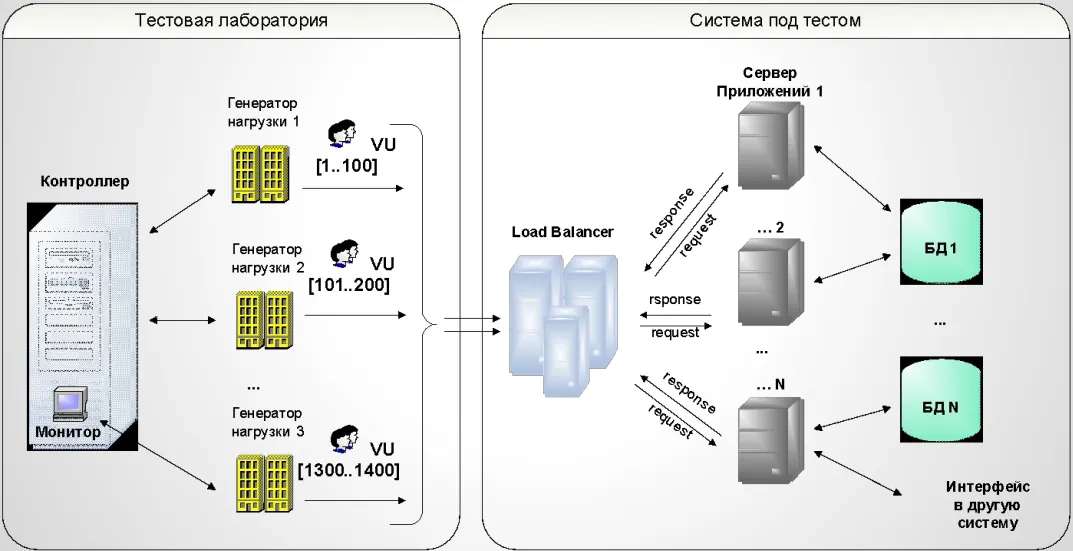
It's important to understand that load testing (we'll study it only in the next level) belongs exclusively to automated testing, as a separate sub-type of its own. After all, it's hard to even imagine putting load on a server by manually sending hundreds of requests a minute. For that kind of fun you would have to hire a thousand or two extras to use the target resource. Instead, one tester emulates the behavior of a single user (records a test script) and then uses that automated test to simulate load. The script is then used by load generator machines to test how the server behaves in a given mode. A load testing lab looks like this:
Key Aspects
- Automation is always closely tied to manual testing
- It makes sense to automate only functionality that has been well tested manually, because a manual test is more intelligent
- Ideally, every script should be based on a manual test case with the proper level of detail
- Everything that looks worth automating should be automated. This applies first of all to regression tests
Levels of Automated Tests
- Unit tests - written by programmers to cover their own code with tests. They make sure that selected functions (units) return the correct results
- Integration tests - written by programmers or testers. They test how units interact with each other. They can use databases and interfaces.
- E2E tests (End to End - from start to finish) - test all the functionality as a whole, the way the user sees it. They use the GUI to perform operations.
Unit Tests vs. E2E Tests
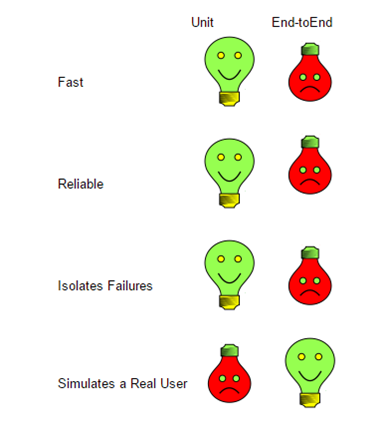
1. Although end-to-end tests do the best job of simulating real user scenarios, this advantage becomes less obvious once you look at all the downsides that come with the feedback you get after the tests have run.
2. Unit tests also have one significant drawback: even if the units work well in isolation, you don't know how they interact or whether they work well together.
3. But even when you need to test how the modules of a program interact, you don't have to use E2E tests. You can use an integration test for that. An integration test covers a small group of units, often two, and checks their behavior as a whole, making sure they work together consistently and correctly.
The Test Pyramid
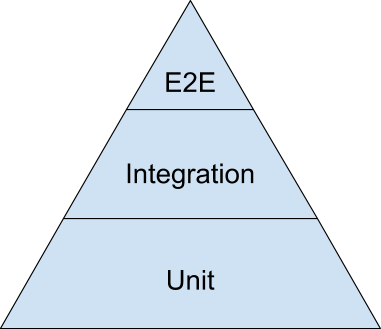
It's like a pyramid scheme, only cooler. This is Google's test pyramid, which they often recommend as a first approximation for distributing tests in a 70/20/10 ratio: 70% unit tests, 20% integration tests, and only 10% of all tests being E2E.
While reading all this super useful information about automated tests, I came up with some questions. Please help me sort them out. As always, the Master will give a hint in a minute.

1. What is test automation?
2. What types of automated testing are there?
3. What is best to automate?
4. How do the types of automated testing differ?
Practice: Creating Automated Tests
Today you'll learn to write automated tests! Yes, it's true. Believe it or not, after you finish this level, robots will obey you! And we'll be mastering an automation tool called Selenium IDE.
Selenium IDE is a helper for executing test cases. It belongs to the family of web script recorders that may include elements of programming. This tool is a plugin for Firefox that can record a tester's actions on a web page. Selenium IDE is the most basic program in the family of web testing frameworks. Its big brother, plain Selenium, is the most popular library for creating web automated tests in many programming languages. At the same time, Selenium IDE doesn't require a shred of programming knowledge, because testing is done using the application's reserved commands. Of course, this limits the tester's freedom of action, but for most routine tests it's more than enough. Selenium IDE is:
- The simplest tool for recording/playing back automated tests;
- Easy to pick up in a short time;
- Doesn't require special programming skills
- The first step in mastering test automation.

How to Install Selenium IDE
1) Open/install the latest version of the Mozilla Firefox browser
2) In Firefox, open the download page http://www.seleniumhq.org/download/ and find the link for downloading the IDE plugin, or use the direct link
4) Click the icon, and get to work!
How It Works
1) Launch the application;
2) Open the page to be tested;
3) Click the record button ;
4) Perform the necessary actions on the page (step by step from the test case);
5) Play back the resulting test ;
6) Save the test case.
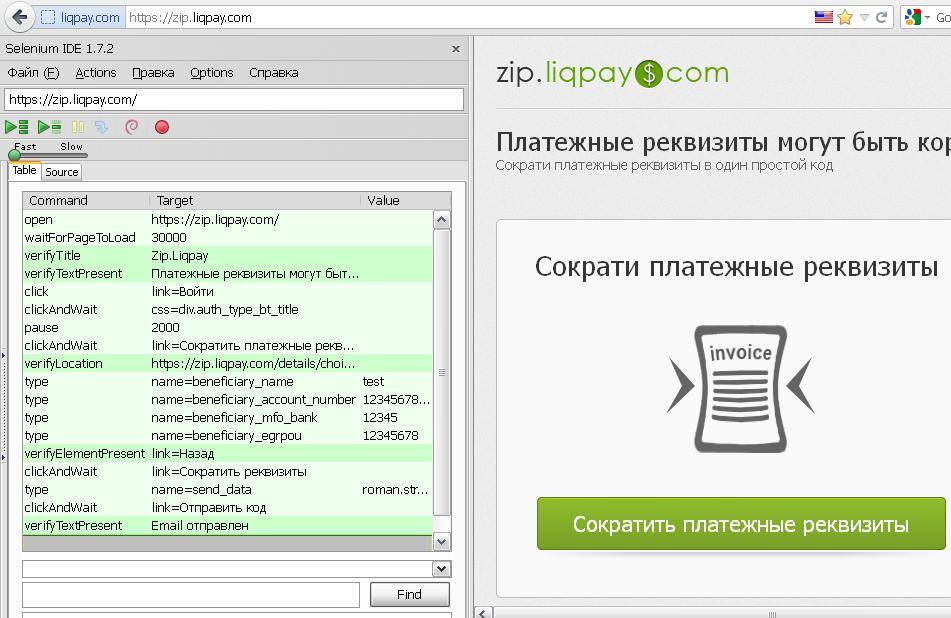
Example of a Simple Automated Test Case
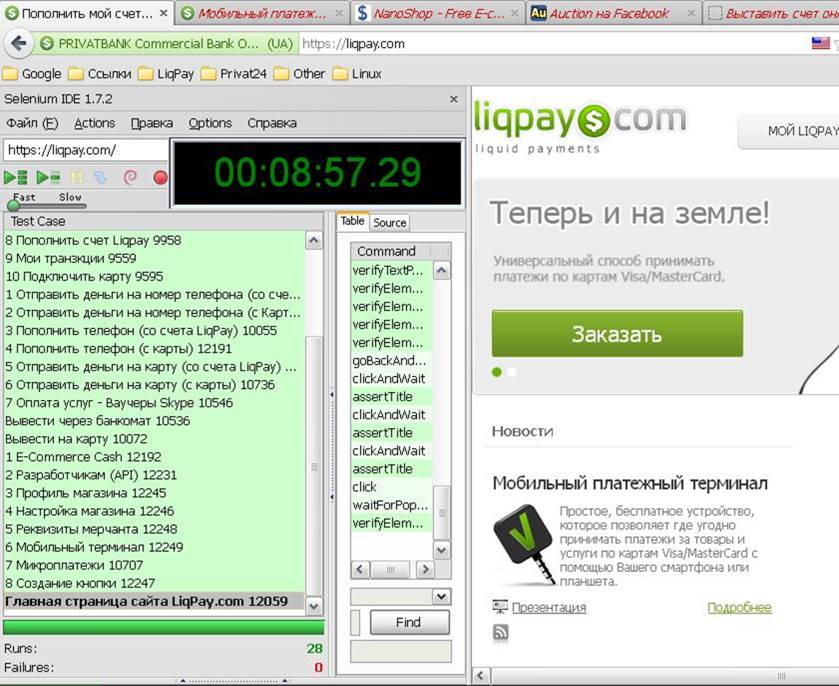
Result
Extending Functionality: Adding Logic
1) To extend the functionality of the IDE, you can plug in an additional custom module or create your own.
2) You can use JavaScript in tests;
This makes it possible to:
- use conditional statements (if) in tests.
- use unconditional jumps (go to).
- use loops.
- create and work with variables inside a test.
- harness the power of the JavaScript language.
To use logic in Selenium IDE, you need to know JavaScript

Selenium IDE Summary


Advantages
1) Open-source project;
2) Tests are quick to create;
3) The IDE is easy to work with;
4) Doesn't require programming knowledge;
5) Offers the minimum functionality needed to create automated tests;
6) The IDE builds locators itself (almost always correctly);
7) Export of a finished scenario to Selenium RC or WebDriver in a "real" programming language;
8) Doesn't require the browser window to be in focus;
Disadvantages
1) Firefox only;
2) Only "simple" tests;
3) Can't work with native windows;
4) Can't handle file uploads;
5) Works correctly only at medium and low speed;
6) Logic requires JavaScript
7) Tests are not long-lasting (for example, they break when the balance on a card changes)
8) Problems when working with iframes and pop-ups
Why WebDriver, or an Overview of Other Test Automation Tools

- WebDriver is a free project with broad support and full documentation in Russian. It is supported in 5 programming languages, plus you can plug in various frameworks, for example Thucydides.
- SilkTest 8.5 A paid project, a crack exists. All the documentation is in English, support is paid, and the only language is C++.
- IBM Rational. A paid project. Most of the documentation is in English, support is paid, and the only language is Java. Price: $2,600.00.
- TestComplete. A paid project. Cross-browser testing + application testing. (IE, Firefox, Chrome, Flash, Flex, AIR, Silverlight, Java, .NET compilers (Visual C#)) Price: $2,000.00
Selenium WebDriver
To move to Selenium WebDriver you need:
1) Knowledge of the basics of programming in one of these languages: Java, C#, Ruby, Python, Perl, PHP.
2) Knowledge of the main features and commands in Selenium WebDriver
3) Ready-made sets of test cases and their priorities.
4) A decision on what to automate first.
5) Time (a lot of time) to develop the automated tests.
6) You can export ready-made test cases from the IDE (better to rewrite them from scratch)
Selenium WebDriver Summary

Advantages
WebDriver has all the capabilities available in Selenium IDE.
1. Open-source project;
2. The full power and capabilities of the Java language.
3. Tests can be as complex as you like (limited only by the author's imagination).
4. Can upload files and analyze them using Java.
5. Can take screenshots.
6. Can execute JavaScript in the browser (useful for complex projects with Ajax)
7. The project is actively developed and supported.
8. Full-fledged testing in:
a. Internet Explorer (any version)
b. Mozilla Firefox (any version)
c. Google Chrome (any version)
d. Opera (any version)
Disadvantages
1. The library for the Safari browser is still in development.
2. Profile support exists only in the Firefox browser.
3. WebDriver still doesn't support native windows (Basic HTTP authentication).
4. WebDriver can't check design (layout); screenshot-based testing doesn't count :)
5. You need to know one of the languages: Java, C#, Ruby, Python, Perl, PHP
The Locator Problem and How Different Browsers Behave
1) Locators written for Firefox may not work in Chrome and Internet Explorer (both the element ids and the overall xpath can change)
2) By default, focus on an input field works differently in different browsers.
3) Firefox inserts text at the end, other browsers at the beginning.
4) If an element has no id or name set, the automated test crumbles at the slightest change, sometimes even one made in a completely different feature.
5) If an element has no id or name set, different browsers may produce different xpath and cssid values; as a result, cross-browser compatibility is lost and you have to write separate automated tests for every browser

The Difficulty of Working with Frames and Windows
When working with Selenium WebDriver, if a site's page is very complex, has a nested frame structure, or the site opens new windows, you need to be very careful. In such cases the most common error is Element not found, and it happens not because your locator is wrong, but because you're looking in the wrong frame or window.
// Reset frames, switch focus back to the page
driver.SwitchTo().DefaultContent();
// Switch to the frame you need
driver.SwitchTo().Frame("main");
Selenium IDE Tutorial Video
Selenium locators, or how to find the elements that commands are applied to
Locators are used to find the elements that commands act on. The list of Selenium locators is quite long:
- id – uses the element's id attribute (identifier)
- name – uses the element's name attribute
- identifier – uses the element's id attribute; if no element is found by id, the search falls back to the name attribute
- dom – used to find an element by a DOM expression, which must start with document.
- xpath – used to find an element by an XPath expression, which must start with //
- link – used to find links with the specified text.

Battle Tips from the Master
- To help you, I give you the basic Selenium IDE commands.
- If your automated test passes in step-by-step mode but fails when you run it, most likely the test is trying to act on an element that isn't available on the page yet. In that case, add the waitForElementPresent command plus the element's locator. It makes the test wait for the element for as many milliseconds as you specify in the Value field.
- If there is nothing to wait for, or waiting doesn't help, you can simply add a pause with the pause command, but keep in mind that these commands make the test much longer.
- Don't forget about checks! A test shouldn't just click through the whole path of the test case, it should also verify the expected results using the verify and assert commands.
- Leave comments between the blocks of your test so your intentions are clear.
- Assignment acceptance criteria:
- the tests contain checks and verifications of the steps
- the tests contain comments describing the actions
- the tests always pass when there are no bugs
Homework and Practice

The practical assignment is to create an automated test with Selenium IDE. Save the finished test as an HTML file, upload it to the network drive and submit it through the form. It's
You need to create the automated test not just for the sake of it, but based on a manual test case: buying cookies. To do that, convert the manual test case into an automated one: simplify it and split it into modules that are independent of each other. Don't forget to add comments and checks to your test, besides the steps
What questions do you think will be on the theory test?

Psssst... Come over here quick, I'll help you with the automated test case. This assignment isn't easy, and it takes special automation skills. To write robots you have to think like a robot: short and precise. Take this automated test example, download it and run it. Run the test and you'll understand what each command does, and writing your own test will be much easier.