Level 15. Automated Scenarios
Level 15
Test Automation Scenarios
Hi! We, the star robots, will teach you to think like a robot, test like a robot, and act like a robot
In this level we'll look at the principles of writing automated test scenarios and at the methodologies behind automation. And you will indeed discover that to write autotests you have to think not like a human but like a robot. Not in the sense of moving in jerks to electronic music, but in the sense that every action must be deterministic (clearly defined and quantifiable). You can't tell a robot, “Check that the site looks good.” You have to say, “Check that the header is 300 x 500 pixels.” That's what we'll talk about.
Automated testing is a process that requires a great deal of time and skill
Stages of automated testing:
- Manual testing of the functionality (exploration)
- Choosing an automation tool
- Learning that tool
- Choosing an automation strategy
- Estimating the timeline and creating an automation plan
- Writing the program code of the tests
- Debugging and rolling out the tests
Defining Automated Testing
Automated testing is:
A set of practices, approaches, and methods that together make it possible to automate test scenarios (using utilities or software products external to the system, including a development environment), and that also ensure the execution of software testing activities.
Practical considerations:
- Automated testing is a type of testing, not a phase of testing
- Test automation does not start after some other stage of testing; it is an independent stage
- Potentially almost any test can be automated
- Not all tests should be automated
- A project approach is recommended for automated testing tasks.
- A project approach to automated testing tasks: Test automation is a project within the test development project Unit testing is the part of test automation performed by the programmers themselves Automation requires a project approach to its stages: planning, allocating resources, design, execution, and analysis of the results obtained The results of the automation project must cover aspects of the quality of the system under test that were defined in advance

Robots are always ready to help you. Just teach us, program us, and we'll do everything you ask!
Types of Automated Testing
Depending on the objects of testing, the following types of automated testing are distinguished:
- Functional testing
- Non-functional testing, or performance testing
- GUI tests
- Database testing
Functional testing allows you to:
- Determine whether the functionality implemented in the system under test matches the stated functional requirements
- Determine how far the system has regressed relative to its previously recorded state
- Make sure that errors that were found and fixed earlier do not reappear
- Run the tests on the largest possible number of supported hardware and software configurations
- Use the testers' off-hours to run the tests
- Separate the testing of established functionality from the testing of new functionality
Performance testing allows you to:
- Determine the application's response time
- Determine how many users the system can support
- Determine the optimal system configuration
Load testing allows you to:
- Check performance on various software and hardware configurations
- Check the system's performance with various volumes of data
- Determine the system's behavior under stress load
Understanding an Automated Scenario
- The foundation of an automated scenario
- Business transactions
- Actions/operations
- Data and parameterization
- Results and checkpoints
- Exception handling
- Analyzing the results obtained
- Practical considerations

The foundation of an automated scenario
- In structure, an automated scenario is similar to a test scenario for manual testing
- The only basis for automation is a test designed in advance that covers the stated functionality of the system
- Auxiliary test functionality, for example functionality that returns the system to a consistent state after a failure, should be implemented in modules separate from the test scripts. Such functionality should not be included in the test coverage analysis.
Business transactions
- Business transaction: a sequence of actions and operations aimed at achieving a result that is meaningful for the business or for a stage of a technological process. The characteristics of business transactions are inherited from the characteristics of transactions in database theory
- A business transaction is the recommended unit for measuring the results of automated test coverage
- From the standpoint of load testing, the most critical parameter of a business transaction is time
- Business transactions in information systems, as a rule, result in creating, deleting, or changing data
- Business transactions in the system are the criterion for measuring load testing results
Glory to the robots!
Actions/operations
- Operation is a sequence of steps/actions carried out by an end user, a system agent or process, or an actor external to the system, whose execution leads to a result that is meaningful for the user, the system, or the automated process
- An operation, or final action in the system, is the atomic unit of automation that can be used in planning
Data and parameterization
- The input data and parameters of tests must be defined at the test design stage
- Data that is external to the automated script should be stored in external, attachable files under version control
Results and checkpoints
- The results of executing a test scenario, and the time/“place” at which those results are checked, must be defined during test design
- Comparing expected and actual results is precisely the main task of an automated scenario
Exception handling
- Besides the logic for carrying out operations as an “end user” would, a test must include exception-handling logic, and must also have associated special functionality that returns the system to a consistent state
Analyzing the results obtained
- From the standpoint of analyzing test results, the ideal test is one that, in case of a failure, provides for analysis its working data (the values of internal test variables and “markers” of the test data) and a “snapshot” of the system's working state (the last N lines of the log, screenshots, a memory dump, etc.)
Practical considerations
- An automated test that requires a tester to be present to evaluate the test result (a situation where the test does not give an unambiguous answer as to whether it passed or not) or to bring the system to a consistent state is not complete and cannot be run repeatedly without an “operator.”
- Pay attention to writing careful descriptions of test cases intended for automation
Don't you dare underestimate robots. We're so cool that even the Egyptians worshiped us!
When Testing and Development Join Forces
Testing early, for example while the code is being written, was once an innovative idea. It is catching on more and more, because it leads to a significant improvement in code quality. Write your tests in advance and you have a chance to win the “crystal star” of the galactic championship. Besides, the ability to verify how the code works and to debug it ahead of time undoubtedly speeds up development.
But even knowing all this, we are still very far from the time when writing tests before writing code becomes the common standard. Just as TDD became the next stage in the evolution of extreme programming (XP) and brought unit-testing infrastructure to the forefront, the next evolutionary leap was made from the level where TDD stands. Here we evolved from TDD to its intuitive relative: behavior-driven development (BDD). But let's take it step by step.

All these techniques belong to the agile software development methodologies. Recall that agile methodology (Agile) is a family of approaches to software development built around iterative development, dynamic shaping of requirements, and making sure they are delivered through constant collaboration within self-organizing teams (Dev, QA, Product ...). There are several techniques in the class of agile development methodologies, in particular extreme programming, DSDM, Scrum, FDD, TDD, and BDD, but we are interested only in those that are related to testing
Test-Driven Development (TDD)
Test-driven development (TDD) is a modern standard of software development based on repeating very short development cycles: first you write a test that covers the desired change, then you write the code that lets the test pass, and finally you refactor the new code to the appropriate standards. Kent Beck, who is considered the inventor of this technique, stated in 2003 that test-driven development lets you be confident in how well your code performs, which ultimately reduces the overall development time. When it appeared in 1999, test-driven development was closely tied to the “test-first” concept used in extreme programming, but it later split off as an independent methodology. At its core lies the unit test: a software procedure that can either confirm or refute that the code works.
The TDD technique is easy to picture with this diagram:


Now I'll explain in more detail how this works:
1. A test is written based on the specification, mockups, and other source documentation. It is written for a program that hasn't even been written yet. If you run such a test, naturally it will fail.
2. The programmer writes the code and builds the program, with the test acting as the indicator. As soon as the test passes, the code is ready.
3. Refactoring. The test is finished or reworked as a result of changed requirements, and new parameters are added if needed. It is rare for a feature to be accepted on the first try.
This cycle can repeat n times until the program reaches the desired state.

Hmm... A great technique! I always thought the test came first, and only then the code. But I don't understand what the tester's role is here, if TDD is an approach for programming?
A wonderful question for a tin can like you! Well, first, we are studying the automation process, and second, we need to learn behavior-driven development, which has TDD at its very core. Besides, we are entering a new era of development in which the tester writes tests even before receiving the program to work on. In fact, our Padawan has already learned this while working with the test plan.
Behavior-Driven Development
Now that we've learned how modern development techniques merge with testing to form TDD, TDD went on to evolve into BDD (behavior-driven development). By now all these abbreviations have probably confused you, and everything has blended into one big alphabet soup.
But let's turn to the experts.
Matt Wynne, one of the developers of the BDD interpreter for the Cucumber Limited framework, conveys the essence of the technology like this:
“BDD practitioners explore, discover, define, and then drive out the desired behavior of the software using conversation, concrete examples, and automated tests.”

Han, is it just me, or is this a tough topic? Let's sit down and think it all through. First of all, I'd like to know how people came up with the idea of BDD in the first place.
As always, I'm in a hurry to go save the galaxy from the Sith, but I have a minute to lay it all out neatly. Picture this: a product manager, a tester, a programmer, and a customer always work together as one team. And we need to write tests so that:
a) They are understandable to each of them
b) They are structured around “reserved phrases,” so that autotest code can be bound to the test
c) The tests are concise
d) The steps are universal and can be reused in subsequent tests.
What do you think, which of the documentation you've studied fits these criteria?
Let's go through the options one by one:
1) Test case. I don't think it will do, either for conciseness (test cases are usually very long and detailed) or for structure; they are only good for manual testing.
2) A checklist is concise, but it is mostly understandable only to the tester, and it isn't structured the way we need either. No again.
3) A use case / user story won't do either; that's more for product people.
Han Solo, we're out of options, we need something new!
You're thinking right! Those who practiced BDD came to the same conclusion. We need an approach that unites testers, programmers, product managers, business analysts, and customers, and gives them documentation that everyone uses and understands. So let's ask the Master to pour the wisdom of BDD upon us.
As you'll understand from the diagram below, BDD is a technology for creating test scenarios that layers on top of TDD tests and makes them understandable to everyone!
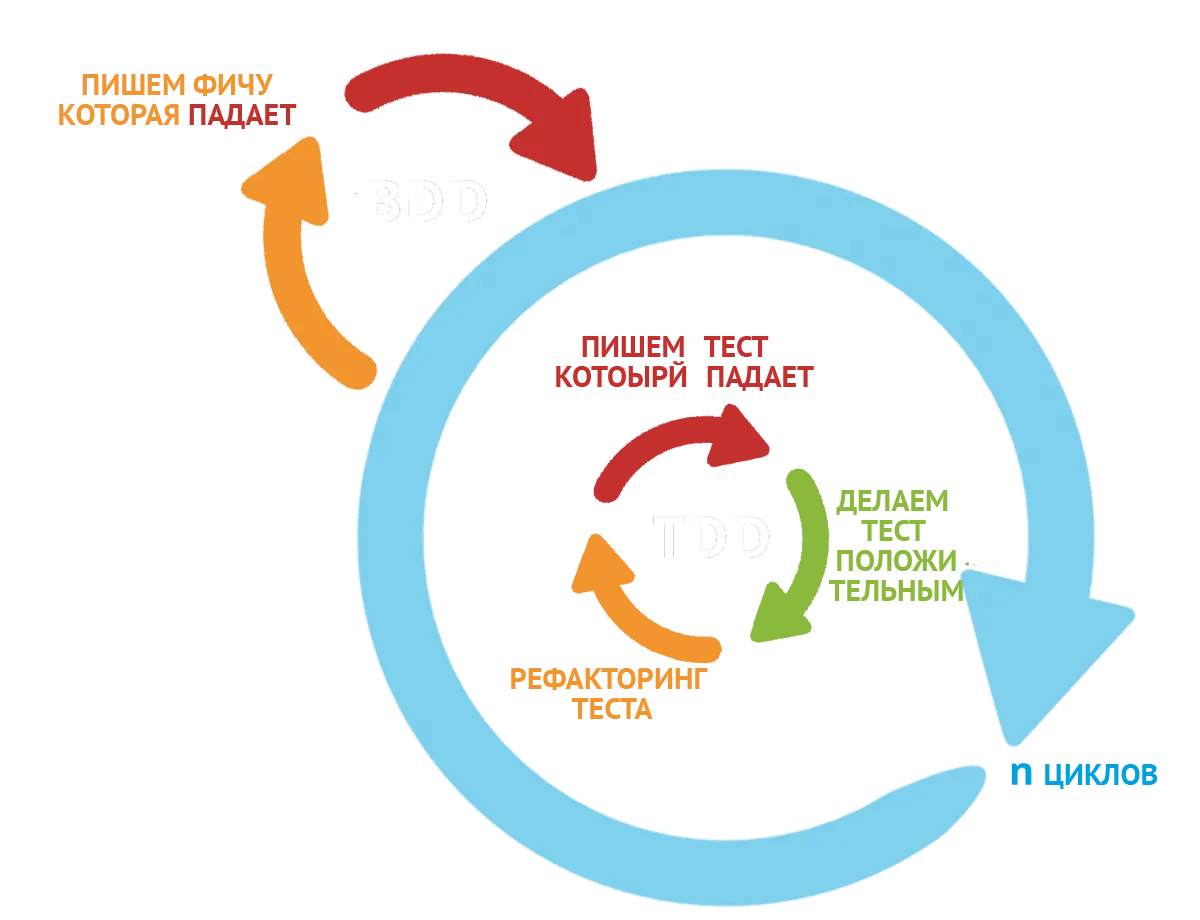

There is nothing revolutionary about the BDD approach. It is simply an evolutionary offshoot of the TDD approach in which the word “test” is replaced by the word “should.” Setting the words aside, many people find the notion of “should” more natural for the development process than the notion of “test.” Thinking in terms of functionality (what the code should do) leads to an approach where you first write classes that check the specification, and those can turn out to be a very effective implementation tool.
As you have already figured out yourself, the BDD approach is about trying to find out what your client or business wants from the software before you start working on it. The first way to do that is to actually collaborate with those people.
Once we have that collaboration, we need to write down somehow what makes sense to anyone who looks at it, so that anyone can come and look at it later, understand it, and, if they want, comment on it. To achieve this, we need to use a language everyone understands.
People often use the words “Given,” “When,” “Then,” and “And” to build a chain of logical reasoning. So let's use these words as the keywords for building tests that everyone can understand.
So our test document will be called a scenario and will use only keyword phrases for each step. At first we'll explain what each keyword means, but after that we will use only the keywords themselves. Our scenario will be built with this structure:
GIVEN <context>
WHEN <event>
THEN <outcome>
How it works:
Given <I put the system under test into its initial state for the test>
When <I perform an action>
Then <I check the result>
And now, an example:
GIVEN I am logged in to the system as a user
WHEN I open the inbox
THEN I see the 20 most recent messages

Master, what should I do if I want to perform two actions for one of the steps and don't want to combine them, because they have nothing in common?
In that case you use the keyword AND. This way you can add a supporting step to any of the keywords. But don't abuse the word AND: if you have too many additions, you most likely need to split your big scenario into smaller ones.
An example of using AND:
GIVEN I delete the user <username> from the database
AND I register the user <username> on the website
WHEN I log in to the website as the new user
THEN I see the new user's welcome message
AND I close the welcome window
Scenario Parameterization

Tell me, honorable Master, have you ever been in a situation where you needed to repeat the same test, but with different input data?
I don't yet understand what you're getting at, Padawan. Yes, earlier we repeatedly ran similar checks in test cases with the same steps but different input data, and we recorded them by copying the steps.
Exactly, and I did that in level 3, but it always seemed to me that this could somehow be unified and shortened. I came up with different tables of steps and data, but none of
them looked appealing enough to become the standard.
That's how it was until BDD came into active use. Then, with small autotests, they needed parameterization to avoid endless duplication. So the Scenario Outline was invented. It is no different from a regular scenario, except that the parameter values for the test change on each round to the next ones in the list.
I suddenly feel like having some fresh juice. Let's write a scenario for a robot that makes apple juice. We'll specify both the fruit for the juice and the expected result as parameters in the test itself.
Feature: Training 03. Fresh juice.
Scenario: Making fresh juice
Given I put "apples" in the blender
When I turn on the blender
Then the apples should turn into "apple juice"
This example test contains external parameterization: instead of the apple you can put in any fruit and its juice, and the test will still be correct. The main thing is to write the steps so that they are universal. In such cases you usually work with input data.
Although it would be too costly to limit ourselves to apples only, let the robot be able to make any fresh juice. To make the test truly parametric, we'll replace the specific apples with abstract fruits. And to tell a looping parametric scenario apart from a non-looping one, we'll call it a Scenario Outline (a looping scenario). Let's try ordering juice from a “fruit” from the robot. It's important to understand that any looping scenario must be parameterized.
Feature: Training 04. Parametric fresh juice.
Scenario: Making fresh juice from any "fruit"
Given I put "fruits" in the blender
When I turn on the blender
Then The fruits should turn into "juice"
Examples: Juices
| fruit | juice |
| apple | apple juice |
| Tasilian cucumber | Tasilian juice |
Examples: Electronic devices
| device | juice |
| Iphone X | toxic juice |
| Samsung Galaxy S9 | toxic juice |
As you can see from this example, you can feed any data into the test as parameters, but the result must match accordingly (otherwise the test will not pass). When the test runs, on each round it goes through with a new parameter from the table, until it has gone through them all.
Examples of the Master's Working Scenarios
@login @settings @onboarding
Feature: chorus log in tests for all available ways: login/pass, google, microsoft, self-serve
A BDD test can be simple, containing only Given, When, Then;
@login
Scenario: Login tests with via email and password
Given I restart driver And I go to home page
When I do log in with registered email user
Then I check I am at account page
But often you need supporting steps, which are added through And;
@xray
@pop
Scenario: opening first card on X-ray page leads to popup containing relevant trackers
Given I am on xray tab of target call
When I click on the first Card
Then corespondent card is displayed
And all trackers are collapsed
And displayed moments count matches actual amount
And I close x-ray moment Popup
As we've learned, there is also external parameterization of a scenario with test data;
@account_page
Scenario: share transcript item
Given I am at transcript of a target call
When I select "3" transcript item
And I open the transcript's menu
And I select "Share Moment" from transcript menu
When click edit share
Then Start time for share equals to moment time
And I close share popup window by clicking "X"
Simple parameterization and looping parameterization can also easily be used together. Some parameters are simply passed in, while others change on every cycle.
@account_search_bar_mobile
Scenario Outline: I search the calls for <search_text> via search bar and clear with x
Given I am at mobile account page starting state
When I go to call "4 - Needs Analysis" on the mobile account page
And I search for "<search_text>"
Then I find expected results for "<search_text>" search
And Mobile section "transcript" is active
And I make sure transcript search bar is closed and cleared by clicking on clear search
Examples: Text Searches
| search_text |
| hi |
| pricing OR okay |
And in this example we see only looping parameterization being used
@moments
@moments_search
Scenario Outline: Search for specific moment, adds result to legend
Given I am at moments search starting state
And I set timeframe filter to "Last 52 Weeks"
And I click apply for filter popup
When I input and select in search <moment_name>
And I select <moment_name> suggestion
Then <moment_name> appear in search bar
And For each moment from search bar exists graph name
Examples: moments names
| moment_name |
| Citizenship |
| Goals |

Analyzing Autotest Run Results
Below is an introductory excerpt from the results of running automated scenarios in the BDD format. And today I will teach you to understand the language of robots. To do that, R2D2 will decode all the values in the log files. After that, you will learn to understand and analyze autotest results.

My still-young Jedi of testing, I'm happy to tell you that the language of robots is always unambiguous. We have no hints or double meanings. Everything is exactly as it is. The only nuance is that it is in English, which is recognized as the main language for all robots. Next, I will explain all the important commands and stages in the bug report.

Before my impatient robo-friend analyzes the bug report, I'll tell you a bit about its history. This log was obtained by running an autotest on one of my looong-ago projects. Back then we were working on converting human speech. This system lets you combine speech recordings into playlists, and this very feature is what the test suite called playlists_page was created for. The tests are written using the BDD technique and executed in Python.
All you want to do is chat! It doesn't matter much which project or language the autotests belong to. What matters now is learning to read logs, because practically everyone uses the Selenium framework, and the errors that occur when tests fail are practically the same in every language! So, let's move on to breaking down the log! As we go, I'll give you links to the technology systems that were used, just for your information.

Running with gitlab-runner 10.0.1 (e991d1b4)
on gitlab-runner-18.194.129.84 (be743b2e)
Using Docker executor with image docker.affectlayer.com:5000/al/automation-ci:5.0 ...
Using docker image sha256:53e5a6b45f119e089b21856075b2ae0e8605eb2edebd725869ec4a7da3813dca for predefined container...
Pulling docker image docker.affectlayer.com:5000/al/automation-ci:5.0 ...
Using docker image docker.affectlayer.com:5000/al/automation-ci:5.0 ID=sha256:80a33c4c7b02376166eb6fb1fae24073a8590fd631e35a13e93e4774b38ed43e for build container...
Running on runner-be743b2e-project-26-concurrent-3 via 1b70c615557b...
Cloning repository...
Cloning into '/builds/affectlayer/system_tests'...
Checking out d03637d8 as system_tests#54-new-pipeline...
Skipping Git submodules setup
$ export DBUS_SESSION_BUS_ADDRESS=/dev/null
$ echo $FRONTEND_LINK
$ mkdir -p dist
$ if [ -z "$FRONTEND_LINK" ];then CHORUS_LINK=$PROD_LINK; else CHORUS_LINK="${FRONTEND_LINK}"; fi
$ if [ -z "$RUN_MODE" ];then RUN_MODE='@self_service'; else RUN_MODE="${RUN_MODE}"; fi
$ if [ $RUN_MODE != '@self_service' ];then RUN_MODE='@nothing'; fi
$ echo $FRONTEND_LINK
$ echo $CHORUS_LINK
hello.chorus.ai
$ export TZ=$TIME_ZONE
$ Xvfb :1 -screen 5 1920x1200x8 &
$ export DISPLAY=:1.5
$ behave --tags=$RUN_MODE -k -D build_id=$BUILD_ID -D username=selfserve8@selfservechorus.com -D password=aA1\!aA1\!a -D user_type=self-serve -D chorus_link=$CHORUS_LINK -D timeout=$TIMEOUT || behave @rerun_failing.features --tags=$RUN_MODE -k -D build_id=$BUILD_ID -D username=selfserve8@selfservechorus.com -D password=aA1\!aA1\!a -D user_type=self-serve -D chorus_link=$CHORUS_LINK -D timeout=$TIMEOUT
waiting for version to update...600 seconds
@self_service @all @playlists
Feature: playlists # features/playlists.feature:4
@all @playlists @self_service @new_playlist @playlists_page
Scenario: Creating a new playlist via playlists page # features/playlists.feature:11
Given I am in playlists page # features/steps/playlists.py:15
When I create a new playlist # features/steps/playlists.py:30
Then toast pops up and disappears # features/steps/playlists.py:38
And a new empty playlist is created # features/steps/playlists.py:49
@self_service @playlists_page @existing_playlist
Scenario: It should not be possible to add a playlist with existing playlist's name # features/playlists.feature:20
Given I am in playlists page # features/steps/playlists.py:15
When I create a new playlist with existing name # features/steps/playlists.py:67
Then "existing playlist" error message appears # features/steps/playlists.py:81
And created playlist exists only once # features/steps/playlists.py:92
@self_service @playlists_page @deleting_playlist
Scenario: When I delete a playlist I created it is deleted # features/playlists.feature:29
Given I am in playlists page # features/steps/playlists.py:15
Given I create a playlist # features/steps/playlists.py:128
When I delete last created playlist # features/steps/playlists.py:134
Then last created playlist is deleted, even after refreshing the page # features/steps/playlists.py:145
And I delete all created playlists # features/steps/playlists.py:139
@all @self_service @playlists_page @search_playlist
Scenario: Only relevant playlists appear when searching playlists # features/playlists.feature:49
Given I am in playlists page # features/steps/playlists.py:15
Given a list with more than one playlist # features/steps/playlists.py:99
When I search for the exact name of one of them (that does not contain the other) # features/steps/playlists.py:105
Then only playlists with relevant names appear # features/steps/playlists.py:118
Test for feature [u'self_service', u'all', u'playlists'] completed
waiting for version to update...600 seconds
@self_service @all @playlists-mobile
Feature: playlists # features/playlists_mobile.feature:4
@self_service @all @playlists-mobile
Scenario: Check pre-defined playlist # features/playlists_mobile.feature:18
Given I am at playlist mobile starting state # features/steps/playlists_mobile.py:12
When I select playlist Default_not_empty_playlist # features/steps/playlists_mobile.py:29
Then I check Playlsit moments list as expected # features/steps/playlists_mobile.py:50
Assertion Failed: Incorrect opp of first moment
And I check name is Default_not_empty_playlist and owner of playlist is the main header user # None
@self_service @all @playlists-mobile
Scenario: Play playlist # features/playlists_mobile.feature:27
Given I am at playlist mobile starting state # features/steps/playlists_mobile.py:12
When I select playlist Default_not_empty_playlist # features/steps/playlists_mobile.py:29
And I activate account ghost # features/steps/playlists_mobile.py:98
And I press the playlist play button # features/steps/playlists_mobile.py:116
Then Playlist is played # features/steps/playlists_mobile.py:104
When I press the playlist pause button # features/steps/playlists_mobile.py:122
And Playlist is paused # features/steps/playlists_mobile.py:110
@self_service @all @playlists-mobile
Scenario: Only relevant playlists appear when searching playlists # features/playlists_mobile.feature:39
Given I am at playlist mobile starting state # features/steps/playlists_mobile.py:12
When I search for Default_not_empty_playlist of in mobile playlists # features/steps/playlists_mobile.py:76
Then I check search result is Default_not_empty_playlist # features/steps/playlists_mobile.py:86
Test for feature [u'self_service', u'all', u'playlists-mobile'] completed
waiting for version to update...600 seconds
@self_service @trial
Feature: Trial for self serve # features/trial.feature:3
@self_service @trial
Scenario: when i log into chorus with a user on trial top right corner should show remaining trial time # features/trial.feature:7
Given I am at chorus logged in as self serve # features/steps/trial.py:7
When I set end time for five days on self serve user # features/steps/trial.py:44
When I am logged in as self serve i see trial bar # features/steps/trial.py:13
Then I click on extend trial # features/steps/trial.py:19
And I move to trial page # features/steps/trial.py:26
No handlers could be found for logger "behave"
@self_service @trial
Scenario: when i go to chorus trial page and invite sales reps # features/trial.feature:34
Given I am at chorus logged in as self serve # features/steps/trial.py:7
When I set end time for five days on self serve user # features/steps/trial.py:44
Then I click on extend trial # features/steps/trial.py:19
And I click on invite sales reps # features/steps/trial.py:75
And I set end time for five days on self serve user # features/steps/trial.py:44
........ lots more passed tests here ......
@self_service @trial_mobile
Scenario: when i go to chorus mobile trial and change trial time to unlimited # features/trial_mobile.feature:34
Given I am at chorus mobile logged in as self serve # features/steps/trial_mobile.py:8
When I set end time to unlimited on self serve user # features/steps/trial.py:51
Then web time will show unlimited on mobile # features/steps/trial_mobile.py:28
Test for feature [u'self_service', u'trial_mobile'] completed
Failing scenarios:
features/playlists_mobile.feature:18 Check pre-defined playlist
@self_service @all @playlists-mobile
Scenario: Check pre-defined playlist # features/playlists_mobile.feature:18
Given I am at playlist mobile starting state # features/steps/playlists_mobile.py:12
When I select playlist Default_not_empty_playlist # features/steps/playlists_mobile.py:29
Then I check Playlsit moments list as expected # features/steps/playlists_mobile.py:50
Assertion Failed: Incorrect opp of first moment
Test for feature [u'self_service', u'all', u'playlists-mobile'] completed
And I check name is Default_not_empty_playlist and owner of playlist is the main header user # None
@all @login
Scenario: Login tests with sales force credentials # features/login.feature:8
Given I restart driver # features/steps/onboarding_selfserve.py:23
And I go to chorus page # features/steps/login.py:12
When I log in with registered sfdc user # features/steps/login.py:68
Traceback (most recent call last):
File "/usr/local/lib/python2.7/dist-packages/behave/model.py", line 1329, in run
match.run(runner.context)
File "/usr/local/lib/python2.7/dist-packages/behave/matchers.py", line 98, in run
self.func(context, *args, **kwargs)
File "features/steps/login.py", line 80, in sfdc_login
login_page.login_to_sfdc(Constants.SFDC_ONBOARDING_EMAIL, Constants.SFDC_ONBOARDING_PASSWORD)
File "/builds/affectlayer/system_tests/drivers/landing_page/new_login_page.py", line 76, in login_to_sfdc
sf_login_page.name_input().add_text(username)
File "/builds/affectlayer/system_tests/drivers/landing_page/sales_force_login_page.py", line 15, in name_input
return Input(self.wait_component_to_load((By.ID, "username")))
File "/builds/affectlayer/system_tests/drivers/basic_components/page_base.py", line 20, in wait_component_to_load
EC.visibility_of_element_located(by_locator))
File "/usr/local/lib/python2.7/dist-packages/selenium/webdriver/support/wait.py", line 71, in until
value = method(self._driver)
File "/usr/local/lib/python2.7/dist-packages/selenium/webdriver/support/expected_conditions.py", line 127, in __call__
return _element_if_visible(_find_element(driver, self.locator))
File "/usr/local/lib/python2.7/dist-packages/selenium/webdriver/support/expected_conditions.py", line 398, in _find_element
return driver.find_element(*by)
File "/usr/local/lib/python2.7/dist-packages/selenium/webdriver/remote/webdriver.py", line 843, in find_element
'value': value})['value']
File "/usr/local/lib/python2.7/dist-packages/selenium/webdriver/remote/webdriver.py", line 306, in execute
response = self.command_executor.execute(driver_command, params)
File "/usr/local/lib/python2.7/dist-packages/selenium/webdriver/remote/remote_connection.py", line 464, in execute
return self._request(command_info[0], url, body=data)
File "/usr/local/lib/python2.7/dist-packages/selenium/webdriver/remote/remote_connection.py", line 488, in _request
resp = self._conn.getresponse()
File "/usr/lib/python2.7/httplib.py", line 1136, in getresponse
response.begin()
File "/usr/lib/python2.7/httplib.py", line 453, in begin
version, status, reason = self._read_status()
File "/usr/lib/python2.7/httplib.py", line 417, in _read_status
raise BadStatusLine(line)
httplib.BadStatusLine: ''
@xray @play
Scenario: playing a moment from x-ray card # features/call_xray.feature:41
Given I am on xray tab of target call # features/steps/x-ray.py:16
Traceback (most recent call last):
File "/usr/local/lib/python2.7/dist-packages/behave/model.py", line 1329, in run
match.run(runner.context)
File "/usr/local/lib/python2.7/dist-packages/behave/matchers.py", line 98, in run
self.func(context, *args, **kwargs)
File "features/steps/x-ray.py", line 22, in step_impl
context.account_page.wait_until_account_page_finished_loading()
File "/builds/affectlayer/system_tests/drivers/account_page/account_page_executor.py", line 301, in wait_until_account_page_finished_loading
self.wait_for_chorus_page_to_load()
File "/builds/affectlayer/system_tests/drivers/basic_components/page_base.py", line 60, in wait_for_chorus_page_to_load
self.wait_for_component_disappear((By.CSS_SELECTOR, 'div.chorus-loading'), 60)
File "/builds/affectlayer/system_tests/drivers/basic_components/page_base.py", line 40, in wait_for_component_disappear
.until(EC.invisibility_of_element_located(by_locator))
File "/usr/local/lib/python2.7/dist-packages/selenium/webdriver/support/wait.py", line 80, in until
raise TimeoutException(message, screen, stacktrace)
selenium.common.exceptions.TimeoutException: Message:
3 features passed, 1 failed, 28 skipped
13 scenarios passed, 1 failed, 230 skipped
5 steps passed 9, 1 failed, 1519 skipped,
Took 4m33sec
Hi! As you've probably figured out, exceptions can be of completely different types, and naturally they can't all show up in one log. So I've put together a list of the most common exceptions separately for you.

Hi, I think you understood the material perfectly. But to be honest, I still have questions about all these TDD and BDD buzzwords. They say material sinks in better when you explain it to someone else. I'd like to know:
What is the tester's role in test-driven development?
How does the TDD methodology work?
What is the essence of the BDD methodology?
Why do we need external parameterization if the test has no loop parameterization?
What is an exception in automation?
Homework and Practice

In the practical assignment you will have to show that you can think like a robot and become a master over robots. To implement an autotest in level 17, you will first have to write automated scenarios. We will automate our favorite cookie website! You need to create scenarios to check:
- Check how the gallery on the home page works (enlarging a picture)
- Check sending a message on the contact us page
- Check menu navigation
- Ordering one of the candies (properties as parameters)
- Ordering cookies (type as a parameter)
- Changing the quantity of items in the cart (quantity as a parameter)
- Placing the order from the cart
In this assignment you need to write 7 BDD scenarios in a Google Doc and submit the assignment through the form. By the way, the Master has a little assignment for you too.

I have an interesting assignment for you too. I spent the whole night running autotests on a project, and I'm very tired. Please help me analyze the results. I've uploaded the test logs here. Write your answer in a Google Doc, in this format:
1. The test Scenario Outline: Displaying pricing moments modal dialog failed at
"features/steps/login.py", line 44, in browse_to_login
base_page.wait_for_chorus_page_to_load()
with the error
selenium.common.exceptions.WebDriverException: Message: chrome not reachable
Chrome is not available. The site froze when trying to log in.