Level 2. Where Testing Fits in the Development Process
Level 2
Where Testing Fits in the Development Process

Welcome to the next level, my young Padawan! Before you learn new secrets of the power of testing, I would like to go over your homework with you. In the video, Master Ki-Adi-Mundi shows how he tested the website from the practical assignment. He shares the secrets of hands-on testing, tells you what to pay attention to, and explains which approach to use.

So, let's get started with our topic: “Where Testing Fits in the Development Process”. You may insist that you're not ready yet, but already on the second level you will have to meet the forces of evil! As you might guess, the main forces of evil are programmers, or developers. They are the ones who create the treacherous code that contains all those terrible bugs.
Some will tell you that in real life they are good-natured, bearded fellows who wouldn't hurt a fly. And that's true, too. But on the field of software development, they are our main enemies.
My young Padawan, today we are embarking on a risky mission: we will observe how the process runs on the Death Star (among the programmers) and compare their workflow with ours, so we can be as effective as possible. For you must know your enemy better than your friend!
Testing and Development Stages
Below is a diagram of how development and software testing work together. You can learn more about each stage by following its link, though you will meet most of these concepts again in more detail on the following levels.
Development process
Testing process
analysis
Test design, e.g. test cases
Programming (coding)
Test execution (running test cases, launching automated tests)
Test debugging
(adapting test cases to changed functionality)

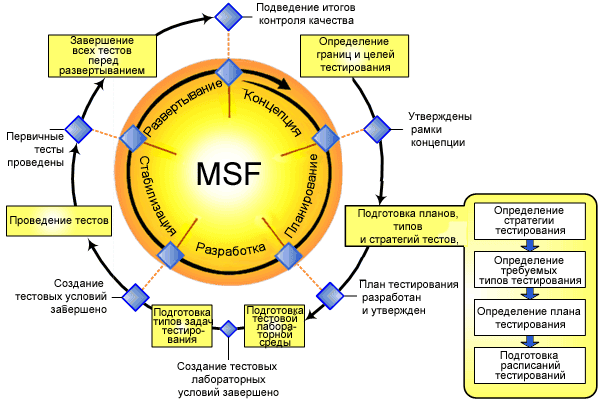
Creating versions of the product you are testing (build)
Test results
(test result)
Product support
Product support
More about the testing stages
Software
product testing
analysis
Test planning
Test design
Test
execution (testing cycles)
Test debugging
System testing
(System Testing)
Static testing stages:
- Requirements analysis - studying the specifications and the functional requirements for the system. Gathering the data needed to draw up the test plan
- Test planning - defining the scope of testing, the approaches, the resources, and the schedule for the planned activities
- Test design - defining the goal of testing, specifying the input data, and designing the test architecture to organize the tests into groups
Dynamic testing stages:
- Test execution (testing cycles) - the actual running of the designed tests and the analysis of all possible test cases
- Test debugging - reviewing and debugging the test cases
- System Testing - functional verification and testing to determine operating characteristics
- Acceptance Testing: alpha testing, beta testing
- Operation and support - checking the results, fixing defects
Acceptance testing
(Acceptance Testing)
Operation and
support

We have seen the concept of the testing and development process, so to speak, from a bird's-eye view. Now it's time to come down to earth and look at specific things.
Let's go from simple to complex:
- Requirements analysis - level 8
- Planning - level 7
- Test design - this is where we'll go into more detail
We will start looking at all the items below right now and keep working on them smoothly in the next level. Let's begin by understanding what a Test actually is.
Defining a Test and a Test Suite

A test is an Input/State/Output “triplet”
A test is a sequence of steps/actions that moves the system from one state to another
A test is described by the ISO abbreviation, where:
- [I] – is input data or action (the input data or actions)
- [S] – is State of system at which data will be input (the state of the system that receives the input data or action)
- [O] – is the expected Output (the expected output, output data, or output state of the system)
Test suite
- A set of tests that implements a complete business task automated by the functionality of the system under test
- Besides the test scenarios themselves, a test suite also includes the test data or the rules for creating/generating it
Test suites – practical considerations
- After the tests are grouped into suites, no tests should be left unused
- When tests are designed “top-down”, the test cases become parts of the test suites
- It is recommended to use exactly this “top-down” approach to test design
Test coverage – practical considerations
- The number of tests does not determine the quality of test coverage
- A test coverage percentage does not determine how far you can trust the test results, unless it equals 100%
- 100% coverage is practically unattainable in real-world development
- Raise the test coverage threshold whenever errors turn up in a test area or component
Developing test scenarios – practical considerations
There are formal methods for developing test scenarios
- A methodology for developing test cases based on use cases
- A methodology for developing test cases based on orthogonal defect classification
There are formal techniques for estimating the amount of work required for minimal test coverage
- A method of calculating cyclomatic complexity based on the McCabe metric
Mixed techniques - a combination of approaches
Classification of testing by the system's level of “readiness”
Unit level - the module level
- Testing code integrity at the level of logical modules
- Performed by developers
- Monitored by the testing team using unit test coverage tools
Comment: according to the TDD concept, a tester should require programmers to cover the code with unit tests (basic testing of every module). This is not always the tester's responsibility. From the manual testing point of view, the module level means testing a standalone login form (login + password)
Integration level - cross-module interaction
- Testing the intermediate results of system integration
- Performed by developers and testers
Comment: from the manual testing point of view, this means moving your login form onto a website page and checking how the form and the page interact.
System level - the level of the system as a whole
Validation of the fully built system against the stated requirements
Sub-levels of system testing:
- Alpha Testing
Performed by the testing team within the development team/organization
- Beta Testing
Performed by the testing team in an environment of friendly customers
- Acceptance Testing
Performed by the customer to determine whether the system will be accepted for operation
- “Smoke testing” Performed by the testing team to determine whether the system will be accepted for testing. It is used to find out whether the program works at all and whether it is worth starting a testing cycle.
Comment: from the manual testing point of view, this means testing the form within the whole project. Example: checking the user database, where a new record should appear after a user registers on your finished website through the login form

Congratulations! You are halfway through level two.
It's the perfect time to take a break and stretch your back, sip some tea, take a deep breath, and dive back into the world of testing

White box (Structural) Testing
- Analysis of the application at the code level
- It comes in two forms: manual, expert review of the code, and automated testing with static analysis tools
- One of the most “expensive” testing methods, requiring a high level of expertise
Grey box testing
- A mixed, adaptive technique used by experienced testers or by developers during debugging
- Analyzing the application from the standpoint of an end user performing operations and checking the results, while drawing on knowledge of the application's code and the implementation details of its functions
One last dive into functional testing
Next come the types of testing that are subsections or variations of functional testing. They also check that the application works correctly, but each has its own peculiarities ...
Regression testing (regression testing) is a set of tests aimed at finding defects in parts of the application that have already been tested. It is not done to finally prove there are no bugs, but to find and fix regression errors, that is, errors in something that worked fine before. Such errors are usually caused by fixing other errors or by adding new functionality, often in a completely different place. After all, a program is like a Rubik's Cube: you turn one face, and the colors change all around the band.
Automated testing - involves using special software (or code you write yourself) to control the execution of tests and to compare the expected and actual results of the program. This type of testing helps automate tasks that are repeated often but are necessary to maximize test coverage. And we will learn how to do it!
Negative testing is a subsection of functional testing that covers the scenarios that can happen to the system if, say, a user makes a mistake while entering data or deliberately tries to break it. In this case, the system must be ready to “respond” to the user's request with an error message.
Example: when the expected input is from 0 to 10, enter -1 and an empty value.


1. What testing stages do you know?
2. What is a test suite?
3. What kinds of testing exist, by classification?
4. What is the difference between validation and verification?

I'm thrilled with your progress! You crack levels like sunflower seeds. I think it's already becoming clear that becoming a tester isn't hard at all. But this is only the beginning of the road, and there are still 19 levels ahead, each unique in both content and design. Take the next step and unlock new mysteries with the power of testing.
I will gladly check the results of your work after you toss the old Master a couple of credits for a new lightsaber, because the old one keeps acting up...
To move on to level 3, you need to score at least 20.6 points on the level 2 assignments.
Classification of testing by approach
Black box (Functional) Testing
- Testing from the end user's point of view
- Often combined with white box techniques
- The most widespread testing techniques for user-oriented systems and applications

I think you're ready to move on, my friend. Good luck!
Functional testing

Functional testing is the primary type of testing. It aims to check that the software's functional requirements match its actual behavior. The main goal of functional testing is to confirm that the software product under development has all the functionality the customer requires.
Depending on the goal, functional testing can be carried out:
• Based on the functional requirements stated in the specification. Test cases are created for the testing, and their design takes into account the priority of the software functions that need to be covered by tests. This way we can make sure that all the functions of the product under development work correctly with different types of input data, their combinations, quantities, and so on.
• Based on the business processes your application must support. Here we care less about whether individual software functions work and more about whether the operations are performed correctly from the standpoint of the system's usage scenarios. In this case, testing is based on the system's use cases (usecases).
• Based on common sense. Since there can be a mistake in the project documentation and even in the architect's head (something was forgotten, something was not taken into account), a tester must always be on their toes. When the written spec contradicts common sense and experience, the natural reaction should be: there's a bug here!
Non-functional testing

Unlike functional testing, whose goal is to check
the program's obvious ability to work, non-functional testing may not be stated in the requirements. This concept covers everything that affects the quality of the program but does not relate directly to its business logic.
Non-functional requirements characterize a product in terms such as:
- Reliability - the ability of a software system to work stably for a long time without human intervention
- Performance - how well the system works under various planned loads
- Scalability - requirements for horizontal or vertical scaling of the application. The application should adapt its layout gracefully and appropriately when structural elements are added or removed. The same goes for the application's architecture
- Security - protection of user data from hacking, protection of the system from outside interference and unauthorized access, and protection of user data from system errors
- Installation testing – checking that the application installs, is configured, and is uninstalled successfully. It reduces the risk of losing user data, of the application becoming unusable, and so on
- Usability testing – characterizes the system in terms of how easy it is for the end user to use
- Configuration testing (or portability testing) – investigating how well a software system works under various software configurations
- Failover and Recovery Testing – investigating how a software system recovers from errors and failures. Evaluating the reaction of the application's protective features
- Stress testing – a type of testing that characterizes the system in terms of how stable it stays under conditions beyond the normal. Don't confuse it with performance testing, because here we are talking only about peak loads, not the expected ones
- Performance testing – a group of testing types whose goal is to determine the operability, stability, resource consumption, and other quality attributes of an application under various usage scenarios and loads. Performance testing helps uncover potential vulnerabilities and weaknesses in the system, so that their harmful effect on the program's operation in real use can be prevented. Here we are talking only about the planned loads described in the product requirements
- Interoperability and compatibility testing – a type of testing aimed at evaluating how well the components of a software system, or the whole application, interact with other components or software
Classification of testing by type of check
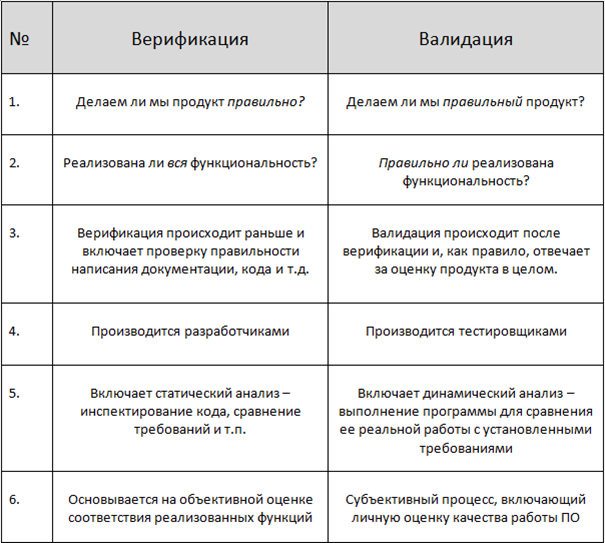
Verification (verification) is the process of evaluating a system or its components to determine whether the results of the current development phase satisfy the conditions set at the start of that phase. In other words, whether the tasks, goals, and deadlines for developing the product are being met.
Validation (validation) is determining whether the software under development matches the user's expectations and needs and the system requirements.
The following table will help you spot the key differences between these two concepts:
Usability and GUI Testing
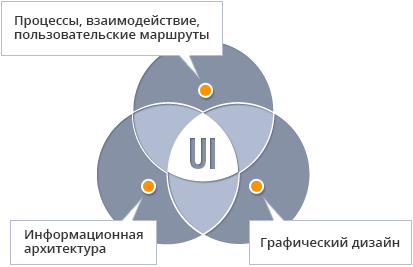
Usability and GUI testing are closely related because their objects of testing overlap: the interfaces. It is also convenient to carry out these two types of testing at the same time. Usability and GUI testing include:
Expert usability evaluation
Here you pose as a hotshot designer and carry out an expert evaluation of your application against the project's goals and the functional and non-functional requirements for the software. Expert evaluation procedures include:
- analysis of the application's information architecture
- analysis of the interface and its elements
- analysis of how well the interface matches the functionality
- consistency of the project's design with the corporate design
Example: you carry out all kinds of fine-grained checks: a consistent style across the application, image quality, stray lines and even pixels, scalability and stretchability of the application's GUI, grammatical errors, and so on.
Simulating user behavior
Here you take on the role of the most basic user and check how the application behaves by simulating that user's behavior. Your task is to forget the application and start using it from scratch. The goal is to get a sense of the overall user experience and to find every moment that could spoil a user's mood. Anything that is not obvious and clear to a new user counts as a bug here.
Example: waiting more than three seconds for a result with no preloader is a bug, and a link that isn't underlined or a wrong cursor shape on hover are usability bugs. So are missing hints during a complicated registration process, and so on.
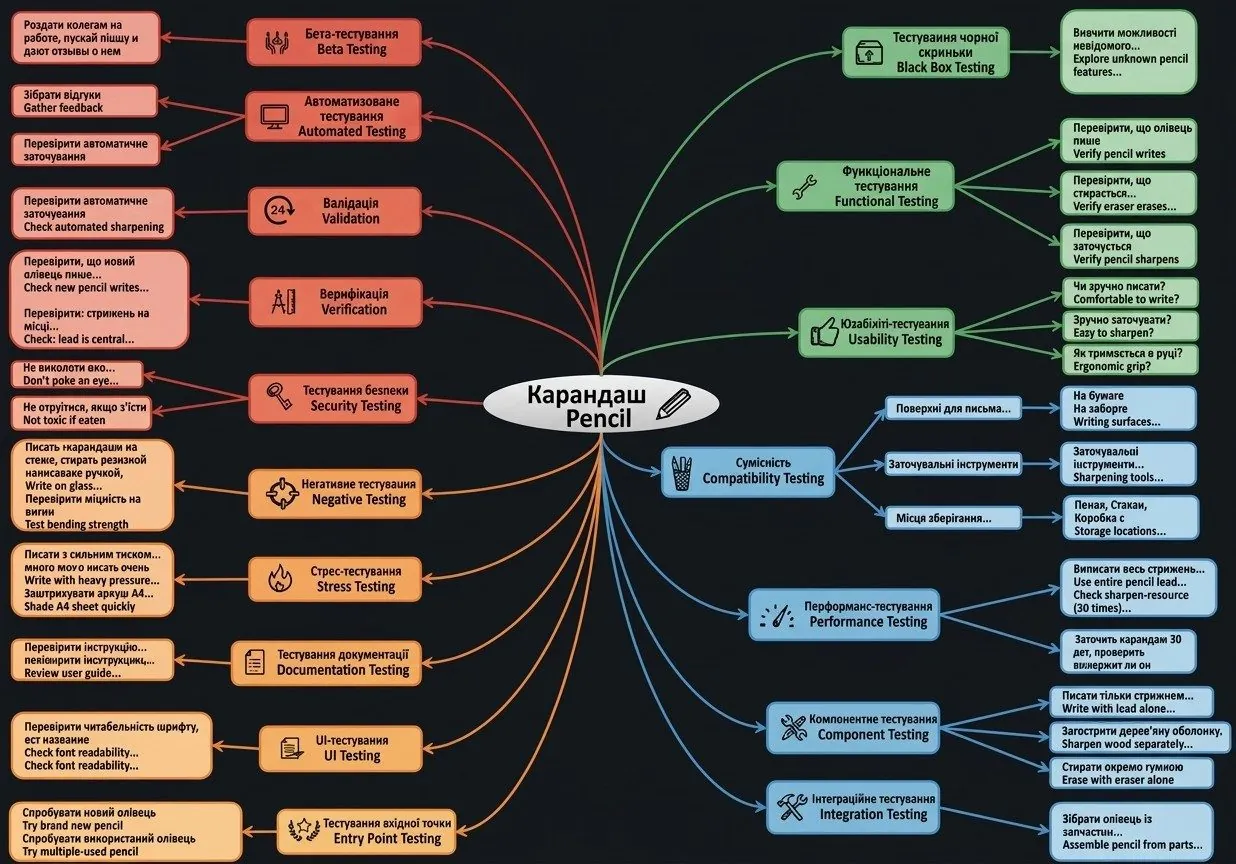
Types of testing, summary:
This is my favorite diagram. Take it to heart. Testing interviews very often include a task like this: test some object. It shows how flexible a tester's mind is when it comes to types of testing and the object under test. After all, it doesn't matter what is in front of you; what matters is understanding the logical concept of the types of testing. Study this diagram and absorb it FOREVER, if a tester you wish to become.
Testing strategy
You will put the testing strategy into practice when testing a player. But for now, not all the types, only those marked in yellow.
Types of testing in a typical strategy:
- Functional testing
- Negative testing
- Business cycle testing
- Usability testing
- User interface testing
- Data and database integrity testing
- Load testing
- Security and access control testing
- Configuration testing
- Installation testing
- Tools

Did you understand the lesson? Answer the questions

Practical assignment

The time has come to put your new knowledge into practice.
First, practice the types of testing.
Your first task is to pick the item from the list that you like best and write one test for each type of testing.
Do it the same way we tested the pencil, but as a table (type of testing - test). The assignment should be prepared in a Google doc using this template and submitted through the form.
The second task is a theory test. Find out how well you understood the material. Don't forget to log in to the testing system.
The third task is even more hands-on. Try using the types of testing while testing the website. Write down all the bugs you find in a separate Google doc as well and submit it through the form. I believe you can do it!
Items for the first task:
1. Chair
2. Bottle of mineral water
3. Stapler
4. Hole punch
5. Paper folder
6. Desk lamp
7. Spray bottle
8. Ruler
9. Scotch tape
10. Paper knife
11. Screwdriver