Level 3. Working with and Creating Testing Artifacts
Level 3
Creating and Working with Test Artifacts
Welcome to the third level, my young Padawan! On this level you will come to know the dark and light forces of testing. Battle the dark side to understand how it works, and become a true tester who has mastered both positive and negative testing. Here you will also meet the holy relic of testing: the test case.
And with all the documentation that goes with it, too.
Test Case
Let's start with what is perhaps the cornerstone of testing. A test case is an artifact that describes a set of steps, specific conditions, and parameters needed to verify that a feature under test (or a part of it) has been implemented correctly.
A test case follows this structure:
Action > Expected Result > Test Result
(Action > Expected Result > Actual Result)
Key Concepts
Depending on the software development processes or methodologies in use, a certain number of test artifacts (documents, models, and so on) are created and used during testing. The most common test artifacts are:
- Test cases and test suites (Test Case & Test Suite)
- Defects and bug reports (Bug Reports / Defects)
- Test plan (level 7)
- Acceptance test plan (level 8)
- Defect descriptions (level 5)
- Test report
- Checklist
- Use cases / User stories
As you may have gathered, three of these artifacts are so serious that entire levels further on are devoted to them. So they'll be waiting for you up ahead, eagerly.
Action
Expected Result
Test Result
passed/failed/blocked
Open page "login"
Login page is opened
passed
A bit of a tricky definition, you may think. Put simply, a test case is a record of what a tester does. However you tested, that's how you write it down. It's needed so that any other tester, or even a newcomer who doesn't know your product, can run the testing in your absence. Test cases are also handy for seeing how much work you've already done and how much is left, and for tracking and documenting your progress. The bosses, you know, really love documents.
Standard Test Case Attributes
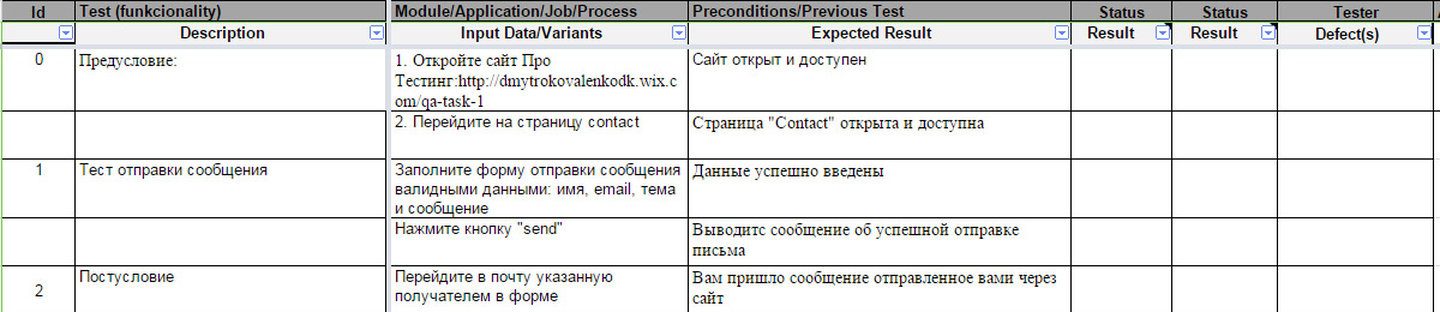
Let's see what a test case looks like in practice. A test case is like borscht: every cook makes it differently, even though they all seem to use the same ingredients. There is no 100% perfect, canonical test case, so we'll look at several ways of formatting them, and then you'll be ready for any turn of events. Here is one example of a test case, written for testing the website from the homework:
 1
1 3
3
1. Number - a unique identifier of the test case. It is handy for knowing exactly which check is meant (for example, you can link to this test case in a bug description)
2. Title - a brief description of what the check is about. It should fit in a tweet and be easy to understand! Short but meaty. The main thing is not to get carried away with brevity: what it is about should be clear to everyone, not just to you.
3. Preconditions (PreConditions) - a description of actions that must be performed but have no direct bearing on the check itself (for example, registering in the system in order to test creating an item). If there are no preconditions, this section is left blank
4. Steps — a description of the actions needed to perform the check (for example, creating an item)
5. Postconditions (PostConditions) - a list of actions that return the system to its original state (the state before the test was run - initial state)
6. Expected result (Expected result) — the check itself: what we expect to get after performing the steps ("Item created")
7. Test result (Test Result) - passed/failed/blocked
8. Test case priority (Test Case Priority) - the importance of the test case. Importance can be set as a number from 1 to N or as priorities: minor, major, critical. There is also blocker, but it is rarely applied to a test case
Action
Expected Result
Test Result
PreConditions
do A1
verify B1
do A2
verify B2
Test Case Description
do A3
verify B3
PostConditions
delete this user
In the example above, the final check is B3. That means it is the key one. So A1 and A2 are actions that bring the system into a testable state, while B1 and B2 are conditions confirming that the system is in a state suitable for testing. Thus we have:
Execution:
Action
Expected Result
Test Result
(passed/failed/blocked)
PreConditions
do A1
verify B1
passed
do A2
failed
verify B2
Test Case Description
do A3
blocked
verify B3
PostConditions
delete this user
In this example, while running the test case, the tester was unable to complete step A2, and as a result the system did not reach a testable state. In that case, the tester files a bug with the status "blocker" and marks all the following statuses as blocked - "blocked". Running such a test case resumes only after this bug is fixed. If a bug is found that doesn't block the following steps, the test case is always run through to the end.
More Examples
Depending on the functional coverage requirements and the test case writing rules at a particular company, you can reduce the level of detail in test cases:
Checking how the page is displayed
Action
Expected result
Test result
Open the "Log In" page
- The "Log In" window is open
- The window title is Log In
- The company logo is displayed in the top right corner
- The form has 2 fields - Name and Password
- The Log In button is enabled
- The "forgot password" link is available
Window title “log”
Opened bug #BG23
Beware the forces of darkness. The darkness never sleeps, and it lies in wait for you in the most unexpected places
Contents of a test report
Polished version
Good afternoon.
A quick update on the testing status of the backgroundperpage feature.
Automated testing cycle:
Automated testing of release candidate 2.983.0 and the backgroundperpage feature - Pass QA.
However, there were problems with the tests that compare GUI screenshots (116 tests failed). The tests failed because a horizontal scroll bar appeared. The scroll bar does not appear when the site is opened manually, so we concluded that the bug is in the autotest. Link to the spreadsheet with the autotest analysis results.
Manual testing cycle:
One more critical bug was found - WOH-9557 - Some of the site templates do not display the background image.
TODO plans:
- Run the autotests with the experiment turned off
- Verify the fix for the bug that was found
- Perform selective regression testing after all the bugs are fixed
Blockers: the horizontal scroll bar issue in the autotests
Regards, Master Obi-Wan Kenobi.
Drawbacks of Checklists
Yes, yes. For all their appeal, don't rush to use checklists from the very start of your career. They do have their drawbacks:
- Beginner testers don't always test effectively without sufficiently detailed documentation
- Checklists can't be used to train new employees, because they don't contain enough detail
- The level of detail that checklists offer may not be enough for the customer or management
A list of features (user stories) is a detailed list of what a user can do in the system. All the functionality of the future product is broken down into the simplest capabilities of the form <who> <does what> <with what>. Each feature has a priority that determines its importance to the overall success of the product. In addition, acceptance criteria are described for each feature: the way the system responds to user actions under which the feature is considered to work correctly.
The feature list overlaps with use cases. The difference is that the former help to account for requirements precisely, while the latter help to understand how the features and the system as a whole work. User stories say what needs to be done, while use cases say how it works.
Use Case Example
Types of Test Cases
Negative Test Case
Operates with both valid and invalid data (at least 1 invalid parameter) and aims to check exceptional situations (validators firing). It also verifies that the function the application invokes is not executed when a validator fires.
Positive Test Case
Uses only valid data and verifies that the application correctly performed the function that was invoked.
Examples
Test suite
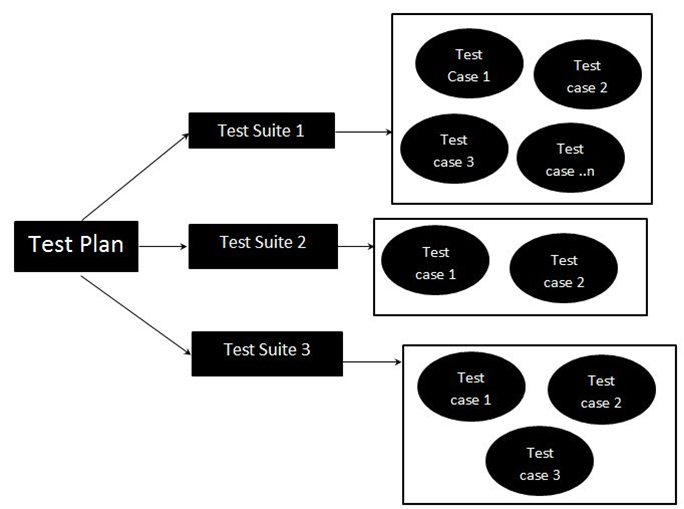
Test suite – a container that holds a set of test cases and helps testers structure, execute, and report on the execution of test cases. Like test cases, test suites are assigned an execution status: Active, Inprogress, Completed.
Test cases are grouped into test suites to make running them more convenient. They need to be run in sequence, from module to module and from one type of testing to another, not haphazardly, dashing from one corner to another and leaving most of a module or of the overall functionality unchecked.
A test case can be added to several test suites and test plans. One suite can contain any number of cases.
Structure of test documentation
The whole structure will become clear to you after this diagram. Test cases are grouped into test suites to test specific features of your project. And the test suites themselves are defined by a test plan, which contains the entire testing strategy.
Test case examples
Treat these examples not just seriously, but most seriously of all. Spend as much time studying them as you need. Sure, reading test cases is not the same as flipping through the magazine "Galactic Beauties". But you need to understand the rules for writing test cases, and the best way to do that is with real examples. So, at your service:
1. A test case as a classic table
2. A test case in table form with variations
3. A test plan with a bank of more than 50 test cases. This is simply a jackpot! (the "Test Case Coverage" tab)
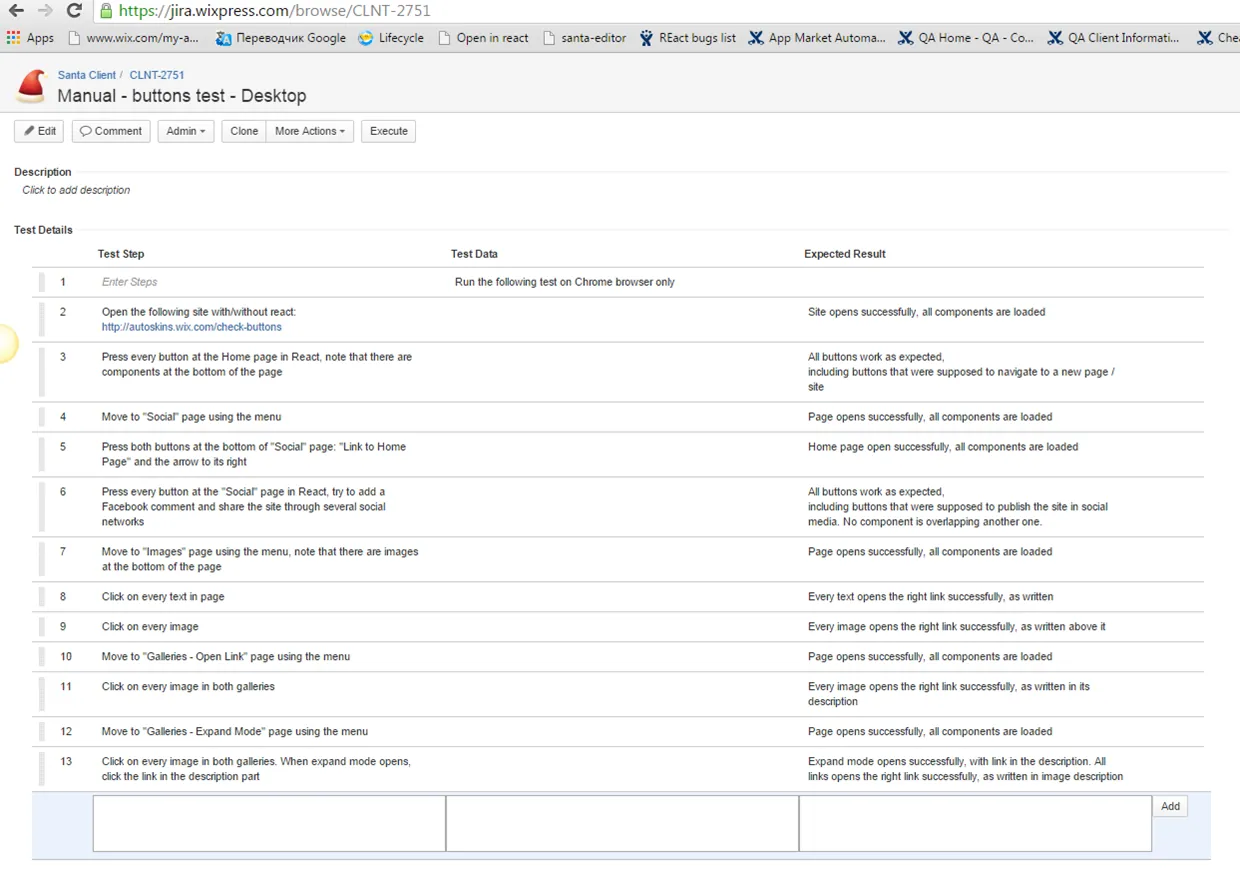
4. A test case in a bug tracking system, Jira
An example of a test case created in the Jira bug tracking system
Test Report
Test Report - a way of communicating that aims to make the QA team's work transparent over a day or another time cycle (a sprint), and it includes information both about the defects found and about the results of the tests that were run.
A test report can take the form of:
• Sending an email/document (most often)
• A meeting/presentation. A meeting with a verbal report, or a report with a presentation
• A report in a blog
• Both a daily email and a weekly meet-up at the same time

A test report is usually intended for:
• Developers
• The project customer
• All sorts of bosses and team leads
• The test environment support team
• The business analyst / product manager and other members of the project team
They are all recipients / meeting participants

• Number of tests planned for the reporting period
• Number of tests executed in this period
• Total number of tests executed (out of the planned ones)
• Number of defects found in this period and their current status
• Total number of defects found to date and their current status
• Number of open critical defects
• Blockers - test environment problems (only if there are any)
• Showstoppers – anything that gets in the way of work, for example, a glitchy PC
• An attachment/link to the document with the test execution
• A link to the bug report, to the defect, to your testing tool
What a team lead looks like when listening to your test report
Practical tips from the Master:
- Mark the overall state of testing with a color indicator. For example: green – tested on time, orange – a little late, red – testing is delayed or blocked.
- Include a few simple metrics in the report, such as the percentage of tests passed so far, the defect density in %, and the percentage of critical defects out of all defects. By doing this, you're not just handing over numbers, you're actually giving a glimpse into the quality of the product you're testing.
- If most of the work is done, mention it.
- If there is a critical defect that will block part of the upcoming work, highlight it.
- If you're using a presentation, don't forget to include a few charts to make its point clearer.
- You can also mention your plans for the near future in a TODO section.
Let's look at two examples of reports. It will be educational.
Example of a test report table
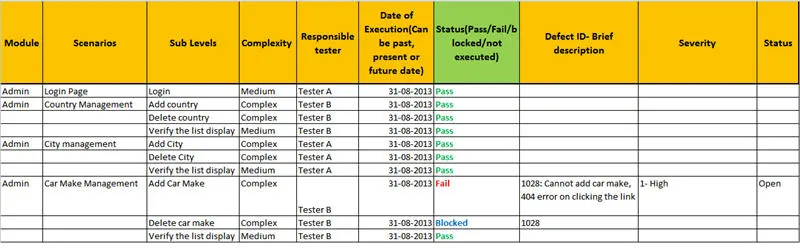
When should you definitely use a table? When several people are working on filling it in, or when the report contains a large amount of data. Let's look at an example in detail:
1. Module - a logical section of the project's functionality. Same as in test case example #3
2. Scenarios - the name of the test scenario. Same as a checklist item
3. Sub levels - a test sub-scenario
4. Complexity - the complexity of the test
5. Responsible tester - the poor human in charge of running it
6. Date - the date the test was run
7. Status - pass/fail/locked/not executed. From here on, the statuses stay in English, so please learn them!
8. Defect ID and brief description - the defect identifier and a short description of it
9. Severity/Priority - the severity or priority of the defect
10. Status - the status of the defect
Example of a test report email
Hello.
Short update about feature status.
In general Automation with 2.983 RC and backgroundperpage open - Pass QA.
But I met a problems with Image compare test (failed 116 tests), because appears scroll on screenshot from site with experiment. This don't reproduces manually.
So I've sent a letter to automation team because don't know how to handle this.
Link to investigation table
Manual QA cycle:
Founded one more critical bug - WOH-9557 - Some templates doesn't show background with experiment turned on
Plans TODO:
- Run image compare test with experiment on
- Check bug fix and perform Sanity cycle after
Blockers: 116 automation test fail due to automation bug. Autotest need be fixed.
Regards
Checklist
Checklists are one of the fundamental testing tools. They let you avoid forgetting important tests, record the results of your work, and track statistics on the status of the software product.
Checklists are intended for testers who have experience and know the product.
A checklist is a document containing a list of what should be tested. A checklist can be at completely different levels of detail. How detailed it will be depends on the reporting requirements, the staff's knowledge of the product, and the complexity of the product.
Important to remember: for all its brevity, a checklist does not allow for vagueness or ambiguity. For example: "Check that the footer is correct" - wrong! Right - "Check that the links and social media icons in the site footer work".

Advantages of checklists
The main principle of checklists is that each tester works through them in their own way, extending the test set with their own expertise and personal vision of testing.
What are the advantages of checklists over test cases:
• Neutralizing the pesticide paradox in regression testing
• Wider test coverage thanks to differences in how the tests are run
• Lower costs of maintaining and supporting tests: no need to write lots of words!
• No drudgery, which skilled testers dislike so much
• The ability to run and combine tests in different ways, depending on team members' preferences
Checklist example
To check a website's layout, you can use the following
checklist (you'll need it at level 9).
To verify the layout of any web page, perform these checks:
- The page's appearance matches the mockup
- Cross-browser compatibility, encoding, and DOCTYPE
- Validity, accessibility, microformats
- Independence of blocks in CSS: minimizing the cascade, using BEM/MCSS/SMACSS techniques
- The site should look fine at all standard resolutions from 1024 and up, have no horizontal scroll, and fit the screens of mobile devices
- Correct behavior when real text is entered, robustness of the layout
- Checking and optimizing load speed
- Availability of Win/Mac/Linux equivalents of fonts
- Accessibility with images turned off (or still loading)
- HTML5 forms, linking, validation
- Semantics. No nonsense in HTML and CSS, consistency, tidiness
- Correct heading structure (H1, H2, … etc., and TITLE)
- Works with JavaScript turned off
- Works with Flash turned off
- No bugs with an increased font size
- And the last item – small checks (more details below)
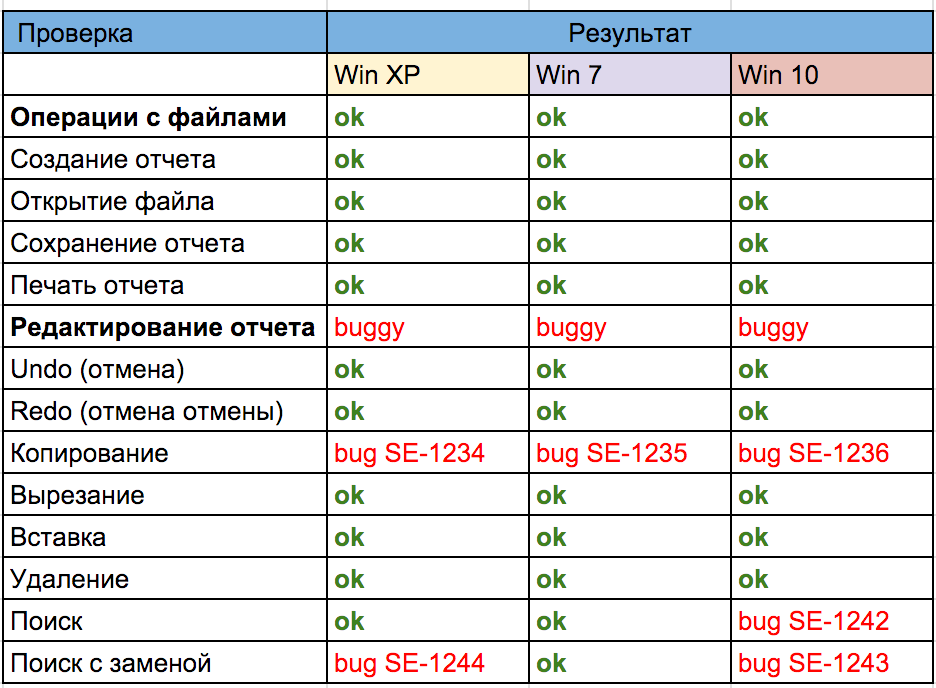
And here's another checklist example. In this case, a desktop application was checked on different operating systems. Every time we have to do cross-platform testing at work, we create a checklist in a Google Doc. In it, each tester marks the status of their own part of the work. More detail, with an example:
Use case
Use case – a description of how a system behaves as it interacts with the outside world.
A use case describes how an actor tries to achieve a goal by using the program.
Use cases are intended primarily for defining the functional requirements for the system, and they drive the entire development process. All the main activities, such as analysis, design, and testing, are carried out on the basis of use cases. During analysis and design, use cases make it possible to understand how the results the user wants to get affect the system architecture, and how the system components must behave in order to deliver the functionality the user needs.
What are use cases used for?
- They give an idea of how the system behaves
- They are understandable to customers and developers alike
- They make it possible to describe many alternatives
(exceptions) - The list of use cases is a list of the system's functionality
They let you describe functionality iteratively (list of Use Cases -> Brief descriptions ->
Main flows -> Extensions)

Structure of a use case
- Goal
- Actors
- Preconditions
- Maximum and minimum guarantees
- Main scenario
- Alternative scenarios
Complicated? And who said it would be easy? No time to give up, onward!
How a manager sees a Use Case
Case: Register on the site
Description: The site must give the user the ability to register. To register, the user must fill in a form. After registration, the site must
send a registration confirmation to the user's e-mail
How a QA writes down a Use case
Description in Use Case format
UC name: Register on the site
Actor: a site user
Preconditions: the user is on the home page
of the site
Main scenario:
- The user clicks the "Register" button
- The site displays the registration form
- The user fills in the form fields and confirms the registration
- The site confirms that the form was filled in correctly
- The site registers the user and sends a registration confirmation email to their e-mail address
Alternative scenarios:
1. The user registers with a social media account...
User story

Just a moment! I see you're about to finish the level. But I don't get why it's needed, this Use case?
For testers, use cases are an excellent basis for building test scenarios - test cases - since they describe the context in which each user action must be performed. Use cases are testable requirements by default, since they always state the goal to be achieved and which steps must be reproduced to achieve it
And here's another one: User story and Use case - such similar names, so how do you tell which is which?
I'll explain, my furry friend,
A User Story is a single scenario, whereas a Use Case is a set of scenarios
A Use Case combines several scenarios and shows the relationships
between them
He will only truly get it once he sees an example. Here is a use case built on the basis of three user stories: US1, US2, US3.
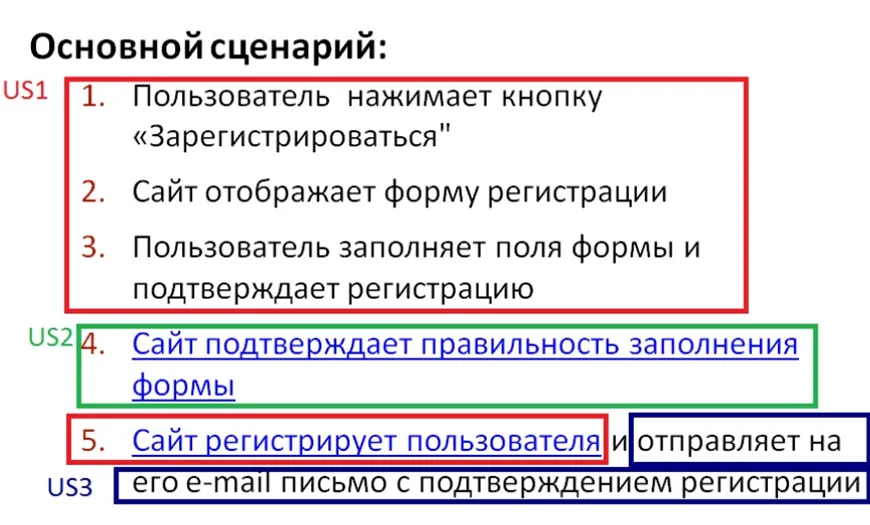
An example of a use case, I will give you. Read it, and try to work out what is what. To become a testing Jedi, understand such things you must
The User Story Formula
A user story can be written in different ways. But the formula that turns out to be the most productive for understanding the task, as well as the most concise and yet comprehensive, is the following:
As an X, I want Y, so that Z.
X is the character on whose behalf the story is told. This is the user of the product, the one the functionality will be built for. Y is the task, action, or property the character needs. Z is the ultimate business value the character will get.
For example, user stories might look like this:
As a Testing Padawan, I take the Galaxy QA Academy course so that I learn how to test.
As a testing master, I want to see students' progress and review their work so that I can be sure of the quality of their knowledge.
The main point of user stories for a tester is to use them to generate acceptance criteria. Acceptance criteria are the customer's requirements: a specification against which the system or user story can be verified. In effect, acceptance criteria are the business rules that the user story being worked out must obey. And the details of the acceptance tests, laid out in specific tests, will form the acceptance tests that make it possible to test the finished product.
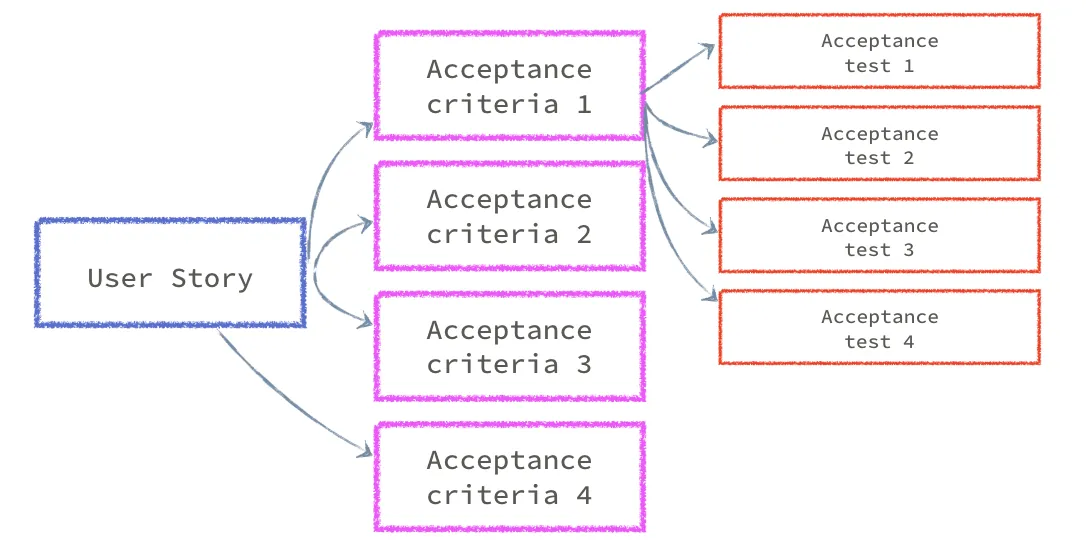
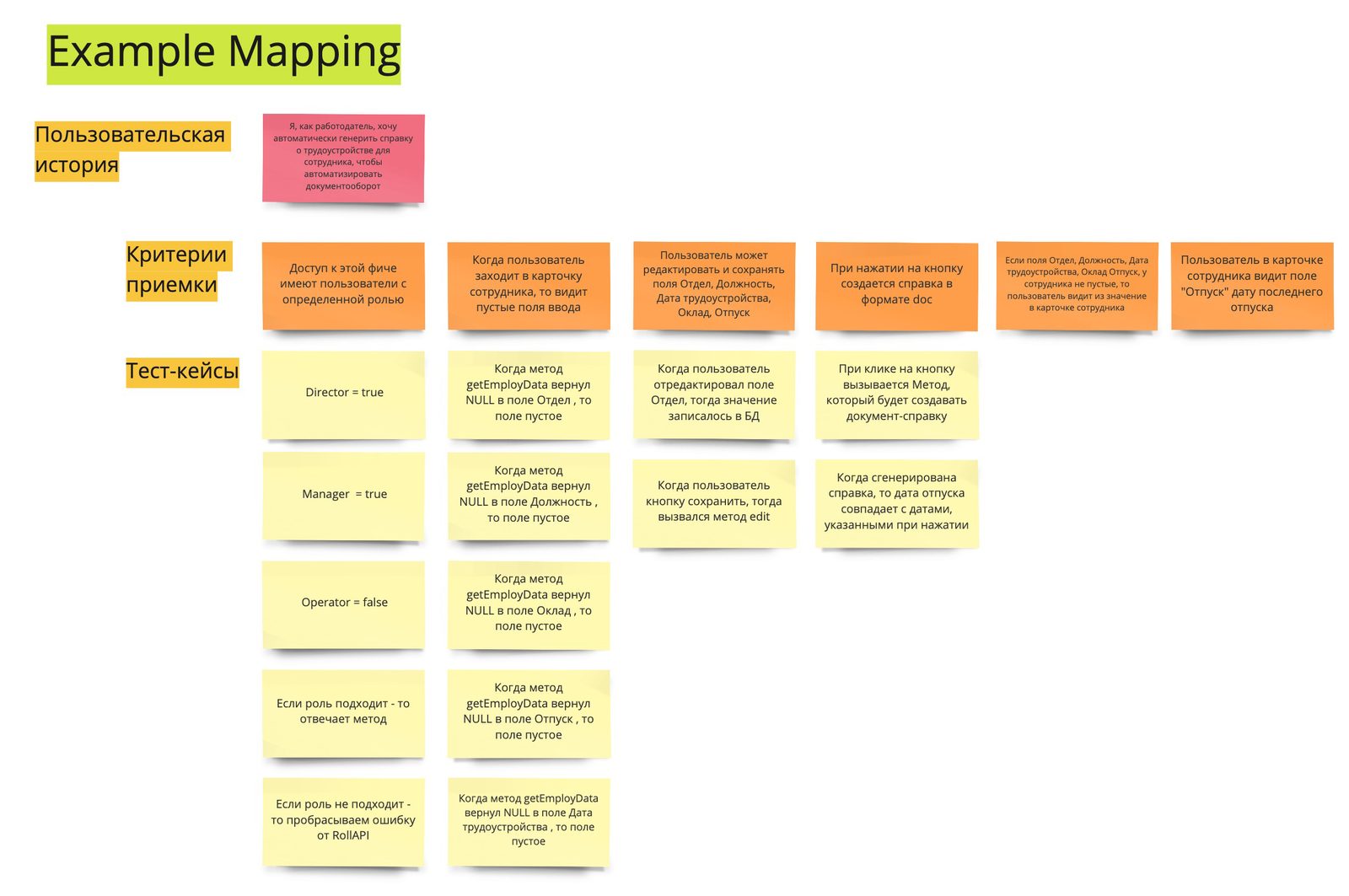
The magic of turning product requirements into concrete test cases is exactly what a tester does. Let's look at the process of creating test cases using an example. At first, a general product requirement arrives. For example, "Only managerial positions have access to the new feature". Then I find all the user roles in the software and split them into managerial and rank-and-file positions. For each position I'll create a test case: if it's a managerial position, I'll check that access is granted; otherwise, there must be no access. And now as a diagram:
Questions and Takeaways
1. What is the difference between a test case and a test suite?
2. Where can a user story be useful?
3. What is the difference between a use case and a user story?
4. When will you use a checklist?
5. What goes into a test report?
6. Why are test cases written?

My people are not as advanced as the star Jedi, but we, too, want to learn testing. We didn't know how to work with Google Sheets before, but we found this video on the internet - it helped us learn to work with Google Sheets. Maybe it will come in handy for you too, budding tester? Feel free to skip it if you're already familiar with spreadsheets.
Practical Assignment
Congratulations, you've made it through a truly bone-crushing level of theory! And I know you'll now be able to move mountains in practice. Let's begin, step by step:
1. Run through Master Kenobi's working test case
2. Write your own checklist for testing the site you already know from the first level
3. Now that you've gotten good at practice, answering a couple of theoretical questions will be no trouble at all
4. Drop in on Master Yoda - he has a personal assignment for you
When you've done everything, send your assignment to the Council of Masters through the form. The Masters have marked you as an outstanding student. Delight them with good work
Test Case Writing Practice
This assignment is for two. So you should turn to your friend Chewbacca for help.
You will need to create a test case for testing the purchase of sweets (I love sweets). The introductory use case goes like this:
The user comes to the home page, looks at the gallery, the pictures, clicks on links and so on - everything must work. Then they go to the categories page via a link and choose different kinds of cookies or candies, putting them in the cart (we don't know exactly what they'll choose, so you need to cover every unique choice with tests). Then they go to the cart and increase or decrease the quantity of items there; we don't know for sure what they'll do, so we check all the actions.
Based on this scenario, you need to build a test case which, when followed, will let a tester make sure that the site works and that the user will be able to perform all the planned functions.
Understand that this is the bare minimum, so that you don't get tangled up in what you need to do. On top of that, you need to fill the test case with the checks of the site's functionality that seem important to you. For example, checking the components of the home page.
Then you swap test cases with Chewbacca: he will check your test case, and you will run his test case and give him your review of it - what you would like to improve or fix. To do that, copy this document for yourself and note all the corrections and comments there.
Chewbacca has also put together a checklist for testing one page of the cookie site, so that you have an example.
P.S. Take a look at his test case before you send in your own.